How to Find a Product Using a Barcode: A Complete Guide for 2026
Identifying a product using its barcode is a streamlined process that involves scanning the visual code with a smartphone camera or manually entering the numerical Global Trade Item Number (GTIN) into a search engine or specialized dat...
Identifying a product using its barcode is a streamlined process that involves scanning the visual code with a smartphone camera or manually entering the numerical Global Trade Item Number (GTIN) into a search engine or specialized database. These tools cross-reference the code against global registries to provide product names, manufacturers, prices, and retail locations.
Contents
In 2026, the barcode remains the fundamental link between a physical object and its digital identity. Whether you are a consumer trying to find the best price, a researcher verifying a product's origin, or a business professional managing inventory, understanding how to navigate barcode databases is essential. While the technology has evolved toward more complex 2D data carriers, the standard linear barcode continues to dominate the global retail landscape.
Understanding Barcode Types and Data Standards
Before attempting to find a product, it is helpful to understand what you are looking at. Not all barcodes are the same, and the type of code determines which database will be most effective for your search.
UPC and EAN (GTINs)
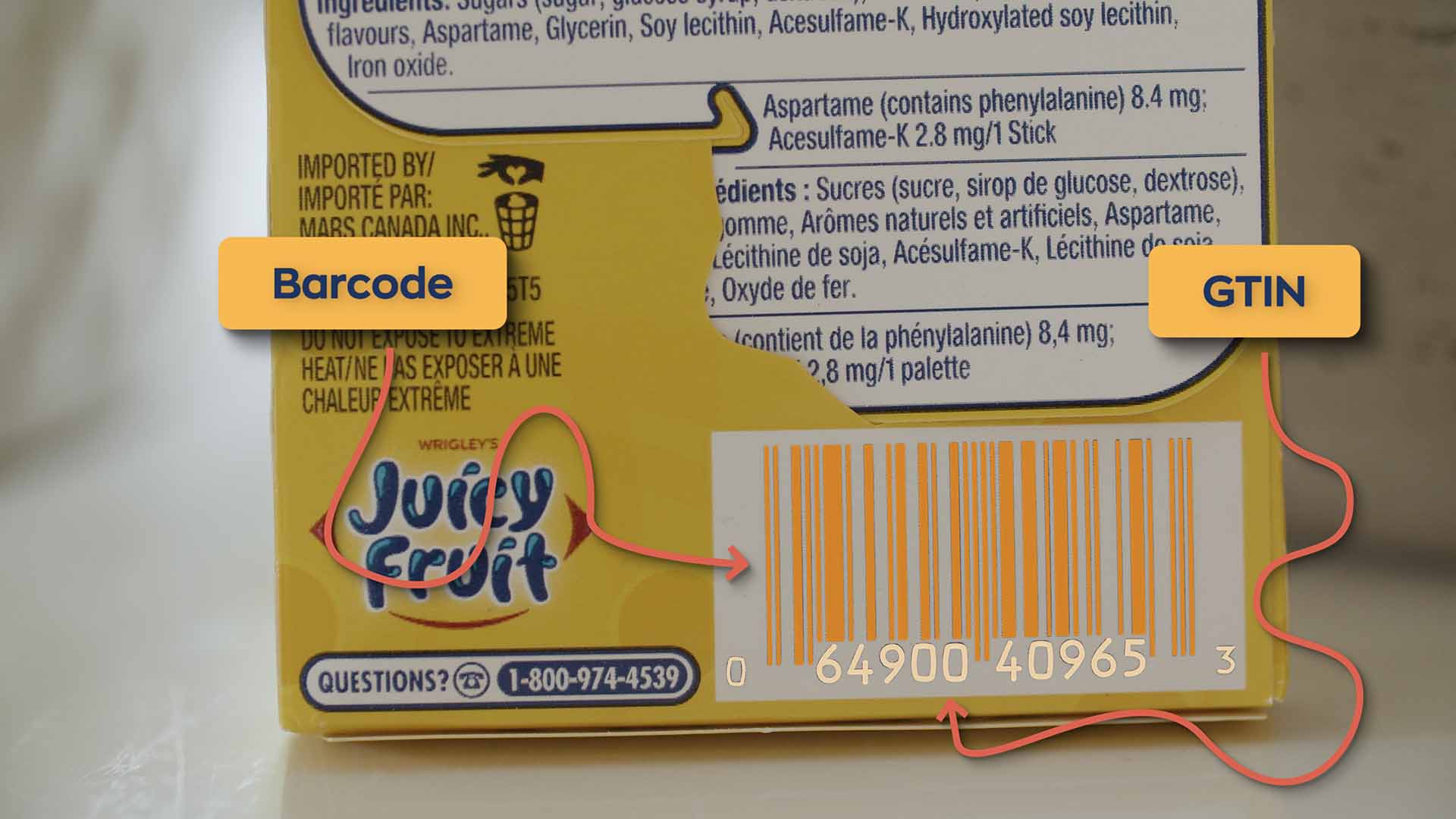
The most common barcodes found on consumer goods are the Universal Product Code (UPC) and the European Article Number (EAN). In the logistics industry, these are collectively referred to as GTINs (Global Trade Item Numbers).
- UPC-A: Primarily used in North America, this consists of 12 digits.
- EAN-13: Used internationally, this consists of 13 digits.
- ISBN: International Standard Book Numbers are specifically for publications and are usually 13 digits long, often starting with 978 or 979.
2D Barcodes and QR Codes
By 2026, the retail industry has significantly adopted "Sunrise 2027" standards, moving toward 2D barcodes (like QR codes) that can hold more data than traditional linear lines. However, for the purpose of simple product identification, these codes often still contain the same GTIN data embedded within a URL or a digital link.
Proprietary and Internal Barcodes
It is important to distinguish between "open" and "closed" barcodes. If you scan a barcode on a product from a store like ALDI, IKEA, or a local boutique, and the search returns no results, you are likely dealing with a proprietary internal code. These are only recognizable within that specific retailer's system and are not registered in global databases like those managed by GS1.
Primary Methods to Find Products Using Barcodes
There are three primary ways to turn a barcode into a product profile: visual scanning via mobile apps, manual entry into web databases, and utilizing search engine visual intelligence.
1. Using Mobile Shopping Apps
Mobile applications are the most intuitive way to find a product. They use the smartphone’s camera to capture the barcode image and instantly query a specific retailer's database.
- Amazon Shopping App: This is perhaps the most robust tool for consumer products. By tapping the camera icon in the search bar and selecting "Barcode," you can scan almost any consumer good. Amazon’s database is so vast that it serves as a de facto global registry for retail items.
- Google Lens: Integrated into the Google app and many Android camera interfaces, Google Lens uses machine learning to identify the barcode and the product's physical appearance simultaneously. It provides a "Shopping" tab that aggregates prices from dozens of different retailers.
- eBay and Walmart Apps: Similar to Amazon, these apps are excellent for finding secondary market values (eBay) or checking current in-store availability (Walmart).
2. Specialized Barcode Databases
If a general search engine fails, or if you need technical data such as the manufacturer’s registered address or shipping dimensions, specialized databases are required.
- GS1 GEPIR: The Global Electronic Party Information Registry (GEPIR) is the "official" source. Since GS1 is the organization that issues barcode prefixes to companies, their database is the most authoritative for verifying if a barcode is legitimate and which company owns it.
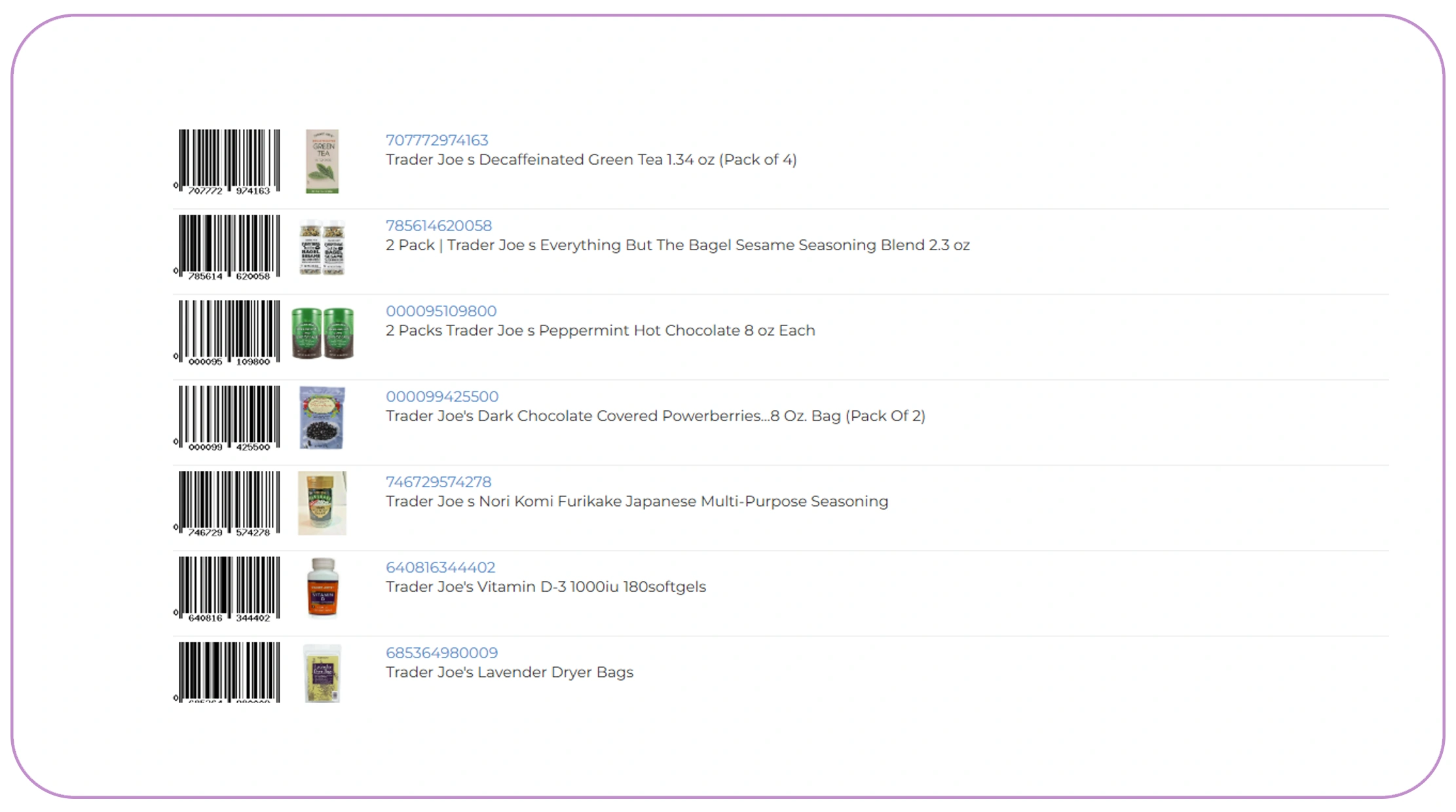
- Barcode Lookup: Websites like BarcodeLookup.com maintain massive repositories of billions of items. They provide high-quality images, descriptions, and specifications that might be missing from a simple search engine result.
- BrickSeek: For those looking for inventory levels and localized pricing in the United States, BrickSeek is a powerful tool that uses barcodes to check the stock systems of major big-box retailers.
3. Manual Search Engine Entry
If you cannot scan the code (for example, if the barcode is damaged but the numbers are legible), you can manually type the numbers into a search engine. When doing this, type the prefix "UPC" or "GTIN" before the number to help the search engine algorithm recognize that you are searching for a product identifier rather than a phone number or random string of digits.
Step-by-Step Instructions for Finding a Product
Depending on your hardware, follow these steps to identify an item:
On a Smartphone (iOS or Android)
- Open your preferred app: For general identification, use Google (Google Lens) or Amazon.
- Activate the scanner: Tap the camera icon located in the search bar.
- Align the barcode: Ensure the barcode is flat and well-lit. Center the red line or the focus box over the vertical bars.
- Review the results: The app will typically vibrate or beep once the code is captured, displaying a list of matching products.
On a Desktop or Laptop
- Locate the GTIN: Read the 12 or 13 digits printed beneath the barcode.
- Visit a Registry: Go to a site like Go-UPC or the GS1 GEPIR tool.
- Enter the digits: Type the number exactly as it appears, including the small digits on the far left and right.
- Search: Press enter to view the manufacturer’s data and product category.
Comparison of Barcode Identification Tools
The following table compares the most effective tools available in 2026 for identifying products via barcode.
| Tool | Best For | Accuracy | Cost |
|---|---|---|---|
| Google Lens | Comparison shopping & visual ID | High | Free |
| Amazon App | Quick purchase & reviews | Very High | Free |
| GS1 GEPIR | Verifying manufacturer/legal info | Absolute | Free (Basic) |
| Barcode Lookup | Detailed specs & images | High | Free/Paid API |
| Buycott | Ethical/Corporate ownership data | Moderate | Free |
| Vivino | Wine-specific identification | Niche | Free |
Why a Barcode Search Might Fail
Sometimes, scanning a barcode yields "No Results Found." This does not necessarily mean the product is fake; there are several technical reasons for a search failure.
Private Label Branding
Retailers like Costco (Kirkland Signature) or Target (Up & Up) often use barcodes that are registered specifically to their supply chain. While some of these appear in global databases, others are restricted to the retailer's internal Point of Sale (POS) system.
Re-used or Non-Standard Prefixes
In rare cases, smaller companies might use "recycled" barcodes or codes from third-party resellers that have not been updated in the global registry. This leads to a mismatch where the barcode identifies an entirely different, discontinued product.
Global vs. Regional Variations
A product manufactured in Japan may have a JAN (Japanese Article Number) that isn't indexed well by North American shopping apps. In these instances, using a global database like GEPIR is more effective than using a local retailer's app.
Damage and Printing Errors
Barcodes rely on the contrast between light and dark bars. If the barcode is printed on a reflective surface (like a soda can) or is wrinkled/torn, the scanner may fail to interpret the "quiet zone" (the white space around the code), resulting in a failed read.
The Future of Product Identification: Beyond 1D Barcodes
As we navigate 2026, the industry is in the midst of a transition. The "Digital Link" standard is becoming more prevalent. This allows a single QR-style code to serve multiple purposes: a cashier can scan it at the register, while a consumer can scan it to see the product’s journey (provenance), sustainability metrics, or assembly instructions.
Finding a product using these newer 2D codes is identical to the methods described above, but the "payload" of information you receive is significantly richer, often including expiry dates and batch numbers that old-fashioned barcodes simply cannot hold.
Frequently Asked Questions
Can I find the price of a product just by scanning the barcode?
Yes, using apps like Google Lens, Amazon, or ShopSavvy will provide current retail prices. However, keep in mind that barcodes identify the product type, not the specific price tag of a single store. Different retailers set different prices for the same barcode.
Is there a way to find a product if the barcode is partially missing?
If the numbers beneath the bars are still legible, you can manually enter them into a search engine. If both the bars and the numbers are missing, you should use "Visual Search" (like Google Lens or Pinterest Lens) to identify the product by its physical shape and packaging design instead of the barcode.
Does every product in the world have a barcode?
No. Many handmade items, fresh produce, and products from very small businesses do not have registered GTINs. Additionally, some items use "Price Look-Up" (PLU) codes—the 4-digit stickers on fruit—which are different from barcodes and are not unique to specific brands.
Are barcode scanning apps safe to use?
Most reputable apps from major retailers and search engines are safe. However, be cautious with third-party "Barcode Scanner" apps that are filled with aggressive advertisements or request unnecessary permissions like access to your contacts or location. Stick to well-known tools like Google, Amazon, or official industry databases.
Can I use a barcode to see if a product is counterfeit?
A barcode scan can help, but it is not definitive. A sophisticated counterfeiter can easily copy a legitimate barcode from a real product and print it on a fake one. To verify authenticity, check the manufacturer's data in the GS1 GEPIR database; if the company name doesn't match the product in your hand, it is likely a fake.
Final Recommendation
To find a product quickly and effectively, start with Google Lens for a broad search of the web. If you are looking to purchase the item immediately or read consumer reviews, the Amazon app remains the most reliable secondary tool. For professional verification of a manufacturer's identity, always consult the GS1 GEPIR registry to ensure the data is coming directly from the source.
Image Gallery