Mastering Date Syntax in SQL Across Major Database Management Systems
Handling date syntax in SQL can quickly become complicated due to differences in how systems like MySQL, PostgreSQL, Microsoft SQL Server, and Oracle parse, store, and format temporal data. Because the SQL standard leaves room for vend...
Handling date syntax in SQL can quickly become complicated due to differences in how systems like MySQL, PostgreSQL, Microsoft SQL Server, and Oracle parse, store, and format temporal data. Because the SQL standard leaves room for vendor-specific implementations, writing portable queries or simple data-retrieval scripts requires a solid understanding of how each database engine processes dates, times, and intervals.
Contents
Introduction to Temporal Data in Relational Databases
At its core, temporal data management requires reliable formatting, precise storage, and accurate manipulation of dates and timestamps. Unlike integers or text strings, dates carry semantic meaning tied to calendars, time zones, leap years, and daylight saving rules. Relational database management systems (RDBMS) store date and time values using specialized internal data types rather than plain text. This ensures data integrity, enables efficient indexing, and allows for mathematical operations such as adding intervals or calculating differences between timestamps.
However, the specific syntax used to insert, query, filter, and format these values varies significantly between database platforms. A query written to extract a year from a date in MySQL will frequently fail in PostgreSQL or SQL Server. Understanding these platform-specific rules is essential for database administrators, data analysts, and software developers alike. This guide explores the fundamental date data types, syntax rules, formatting functions, arithmetic operations, and common pitfalls across the industry's most widely used database engines.
Understanding SQL Date Data Types and Standards
Before writing queries, you must understand how data types are structured. While the ANSI SQL standard defines standard data types such as DATE, TIME, TIMESTAMP (with or without time zone), and INTERVAL, individual database vendors implement these standards with varying levels of strictness and additional proprietary types.
Selecting the appropriate data type affects storage efficiency, execution performance, and query accuracy. Storing a timestamp as a string, for instance, prevents the database from optimizing range queries and invalidates automatic validation checks.
Standard Temporal Data Types
- DATE: Stores calendar dates, typically consisting of year, month, and day. Most systems allocate three bytes for this type, covering a wide historical and future range.
- TIME: Stores time of day (hours, minutes, seconds, and fractional seconds) without reference to a specific calendar date.
- TIMESTAMP / DATETIME: Combines date and time into a single value. Some systems support fractional seconds up to microsecond or nanosecond precision.
- TIMESTAMP WITH TIME ZONE: Stores the absolute point in time alongside the offset from Coordinated Universal Time (UTC) or the specific regional zone name.
Vendor-Specific Date Syntax and Functions
Because every database engine handles syntax differently, examining how each major platform implements date extraction, current date retrieval, and interval arithmetic provides a practical foundation for writing robust SQL code.
MySQL Date Syntax
MySQL is known for its flexibility with date formats, often implicitly casting strings that resemble dates into true temporal types during query execution.
- Current Date and Time: Use
NOW()for the current timestamp orCURDATE()for just the date portion. - Extracting Parts: The
EXTRACT()function or specialized functions likeYEAR(),MONTH(), andDAY()pull specific components.SELECT YEAR(order_date) FROM orders; - Formatting Dates: The
DATE_FORMAT()function uses format specifiers similar to the C programming language (%Y-%m-%d).SELECT DATE_FORMAT(order_date, '%Y/%m/%d') FROM orders; - Date Arithmetic: MySQL utilizes the
DATE_ADD()andDATE_SUB()functions, or direct interval math.SELECT order_date + INTERVAL 7 DAY FROM orders;
PostgreSQL Date Syntax
PostgreSQL adheres closely to SQL standards while offering powerful extensions for date and interval manipulation. It is exceptionally strict about type safety; comparing a string directly to a timestamp without explicit casting often results in an error.
- Current Date and Time: Use
CURRENT_TIMESTAMP,NOW(), orCURRENT_DATE. - Extracting Parts: The standard
EXTRACT(field FROM source)syntax is fully supported and preferred.SELECT EXTRACT(YEAR FROM order_date) FROM orders; - Formatting Dates: The
TO_CHAR()function converts timestamps to formatted text strings.SELECT TO_CHAR(order_date, 'YYYY/MM/DD') FROM orders; - Date Arithmetic: PostgreSQL treats intervals as first-class objects. You can add or subtract intervals directly using standard arithmetic operators.
SELECT order_date + INTERVAL '1 week' FROM orders;
Microsoft SQL Server (T-SQL) Date Syntax
SQL Server uses a rich set of built-in functions for manipulating DATETIME, DATETIME2, and DATE data types. T-SQL relies heavily on dedicated functions rather than implicit casting.
- Current Date and Time: Use
GETDATE()orSYSDATETIME()for high-precision timestamps. - Extracting Parts: The
DATEPART()andDATENAME()functions retrieve specific components. Specialized shorthand functions likeYEAR(),MONTH(), andDAY()are also supported.SELECT YEAR(order_date) FROM orders; - Formatting Dates: Modern versions of SQL Server (2012 and later) use the
FORMAT()function, though it incurs a performance overhead due to its .NET framework underpinnings. For high-performance formatting,CONVERT()with style codes is traditionally used.SELECT FORMAT(order_date, 'yyyy/MM/dd') FROM orders; - Date Arithmetic: The
DATEADD()function handles additions, whileDATEDIFF()calculates the difference between two dates.SELECT DATEADD(day, 7, order_date) FROM orders;
Oracle Database Date Syntax
Oracle handles dates through its proprietary DATE (which actually includes time down to the second) and TIMESTAMP data types. Oracle environments rely heavily on explicit conversion functions.
- Current Date and Time: Use
SYSDATEfor the current database server date and time, orCURRENT_TIMESTAMPfor time-zone-aware values. - Extracting Parts: The standard
EXTRACT()function is fully supported on timestamp data types. - Formatting and Parsing: Oracle uses
TO_CHAR()for formatting dates into strings andTO_DATE()orTO_TIMESTAMP()for parsing strings into temporal types.SELECT TO_CHAR(order_date, 'YYYY/MM/DD') FROM orders; - Date Arithmetic: Oracle allows direct addition and subtraction of numbers on
DATEtypes, where integer units represent days.SELECT order_date + 7 FROM orders;
Comparing Date Functions Across Database Engines
To highlight how syntax varies across platforms, the following table compares common temporal operations side-by-side for MySQL, PostgreSQL, SQL Server, and Oracle.
| Operation | MySQL | PostgreSQL | SQL Server (T-SQL) | Oracle Database |
|---|---|---|---|---|
| Current Timestamp | NOW() |
CURRENT_TIMESTAMP |
SYSDATETIME() |
CURRENT_TIMESTAMP |
| Current Date | CURDATE() |
CURRENT_DATE |
CAST(GETDATE() AS DATE) |
TRUNC(SYSDATE) |
| Extract Year | YEAR(d) |
EXTRACT(YEAR FROM d) |
YEAR(d) |
EXTRACT(YEAR FROM d) |
| Add 30 Days | DATE_ADD(d, INTERVAL 30 DAY) |
d + INTERVAL '30 days' |
DATEADD(day, 30, d) |
d + 30 |
| Date Difference | DATEDIFF(d1, d2) |
d1 - d2 |
DATEDIFF(day, d2, d1) |
d1 - d2 |
| String to Date | STR_TO_DATE(s, format) |
TO_DATE(s, format) |
CAST(s AS DATE) |
TO_DATE(s, format) |
Best Practices for Handling Dates in SQL
Writing maintainable, high-performance SQL queries involving dates requires adherence to established engineering principles. Ignoring these practices often leads to silent bugs, incorrect timezone calculations, and sluggish query execution.
1. Always Use ISO 8601 Date Literals
When filtering or inserting dates via string literals, always use the international standard format: YYYY-MM-DD for dates and YYYY-MM-DD HH:MM:SS for timestamps. Relying on regional formats like MM/DD/YYYY or DD/MM/YYYY frequently causes parsing errors when database server locales change.
2. Avoid SARGable Violations in WHERE Clauses
A query is SARGable (Search Argument-able) if the database optimizer can use an index to evaluate the condition. Wrapping a table column in a date function inside a WHERE clause prevents index utilization, forcing a full table scan.
- Non-SARGable (Avoid):
SELECT * FROM orders WHERE YEAR(order_date) = 2026; - SARGable (Preferred):
SELECT * FROM orders WHERE order_date >= '2026-01-01' AND order_date < '2027-01-01';
3. Handle Time Zones Explicitly
Storing all timestamps in UTC is an industry-standard best practice. Convert local times to UTC before writing them to the database, and handle local formatting only at the application presentation layer. When regional accuracy is mandatory, use TIMESTAMP WITH TIME ZONE types rather than naive timestamps.
Common Mistakes and Troubleshooting
Developers frequently encounter frustrating errors when working with dates due to subtle type mismatches and localization quirks.
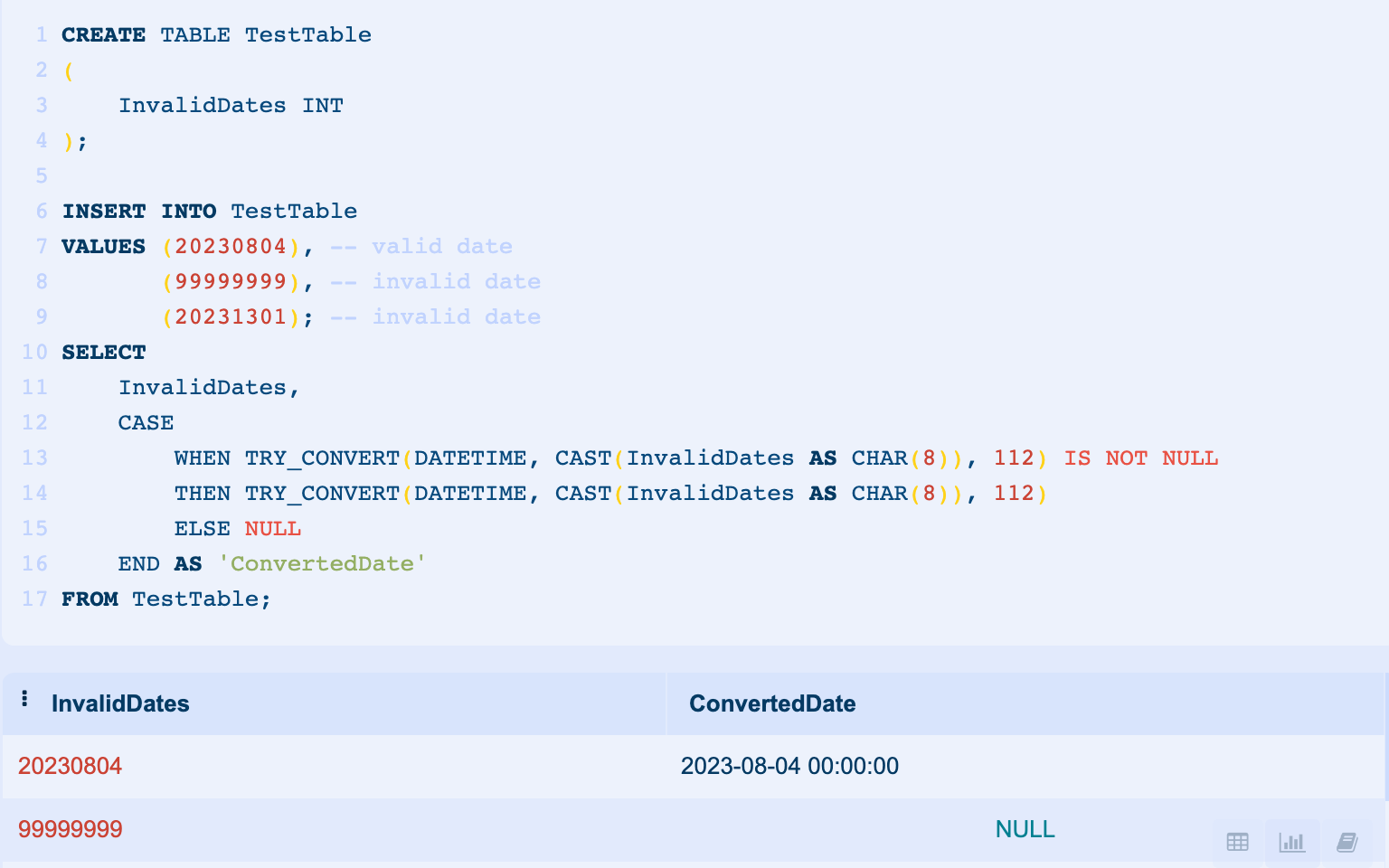
- Implicit String-to-Date Conversions: Relying on the database engine to automatically convert strings into dates can produce unpredictable results when server environments change. Always use explicit parsing functions like
TO_DATE(),STR_TO_DATE(), or explicitCAST()operations. - Fractional Second Truncation: When migrating data between systems, be aware of precision limits. Moving a high-precision
DATETIME2value from SQL Server into an older MySQLDATETIMEfield can silently truncate milliseconds or microseconds. - Time Zone Offset Confusion: Comparing timestamps without normalizing time zones leads to missing or duplicate records in time-series aggregations. Always ensure that compared columns share the same time zone context.
Frequently Asked Questions
How do I get the current date and time in SQL?
The function depends on your database engine. MySQL uses NOW(), PostgreSQL uses CURRENT_TIMESTAMP, SQL Server uses SYSDATETIME() or GETDATE(), and Oracle uses CURRENT_TIMESTAMP or SYSDATE. These functions return the timestamp according to the database server clock.
Why is my SQL date filter running slowly?
Slow date filters are frequently caused by non-SARGable expressions, such as applying a function directly to a column in the WHERE clause (e.g., WHERE YEAR(date_col) = 2026). Rewriting the query to use an explicit date range (BETWEEN or inequality operators) allows the database optimizer to use existing indexes.
How do I calculate the difference between two dates in days?
In MySQL, use DATEDIFF(date1, date2). In PostgreSQL and Oracle, subtracting one date from another (date1 - date2) directly yields the number of days. In SQL Server, use the DATEDIFF(day, date2, date1) function.
Can I store time zones inside a standard SQL date column?
Standard DATE and basic TIMESTAMP or DATETIME columns do not store time zone offsets. To preserve time zone data accurately, you must use data types explicitly defined as TIMESTAMP WITH TIME ZONE or manage offset conversions manually within your application logic.
How do I format a date into a custom string?
Formatting syntax varies by platform. MySQL uses DATE_FORMAT(date, '%Y-%m-%d'), PostgreSQL and Oracle use TO_CHAR(date, 'YYYY-MM-DD'), and SQL Server uses FORMAT(date, 'yyyy-MM-dd') or traditional CONVERT style codes for optimized performance.
Conclusion and Next Actions
Mastering date syntax in SQL requires an understanding of how your specific database engine handles data types, parsing, and arithmetic. By adhering to ISO 8601 formatting standards, writing SARGable query filters, and handling time zones explicitly, you can prevent common errors and build efficient data pipelines. For your next project, review your existing codebase for non-SARGable date functions in WHERE clauses and refactor them to use optimized date ranges.
Image Gallery