Navigating the iPhone Trade-In Process for Samsung Devices
Transitioning from an iPhone to a Samsung device involves more than just a change in operating systems; it requires a strategic approach to trade-in programs to maximize the resale value of your Apple hardware. Whether you are moving t...
Transitioning from an iPhone to a Samsung device involves more than just a change in operating systems; it requires a strategic approach to trade-in programs to maximize the resale value of your Apple hardware. Whether you are moving to a Galaxy S-series or a Z-foldable device, understanding how manufacturers and third-party retailers evaluate, process, and credit these trade-ins is essential to offsetting the cost of your upgrade.
Contents
Understanding the Trade-In Ecosystem
When you trade in an iPhone for a Samsung device, you are essentially engaging in a "buy-back" or "trade-in" transaction where your used Apple hardware is appraised based on market demand, physical condition, and technical specifications. Samsung, like many major electronics manufacturers, utilizes a tiered appraisal system. This system rewards users who keep their devices in pristine condition and punishes those with cracked screens, dead pixels, or non-functional buttons.
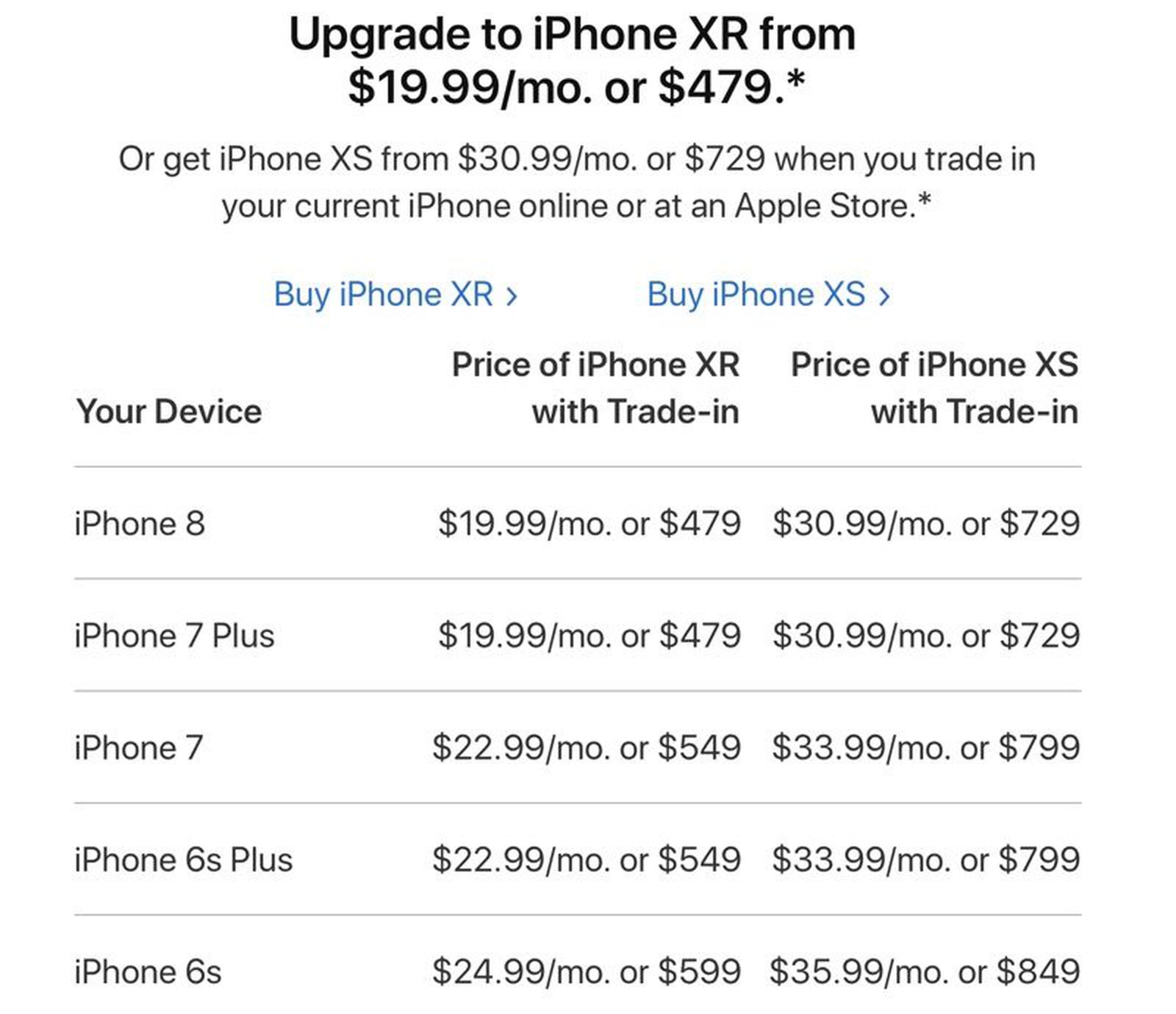
In 2026, the marketplace for used iPhones remains robust due to Apple’s long-term software support cycles, which keeps their resale value higher than that of many competitors. Because of this, you may often find that your current iPhone holds significant "credit equity" that can be applied directly toward a new Samsung flagship. However, the process is not universal; carrier-locked phones, devices with activation locks, and those with significant water damage fall into different eligibility categories that you must navigate before initiating your trade.
Prerequisites Before You Trade
Before you commit to a trade-in, you must prepare your iPhone to ensure it meets the receiving party’s requirements. Failure to perform these steps often results in a "zero-value" assessment, meaning the company will take your device but offer no credit toward your new purchase.
- Disable Activation Lock: This is the most critical step. Navigate to Settings > [Your Name] > Find My and turn off "Find My iPhone." If this is active, the device is effectively tethered to your Apple ID and cannot be refurbished or resold by the recipient.
- Back Up Your Data: Ensure all photos, contacts, and messages are backed up to iCloud or an external drive. Note that transferring data from iOS to Android requires specific tools like Samsung’s "Smart Switch" application.
- Factory Reset: Once backed up, perform a full "Erase All Content and Settings" from the general settings menu. This wipes your personal data and restores the device to its original state.
- Remove SIM/eSIM: Physically remove any physical SIM cards and deactivate or transfer any digital eSIMs associated with your cellular plan.
- Clean the Device: Use an appropriate micro-fiber cloth and, if necessary, an electronics-safe cleaning solution to remove debris. While cosmetic cleanliness does not affect the technical appraisal, a clean device is less likely to be mistakenly flagged for "excessive wear."
Evaluating Your iPhone’s Condition
Manufacturers and retailers utilize a checklist to grade your device. While the exact terminology may vary, the criteria generally align with the following standard:
- Excellent/Good Condition: The device powers on, the screen is free of cracks or significant scratches, the casing is dented but not compromised, and all features (camera, speakers, microphones) function perfectly.
- Fair/Poor Condition: The device powers on but has minor screen cracking, dead pixels, or significant frame damage.
- Non-Functional/Broken: The device does not power on, has a shattered display that obscures the image, or has a faulty battery.
| Condition Tier | Common Eligibility | Expected Credit Impact |
|---|---|---|
| Pristine | No scratches, full functionality | Maximum MSRP Credit |
| Standard Wear | Minor surface marks, full function | 70-85% of Maximum |
| Cracked Screen | Display intact, glass damaged | 40-60% of Maximum |
| Broken/Non-boot | Fails to power, heavy damage | Minimal to Zero |
Navigating Samsung’s Direct Trade-In vs. Retailers
You generally have three pathways to trade in your iPhone for a Samsung device: direct through Samsung.com, through your wireless carrier, or via third-party trade-in portals.
Samsung Direct: Samsung’s official website often offers aggressive promotional credits for high-end iPhones. The primary advantage here is the "instant discount" model, where the trade-in value is deducted from your new phone’s price immediately at checkout. You receive the device first, and you are given a 15-day window to ship your old iPhone back.
Wireless Carriers: Carriers like AT&T, Verizon, or T-Mobile frequently offer "bill credits." They may offer a significantly higher total value than the raw market price of your phone, but this is usually spread out over 24 or 36 months as a recurring discount on your monthly bill. If you leave the carrier early, you forfeit the remaining credit.
Third-Party Retailers: Outlets like Best Buy or dedicated tech-recycling services offer cash or store gift cards. These are often less promotional than manufacturer or carrier deals but provide more liquidity and flexibility, as you are not tied into a long-term service contract.
Common Pitfalls and Troubleshooting
A frequent issue reported by users is the "re-evaluation" surprise. This occurs when you estimate your phone as "Good," but the warehouse identifies a defect you missed—such as a non-functional proximity sensor or an internal water-damage indicator.
- The "Mail-In" Risk: Always use the provided shipping label and packaging materials. Document the condition of your phone with photos or a video before sealing the box. This serves as your evidence if the package is damaged during transit or if the appraisal outcome is contested.
- Shipping Deadlines: Pay close attention to the specific day you must mail the device. Late shipments often lead to the cancellation of your promotional credit, reverting the price of your new Samsung to the full retail cost.
- Carrier Lock Issues: Even if a phone is "unlocked," if it still has an outstanding balance on an installment plan, the trade-in will be rejected. Ensure your iPhone is fully paid off with your current carrier before initiating the trade.
The Financial Perspective: When to Trade
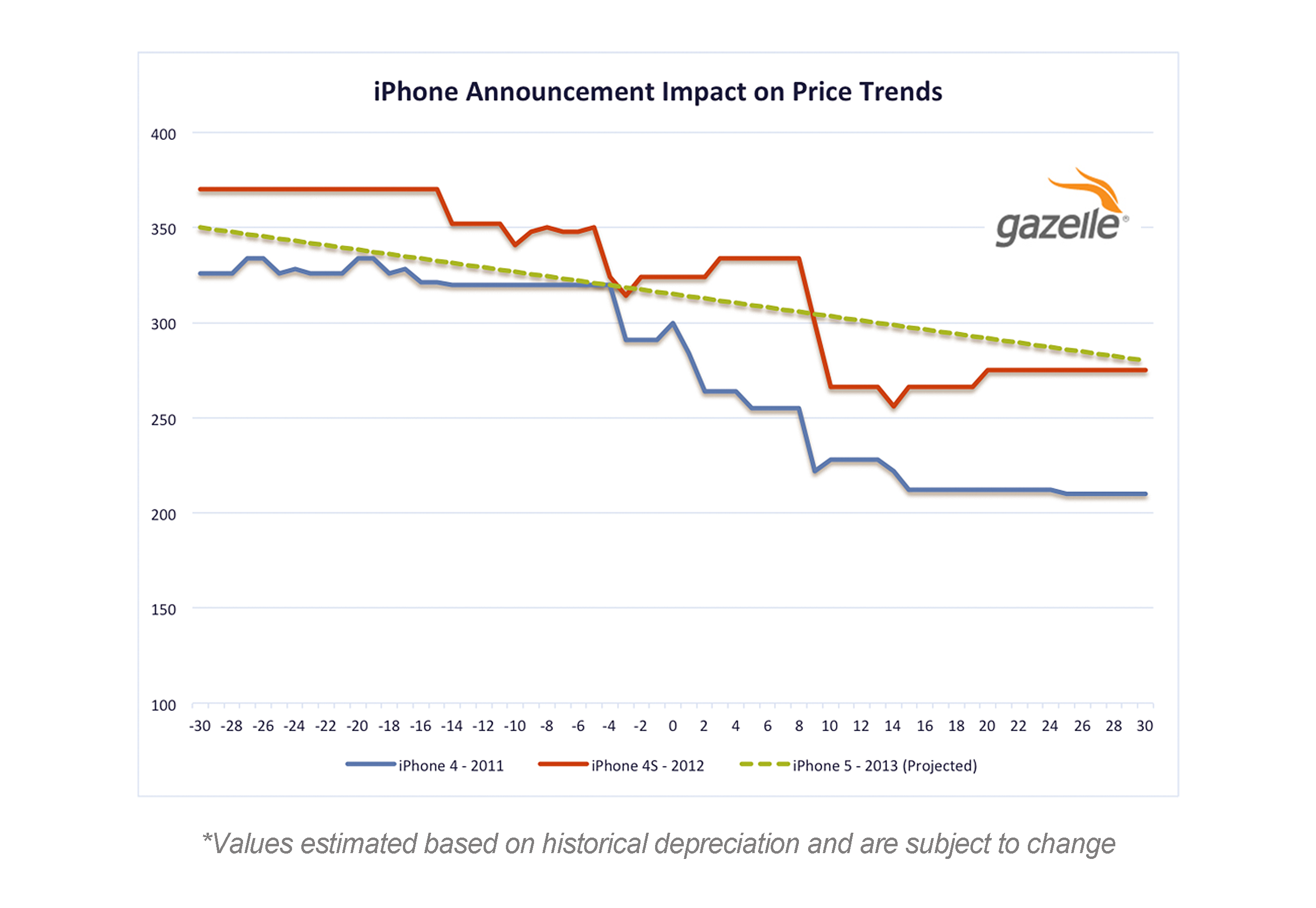
In 2026, the strategy for trading in an iPhone should center on the release cycle. Samsung typically refreshes its flagship Galaxy S-series in the early months of the year. During the launch month, trade-in values are often artificially inflated by "enhanced trade-in" bonuses. If you are not in a rush, waiting for a major promotional event or a holiday sale can result in a higher return on your current device compared to trading it in during off-peak times.
Frequently Asked Questions
Does a cracked back glass affect my trade-in value? Yes. Even if the front screen is perfect, most trade-in programs classify a cracked back glass as physical damage. This will generally drop your status to "Fair" or "Poor," significantly reducing your trade-in credit.
What happens if I forget to turn off Find My iPhone? Your trade-in will likely be rejected or held indefinitely. The device cannot be refurbished by the manufacturer if it is activation-locked. Most companies will send an email notification providing a short grace period to resolve the issue, but if you do not comply, the phone may be returned to you at your expense.
Can I trade in an iPhone that has a non-original screen? This depends on the specific terms and conditions of the retailer. Some prioritize functionality over component originality, while others require all parts to be original. Check the FAQ section of the specific trade-in portal you are using to ensure they do not disqualify third-party repairs.
Is it better to sell privately than to use a trade-in program? Selling privately via classifieds or peer-to-peer marketplaces usually yields higher cash returns than manufacturer trade-in programs. However, it requires more effort, negotiation, and risk regarding potential scams or non-payment. Trade-in programs are preferred by those who value convenience, speed, and guaranteed security.
What if my phone has a swollen battery? Do not ship a device with a swollen battery. It is a fire hazard and violates shipping regulations for lithium-ion batteries. Contact the support team of the trade-in service for instructions on how to proceed, or dispose of it at a local e-waste recycling center.
Recommendation
If you are planning to switch, verify that your iPhone is unlocked, paid off, and fully backed up. Prioritize trade-ins through the manufacturer’s own website during product launch windows to capture the highest possible promotional value. Always capture high-resolution photos of your device’s physical condition and the screen powered on immediately before packing it for shipment. This simple documentation is your best protection against inaccurate appraisal assessments.
Image Gallery