Understanding the Verizon Wireless Backup Internet Plan
Verizon Wireless backup internet plans provide a reliable secondary connection designed to keep homes and small businesses online when primary wired broadband services fail. Reliability is a cornerstone of modern residential and profes...
Verizon Wireless backup internet plans provide a reliable secondary connection designed to keep homes and small businesses online when primary wired broadband services fail.
Contents
Reliability is a cornerstone of modern residential and professional life. When primary fiber-optic, cable, or DSL connections experience outages due to maintenance, inclement weather, or infrastructure damage, productivity halts, smart home ecosystems go offline, and entertainment streams drop. To combat these vulnerabilities, major telecommunications providers offer secondary redundancy solutions. Verizon offers cellular-powered backup options that tap into its extensive 4t LTE and 5G networks. Understanding how these plans function, their hardware requirements, cost implications, and installation procedures helps users determine whether cellular redundancy is the right safeguard for their digital infrastructure.
What is a Wireless Backup Internet Plan?
A wireless backup internet plan is a secondary telecommunications service that relies on a cellular network rather than a traditional hardwired line. Unlike primary mobile hotspot data plans designed for on-the-go usage, backup internet plans are specifically engineered to integrate with home or office networking hardware. They remain in a standby or low-consumption state until the primary internet service provider (ISP) fails, at which point traffic routes through the cellular gateway.
The primary objective of this architecture is business continuity and uninterrupted remote work capability. For households relying on smart security systems, VoIP telephone services, and cloud-backed appliances, a localized power outage or severed fiber line can compromise safety and convenience. A wireless backup system acts as a safety net. It continuously monitors the primary connection. When it detects a loss of signal or internet handshake failure, the system automatically or manually shifts data routing to the cellular tower.
Examining Hardware Requirements and Gateway Devices
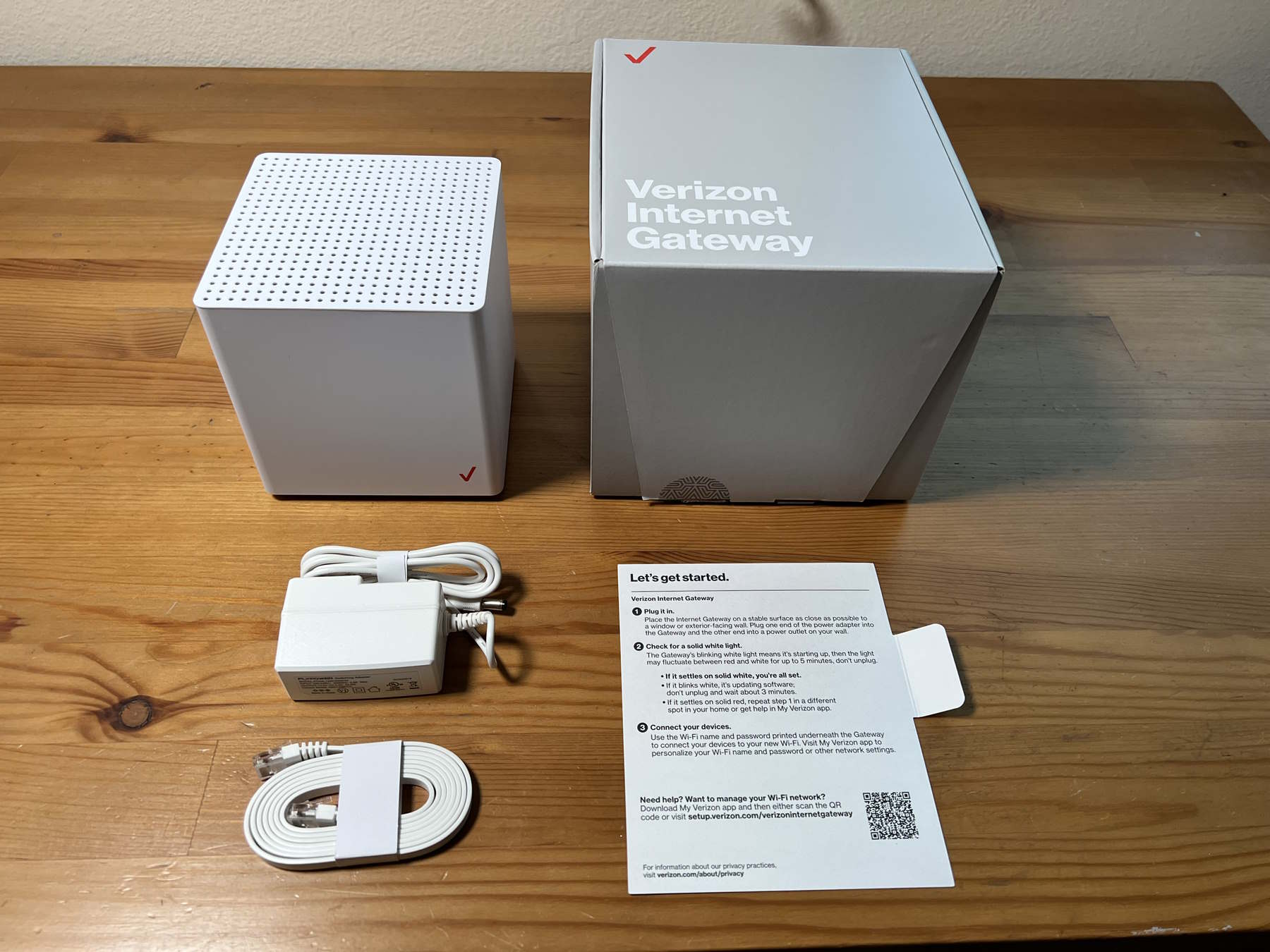
Implementing a Verizon wireless backup internet plan requires specific hardware capable of translating cellular signals into standard Ethernet or Wi-Fi local area network (LAN) traffic. Unlike a smartphone hotspot that shares a connection with a few nearby devices, a dedicated home backup solution utilizes fixed wireless access (FWA) routers or specialized gateways.
Verizon typically provides or recommends specific gateway devices for its data backup services. These devices house a physical SIM card linked to a designated data profile. Key technical attributes of these gateways include:
- Dual-Band Wi-Fi Support: Broadcasting across 2.4 GHz and 5 GHz frequencies to accommodate multiple local devices simultaneously.
- Gigabit Ethernet Ports: Allowing direct wired connections to network switches, mesh routers, or computers for optimal data transfer speeds.
- External Antenna Ports: Enhancing signal reception in remote areas or buildings with thick construction materials like concrete and brick.
- Battery Backup Compatibility: Ensuring the cellular gateway remains operational during localized power failures when paired with an uninterruptible power supply (UPS).
Choosing the correct placement for the gateway is critical. Because cellular signals depend on line-of-sight and proximity to cell towers, placing the device near an exterior window on an upper floor drastically improves signal-to-noise ratios and maximizes download and upload speeds.
Eligibility, Activation, and Plan Integration
Not every Verizon customer automatically qualifies for a discounted or bundled backup internet plan. Availability often depends on geographic coverage, existing account structures, and the presence of primary Verizon services such as Fios or 5G Home Internet.
To establish a backup plan, users typically navigate an eligibility check through Verizon’s customer portal or authorized retail channels. The verification process examines the service address to ensure adequate 4G LTE or 5G Ultra Wideband coverage. If the area is deemed suitable, the subscriber can select a data tier that matches their usage requirements.
Standalone Versus Bundled Options
Verizon structures its secondary data offerings in different ways depending on whether the customer uses Verizon for primary wireline services.
| Plan Type | Primary Use Case | Typical Data Policy | Hardware Requirement |
|---|---|---|---|
| Bundled Fios Backup | Supplemental redundancy for Verizon Fios fiber customers. | Often includes specific data allotments or throttled speeds post-threshold. | Specialized LTE/5G network gateway. |
| Standalone Cellular Backup | General-purpose redundancy for cable or DSL subscribers. | Varies by tier; subject to monthly data caps or unlimited deprioritization rules. | Independent cellular router or mobile broadband device. |
| Business Continuity Plan | Enterprise-grade failover for small-to-medium offices. | High-priority data buckets with dedicated support SLAs. | Enterprise multi-WAN router with cellular failover module. |
Reviewing the fine print regarding data caps is essential. While some cellular backup plans offer unlimited data, others enforce a specific high-speed data threshold before reducing speeds, which can impact performance during extended outages.
Automated Failover Versus Manual Switching
Understanding how traffic transitions from the primary ISP to the Verizon backup plan is vital for maintaining a seamless user experience. There are two primary methods of activation: manual switching and automated failover.
Manual Switching
Manual switching requires the user to physically unplug Ethernet cables from the primary router and plug them into the cellular gateway, or manually connect client devices to the backup Wi-Fi network. While this method requires no advanced networking hardware, it introduces downtime. Users must wait until they notice the primary outage, walk to the networking equipment, and manually reroute the connections.
Automated Failover
Automated failover relies on advanced networking equipment, such as a multi-WAN (Wide Area Network) router. In this configuration, both the primary ISP and the Verizon cellular gateway plug into the multi-WAN router. The router constantly pings external servers to monitor connection health.
When the primary connection drops packets or loses synchronization, the multi-WAN router automatically reroutes all local network traffic through the Verizon cellular gateway in a matter of seconds. When the primary ISP recovers, the router seamlessly switches back without requiring user intervention.
[Primary ISP Modem] \ ---> [Multi-WAN Router] ---> [Local Home Network / Devices] [Verizon 4G/5G Gateway] /
Cost Analysis and Financial Considerations
Implementing a backup internet plan introduces recurring subscription costs and upfront hardware expenses. Consumers must weigh these financial factors against the cost of potential downtime, especially for remote workers whose income depends on uninterrupted connectivity.
- Monthly Service Fees: Unlike primary gigabit fiber connections, backup plans are often priced as supplemental add-ons. Fees vary based on the selected data allowance and whether the plan is bundled with existing mobile or home internet accounts.
- Equipment Costs: Purchasing or leasing a dedicated 5G home router or cellular gateway adds to the initial setup cost. Some providers offer equipment lease programs, while others require outright purchase.
- Activation and Installation Fees: One-time administrative charges may apply when activating a new data line on the cellular network.
Evaluating the return on investment involves calculating the financial impact of lost work hours or disrupted business operations versus the steady monthly cost of maintaining an idle cellular connection.
Common Mistakes and Setup Pitfalls
Setting up a wireless backup system can present technical hurdles. Avoiding frequent missteps ensures the backup network performs reliably when an emergency strikes.
- Neglecting Placement Optimization: Hiding the cellular gateway inside a metal utility box or a deep basement severely degrades signal strength. Always test signal metrics before finalizing placement.
- Ignoring Power Redundancy: Relying on standard wall power without a battery backup renders the cellular gateway useless during area-wide electrical storms that knock out power alongside internet lines.
- Failing to Test the Failover: Assuming the backup system works without testing it can lead to unpleasant surprises during a real outage. Periodically disconnect the primary ISP to verify that devices transition smoothly to the cellular backup.
- Overlooking Data Limits: Utilizing heavy cloud backups or streaming large video files over a capped cellular backup plan can exhaust monthly data allowances within hours.
Troubleshooting Performance Issues
When a Verizon wireless backup plan fails to deliver expected speeds or connectivity during an outage, systematic troubleshooting can resolve most complications.
- Check Signal Strength Indicators: Look at the LED indicator lights or log into the gateway's administrative dashboard to verify cellular signal metrics (such as RSRP and SINR values). Relocate the device if signal quality is poor.
- Verify SIM Card Activation: Ensure the active SIM card is properly seated in the gateway slot and that the cellular account remains in good standing with Verizon.
- Reboot Network Hardware: Power cycle both the multi-WAN router and the cellular gateway to clear temporary cache corruption or routing table errors.
- Inspect Cable Connections: Verify that Ethernet cables connecting the gateway to the router are securely clicked into place and rated for gigabit speeds (Cat5e or higher).
Frequently Asked Questions
Will my smart home devices work on a cellular backup plan?
Yes, as long as the local Wi-Fi network name (SSID) and password remain identical during the switch, or if your multi-WAN router maintains local network routing while swapping the WAN source. However, bandwidth-heavy devices like security cameras may need their video quality adjusted to conserve cellular data.
Do I need a special router for automated failover?
Yes. Standard single-WAN routers provided by most cable companies do not support automatic failover. To automate the transition between your primary ISP and Verizon wireless backup, you must use a dedicated multi-WAN router or a firewall appliance capable of health-checking multiple internet sources.
How much data do I need on a backup plan?
The required data depends on how long your primary outages typically last and what tasks you perform. For basic web browsing, email, and VoIP calls, a 50GB to 100GB monthly tier may suffice. If you plan to stream 4K video or engage in heavy file transfers during an outage, an unlimited or high-cap plan is recommended.
Can I move my Verizon backup gateway to a different location?
Most home backup plans are tied to a specific service address to ensure network capacity and coverage availability at that location. Moving the device to a different address may violate terms of service or result in degraded performance if the local cell tower becomes congested.
Conclusion and Next Actions
Implementing a Verizon wireless backup internet plan provides a reliable defense against unexpected connectivity drops, safeguarding remote work, smart home automation, and digital communication. Begin by verifying your address for coverage eligibility through Verizon’s portal, assess your household data requirements, and evaluate whether your current networking hardware supports automated failover. If you rely heavily on continuous uptime, securing a dedicated cellular backup plan is a practical step toward total digital resilience.
Image Gallery