How a Freelance Shopify Developer Works: Workflow, Tools, and Project Lifecycle
A freelance Shopify developer works as an independent technical consultant who builds, customizes, and optimizes e-commerce stores on the Shopify platform. Operating outside a traditional agency structure, these specialists handle ever...
A freelance Shopify developer works as an independent technical consultant who builds, customizes, and optimizes e-commerce stores on the Shopify platform. Operating outside a traditional agency structure, these specialists handle everything from bespoke theme development using Liquid and React to custom app integration via Shopify’s GraphQL APIs. They manage the entire project lifecycle—from discovery and local code development to staging, deployment, and ongoing optimization—using Shopify Partner accounts to collaborate securely with store owners.
Contents
The Shopify Developer Ecosystem and Core Technical Stack
To understand how a freelance Shopify developer operates, one must first look at the specialized technical environment they navigate. Shopify is not a static site builder; it is a complex, cloud-based e-commerce platform with its own proprietary languages, API limits, and architecture standards. Freelance developers master this specific ecosystem to build scalable online stores for merchants.
| Component | Stack |
|---|---|
| Frontend Layer | Liquid Templates, Theme App Extensions, Hydrogen/React |
| Development Tools | Shopify CLI, Git / GitHub, VS Code |
| Backend & APIs | GraphQL Admin API, Storefront API, Shopify Functions |
| Infrastructure | Shopify Partner Dashboard, Staging Development Stores |
The Frontend Framework: Liquid and Modern Storefronts
At the core of standard Shopify storefront development is Liquid, an open-source, Ruby-based template language created by Shopify. Freelancers use Liquid to dynamically load store content—such as product attributes, inventory counts, and customer data—into HTML documents. Modern developers build using Shopify's Online Store 2.0 architecture, which modularizes code into JSON templates, sections, and blocks. This structure allows non-technical merchants to customize page layouts via the Shopify Theme Editor without breaking underlying code.
For headless e-commerce builds, developers bypass standard Liquid themes entirely. Instead, they build custom frontend applications using frameworks like React or Remix, powered by Shopify’s Hydrogen framework and connected via the Storefront API.
Custom Apps, APIs, and Extensibility
When built-in Shopify features or third-party app market solutions fall short of a merchant's requirements, freelance developers build custom solutions. They rely primarily on the Shopify GraphQL Admin API to read and write store data efficiently.
Rather than modifying core theme files directly—which can cause issues during theme updates—modern developers build Theme App Extensions and leverage Shopify Functions. Functions allow developers to inject custom business logic directly into Shopify's backend infrastructure for tasks like custom discount engines, delivery rules, and payment customization, ensuring fast execution without compromising store performance.
The 5-Stage Project Lifecycle of a Freelance Shopify Developer
Unlike salaried in-house developers who focus on continuous feature updates for a single employer, freelancers manage distinct project lifecycles across multiple clients. A structured development lifecycle prevents scope creep, ensures store security, and protects both the freelancer and the client.
- Discovery & Technical Architecture
- Requirements gathering, technical specs, wireframing
- Store Access & Environment Setup
- Partner Dashboard request, Collaborator permissions, local Git repo
- Local Development & Customization
- Shopify CLI local server, Liquid/JS coding, API integrations
- Quality Assurance & Staging
- Cross-device QA, Lighthouse performance audits, client sign-off
- Deployment & Post-Launch Handover
- Theme publishing, API credential rotation, merchant training
1. Discovery and Technical Architecture
Every project begins with a discovery phase. The developer reviews the merchant's functional requirements, design files (typically from Figma or Adobe XD), and current tech stack. During this phase, the developer defines:
- Whether the project requires a customized off-the-shelf theme, a custom Liquid theme built from scratch, or a headless setup.
- Which third-party apps are necessary and where custom API integrations must be built.
- Data migration strategies for store assets, customer records, and order histories from platforms like WooCommerce, Magento, or BigCommerce.
2. Secure Access and Development Environment Setup
Freelance Shopify developers do not ask clients for primary login credentials or staff accounts. Instead, they use a Shopify Partner Account to request Collaborator Access directly from the client's live store. This grants the developer permission to work on themes, apps, or settings without accessing sensitive business information like customer payment details or financial reporting.
For new store builds or heavy custom development, the freelancer creates a dedicated Development Store within their Partner Dashboard. Development stores allow developers to build and test functionality for an unlimited period without incurring Shopify plan fees until ownership is transferred to the merchant.
3. Local Development with Shopify CLI and Version Control
Professional freelancers do not edit code directly in the browser-based Shopify admin code editor. Direct browser editing lacks version history, testing capabilities, and collaboration tools.
Instead, developers configure a local development environment using the Shopify CLI. The CLI bridges the local code editor (such as Visual Studio Code) with a Shopify development store. When the developer runs shopify theme dev, the CLI creates a secure development server that previews changes in real time on the live engine without publishing them to site visitors.
# Typical CLI initialization flow used by freelance developers shopify theme init my-custom-theme cd my-custom-theme shopify theme dev --store=my-client-store.myshopify.com
Developers use Git for version control, pushing changes to remote repositories on GitHub or GitLab. This practice tracks every revision, allows parallel feature development via code branches, and enables rollback to previous code states if bugs occur.
4. Staging, Quality Assurance, and Testing
Before code reaches a live storefront, the freelancer conducts rigorous Quality Assurance (QA). Key testing areas include:
- Responsive Rendering: Verifying layouts across mobile devices, tablets, and desktop browsers.
- Performance Audits: Running Google Lighthouse and Web Vitals audits. Developers minimize Liquid loops, optimize images, and eliminate unoptimized app scripts that degrade page load speed.
- Checkout & Event Tracking Verification: Ensuring custom cart scripts, dynamic checkout buttons, and analytics pixels execute accurately.
- Accessibility Standards: Checking color contrast, screen reader compatibility, and keyboard navigation against WCAG guidelines.
5. Deployment and Handover
Once the merchant approves the preview theme, the freelancer schedules deployment, typically during off-peak traffic hours. The developer publishes the theme within the Shopify admin, migrates any necessary metafield data, configures webhooks, and sets production API keys.
Following deployment, the freelancer provides store documentation and merchant training, explaining how store managers can update banners, edit content, and utilize theme settings without editing code.
Freelance Engagement and Billing Models
Freelance developers structure their business terms based on project complexity, client budget, and the scope of work. The three primary engagement models used in the software industry each offer distinct advantages depending on the project goals.
| Model | Ideal Use Case | Pricing Structure | Pros | Cons |
|---|---|---|---|---|
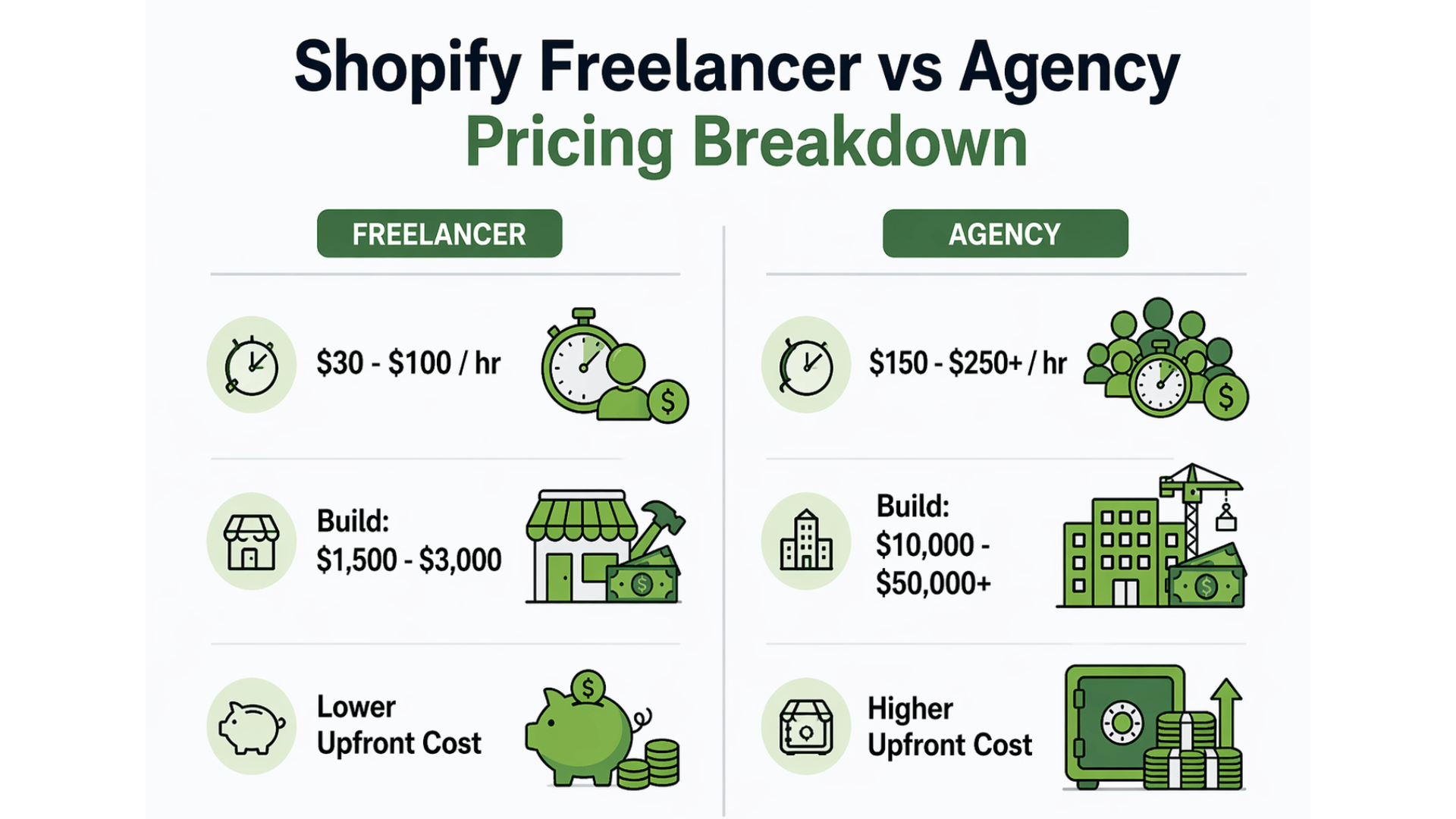
| Fixed-Price Project | Full store builds, structured migrations, clear design handoffs | Flat fee based on defined Scope of Work (e.g., $3,000–$15,000+) | Predictable cost for client; clear deliverables | Strict scope; changes require formal change orders |
| Hourly Rate | Troubleshooting, custom bug fixes, exploratory app builds | Billed per hour worked (typically $75–$200+/hr) | Flexible; ideal for vague or evolving requirements | Final cost is unpredictable; requires tight time tracking |
| Monthly Retainer | Ongoing store optimization, conversion testing, routine maintenance | Recurring monthly fee for set allocated hours | Guaranteed developer availability; continuous improvement | Unused hours may expire; requires ongoing commitment |
Essential Tools Used by Freelance Shopify Developers
A freelance developer relies on a specialized suite of software to handle code development, project management, and client communication.
| Category | Tools |
|---|---|
| Development | VS Code, Shopify CLI, Git, Terminal |
| Design & UI | Figma, Adobe XD, Tailwind CSS |
| APIs & Data | Postman, GraphQL Playground |
| Operations | Shopify Partner Dashboard, Slack |
- Shopify Partner Dashboard: The central management hub where developers track client access requests, create development stores, manage custom apps, and track affiliate earnings.
- Visual Studio Code (VS Code): The standard code editor, customized with extensions like Liquid syntax highlighting, Theme Check (Shopify's linter), and Git integration.
- Postman or Insomnia: API clients used to draft and test complex GraphQL queries and REST webhooks before writing production backend code.
- Figma: Design software where developers inspect client mocks, extract assets, and read typography, color codes, and spacing constraints.
- Theme Check: A command-line linter tool provided by Shopify that analyzes Liquid code for performance bottlenecks, deprecated tags, and syntax errors.
Technical Challenges Unique to Shopify Freelancing
Working within a hosted SaaS environment presents technical constraints that require specialized developer knowledge to resolve.
Managing App Script Overhead
Merchants frequently install multiple third-party apps from the Shopify App Store. Older apps often inject script tags directly into the storefront frontend, creating bloated JavaScript assets that slow down page loads. A skilled freelance developer identifies script bloat, removes unused app leftovers from theme files, and migrates functionality to Theme App Extensions or native Liquid logic where possible.
Maintaining Theme Upgrade Paths
When a developer writes heavy custom code directly inside a purchased base theme, the merchant loses the ability to perform automated theme updates provided by the original theme vendor. Freelance developers mitigate this by isolating custom logic inside distinct section templates, using snippet files, or wrapping custom features inside private apps, preserving the theme's core upgrade path.
Working Within API Rate Limits
Shopify enforces strict API rate limits to maintain platform stability. The GraphQL Admin API uses a leaky bucket algorithm based on query cost rather than simple call counts. Freelance developers must construct efficient, optimized GraphQL queries—requesting only the specific fields necessary—to prevent API throttling during data imports or inventory synchronizations.
Best Practices for Merchants Hiring a Freelance Developer
To establish an efficient working relationship with a freelance developer, store owners should adhere to established industry practices:
- Never Share Master Account Logins: Always grant permissions through official Shopify Partner Collaborator Requests. This protects account ownership and allows store owners to restrict access to financial settings.
- Define Detailed Functional Requirements: Draft a clear document detailing expected store behavior, design references, and required integrations before requesting a project estimate.
- Demand a Staging Environment: Ensure all development and testing occur on preview themes or development stores. Code changes should never be written directly to a live theme handling active customer traffic.
- Establish Clear Code Ownership: Agree upfront in contract terms that all custom Liquid, CSS, JavaScript, and application code developed during the project belongs to the client upon full payment.
Frequently Asked Questions
What is the difference between a Shopify partner, developer, and expert?
A Shopify Partner is anyone registered in the free Shopify Partner Program with access to development resources. A Shopify Developer is a software engineer specializing in Liquid, custom apps, and storefront code. A Shopify Expert is a partner vetted and formally recognized by Shopify within its directory based on verified client work, platform experience, and technical skill.
Do freelance Shopify developers handle store design and graphics?
It depends on the freelancer's specific discipline. Many developers specialize strictly in engineering (writing Liquid, JavaScript, and backend code) and work alongside UI/UX designers who supply Figma files. However, "full-stack" e-commerce freelancers offer both visual interface design and technical frontend implementation.
Why do freelance developers prefer GraphQL over REST for Shopify builds?
Shopify prioritizes its GraphQL Admin API for new platform features and performance enhancements. GraphQL allows developers to request precisely the data fields needed in a single HTTP request, minimizing bandwidth overhead and avoiding the multiple API calls often required by REST endpoints.
How do freelance Shopify developers work on live stores without breaking them?
Developers use local development environments powered by the Shopify CLI alongside hidden preview themes. They construct, test, and refine code within unpublished draft themes or isolated development stores. The live storefront remains completely unaffected until the tested theme is explicitly published.
Can a freelance developer build custom features without using third-party apps?
Yes. Developers can build custom functionality using native Shopify platform capabilities, such as Metafields, Custom Sections, Liquid logic, and Shopify Functions. For advanced business requirements, they can build private app extensions tailored specifically to the merchant's workflow without incurring recurring third-party app subscriptions.
Recommended Next Steps
Whether looking to hire a freelancer or launch a freelance development career, establishing structured operating standards ensures project efficiency:
- For Merchants: Begin by auditing your store requirements. Document your technical needs, target launch dates, and design assets. Prepare your store for external access using the standard Shopify Partner Collaborator Account Access workflow rather than sharing administrative password details.
- For Aspiring Freelance Developers: Create a free Shopify Partner account to access unlimited development stores. Install the Shopify CLI, clone an open-source theme framework (like Dawn), and practice building custom theme sections using modern Liquid and JSON standards before taking on client work.
Image Gallery