How to Add In-Laws to Your USAA Auto Insurance Policy
To add your in-laws to your USAA auto insurance policy, you must log into your account via the USAA mobile app or website, navigate to your auto policy, and select the option to "Add a Driver." Generally, in-laws are only eligible for...
To add your in-laws to your USAA auto insurance policy, you must log into your account via the USAA mobile app or website, navigate to your auto policy, and select the option to "Add a Driver." Generally, in-laws are only eligible for inclusion if they reside in your primary household or regularly operate your covered vehicles.
Contents
Adding family members to an existing insurance policy is a common logistical step when multi-generational households merge or when elderly parents require more frequent assistance with transportation. However, USAA (United Services Automobile Association) operates with specific eligibility criteria that differ from standard commercial carriers due to its member-owned structure and focus on the military community. Understanding the distinction between adding a "listed driver" and granting "membership eligibility" is crucial before you modify your coverage in 2026.
Understanding USAA Eligibility for In-Laws
The primary hurdle when adding in-laws to a USAA policy is the strict definition of household membership. USAA’s business model is built on serving military members, veterans, and their direct families. While children and spouses of service members can often establish their own membership, in-laws occupy a more complex space in the hierarchy.
In the context of 2026 insurance regulations and USAA internal policy, you can add an in-law as a driver on your policy if they live under your roof. USAA generally requires all licensed drivers residing in a household to be disclosed on the policy to ensure accurate risk assessment. If your in-laws have moved into your home—perhaps for retirement or caretaking—they are viewed as part of the "household risk pool."
However, adding an in-law as a driver does not automatically grant them USAA membership. Membership allows an individual to open their own policies and access banking products. Typically, in-laws cannot "inherit" eligibility from a son-in-law or daughter-in-law. They are simply authorized operators of your vehicles under your primary membership. If they live at a separate address, USAA usually requires them to maintain their own independent insurance policy, as the "insurable interest" remains with the owner and primary resident.
Step-by-Step Process to Add a Driver in 2026
If your in-laws meet the residency requirements, the process to add them is streamlined through USAA’s digital platforms. By 2026, the interface has been optimized for rapid updates, but you will still need several pieces of verified information to complete the transaction.
1. Gather Required Information
Before starting the application, ensure you have the following details for each in-law you intend to add:
- Full Legal Name: As it appears on their government-issued ID.
- Date of Birth: Crucial for actuarial age-based pricing.
- Social Security Number: Used for verifying driving history and credit-based insurance scores (where permitted by state law).
- Driver’s License Number and State: To pull their Motor Vehicle Record (MVR).
- Driving History: Details of any accidents, claims, or moving violations over the last 3 to 5 years.
2. Access the USAA Member Portal
Log in to your account through the official USAA website or the mobile application. Security protocols in 2026 often require multi-factor authentication (MFA), so have your mobile device or biometric key ready. Once logged in, navigate to the "Insurance" tab and select "Auto Insurance."
3. Initiate the "Add Driver" Request
Within the policy management screen, look for the "Drivers" section. There will be a button or link labeled "Add a Driver" or "Update Drivers." The system will prompt you to enter the information gathered in step one.
4. Disclosure of Vehicle Use
The system will ask which vehicle the in-law will primarily drive. This is a critical step because assigning a high-risk driver (e.g., one with multiple recent violations) to a high-value vehicle can significantly spike your premiums. Conversely, if they are only an occasional driver of a secondary vehicle, the impact may be moderated.
5. Review and Bind Coverage
After entering the data, USAA will provide a real-time quote reflecting the change in your premium. Review the new total, the effective date of the change, and any adjustments to your coverage limits. Once you confirm, the coverage is typically "bound" immediately, and an updated ID card will be generated digitally.
Financial Impacts and Premium Adjustments
Adding a driver is rarely cost-neutral. The financial impact of adding in-laws depends on several actuarial factors that USAA evaluates during the addition process.
The Impact of Age and Driving Record
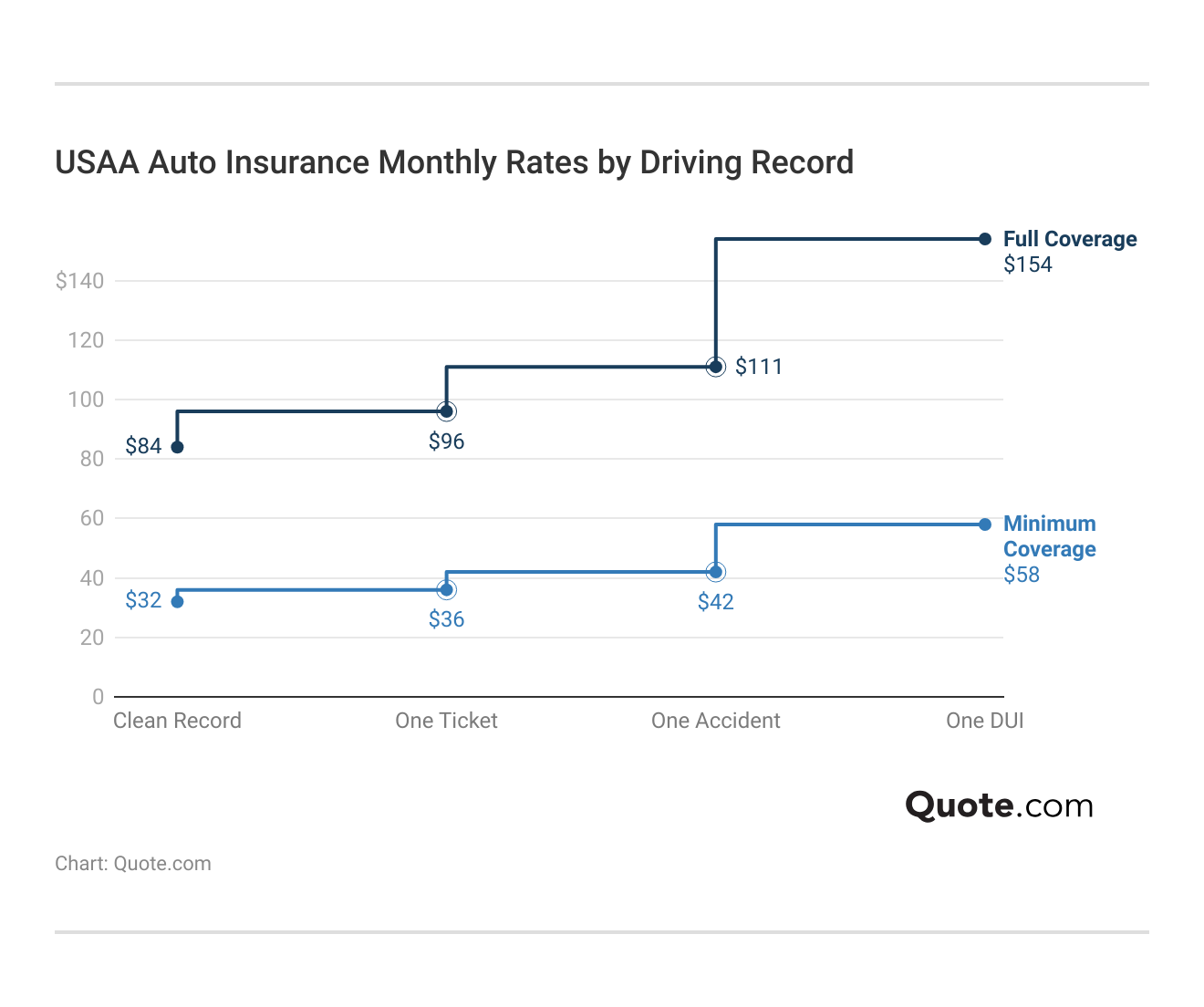
In 2026, insurance companies continue to place significant weight on the age of the driver. If your in-laws are older, they may benefit from "mature driver" discounts if they have completed recognized defensive driving courses. However, if they are of an age where statistics show a higher frequency of claims, your rates might increase. Their individual driving record—including speeding tickets or at-fault accidents—will be merged into your policy’s risk profile, potentially affecting your "Premier Driver" or "Good Student" equivalent discounts.
Multi-Driver and Multi-Car Dynamics
If adding your in-laws also involves adding their vehicle to your policy, you may qualify for multi-car discounts. USAA often provides a reduction in the per-vehicle rate when more than one car is insured under the same policy. However, this only applies if you have the legal right to insure the vehicle (i.e., you are a co-owner or it is garaged at your residence).
Table: Comparison of Addition Scenarios
| Scenario | Eligibility Status | Impact on Membership | Primary Cost Driver |
|---|---|---|---|
| In-law lives in your home | Eligible to be added | No membership granted | Age and MVR of the in-law |
| In-law lives elsewhere | Generally Ineligible | N/A | Must obtain separate policy |
| In-law co-owns your car | Eligible to be added | No membership granted | Combined risk of both owners |
| In-law is a veteran | Eligible for own policy | Full membership possible | Their own service history |
Legal and Liability Considerations
When you add someone to your USAA auto insurance, you are extending your liability limits to their actions behind the wheel. This is a significant legal responsibility. If an in-law is involved in a catastrophic accident while driving your vehicle, your policy limits (e.g., $100,000/$300,000) are what stand between your assets and a legal judgment.
In 2026, it is highly recommended to review your Umbrella Insurance policy alongside your auto insurance update. If your in-laws have significant assets of their own but are listed on your policy, an umbrella policy provides an extra layer of protection (usually starting at $1 million) that kicks in after your auto limits are exhausted. USAA offers integrated umbrella coverage that is relatively inexpensive and provides peace of mind when adding more drivers to the household.
Furthermore, ensure that the in-laws understand "Permissive Use" versus "Listed Driver" status. While USAA often covers occasional drivers under permissive use, someone who lives in the house and drives the car weekly must be listed. Failing to list a resident driver is a form of "rate evasion" and can lead to a claim being denied if an accident occurs.
Common Mistakes to Avoid
- Assuming Membership Transfer: Do not promise your in-laws that they will get "USAA rates" for their own separate house or life insurance. Adding them to your auto policy is a specific, limited action.
- Inaccurate Mileage Reporting: When adding a new driver, USAA will ask for estimated annual mileage. Underestimating this to save money can lead to issues during a claim investigation in 2026, as telematics and digital tracking have made mileage verification more precise.
- Neglecting State-Specific Rules: Insurance is regulated at the state level. If your in-laws are moving from a "No-Fault" state to a "Tort" state, the coverage requirements will change significantly. USAA’s system usually handles this automatically based on your address, but you should verify the Personal Injury Protection (PIP) or Medical Payments (MedPay) levels.
- Forgetting to Remove Drivers: If your in-laws eventually move out or stop driving, you must manually remove them to stop paying for their risk. USAA does not automatically track household departures.
FAQs About Adding In-Laws to USAA
Can I add my in-laws if they don't live with me?
Generally, no. USAA requires drivers on a single policy to reside at the same address. If they live elsewhere, they must maintain their own insurance. The exception is if they are co-owners of the vehicle you are insuring, but even then, garaging location rules apply.
Do my in-laws get their own USAA member number?
No. Adding them as a driver to your insurance does not grant them a USAA membership number or eligibility for other USAA products like banking or homeowners insurance. They are "guests" on your policy.
Will adding an elderly in-law increase my rates significantly?
It depends on their driving record. While senior drivers can sometimes have higher rates due to increased accident frequency statistics, many qualify for "Safe Driver" discounts. The most significant increases occur if the added driver has a history of claims or serious violations.
What if my in-law has their own car?
If they live with you and have their own car, you can add both the driver and the car to your USAA policy. This often results in a multi-car discount. However, the registration of the car must usually be updated to reflect the household address.
Is there a limit to how many drivers I can add?
USAA allows for multiple drivers per policy, but there must be a logical connection (residency or ownership). Adding a high number of drivers to a single policy may trigger a manual review by an underwriter to ensure the risk is being appropriately managed.
Practical Recommendation
Before finalizing the addition of your in-laws to your USAA auto insurance, perform a quick "Insurance Check-up." Since 2026 premiums are influenced by a wide array of data points, including credit and driving habits, it is wise to call a USAA representative directly at 1-800-531-USAA. A phone consultation can help you uncover specific discounts, such as those for vehicles with advanced safety features or for drivers who have completed recent safety courses, which might not be immediately obvious in the mobile app’s automated flow. Ensure you have the in-laws' previous insurance information handy to avoid any "lapse in coverage" surcharges.
Image Gallery