Linux EFI Support in Modern Systems: Architecture, Boot Mechanics, and Configuration
Linux EFI support in modern systems relies on the Unified Extensible Firmware Interface standard to initialize hardware, load the Linux kernel, and transition control to the operating system using secure, standardized boot services and...
Linux EFI support in modern systems relies on the Unified Extensible Firmware Interface standard to initialize hardware, load the Linux kernel, and transition control to the operating system using secure, standardized boot services and runtime environments.
Contents
Introduction to Linux EFI Support in Modern Systems
The transition from legacy Master Boot Record (MBR) partitioning and the Basic Input/Output System (BIOS) to the Unified Extensible Firmware Interface (EFI or UEFI) has fundamentally reshaped how Linux operating systems boot on modern hardware. EFI provides a robust, standardized interface between the operating system and platform firmware. For Linux, this modernization brings faster boot times, support for hard drives larger than two terabytes via the GUID Partition Table (GPT), and architectural security frameworks like Secure Boot.
Understanding Linux EFI support requires examining how the kernel interacts with firmware interfaces, the role of the EFI System Partition (ESP), and how bootloaders bridge the gap between firmware execution and kernel initialization. This guide explores the architectural components, verification methods, configuration steps, and troubleshooting techniques necessary to manage Linux systems running in native EFI mode.
The Evolution from Legacy BIOS to UEFI Architecture
Legacy BIOS firmware initializes hardware via 16-bit real-mode x86 architecture, executing code from a specific memory address known as the reset vector. This method is constrained by severe limitations, including a 1 megabyte address space limit and reliance on the MBR partitioning scheme, which struggles with modern storage configurations.
UEFI replaces this antiquated model with a modular, extensible architecture written primarily in C. It operates in 32-bit or 64-bit protected or long mode, offering hardware-independent drivers, pre-boot networking capabilities, and a graphical shell environment.
Key Architectural Differences
| Feature | Legacy BIOS | UEFI (EFI) |
|---|---|---|
| Partition Table | MBR (Master Boot Record) | GPT (GUID Partition Table) |
| Maximum Drive Size | 2.1 Terabytes | 9.4 Zettabytes |
| Boot Code Location | First sector (sector 0) of the disk | EFI System Partition (ESP) files |
| Execution Mode | 16-bit real mode | 32-bit or 64-bit protected/long mode |
| Security Framework | None native | Secure Boot via cryptographic signatures |
The implementation of GPT alongside UEFI is mandatory for fully utilizing modern storage arrays and multi-terabyte drives. GPT removes the four-primary-partition ceiling imposed by MBR, supporting up to 128 partitions natively on standard implementations without relying on complex extended or logical partition workarounds.
Core Components of the Linux EFI Boot Process
The Linux EFI boot process is a structured sequence that moves execution from motherboard firmware to the fully running operating system kernel. Unlike legacy systems where bootloaders had to inject code into arbitrary disk sectors, UEFI reads executable files directly from a filesystem.
The EFI System Partition (ESP)
The cornerstone of any EFI-based Linux installation is the EFI System Partition. Typically formatted with the FAT32 filesystem to ensure universal firmware readability, the ESP stores EFI applications, drivers, and kernel images.
Standard directory structures within the ESP follow conventions defined by the UEFI specification. Operating systems place their boot files inside subdirectories under the /EFI/ mount point—for example, /EFI/ubuntu/, /EFI/fedora/, or /EFI/boot/.
EFI Boot Variables and NVRAM
Modern UEFI firmware maintains boot configuration data in non-volatile RAM (NVRAM) internal to the motherboard. These variables define boot entries, containing paths to specific EFI binaries on the ESP, hardware device paths, and timeout parameters.
Linux utilities such as efibootmgr interact directly with these NVRAM variables from user space. Administrators can view, create, modify, or delete boot entries without needing to reflash motherboard firmware, providing granular control over boot order and fallback mechanisms.
Role of Bootloaders and Direct Stub Booting
Linux distributions employ different methods to load the kernel from the ESP into system memory, ranging from traditional third-party bootloaders to direct firmware execution.
GRUB2 in EFI Environments
GRUB2 remains the default bootloader for many enterprise and desktop Linux distributions, including Ubuntu, Debian, Red Hat Enterprise Linux, and Fedora. In an EFI deployment, GRUB2 compiles as an EFI application (grubx64.efi).
When selected by the UEFI firmware, the GRUB EFI binary executes, reads its configuration file (grub.cfg), presents the user interface if configured, and loads the Linux kernel along with its initial RAM disk (initrd) into memory before passing execution control.
systemd-boot
Lightweight alternatives like systemd-boot (formerly gummiboot) provide a simpler, configuration-driven approach. Operating directly as an EFI boot manager, systemd-boot reads plain-text configuration files to load kernels directly from the ESP, bypassing complex intermediary bootloaders and reducing boot latency.
EFI Stub Kernel Loading
Modern Linux kernels can be compiled with EFI stub support (CONFIG_EFI_STUB=y), allowing the kernel itself to act as a valid EFI application.
This enables direct booting from the UEFI firmware without any intermediary bootloader like GRUB or systemd-boot. The kernel image is placed directly on the ESP, and an NVRAM entry is created pointing straight to the kernel binary, streamlining the boot chain and simplifying system maintenance.
Verifying and Managing EFI Mode on Running Systems
Before performing maintenance, kernel updates, or migrating systems, administrators must verify whether a Linux host is actively running in UEFI mode or legacy compatibility mode (Compatibility Support Module, or CSM).
Checking Firmware Interface Type
The presence of the /sys/firmware/efi directory in a running Linux environment confirms that the system booted via UEFI. Administrators can inspect this via the command line:
[ -d /sys/firmware/efi ] && echo "System booted in UEFI mode" || echo "System booted in Legacy BIOS mode"
Additionally, running the efibootmgr utility on a non-UEFI system will return an error indicating that the EFI variables are not supported by the kernel, whereas a UEFI system will output the active NVRAM boot entries.
efibootmgr
Sample output from a properly configured system displays active boot targets, timeout values, and the current boot order:
BootCurrent: 0001 Timeout: 2 seconds BootOrder: 0001,0000,0002 Boot0001* ubuntu Boot0000* Windows Boot Manager Boot0002* Internal Hard Disk
Secure Boot Implementation and Linux Compatibility
Secure Boot is a security standard developed by the UEFI Forum designed to protect a device's pre-boot phase against rootkits and bootkit malware. It ensures that the system only boots software trusted by the motherboard manufacturer.
Mechanics of Secure Boot
Secure Boot relies on public-key cryptography. The firmware stores authorized public keys in NVRAM, including the Platform Key (PK), Key Exchange Key (KEK), and Signature Database (db).
When the system powers on, the firmware verifies the cryptographic signature of the first-stage bootloader against the authorized databases before execution. If the signature is missing, invalid, or signed by a revoked key, the firmware halts execution.
Linux and Shim Signatures
Because the Linux kernel and most open-source bootloaders are distributed under terms that conflict with proprietary binary signing models, distributions utilize a signed intermediary bootloader known as Shim.
The Shim binary is signed with a certificate trusted by major hardware vendors (typically Microsoft's third-party UEFI certificate authority). Once executed, Shim verifies the digital signature of the distribution's primary bootloader (such as GRUB2) or signed kernel against local machine-owner keys (MOK) before passing execution.
Common EFI Configuration Tasks and Troubleshooting
Managing Linux EFI environments occasionally requires repairing corrupted boot sectors, updating NVRAM entries, or addressing firmware bugs.
Reinstalling GRUB in an EFI Environment
If a motherboard battery fails, NVRAM variables are reset, or a storage drive is moved to a new system, the EFI boot entries may disappear. Repairing this requires booting into a live Linux environment, mounting the root file system and the ESP, and reinstalling the bootloader.
- Boot into a live Linux distribution via USB.
- Mount the root partition to
/mntand the EFI System Partition to/mnt/boot/efi. - Bind the necessary virtual filesystems (
/dev,/proc,/sys). - Chroot into the mounted environment and reinstall the GRUB EFI package.
sudo mount /dev/sdXY /mnt sudo mount /dev/sdXZ /mnt/boot/efi for i in /dev /dev/pts /proc /sys /run; do sudo mount -B $i /mnt$i; done sudo chroot /mnt grub-install --target=x86_64-efi --efi-directory=/boot/efi --bootloader-id=ubuntu --recheck update-grub
Common Pitfalls and Troubleshooting Steps
- Mismatched Firmware Architecture: Attempting to boot a 64-bit UEFI firmware with a 32-bit EFI bootloader (or vice versa) will cause the firmware to ignore the boot entry entirely. Ensure kernel and bootloader architectures match the motherboard capability.
- Corrupted NVRAM Entries: If
efibootmgrfails to write new entries due to NVRAM space exhaustion (common on certain older motherboard firmware implementations), clearing old or orphaned boot entries is required. - Fast Startup Interference: On dual-boot systems, Windows "Fast Startup" or hibernation leaves the NTFS file system in a dirty state and can lock EFI NVRAM variables, preventing Linux from modifying boot orders. Disabling Fast Startup within Windows resolves this conflict.
Frequently Asked Questions
Can a Linux system run in UEFI mode without an EFI System Partition?
No. UEFI firmware requires an accessible partition formatted with FAT32 containing the necessary EFI binaries to initialize the boot sequence. Without an ESP, the firmware cannot locate or execute Linux bootloaders or stub kernels.
How do I enable or disable Secure Boot for Linux?
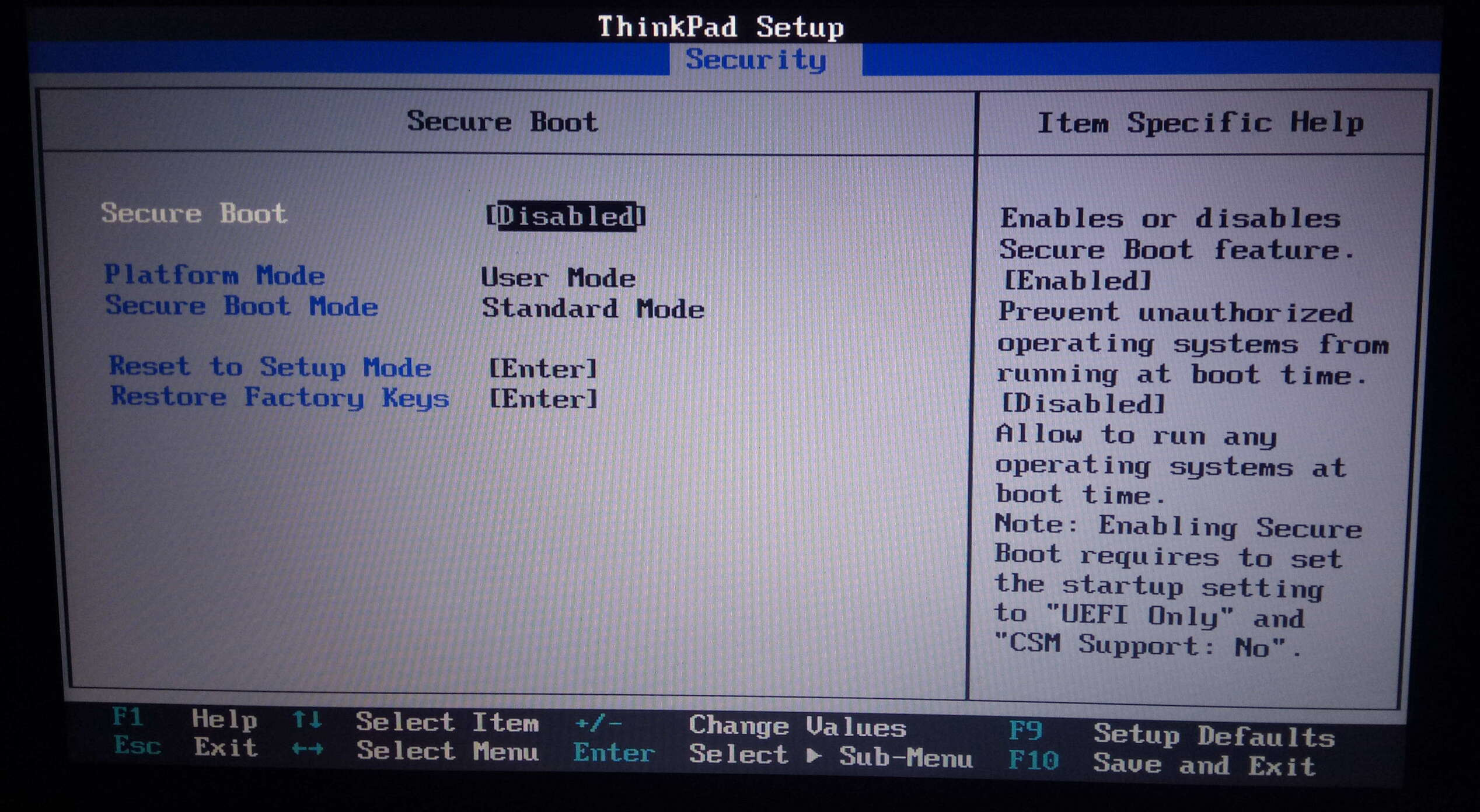
Secure Boot settings are managed directly within the motherboard's UEFI firmware settings menu, typically accessed by pressing a designated function key during system startup. Most modern Linux distributions support Secure Boot natively through signed bootloaders like Shim.
What is the difference between GPT and MBR?
GPT (GUID Partition Table) is a modern partitioning standard that supports drives larger than 2 terabytes and allows up to 128 partitions without workarounds. MBR (Master Boot Record) is a legacy standard restricted to 2 terabytes and a maximum of four primary partitions.
Why do my Linux boot entries disappear after a BIOS/UEFI update?
Motherboard firmware updates frequently reset NVRAM variables to factory defaults, erasing custom Linux boot entries. Administrators can restore these entries by booting into a live environment and running the bootloader installation utility for their distribution.
Is Legacy BIOS mode still supported on modern hardware?
Many modern motherboards include a Compatibility Support Module (CSM) to support legacy BIOS operating systems, though hardware manufacturers are increasingly phasing out CSM support entirely in favor of native UEFI-only implementations.
Conclusion
Linux EFI support in modern systems provides a secure, fast, and scalable foundation for operating system execution. By replacing legacy BIOS limitations with GUID Partition Tables, structured EFI System Partitions, and cryptographic verification through Secure Boot, modern Linux deployments achieve higher reliability and compatibility with enterprise hardware. Mastering EFI boot mechanics, NVRAM variable management, and troubleshooting procedures ensures administrators can maintain robust, secure Linux environments across diverse hardware platforms.
Image Gallery