Why Critical Path Software Matters for Modern Projects in 2026
Critical path software is essential for modern projects because it mathematically identifies the sequence of tasks that dictates the minimum project duration. By automating complex dependency calculations, it enables managers to priori...
Critical path software is essential for modern projects because it mathematically identifies the sequence of tasks that dictates the minimum project duration. By automating complex dependency calculations, it enables managers to prioritize high-stakes activities, optimize resource allocation, and predict potential delays before they impact the final delivery timeline in an increasingly volatile global economy.
Contents
Understanding the Critical Path Method (CPM) in a Modern Context
The Critical Path Method (CPM) is a project modeling technique developed in the late 1950s, but its relevance has intensified as projects have become more complex and data-driven. At its core, the critical path is the longest stretch of dependent activities and the shortest time it takes to complete a project from start to finish. Any delay in a critical path task directly translates to a delay in the project’s completion date.
In 2026, the "modern project" is characterized by global distribution, interdependencies across different business units, and tight regulatory requirements. Manual tracking via spreadsheets or static charts is no longer viable. Critical path software acts as a dynamic engine that processes thousands of variables—such as task duration, dependencies (Finish-to-Start, Start-to-Start, etc.), and resource availability—to provide a real-time "health check" of the schedule.
To understand why the software is indispensable, one must look at the mathematical components it handles:
- Early Start (ES) and Early Finish (EF): The earliest possible time a task can begin and end.
- Late Start (LS) and Late Finish (LF): The latest a task can start and finish without delaying the project.
- Total Float (Slack): The amount of time a task can be delayed without affecting the overall project deadline.
- Free Float: The time a task can be delayed without affecting the start of the next task.
Software automates these calculations (the "forward pass" and "backward pass"), allowing project managers to focus on strategy rather than arithmetic.
The Evolution from Manual Charts to Intelligent Software
Historically, the critical path was calculated on paper or basic mainframe computers. This led to "frozen" schedules that were obsolete the moment they were printed. In 2026, the transition to cloud-native, AI-augmented critical path software has changed the landscape.
Modern software does not just display a Gantt chart; it integrates with other enterprise systems. For instance, in a large-scale construction project, the software might pull data from IoT sensors on-site or supply chain logs to update the status of a critical path task automatically. If a shipment of structural steel is delayed, the software immediately recalculates the critical path, identifies which "near-critical" paths have now become critical, and alerts the stakeholders.
This shift from reactive to proactive management is why the software is now a standard requirement for Project Management Professional (PMP) standards and ISO 21502:2020 guidelines for project management.
Key Benefits of Critical Path Software
1. Enhanced Visibility and Transparency
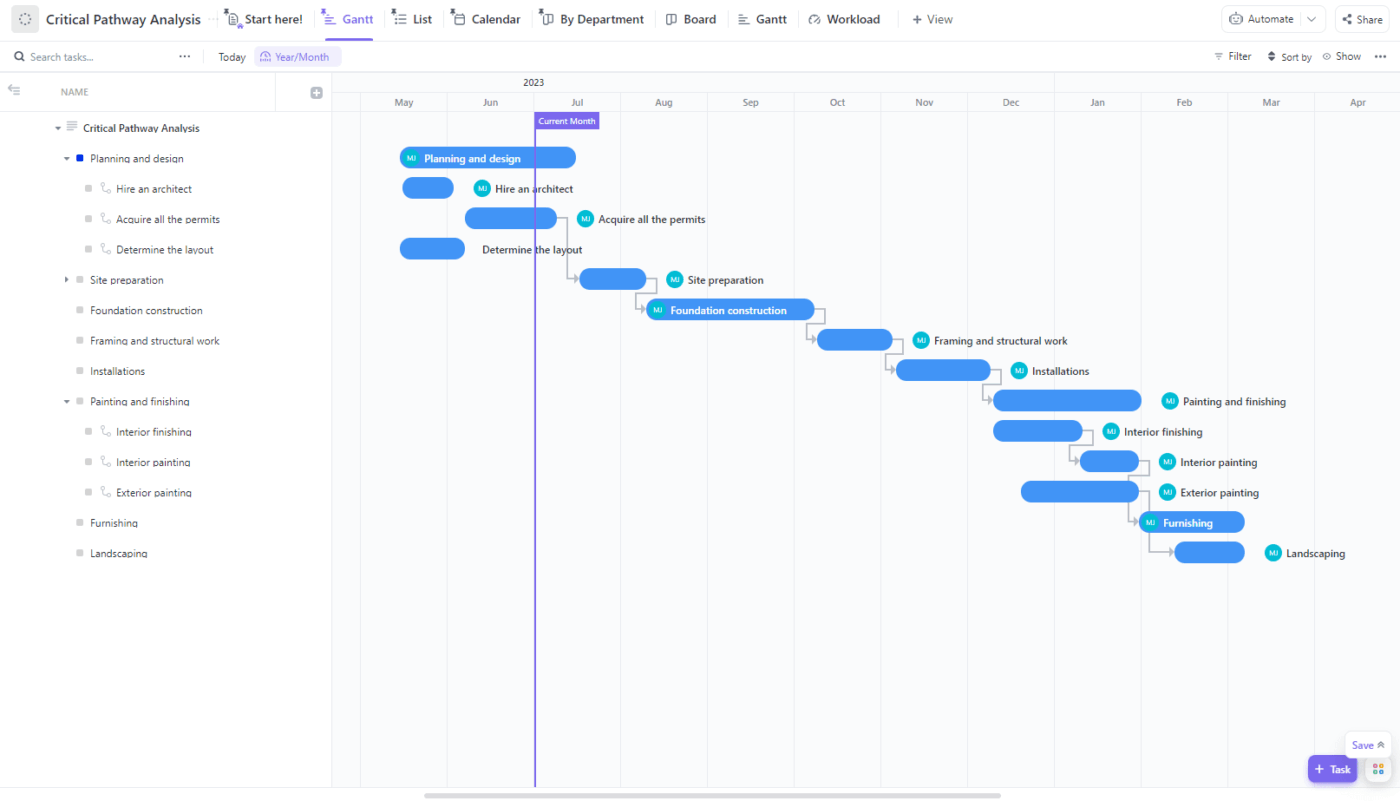
In a complex project, it is easy to lose sight of which tasks truly matter. A project may have 500 tasks, but only 50 might be on the critical path. Critical path software highlights these "bottleneck" activities in high-contrast visuals (often red in Gantt views). This allows leadership to ignore the "noise" of non-critical tasks that have significant float and focus their energy on the activities where a single day's delay costs the company money.
2. Precise Resource Optimization
One of the most difficult aspects of management is resource leveling—ensuring that no single employee or machine is overworked while others sit idle. Modern CPM software identifies when a resource is assigned to multiple critical path tasks simultaneously. It provides "what-if" scenarios, allowing a manager to see the impact of moving a resource from a task with high float to a critical path task.
3. Predictive Risk Mitigation
By 2026, top-tier project software incorporates Monte Carlo simulations. This allows managers to run thousands of iterations of a project schedule based on probabilistic task durations. Instead of saying, "The project will finish on October 12," the software can state, "There is an 85% probability the project will finish by October 12, but if this critical path task slips by three days, that probability drops to 40%." This level of statistical insight is impossible to achieve without dedicated software.
Critical Path vs. Agile: The Rise of Hybrid Methodologies
A common misconception is that critical path software is only for "Waterfall" or traditional projects. In 2026, the industry has largely moved toward Hybrid Project Management.
Large enterprises often use Agile for software development cycles but rely on CPM for the overarching product launch, hardware manufacturing, or regulatory compliance phases. Critical path software now integrates with tools like Jira or Azure DevOps, pulling "Sprints" into a larger critical path framework. This ensures that while a team is working flexibly, they remain aware of the rigid deadlines imposed by the broader project milestones.
Industry-Specific Applications of CPM Software
While applicable to any sector, certain industries find critical path software non-negotiable:
| Industry | Primary Use Case | Critical Software Feature |
|---|---|---|
| Construction | Managing subcontractors and material lead times. | BIM (Building Information Modeling) Integration. |
| Aerospace | Coordinating thousands of components and testing phases. | Advanced Dependency Logic (Lead and Lag times). |
| Pharmaceuticals | Tracking clinical trials and FDA approval milestones. | Regulatory Compliance and Audit Trails. |
| Software Dev | Orchestrating multi-platform releases and security audits. | Integration with CI/CD pipelines. |
| Energy | Planning refinery shutdowns or grid maintenance. | Resource Leveling and Multi-shift Scheduling. |
In the energy sector, for example, a "Turnaround" (a planned shutdown for maintenance) can cost millions of dollars per day in lost production. In 2026, critical path software is used to schedule these events down to the hour. If a specific valve repair on the critical path takes two hours longer than expected, the software immediately re-sequences the next 48 hours of work to minimize the total downtime.
Essential Features to Look for in 2026
When evaluating critical path software for modern enterprise use, several features are mandatory for ensuring performance and reliability:
- Real-Time Collaboration: The software must be cloud-native, allowing multiple schedulers to work on the same file without version conflicts.
- Dynamic Baseline Tracking: The ability to "save" the original plan and compare it against the current progress (Variance Analysis) to see where the project diverged from the critical path.
- Automated Bottleneck Detection: AI features that flag tasks that frequently shift or have unrealistic durations based on historical data from previous projects.
- Scalability: The engine must be able to calculate the critical path for projects exceeding 100,000 tasks without significant latency. Tools like Oracle Primavera P6 remain the gold standard for this level of complexity.
Implementation Challenges and Best Practices
Despite the power of the software, it is only as good as the data entered into it. A common pitfall is "GIGO" (Garbage In, Garbage Out). If dependencies are not mapped correctly—for example, forgetting to link a testing phase to a development phase—the software will generate an incorrect critical path.
Best Practices for 2026:
- Define All Dependencies: Avoid "dangling" tasks. Every task should have at least one predecessor and one successor (except for the start and end of the project).
- Regular Status Updates: In a fast-moving modern environment, the critical path should be updated at least weekly, if not daily, via automated data feeds.
- Use Lead and Lag Wisely: Don't just link tasks. Use "Lag" for required waiting periods (like concrete drying) and "Lead" for tasks that can overlap.
- Involve the Team: The people doing the work should verify the durations. Software can calculate the path, but humans provide the context for task length.
Frequently Asked Questions
Can a project have more than one critical path?
Yes. If two different sequences of tasks both result in the longest duration, the project has multiple critical paths. This increases project risk because a delay on either path will delay the completion date. Software helps identify these "near-critical" paths so managers can monitor them closely.
Is Microsoft Project still the standard for critical path software?
Microsoft Project remains a dominant player for mid-to-large scale projects due to its integration with the Microsoft 365 ecosystem. However, for massive infrastructure or highly specialized engineering projects, Oracle Primavera P6 or specialized SaaS platforms like Smartsheet are often preferred for their advanced multi-user capabilities and specific industry features.
What is the difference between "crashing" and "fast-tracking"?
Both are techniques to shorten a project's duration. Crashing involves adding more resources to critical path tasks to finish them faster (which increases costs). Fast-tracking involves performing tasks in parallel that were originally scheduled in sequence (which increases risk). Software allows you to simulate both to see which is more viable.
How does AI improve critical path software?
By 2026, AI analyzes historical project data to predict task durations more accurately than humans. It can flag if a manager is being "over-optimistic" about a critical path task and suggest a more realistic buffer based on past performance of similar projects.
Final Recommendation
For organizations managing anything beyond simple, linear tasks, investing in robust critical path software is no longer optional—it is a strategic necessity. To get started, conduct an audit of your current project success rates and identify where delays most frequently occur. If the answer is "unexpected dependencies" or "resource conflicts," prioritize a software solution that offers real-time CPM calculations and AI-driven risk modeling. The goal is not just to see the schedule, but to control it.
Image Gallery