How to Find the View Contact Email: A Comprehensive Guide to Locating Hidden Addresses
To find a "view contact email" button or reveal a hidden address, navigate to the specific "Contact Info" section on a social profile (like LinkedIn), the "About" or "Details" tab on a YouTube channel, or use professional email discove...
To find a "view contact email" button or reveal a hidden address, navigate to the specific "Contact Info" section on a social profile (like LinkedIn), the "About" or "Details" tab on a YouTube channel, or use professional email discovery tools such as Hunter.io or Apollo.io for company websites.
Contents
Locating a contact email address often feels like a digital treasure hunt. As of 2026, privacy regulations and sophisticated anti-spam measures have made platforms more protective of user data. However, for sales professionals, recruiters, and journalists, finding a direct line of communication remains a vital skill. This guide explores the legitimate methods, tools, and technical steps required to find contact emails across various platforms.
Understanding the "View Contact Email" Mechanism
The "view contact email" functionality is a gatekeeping mechanism used by platforms to prevent automated bots from scraping personal data. By requiring a manual click or a CAPTCHA verification, platforms ensure that the person requesting the information is a human with a genuine intent.
When you encounter a button labeled "View Email" or "Show Contact Details," you are interacting with a database query that pulls the information only upon request. Understanding that this data is often tiered—meaning it is visible to some users but not others—is the first step in successful digital prospecting.
Finding Contact Emails on Professional Networks
LinkedIn Contact Information
LinkedIn remains the primary source for professional contact data. However, the "View Contact Info" button’s visibility is heavily dependent on your degree of connection.
- First-Degree Connections: For direct connections, click on the "Contact info" link located in the introduction section of their profile. This usually reveals their primary email, phone number, and social links.
- Second and Third-Degree Connections: You will rarely see a direct email address here unless the user has set their privacy settings to "Public." In most cases, you will need to use a third-party browser extension or LinkedIn Sales Navigator to bridge this gap.
- Privacy Settings Impact: Users can choose to hide their email from everyone except direct connections. If the "Contact info" popup doesn't list an email, it means the user has restricted access.
Using Sales Intelligence Tools
In 2026, the use of AI-driven sales intelligence tools has become the standard for bypassing the manual search process. Tools like Lusha, Apollo.io, and RocketReach function as browser extensions that "read" the profile you are viewing and cross-reference it with their proprietary databases to find the associated business email.
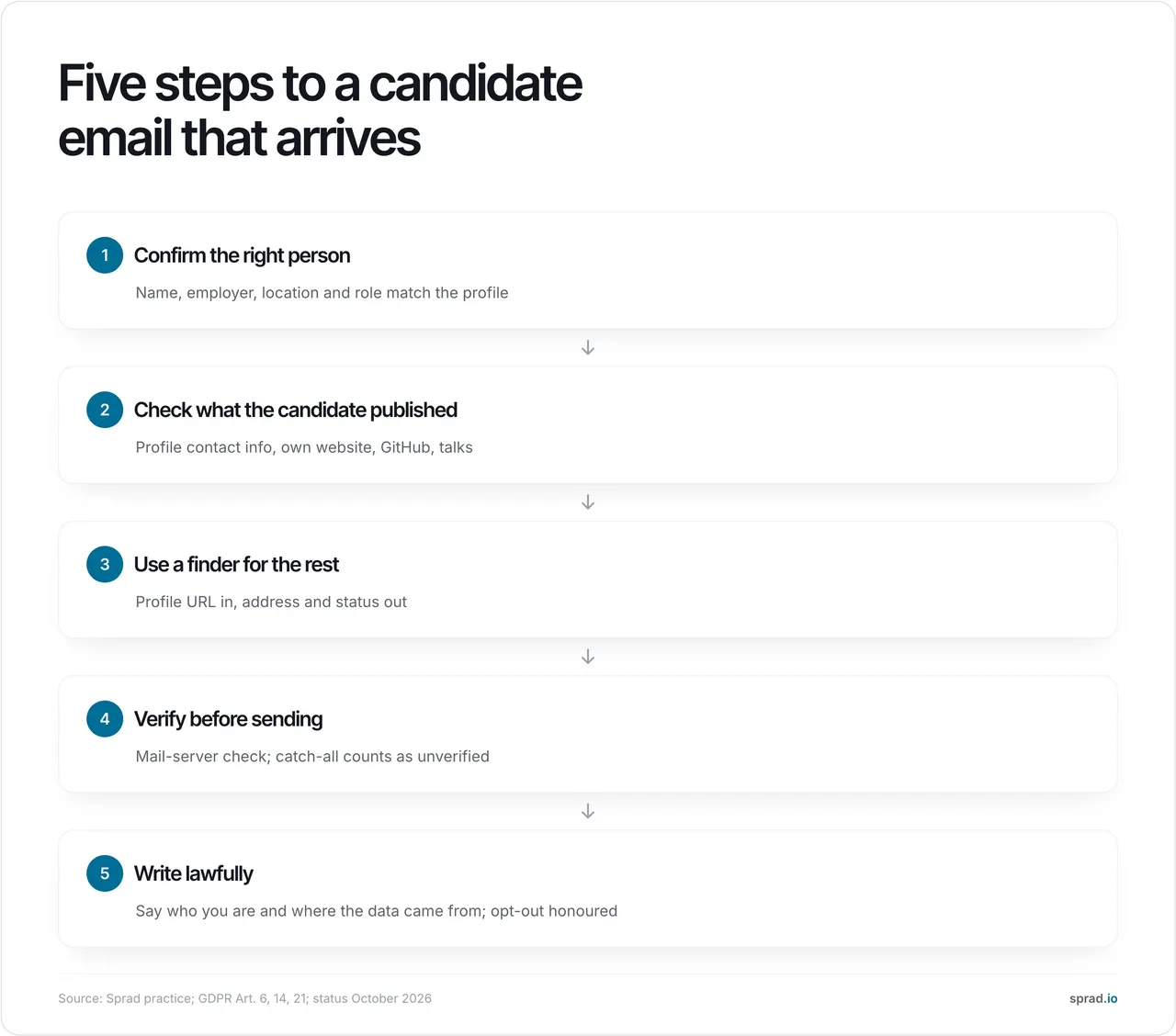
- Data Enrichment: These tools don't just find the email; they verify it in real-time by pinging the mail server to ensure the address hasn't bounced.
- Credit Systems: Most of these services operate on a credit-based model, where revealing one "view contact email" entry costs one credit.
Locating Emails on YouTube and Content Platforms
YouTube creators often hide their business inquiries email behind a verification wall to avoid spam.
Steps to Reveal a YouTube Email
- Navigate to the creator's channel page.
- Click on the "About" section (often found under the "More about this channel" arrow or the "Links" area in the 2026 interface).
- Scroll down to the "Details" or "Contact Information" section.
- Click the button labeled "View email address."
- Complete the reCAPTCHA.
- The email will be displayed, allowing you to copy it.
Note that YouTube limits the number of "View Email" requests a single account can make within a 24-hour period to prevent bulk scraping.
Finding Emails on Corporate Websites
When a company website doesn't explicitly list a "Contact Us" email, or only provides a generic "info@" address, you can use technical methods to find the specific person you need.
The "Contact Us" and "About Us" Strategy
Always start with the footer. Standard placement for contact information includes the "Privacy Policy" or "Terms of Service" pages, which are legally required to provide a contact point. While these are often legal or administrative emails, they can serve as a starting point for internal referrals.
Email Permutators and Verification
If you know the name of the individual and the company domain (e.g., john.doe@company.com), you can use an email permutator. These tools generate common variations of email structures:
Once generated, use a tool like NeverBounce or ZeroBounce to verify which version is active. This avoids the "view contact email" hurdle entirely by predicting the address based on standard corporate patterns.
WHOIS Lookup
For smaller companies or personal blogs, the domain registration records (WHOIS) may contain the owner's email. While GDPR has redacted much of this information for European domains, many .com, .net, and .org domains registered outside of strict privacy jurisdictions still display an administrative contact email.
| Method | Best For | Accuracy | Difficulty |
|---|---|---|---|
| LinkedIn Contact Info | Direct professional peers | High | Low |
| YouTube "About" Tab | Influencers and Creators | High | Low |
| Hunter.io / Apollo | B2B Sales & Prospecting | Very High | Medium |
| WHOIS Records | Website owners / Bloggers | Medium | Medium |
| Source Code Inspection | Tech-savvy users | Low | High |
Advanced Technical Methods
Inspecting Website Source Code
Sometimes, emails are "hidden" in the HTML source code to keep them away from visual scrapers but remain accessible to the browser.
- Right-click on the webpage and select "View Page Source" or press
Ctrl + U. - Press
Ctrl + Fand search for the "@" symbol. - Look for
mailto:links. Often, developers use CSS to hide an email address from the UI, but the underlying link remains in the code.
Using Search Operators (Google Dorks)
You can force search engines to find instances where an email was published in a document or a sub-page. Use the following syntax:
site:companywebsite.com "email"site:linkedin.com/in/ "at * dot com" "Individual Name""Individual Name" + "contact"
By searching for "at" and "dot" instead of "@" and ".", you can find addresses that users have obfuscated to prevent automated discovery.
Common Obstacles and How to Overcome Them
The "Email Not Found" Message
If a professional tool or a platform's "view contact" button returns no results, the individual likely has a very high privacy tier or uses a "stealth" email configuration. In these cases, the best alternative is to reach out via platform-native messaging (like LinkedIn InMail or Twitter/X DMs) to request their email directly.
CAPTCHA Failures
Frequent use of "View Email" buttons can trigger security blocks. If you are unable to see the email after completing a CAPTCHA, try:
- Clearing your browser cache and cookies.
- Disabling your VPN, as many platforms flag VPN IP addresses as suspicious.
- Switching to a different browser or a mobile device.
Ethical and Legal Considerations
As we move through 2026, data privacy laws like the GDPR (Europe), CCPA (California), and various international equivalents have tightened. Finding a "view contact email" address does not automatically grant the right to add that person to a bulk marketing list.
- Consent: Only use the email for the specific purpose it was intended (e.g., a business inquiry for a creator who lists a "Business Inquiries" email).
- Opt-Out: If you are using found emails for cold outreach, you must provide a clear and immediate way for the recipient to opt-out of further communication.
- Data Storage: Be mindful of how you store found contact information. Keeping large databases of "scraped" emails can lead to compliance risks if you are operating within highly regulated jurisdictions.
Troubleshooting Missing "View Email" Buttons
If you expect to see a contact button but it is missing, consider the following:
- Account Maturity: Some platforms, like YouTube or specialized forums, hide contact details from newly created accounts to prevent spam.
- Mobile vs. Desktop: On Instagram and Facebook, the "Contact" or "Email" button is often only visible on the mobile app and does not appear on the desktop website. Always check the mobile version if the desktop site is unhelpful.
- Browser Extensions: Ad-blockers or privacy extensions (like Ghostery or uBlock Origin) may accidentally hide the script that generates the "view contact" button. Try disabling these extensions temporarily.
Practical Recommendation
For the most efficient results, combine manual platform searches with one reliable AI-powered discovery tool. Start by checking the LinkedIn Contact Info or the YouTube About section for the most direct and accurate data. If those are restricted, utilize a verified service like Apollo.io to find the professional email. Always verify any "found" email with a pinging service before sending an important message to ensure your sender reputation remains intact and your communication reaches its intended destination.
Image Gallery