How a White Label Learning Platform Works: Technical Architecture, Branding, and Operational Mechanics
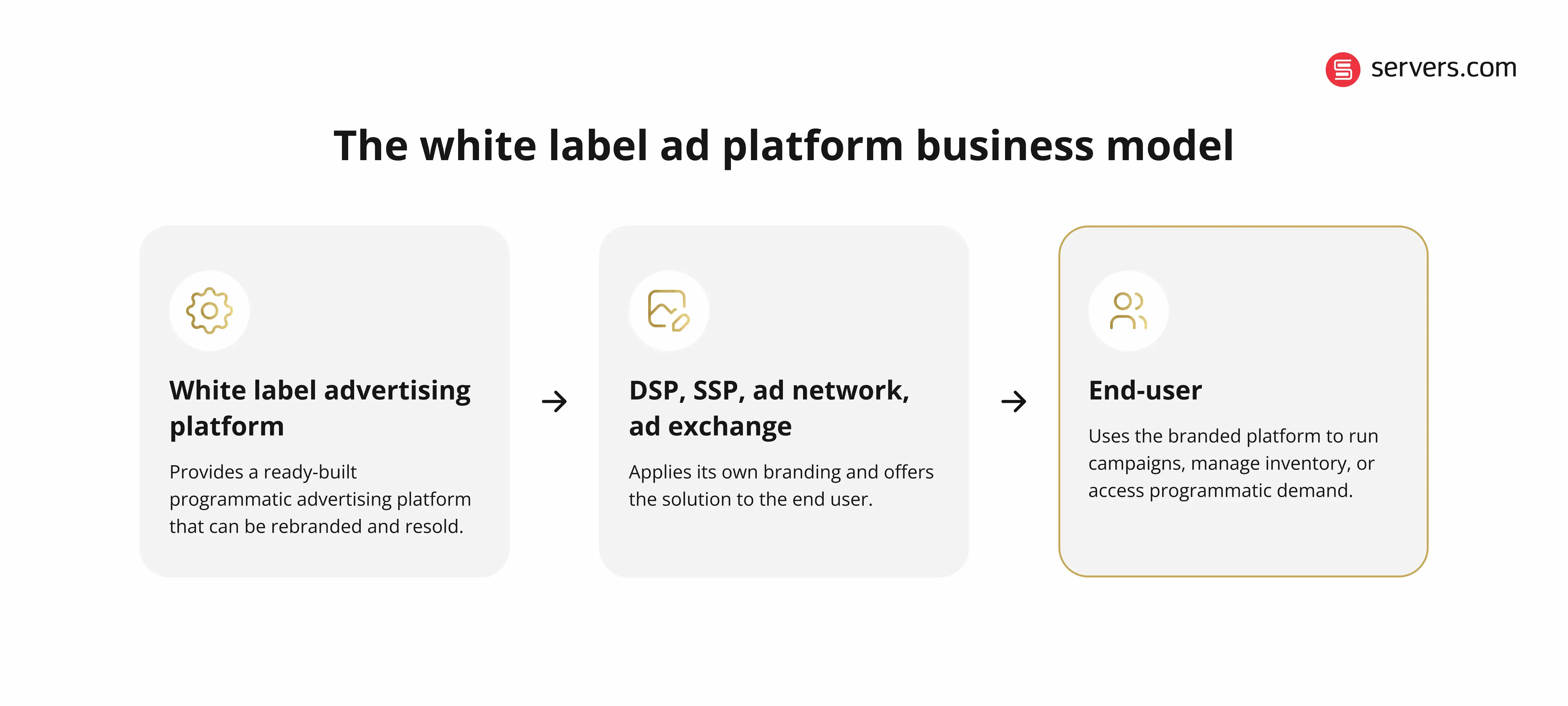
A white label learning platform operates by decoupling the underlying software architecture from the front-end user interface. A third-party software provider hosts, secures, and maintains the core Learning Management System (LMS) code...
A white label learning platform operates by decoupling the underlying software architecture from the front-end user interface. A third-party software provider hosts, secures, and maintains the core Learning Management System (LMS) code, while an organization applies its custom domain, visual branding, user access rules, and integrations to present a seamless proprietary training portal to learners.
Contents
Core Architecture: How Multi-Tenancy and Infrastructure Function
At a technical level, a white label learning platform relies on cloud-based multi-tenant architecture or dedicated virtual instance hosting. The software vendor builds and maintains the core codebase, database schemas, security protocols, and infrastructure scaling. This structure shifts the heavy burden of software maintenance, server management, and regulatory compliance away from your internal engineering team.
- SaaS Vendor Infrastructure
- Server Scaling
- Database Maintenance
- Core Code Updates
- White Label Layer (Your Brand)
- Custom Domain
- CSS & Styling
- SSO/RBAC
- Email Routing
- End Users
- Learners
- Instructors
- Client Administrators
In a multi-tenant architecture, multiple customer accounts (tenants) share the same underlying application infrastructure and database server. However, the vendor enforces logical data isolation. Data fields are tagged with unique organization identifiers, ensuring that tenant data remains entirely segregated and invisible to other accounts on the same system.
In a dedicated tenant architecture (often offered at higher enterprise tiers), the vendor provisions an isolated application instance and database specifically for your organization. This model is commonly preferred by organizations with strict compliance requirements under frameworks like HIPAA, GDPR, or SOC 2 Type II.
Under both hosting models, system updates, server security patches, and infrastructure maintenance occur centrally. When the software vendor rolls out an update, your platform receives the improvement automatically without breaking your custom branding or custom domain mapping.
Branding and Customization Mechanics
The defining feature of a white label LMS is its ability to remove all vendor logos, copyright notices, and system references, replacing them with your corporate identity. This transformation happens across four major layers: web domains, frontend styles, email systems, and native mobile apps.
Custom Domain Mapping (CNAME & SSL)
To make the learning platform appear as a native extension of your existing website, you configure a Domain Name System (DNS) record—typically a Canonical Name (CNAME) record. For example, instead of directing users to yourcompany.vendorlms.com, you point a custom subdomain like academy.yourcompany.com to the vendor's application server.
Once the CNAME record is established, the platform provisions a Secure Sockets Layer (SSL/TLS) certificate—often automated using certificate authorities like Let's Encrypt—ensuring all user traffic remains encrypted over HTTPS under your custom domain.
UI/UX Frontend Customization
The platform allows administrators to control visual layout elements via a central control panel or custom CSS stylesheets. Key components customized at this layer include:
- Visual Assets: High-resolution logos, favicons, login background imagery, and custom certificate templates.
- Color Palettes: Primary, secondary, and accent hex codes mapped to buttons, navigation bars, hover states, and links.
- Typography: Loading custom Google Fonts or Web Safe Fonts to align with corporate brand guidelines.
- Navigation & Footer Links: Adding custom links back to your main site, privacy policy, terms of service, and support channels.
White-Label Email Routing (SMTP, DKIM, and SPF)
A training platform frequently dispatches system notifications, such as password resets, course enrollment confirmations, and completion certificates. To prevent these emails from appearing to come from a third-party vendor, the platform routes transactional mail through your enterprise email domain.
To configure this securely without triggering spam filters, your IT team establishes DKIM (DomainKeys Identified Mail) records and updates your domain's SPF (Sender Policy Framework) record. This grants the learning platform's mail delivery nodes explicit authorization to send authenticated messages on behalf of your domain (notifications@yourcompany.com). Alternatively, many platforms support direct integration via custom SMTP (Simple Mail Transfer Protocol) settings or email APIs such as SendGrid and AWS SES.
Native Mobile Application White-Labeling
For organizations requiring branded iOS and Android applications, top-tier white label vendors offer custom app building workflows. The vendor builds a native wrapper containing the core platform interface, applies your application icon, splash screen, and color scheme, and compiles the binaries.
These mobile applications are then submitted directly to the Apple App Store and Google Play Store under your organization's developer accounts, ensuring complete brand continuity across mobile devices.
User Access, Authentication, and System Integration
A white label platform must integrate cleanly into your existing technical stack. This requires modern standards for single sign-on (SSO), role-based access control (RBAC), and application programming interfaces (APIs).
- Identity Provider (Okta / Azure AD)
- SAML 2.0 / OAuth 2.0 protocol connection to White Label LMS (academy.yourcompany.com)
- Authenticated User Session response
- White Label LMS (academy.yourcompany.com)
- Webhook Triggers / REST API integration with Third-Party Systems
- Third-Party Systems (Salesforce, Stripe, CRM)
Identity and Access Management (SSO)
Rather than requiring users to create separate credentials, white label platforms support enterprise Identity Providers (IdPs) via protocols such as SAML 2.0, OAuth 2.0, and OpenID Connect (OIDC). Systems like Okta, Microsoft Entra ID (formerly Azure AD), and Ping Identity connect directly to the platform.
When a user logs into your enterprise portal, the identity provider sends a signed security assertion to the learning platform, authenticating the user and granting access instantaneously without revealing raw credentials.
Role-Based Access Control (RBAC) and Multi-Tenancy Sub-Accounts
White label platforms utilize fine-grained permission hierarchies to separate user capabilities. Typical default user roles include:
- Super Administrator: Full system access, including billing, API keys, global branding, and security settings.
- Organization Admin (Sub-Tenant Admin): Restricted to managing a specific sub-account or external client portal (ideal for B2B customer training).
- Content Creator / Instructor: Permitted to build courses, manage curriculum, upload media, and view class-level gradebooks.
- Learner: End-user access restricted to consuming assigned learning materials, participating in discussions, and downloading earned credentials.
For organizations selling training to multiple corporate clients (B2B education), modern white label LMS platforms allow the creation of nested sub-portals. Each enterprise client receives their own branded sub-domain with unique admin permissions, ensuring client A cannot view the learner data, rosters, or reports of client B.
API and Webhook Integration
To automate administrative tasks, white label platforms expose RESTful APIs and event-driven webhooks.
- APIs allow your systems to programmatically create users, enroll learners in courses, query completion status, and generate performance reports.
- Webhooks send real-time payload notifications to external systems when specific events take place (e.g., sending a webhook to your CRM when a customer completes a compliance certification).
Common third-party software integrations include:
- CRMs: Salesforce, HubSpot (to sync training completion with customer success metrics).
- Payment Gateways: Stripe, PayPal (to process course purchases via built-in ecommerce features).
- Communication Platforms: Slack, Microsoft Teams (for automated notifications and social learning updates).
Content Ingestion, Delivery, and Learning Standards
A learning platform's main function is delivering educational content reliably and measuring learner progress accurately. White label systems support standardized eLearning packages along with native rich media.
eLearning Standards Compliance
To ensure interoperability with third-party course authoring tools (such as Articulate Storyline, Adobe Captivate, or iSpring), white label platforms support universal industry specs:
- SCORM (1.2 and 2004): The legacy standard for packaging interactive modules, tracking completion status, time spent, and basic quiz scores.
- xAPI (Experience API / Tin Can): A modern tracking specification that records learning actions taking place across multiple environments (mobile apps, offline simulations, real-world tasks) using "Actor-Verb-Object" statements.
- cmi5: The modern successor to SCORM that operates over xAPI rules, offering improved web-native streaming, mobile compatibility, and security.
Media Streaming and Optimization
For native video content, platforms utilize Adaptive Bitrate Streaming via protocols like HLS (HTTP Live Streaming). When an instructor uploads a raw video file, the platform's backend media engine encodes it into multiple resolutions (e.g., 1080p, 720p, 480p). The platform then serves the optimal stream based on the learner's real-time internet connection speed, reducing buffering issues across mobile networks.
Architectural Comparison: White Label LMS vs. Custom vs. Open Source
When evaluating how to deliver branded training, organizations usually weigh white label SaaS platforms against building proprietary software from scratch or modifying open-source systems.
| Feature / Metric | White Label SaaS LMS | Custom-Built LMS | Open-Source LMS (e.g., Moodle) |
|---|---|---|---|
| Time to Deployment | Days to weeks | 6 to 18 months | 1 to 3 months |
| Upfront Capital Expenditure | Low (subscription-based) | High ($100k - $500k+) | Moderate (setup & hosting costs) |
| Ongoing Maintenance Overhead | Managed entirely by vendor | Requires dedicated dev team | Requires internal DevOps/IT staff |
| Brand Masking Capability | High (Complete CNAME/UI control) | Native (100% owned codebase) | High (Requires custom theme coding) |
| Security & Compliance | Handled by vendor (SOC 2, GDPR) | Must be built and audited manually | Must be configured and maintained manually |
| Feature Enhancements | Continuous automatic updates | Requires custom software development | Dependent on plugin ecosystem/updates |
Step-by-Step Implementation Workflow
Deploying a white label learning platform follows a structured sequence to transition from a default vendor instance to a fully integrated corporate training hub.
- Step 1: DNS & Custom Domain Configuration
- Set CNAME records and provision SSL certificates for custom URL.
- Step 2: Visual Identity Setup
- Apply logos, color palettes, web fonts, and custom CSS styling.
- Step 3: Security & Authentication Setup
- Configure SSO (SAML 2.0/OAuth) and set up DKIM/SPF email authentications.
- Step 4: Integrations & Payments
- Connect payment gateways, webhooks, and enterprise CRM software.
- Step 5: Content Ingestion & Beta Testing
- Upload SCORM/xAPI packages, build course tracks, and run end-to-end user tests.
1. DNS and Subdomain Setup
Create a dedicated record within your domain management software (e.g., Cloudflare, Route 53, GoDaddy). Map your chosen subdomain (e.g., learn.yourcompany.com) to the target destination provided by your platform vendor. Verify that automatic SSL generation completes successfully.
2. Visual Identity Configuration
Navigate to the administrator branding console. Upload your high-resolution PNG or SVG logos for light and dark themes, set your primary brand colors using hex codes, and configure custom domain footers. If advanced styling is required, upload custom CSS to override default component styles.
3. Authentication and Domain Email Configuration
Set up identity mapping within your Identity Provider (such as Okta or Azure AD) and exchange SAML metadata XML files with the LMS. Next, update your company's DNS settings by adding the vendor's DKIM keys and SPF server addresses so system emails sent via the LMS originate from your corporate domain name.
4. Integration with Business Systems
Connect external software platforms via native integrations or API keys. If selling courses directly to consumer or business markets, link payment processors like Stripe or PayPal. Set up webhooks to feed enrollment data into your internal analytics database or customer success platform.
5. Content Ingestion and User Acceptance Testing (UAT)
Upload course materials, structure modules, configure assessment pass thresholds, and attach completion certificates. Create test user accounts across various permission tiers (Learner, Instructor, Manager) to verify that single sign-on functions properly, branding displays consistently across screen sizes, and automated emails reach the inbox reliably.
Common Technical Pitfalls and How to Avoid Them
While white label learning platforms eliminate code development, integration misconfigurations can still create friction for users.
1. Email Deliverability Failures (Spam Placement)
- The Issue: Transactional emails like password resets or enrollment notices land in user spam folders or get blocked outright by corporate email gateways.
- The Solution: Do not rely on default vendor mail servers without configuration. Always validate your DNS setup using tools like
digor online SPF/DKIM checkers to ensure your domain explicitly authorizes the platform's IP addresses to send mail on your behalf.
2. Broken SSO Attribute Mapping
- The Issue: Users can authenticate via Single Sign-On, but their first name, last name, or email addresses do not populate correctly in the platform, creating broken profiles.
- The Solution: Verify that your Identity Provider's SAML assertion attributes match the platform's expected field names (e.g., mapping
givenNametofirst_nameandmailtoemail).
3. Unoptimized SCORM/Media Packages
- The Issue: Course modules load slowly or crash on mobile devices, causing learner drop-off.
- The Solution: Ensure SCORM files are published using HTML5 output standards rather than legacy web formats. Compress high-bitrate video assets before uploading, or utilize the platform’s native video transcoding pipeline rather than embedding heavy raw media directly inside zip archives.
Frequently Asked Questions
What is the primary difference between a standard LMS and a white label LMS?
A standard LMS displays the vendor’s brand, web URL, and default interface design to all end users. A white label LMS allows organizations to strip away all vendor branding and replace it with their own domain name, logos, color schemes, custom mobile apps, and transactional email domains, making the platform look like custom software developed in-house.
Can end users tell that a white label platform is built by a third-party vendor?
If configured correctly with custom domain mapping (CNAME), branded emails (DKIM/SPF), custom UI elements, and a dedicated mobile app, end users generally cannot tell that the platform is provided by a third-party vendor. The only time a vendor might be visible is if system-level copyright notices are left unconfigured in custom footers.
How does payment processing work on a white label platform?
White label platforms typically integrate directly with payment gateways such as Stripe, PayPal, or Authorize.net. When a user purchases a course, the transaction processes through your organization's merchant account. The platform vendor usually takes no transaction fees (depending on your software tier), and funds deposit directly into your business bank account.
Do white label platforms support enterprise client management (B2B training)?
Yes. Most enterprise-grade white label systems feature sub-licensing or multi-tenant management capabilities. This allows you to create isolated sub-accounts for different enterprise clients, giving each client their own branded portal, custom domain, and isolated user reporting while you maintain master administrative control over the entire system.
What technical resources are needed to launch a white label LMS?
Building the software requires no developer team. However, launching the platform successfully requires basic technical administration skills: access to your domain's DNS manager (to configure CNAME, SPF, and DKIM records), an administrator with access to your Identity Provider (if configuring SSO), and a web designer or administrator to upload visual assets and manage platform settings.
Strategic Recommendations for Selecting a Platform
When choosing a white label learning platform, evaluate prospective software vendors on technical flexibility rather than surface-level feature lists alone:
- Audit the API and Webhook Documentation: Ensure the vendor provides open REST APIs and configurable webhooks so your team can automate data transfers to CRMs, analytics engines, or custom software as your platform scales.
- Verify Multi-Tenant Sub-Portal Capabilities: If you plan to sell training courses to corporate clients, confirm that the platform allows nested sub-accounts with independent branding and isolated database environments.
- Test Sandbox Environments: Request a trial instance to verify how easily custom CSS, custom domains, and SSO connections can be configured before signing a long-term contract.
By selecting an architecture that meets your current integration requirements while leaving room for scaling, you can deliver a native, fully branded learning environment without incurring the costs and ongoing maintenance of custom software development.
Image Gallery