How Cloud Backup Systems Protect Data: A Comprehensive Technical Guide
Cloud backup systems protect data through a multi-layered security architecture that combines end-to-end encryption, geographic redundancy, and immutable storage protocols. These systems ensure data integrity by isolating copies from t...
Cloud backup systems protect data through a multi-layered security architecture that combines end-to-end encryption, geographic redundancy, and immutable storage protocols. These systems ensure data integrity by isolating copies from the primary network, utilizing automated versioning to revert from ransomware attacks, and maintaining strict identity controls to prevent unauthorized access during transit and at rest.
Contents
In 2026, the reliance on digital infrastructure has made data the most valuable asset for both individuals and enterprises. As cyber threats evolve from simple malware to sophisticated, AI-driven exfiltration tactics, the mechanism of cloud backup has shifted from a "simple copy" to a complex ecosystem of defensive technologies. Understanding how these systems safeguard information requires looking beyond the surface-level interface to the underlying protocols that manage encryption, storage, and recovery.
Encryption: The Foundation of Confidentiality
Encryption is the most critical component of cloud backup security. It serves as a mathematical lock that renders data unreadable to anyone without the specific decryption key. In a modern cloud environment, encryption is applied at three distinct stages: in-transit, at-rest, and during the processing phase.
In-Transit Encryption protects data as it travels from your local device or server to the cloud provider’s data center. Most providers utilize Transport Layer Security (TLS) 1.3, which creates a secure tunnel for data packets. This prevents "man-in-the-middle" attacks where hackers attempt to intercept data as it moves across the public internet. By the time the data leaves your network boundary, it is already encapsulated in a layer of cryptographic security.
At-Rest Encryption occurs once the data is stored on the provider's disks. The industry standard is AES-256 (Advanced Encryption Standard), which uses a 256-bit key to scramble the data. AES-256 is currently considered "quantum-resistant" for the foreseeable future, meaning even with massive computing power, it would take billions of years to crack.
A significant advancement in 2026 is the widespread adoption of Zero-Knowledge Encryption. In this model, the service provider does not hold the decryption keys; only the user does. If a government entity subpoenas the provider or if the provider’s internal systems are compromised, the data remains encrypted and inaccessible because the provider literally lacks the technical means to unlock it. This "private key" management ensures that the user retains absolute sovereignty over their information.
Ensuring Data Durability through Redundancy and Erasure Coding
Physical hardware is fallible. Hard drives fail, servers overheat, and data centers can be affected by natural disasters. Cloud backup systems protect against these physical risks through sophisticated redundancy strategies that go far beyond simple mirroring.
Most enterprise-grade cloud providers, such as Amazon Web Services (AWS) and Microsoft Azure, utilize a technique called Erasure Coding. Unlike traditional RAID (Redundant Array of Independent Disks) which might just mirror a drive, erasure coding breaks data into fragments, expands and encodes it with redundant data pieces, and stores it across a distributed set of different locations or storage nodes. If several nodes fail simultaneously, the system can still reconstruct the original data from the remaining fragments.
Furthermore, Geo-Replication ensures that your backup isn't stored in just one building. Data is typically replicated across multiple "Availability Zones"—physically separated data centers within a single region—and often across "Cross-Region" boundaries. This means that even if an entire metropolitan area suffers a power grid failure or a natural disaster, a complete and functional copy of your data exists hundreds or thousands of miles away, ready for immediate recovery.
Defeating Ransomware with Immutability and Versioning
Ransomware has become the primary threat to data integrity. Modern attackers do not just encrypt your live production data; they actively seek out and delete your backups to ensure you have no choice but to pay the ransom. Cloud backup systems have evolved to counter this through Data Immutability.
Immutable storage, often referred to as WORM (Write Once, Read Many) technology, allows users to set a "retention lock" on their backup files. Once a backup is written to an immutable bucket, it cannot be modified, overwritten, or deleted by anyone—not even an administrator with full credentials—until the lock period expires. This creates a "gold copy" of the data that is immune to ransomware encryption.
Complementing immutability is Automated Versioning. Instead of simply overwriting the previous backup with new data, the system saves every change as a new version. If a system is infected by ransomware at 10:00 AM, the administrator can simply roll back the entire environment to the 9:55 AM version. This granular recovery capability minimizes "Data Loss Units" and ensures that businesses can resume operations with minimal downtime.
Identity and Access Management (IAM)
The strongest encryption is useless if an attacker gains access to the administrator’s login credentials. Therefore, cloud backup systems rely heavily on robust Identity and Access Management (IAM) protocols.
In 2026, Multi-Factor Authentication (MFA) is a non-negotiable requirement for accessing backup consoles. This usually involves hardware security keys (like YubiKeys) or biometric verification, moving away from vulnerable SMS-based codes.
Furthermore, the Principle of Least Privilege (PoLP) is strictly enforced. Backup systems use Role-Based Access Control (RBAC) to ensure that a user who only needs to monitor backup success cannot actually delete or modify the backup sets. Advanced systems also implement "Just-In-Time" (JIT) access, where administrative privileges are granted only for a specific window of time and for a specific task, after which they are automatically revoked.
Comparison of Cloud Backup Security Features
To better understand how different technologies contribute to overall protection, the following table breaks down the primary mechanisms used by top-tier cloud providers in 2026.
| Security Layer | Technology Used | Primary Threat Protected Against | Impact on Performance |
|---|---|---|---|
| Confidentiality | AES-256 & TLS 1.3 | Eavesdropping, Data Theft | Minimal (Hardware accelerated) |
| Availability | Geo-Replication | Hardware Failure, Natural Disaster | High (Depends on bandwidth) |
| Integrity | Hashing & Checksums | Silent Data Corruption (Bit Rot) | Automated/Background |
| Resilience | Immutable Snapshots | Ransomware, Malicious Deletion | Moderate (Storage overhead) |
| Access Control | RBAC & MFA | Credential Stuffing, Insider Threats | Administrative only |
Compliance and Physical Infrastructure Security
Beyond the software and cryptographic layers, cloud backup systems are protected by the physical security of the data centers themselves. Leading providers adhere to strict international standards such as ISO/IEC 27001, SOC 2 Type II, and HIPAA for healthcare data.
Physical data centers are monitored 24/7 by security personnel and utilize multi-layered biometric access controls (thumbprints, iris scans). Within the facility, individual server racks are often caged and alarmed. Furthermore, the infrastructure is designed with "N+1" or "2N" redundancy for power and cooling, ensuring that the servers storing your backups never shut down due to external utility failures.
For organizations operating in the European Union or handling EU citizen data, cloud backups must also comply with the General Data Protection Regulation (GDPR). This includes the "Right to be Forgotten," which creates a technical challenge for backups. Modern systems solve this through "logical deletion" or by ensuring that backup rotation policies eventually purge the data in accordance with legal requirements.
Common Challenges and Troubleshooting
While cloud backup systems are highly secure, they are not "set and forget." Several factors can compromise their effectiveness:
- Bandwidth Bottlenecks: If the internet connection is too slow, the "backup window" might close before all data is uploaded, leaving the most recent changes unprotected.
- Misconfiguration: The most common cause of cloud data breaches is not a failure of the provider, but a user leaving a storage bucket "publicly readable" by mistake.
- Key Management: If an organization loses its private encryption keys in a zero-knowledge setup, the data is permanently unrecoverable. There is no "forgot password" button for a master encryption key.
To mitigate these, organizations should perform Automated Recovery Testing. It is not enough to know that the backup finished; you must verify that the data can be restored. In 2026, many systems include "Sandboxed Recovery," where the backup is automatically restored to a private, isolated virtual network once a week to verify its integrity without interrupting production.
FAQs
What is the difference between cloud storage and cloud backup?
Cloud storage (like Google Drive or Dropbox) is designed for syncing and collaborating on active files, where deletions often sync immediately across all devices. Cloud backup is a specialized service designed for disaster recovery, keeping multiple historical versions of files and providing tools to restore an entire system state after a total loss.
Can cloud backups be infected by viruses?
Yes, if a file is infected on your local machine and then backed up, the backup will contain the infected file. However, because cloud backups use versioning, you can look back in time to find the "clean" version of the file from before the infection occurred. Many modern providers also scan backups for known malware signatures during the upload process.
Is my data safe if the cloud provider goes out of business?
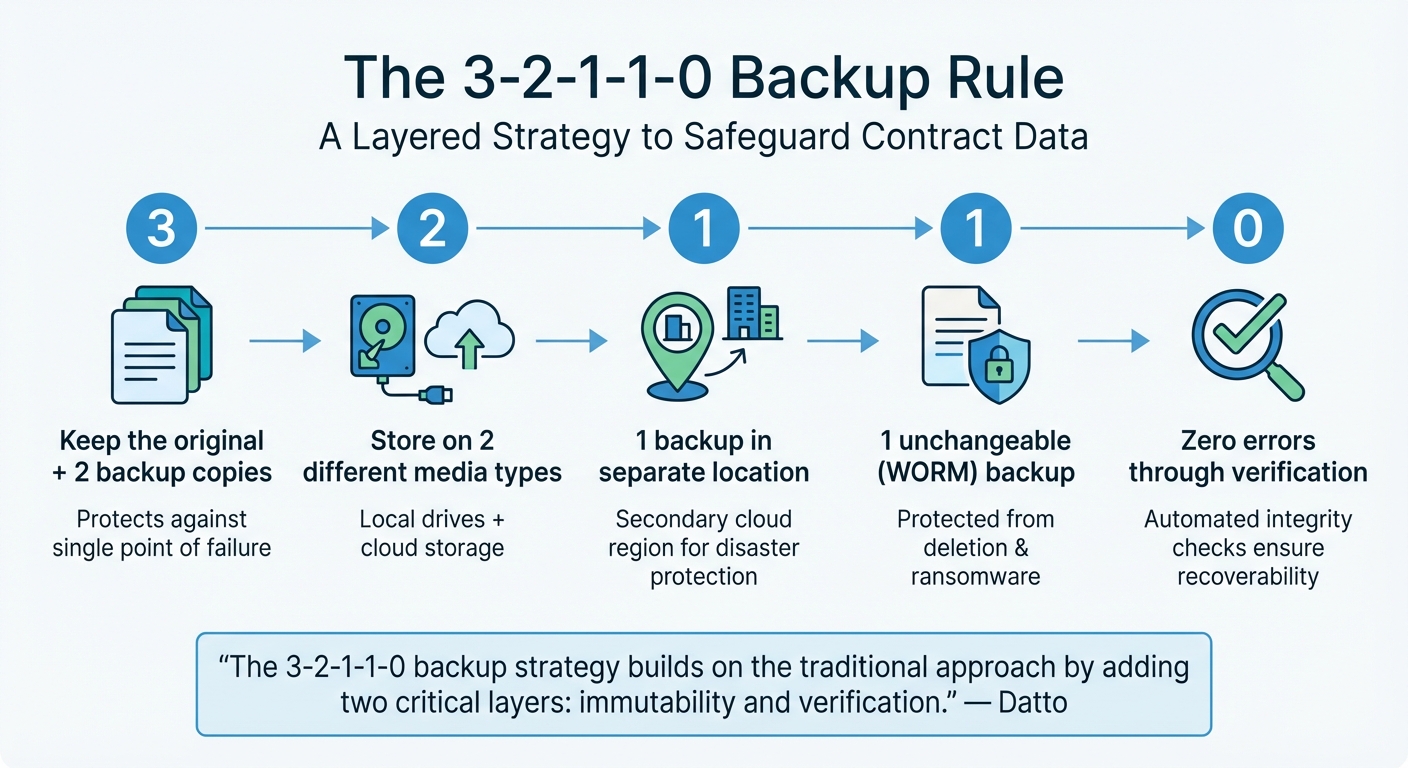
Most major providers have "Data Portability" agreements and are built on standardized formats. However, it is a best practice to follow the 3-2-1 Backup Rule: Keep 3 copies of your data, on 2 different media types, with 1 copy off-site (the cloud). For critical data, some organizations use "Cloud-to-Cloud" backup to copy data from one provider (e.g., Azure) to another (e.g., AWS) as a fail-safe.
How often should I back up to the cloud?
The frequency depends on your Recovery Point Objective (RPO). For a personal user, once a day is usually sufficient. For a business, "Continuous Data Protection" (CDP) is standard, where changes are backed up almost instantly as they occur.
Does cloud backup meet legal compliance for medical or financial data?
Yes, provided you choose a service that signs a Business Associate Agreement (BAA) for HIPAA or meets the specific SOC 2 requirements for financial services. You must also ensure that the data center region matches your jurisdictional requirements (e.g., keeping UK data within the UK).
Practical Recommendation: Implementing a Secure Cloud Strategy
To maximize the protection offered by cloud backup systems, users should prioritize services that offer Zero-Knowledge Encryption and Immutable Storage as standard features. In 2026, the baseline for safety is no longer just "having a copy," but having a copy that is mathematically unreachable by unauthorized parties and physically unchangeable by ransomware.
Start by auditing your most critical data and classifying it by its RPO (how much data you can afford to lose) and RTO (how fast you need it back). Enable MFA on your backup account immediately and conduct a test restoration of at least one major database or folder every quarter. By treating cloud backup as an active part of your security posture rather than a passive insurance policy, you ensure that your data remains resilient against the evolving threats of the digital landscape.
Image Gallery