Does PNC Bank Offer Zelle for Transfers?
Yes, PNC Bank offers Zelle as an integrated service within its digital banking platform, allowing customers to send and receive money directly from their accounts. Zelle is available to PNC personal banking customers through the PNC mo...
Yes, PNC Bank offers Zelle as an integrated service within its digital banking platform, allowing customers to send and receive money directly from their accounts. Zelle is available to PNC personal banking customers through the PNC mobile app and the bank's online banking website, facilitating near real-time transfers between eligible bank accounts in the United States.
Contents
Understanding Zelle Integration at PNC Bank
Zelle is a peer-to-peer (P2P) payment network that allows users to send money to friends, family, and trusted individuals using only an email address or a U.S. mobile phone number. PNC Bank has integrated this service directly into its existing infrastructure, meaning customers do not need to download a separate third-party application or create a new account to use the platform.
Because the service is embedded in the PNC mobile app and online banking portal, the security measures applied to your standard PNC banking sessions extend to your Zelle transactions. This includes multi-factor authentication, account encryption, and the fraud monitoring systems that PNC utilizes to protect client assets. When you use Zelle through PNC, the funds move directly between bank accounts, which generally minimizes the delay often associated with traditional electronic transfers or third-party digital wallets.
Prerequisites for Using Zelle with PNC
To utilize Zelle through your PNC account, you must meet a specific set of eligibility requirements. Primarily, you must be a PNC personal banking customer with an active checking or money market account. Business accounts may have different eligibility criteria or integration paths, so it is essential to verify your specific account type within your online dashboard.
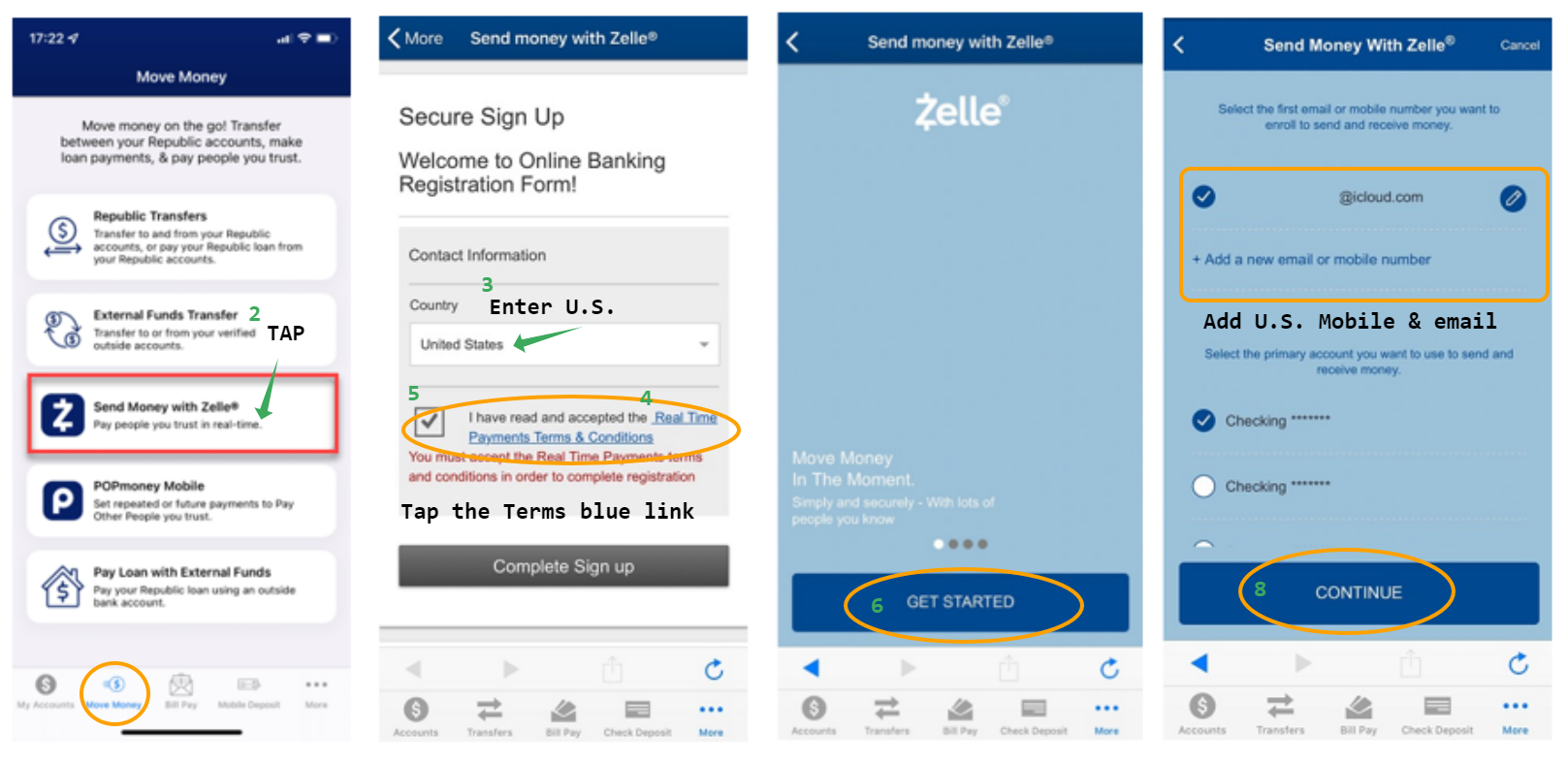
Before your first transfer, you must complete the enrollment process:
- Digital Banking Enrollment: Ensure you are registered for PNC Online Banking or the PNC Mobile app.
- Contact Information: You must link a valid U.S. mobile number or an email address to your PNC account. This information acts as your "Zelle token" or identifier.
- Device Requirements: Your mobile device must be running a current version of the PNC Mobile app, which is compatible with major mobile operating systems.
- Account Verification: If you have multiple accounts, you must select which specific account will be the default for receiving funds sent to your registered email or phone number.
How to Initiate a Transfer via PNC
Once you have completed the enrollment, sending money is a streamlined process. Within the PNC mobile app, you will navigate to the "Transfer & Pay" section and select the Zelle icon.
To send money, follow these steps:
- Select a Recipient: Enter the recipient’s name and their U.S. mobile number or email address. If they are already in your phone’s contact list and you have granted the app permission, you can select them directly.
- Specify the Amount: Input the dollar amount you wish to send. The app will typically display your available balance to ensure you have sufficient funds to cover the transaction.
- Review and Confirm: Carefully review the recipient’s information. Because Zelle transfers are often processed almost instantly, they cannot be canceled once the recipient has been successfully enrolled in the network.
- Send: Authorize the transfer. The recipient will receive a notification via email or text message informing them that the funds are available.
Receiving Money Through Zelle
Receiving funds is equally straightforward. If someone sends money to the email address or phone number you linked to your PNC account, the money is typically deposited directly into your designated account. You do not need to take any action to "accept" the funds if you have already set up your profile. However, if you are new to Zelle and someone sends money to an email or phone number not yet linked, you will receive a notification prompting you to enroll in Zelle through your bank to claim the funds.
Comparison of Transfer Methods
It is helpful to understand how Zelle compares to other common transfer methods offered by PNC Bank. While Zelle is optimized for speed and simplicity, other methods may be more appropriate for different types of transactions.
| Transfer Method | Typical Speed | Best Used For |
|---|---|---|
| Zelle | Near real-time | Splitting bills, sending money to family/friends |
| PNC Online Bill Pay | 1–3 business days | Paying recurring bills or service providers |
| External Bank Transfer | 1–3 business days | Moving money between your own accounts at different banks |
| Wire Transfer | Same day | Large, time-sensitive payments (higher fees usually apply) |
Important Security Considerations
While Zelle is a secure service, users must exercise caution when sending money. The most critical rule of using Zelle is to treat these transactions like cash. Because funds are sent directly to the recipient’s bank account, PNC Bank may have limited recourse if you send money to an unintended recipient or fall victim to a scam.
- Verify Recipients: Only send money to people you know and trust.
- Check Information: Double-check the recipient's mobile number or email address before hitting send. A single digit or character error could result in the money being sent to the wrong person.
- Beware of Scams: Be wary of requests for payment from individuals claiming to be from official organizations, utility companies, or even your bank. Legitimate businesses rarely use P2P services to collect payments for services or unexpected fees.
- Reporting Fraud: If you suspect your account has been compromised or you have been the target of a fraudulent Zelle transaction, contact PNC Bank customer service immediately.
Troubleshooting Common Issues
If you encounter difficulties using the service, start by verifying your internet connection and ensuring your PNC app is updated to the latest version available in the App Store or Google Play.
- Recipient Not Receiving Funds: Confirm that the recipient has enrolled their email or phone number with their own bank. If they haven't enrolled, they will receive a notification to do so before the funds can reach their account.
- Transaction Limits: PNC imposes daily and monthly limits on Zelle transfers for security reasons. If your transaction is rejected, it may be because you have exceeded these limits. These limits are not always static and may change based on your account history and tenure with the bank.
- Verification Codes: If you are not receiving the one-time passcode (OTP) required to authorize a new recipient, check your cellular signal and ensure your phone is not blocking automated SMS messages.
Frequently Asked Questions
Can I use Zelle to pay businesses for goods and services? Zelle is primarily designed for personal, peer-to-peer transactions. While some businesses do accept Zelle, it is generally recommended to use other payment methods for commercial purchases, as you may lose certain consumer protection benefits afforded by credit or debit card transactions.
Are there fees for using Zelle through PNC? PNC Bank typically does not charge a fee for standard Zelle transfers. However, you should review your specific account disclosures, as fee structures can be updated periodically.
What happens if I send money to the wrong person? If you send money to the wrong person, contact PNC Bank immediately. However, be aware that because Zelle transfers are processed quickly, the bank may not be able to stop or reverse the payment once it has been completed.
Is my Zelle transfer covered by the same protections as my debit card? Zelle transactions are handled differently than debit card purchases. While PNC provides security for your account, you should always treat P2P transfers as immediate cash payments. Ensure you are sending money to someone you know and trust.
How do I update my Zelle contact information? You can update or change the phone number or email address linked to your Zelle profile by accessing the Zelle settings menu within the PNC mobile app or the online banking dashboard.
Next Steps for Users
If you are a current PNC customer and have not yet activated Zelle, the best way to get started is by logging into your account via the PNC mobile app. Navigate to the "Transfer & Pay" tab to see if the Zelle setup wizard is available. Once your contact information is verified, you can begin sending and receiving funds. If you do not have the app, consider downloading it from an official app store to ensure you are using the most secure and up-to-date version of the service. Always keep your banking credentials private and enable alerts for transaction activity to stay informed about your account status.
Image Gallery