Understanding Hootsuite Pro for Social Media Teams in 2026
Hootsuite Professional and Team plans (formerly known as Hootsuite Pro) provide a centralized command center for social media teams to schedule content, manage multi-channel engagement, and generate data-driven reports. In 2026, these...
Hootsuite Professional and Team plans (formerly known as Hootsuite Pro) provide a centralized command center for social media teams to schedule content, manage multi-channel engagement, and generate data-driven reports. In 2026, these tiers prioritize AI-assisted content creation and unified inbox management to streamline complex digital marketing workflows for growing organizations.
Contents
The Evolution of Hootsuite Pro in the Modern Ecosystem
The term "Hootsuite Pro" was historically used to describe the first-tier paid subscription for individual professionals and small teams. As of 2026, the platform has refined its naming convention to better reflect the specific needs of its users. The current "Professional" plan is designed for a single power user, while the "Team" plan is the functional entry point for collaborative groups.
For a social media team, the "Team" tier is the minimum requirement. It allows for multiple user seats and the delegation of tasks, which the base Professional plan lacks. Understanding these distinctions is critical for resource allocation and ensuring that your marketing department has the necessary permissions to execute a cohesive strategy across platforms like X (formerly Twitter), Instagram, LinkedIn, TikTok, and Facebook.
The 2026 iteration of these plans integrates advanced automation features that were once reserved for enterprise clients. This includes sophisticated "Best Time to Publish" algorithms and automated sentiment analysis within the inbox. For teams, this means less time spent on manual data entry and more time focused on high-level creative strategy and community building.
Core Features for Collaborative Social Management
A team-oriented Hootsuite environment relies on four primary pillars: centralized scheduling, the unified inbox, advanced analytics, and permission-based workflows.
Centralized Scheduling and the Bulk Composer
Social media teams often manage dozens of posts per week. The Hootsuite Composer allows teams to draft, preview, and schedule content across all connected networks from a single window. In 2026, the integration of OwlyWriter AI has become a standard feature, helping teams generate captions, brainstorm post ideas, and repurpose high-performing long-form content into bite-sized social updates.
The Bulk Composer remains a powerhouse tool for teams. It allows users to upload a CSV file containing up to 350 scheduled posts at once. For a social media team, this facilitates "batching"—a productivity technique where a month's worth of content is prepared in a single session, leaving the rest of the month free for real-time engagement and reactive marketing.
The Unified Inbox and Team Collaboration
One of the greatest challenges for social media teams is "double-responding" or missing a customer inquiry entirely. The Hootsuite Inbox consolidates private messages, comments, and mentions from all platforms into one stream.
Within the Team plan, managers can assign specific messages to team members. For example, a technical product question can be assigned to a subject matter expert, while a billing inquiry can be sent to the customer success lead. This assignment system includes a clear audit trail, showing who responded to what and when, which is essential for maintaining brand voice and accountability.
Advanced Analytics and Reporting
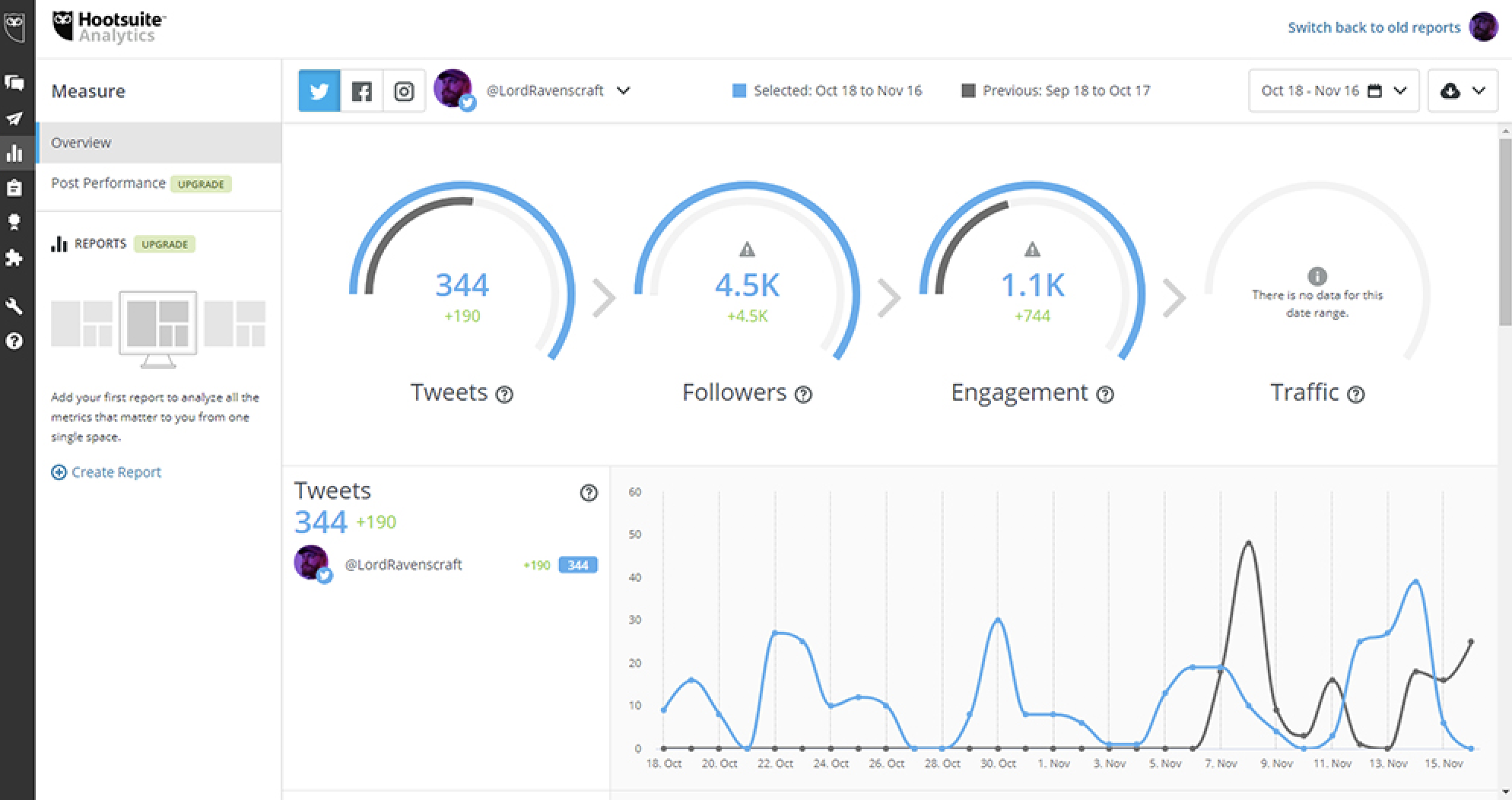
By 2026, data literacy is a non-negotiable skill for social media teams. Hootsuite’s analytics engine in the professional tiers provides more than just "likes" and "shares." It tracks competitive benchmarks, audience demographics, and conversion metrics.
Teams can create customized dashboards that update in real-time. These reports are easily exported as PDFs or PowerPoints for stakeholder meetings. For professional teams, the ability to demonstrate Return on Investment (ROI) through granular data—such as how many LinkedIn clicks led to a whitepaper download—is the primary value proposition of the software.
Comparing Hootsuite Tiers for Teams
Choosing the right plan depends on the size of your staff and the number of social profiles you need to manage. Below is a comparison of the tiers most relevant to professional teams in 2026.
| Feature | Professional Plan | Team Plan | Business Plan |
|---|---|---|---|
| User Seats | 1 User | 3 Users | 5+ Users |
| Social Profiles | 10 Profiles | 20 Profiles | 35+ Profiles |
| Post Scheduling | Unlimited | Unlimited | Unlimited |
| AI Content Tools | Basic Access | Full Access | Enterprise Access |
| Team Assignments | Not Available | Included | Advanced Workflows |
| Certifications | None | 1 Included | Multiple Included |
| Support | Standard | Priority | 24/7 Priority |
Implementing a Professional Workflow
To maximize the value of Hootsuite for a team, you must move beyond basic post-scheduling and implement a structured workflow. This process ensures that no content is published without oversight and that brand standards are strictly maintained.
Step 1: Setting Permissions and Roles
The first action a team lead must take is defining roles. Hootsuite allows for "Administrator," "Editor," and "Responder" roles. Administrators have full control over account settings and billing, while Editors can create and schedule content but may require approval before a post goes live. This hierarchy prevents accidental posts and ensures that junior staff members can contribute without risking the brand's reputation.
Step 2: Content Approval Chains
One of the most valuable aspects of the Hootsuite Team plan is the Approval Workflow. When a team member creates a post, they can submit it for approval. The designated manager receives a notification, reviews the content (including the visual assets and links), and either approves it for scheduling or sends it back with comments for revision. This internal check-and-balance system is vital for regulated industries like finance or healthcare.
Step 3: Integrating External Assets
Teams rarely work exclusively within Hootsuite. By 2026, the platform’s integration with cloud storage and creative tools is seamless. Teams can pull assets directly from Canva, Adobe Creative Cloud, Google Drive, or Dropbox into the Hootsuite Media Library. This eliminates the need to download and re-upload large video files, significantly speeding up the production cycle.
Security and Compliance for Teams
As social media accounts remain high-value targets for cyberattacks, the security features in Hootsuite’s professional tiers are a primary reason teams adopt the platform. Instead of sharing a single password for a corporate Instagram account among five people—a major security risk—team members log in with their individual Hootsuite credentials.
Hootsuite provides Single Sign-On (SSO) and multi-factor authentication (MFA) to ensure that only authorized personnel can access the dashboard. Furthermore, if a team member leaves the company, an administrator can revoke their access to all social media profiles with a single click, rather than having to change the passwords for ten different social networks.
For teams in highly regulated sectors, Hootsuite also integrates with compliance tools like Proofpoint or Smarsh. These integrations automatically scan outgoing posts for restricted language or sensitive data, providing an automated layer of legal protection.
Common Mistakes and Troubleshooting
Even with a powerful tool like Hootsuite, social media teams often encounter hurdles. Being aware of these can prevent operational downtime.
- Token Expiration: Social media platforms (Meta, LinkedIn, etc.) require users to re-authorize their accounts periodically for security reasons. If a "token" expires, scheduled posts will fail. Teams should designate one person to check the "Account Settings" weekly to ensure all profiles are successfully connected.
- Over-reliance on AI: While OwlyWriter AI is a significant asset in 2026, teams often make the mistake of publishing AI-generated content without a human review. This can lead to a "robotic" brand voice. The best teams use AI for drafting and brainstorming but insist on human editing for final approval.
- Ignoring Engagement Data: It is common for teams to focus entirely on the "Publishing" tab and ignore the "Analytics" tab. Without reviewing which posts are actually driving engagement, teams risk wasting resources on content formats that do not resonate with their audience.
Frequently Asked Questions
Can I upgrade from Professional to Team at any time?
Yes, Hootsuite allows for immediate upgrades. If your team grows from a single person to three, you can transition to the Team plan within the billing dashboard. The cost is usually prorated based on the remainder of your billing cycle. This flexibility is vital for startups and agencies that scale rapidly.
How does Hootsuite handle TikTok and Reels in 2026?
Hootsuite fully supports direct publishing for TikTok and Instagram Reels. For social media teams, this includes the ability to choose trending audio and preview how the video will appear in the mobile feed. The Team plan also offers specific analytics for short-form video, such as "Watch Time" and "Retention Rate," which are essential for optimizing video strategy.
Is there a limit to the number of posts I can schedule?
The Professional and Team plans both offer unlimited scheduling. This means there is no cap on how far in advance you can plan your content calendar. However, the Bulk Composer limits you to 350 posts per individual upload to ensure system stability and API compliance with the social networks.
Does Hootsuite offer training for my team?
Hootsuite provides extensive educational resources through Hootsuite Academy. The Team plan often includes a specific number of certifications for team members. These courses cover everything from basic platform navigation to advanced social media strategy and social selling, ensuring all staff members are operating at a high level of competency.
What happens if a social network goes down?
If a platform like Facebook or LinkedIn experiences an outage, Hootsuite will display a notification in the dashboard. Any posts scheduled during the outage will typically fail. However, Hootsuite provides a "Failed Posts" log, allowing your team to easily reschedule the content once the social network’s API is back online.
Final Recommendation for Social Teams
To successfully implement Hootsuite Pro or Team, your first action should be to audit your current social footprint. Identify every profile your organization owns and determine who needs access to them. Once you have a clear map of your assets and personnel, start by setting up your "Organization" and "Teams" within the Hootsuite dashboard.
Focus first on mastering the Unified Inbox to ensure your customer response time is optimized, then move into the Content Approval system. By 2026, the competitive advantage in social media belongs to teams that can react quickly while maintaining a high standard of quality—and Hootsuite’s professional tiers provide the infrastructure to do exactly that.
Image Gallery