Comprehensive Guide to Web-Based Project Management in 2026
Web-based project management refers to the use of cloud-hosted software applications to plan, execute, and monitor projects through a web browser. These platforms centralize task tracking, document sharing, and team communication into...
Web-based project management refers to the use of cloud-hosted software applications to plan, execute, and monitor projects through a web browser. These platforms centralize task tracking, document sharing, and team communication into a single digital environment, enabling real-time collaboration regardless of geographic location or local hardware constraints.
Contents
The Evolution of Web-Based Project Management Systems
By 2026, the landscape of project management has shifted entirely from isolated desktop applications to deeply integrated web-based ecosystems. In the past, project managers relied on local installations that created "data silos," where information was only as current as the last manual update or file share. Today, web-based project management operates on a Software-as-a-Service (SaaS) model, providing a "single source of truth" that updates instantaneously for every stakeholder.
The transition to web-based systems was accelerated by the global shift toward hybrid and remote work. Organizations now require tools that do not just track tasks but also facilitate human connection and synchronized workflows. Modern platforms have moved beyond simple checklists; they now incorporate advanced data visualization, predictive analytics, and automated reporting. This evolution ensures that a project manager in London can see the exact status of a task being completed by a developer in Tokyo the moment it happens, with no latency in communication.
Core Functionalities of Modern Web-Based Platforms
To understand why web-based project management is the standard in 2026, one must examine the core functionalities that distinguish these tools from their predecessors.
Task Management and Visualization
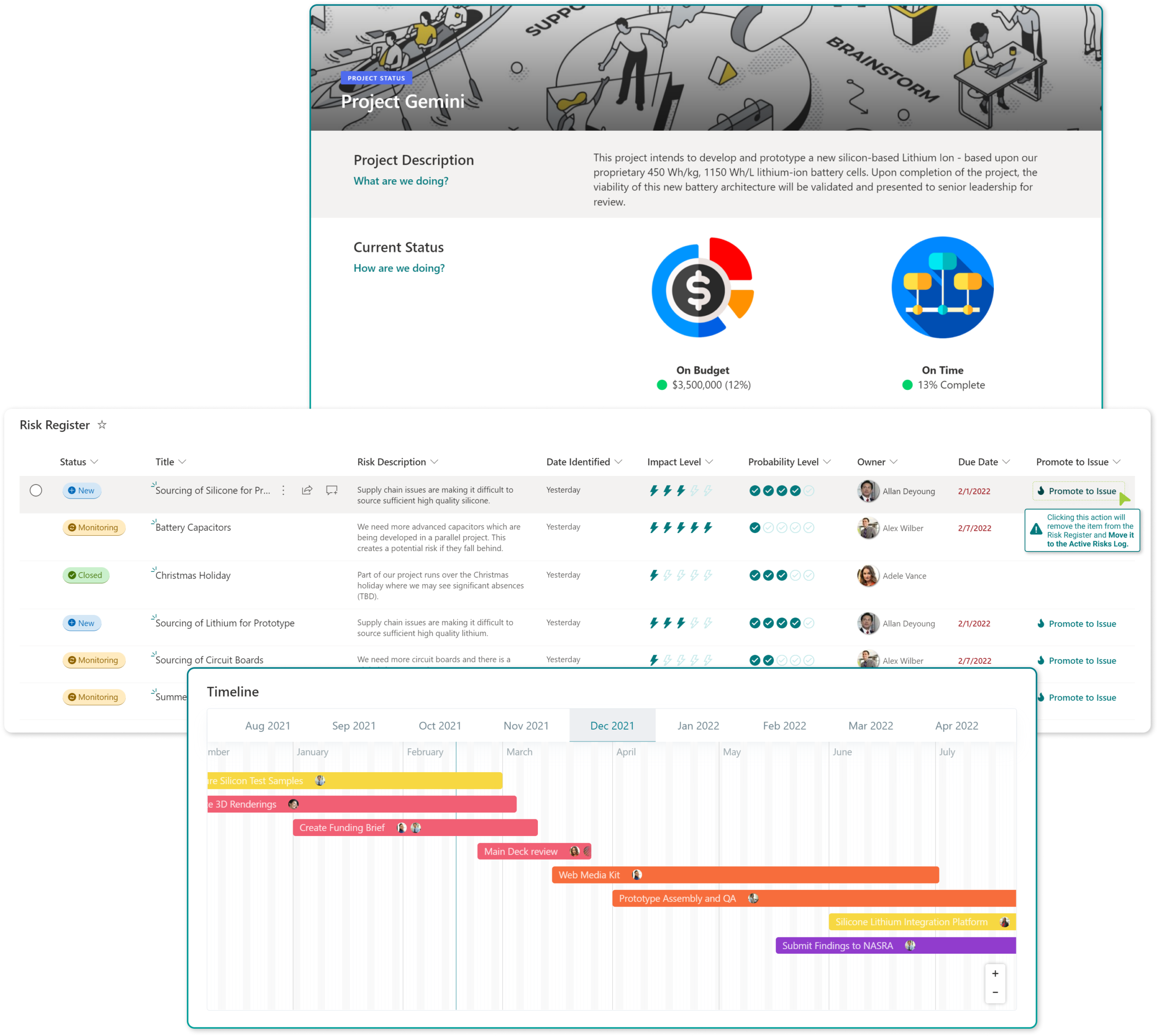
The heart of any project management tool is the ability to break down complex goals into manageable tasks. Web-based systems offer various views to suit different methodologies:
- Kanban Boards: Ideal for continuous flow and Agile methodologies, allowing teams to visualize work-in-progress and identify bottlenecks.
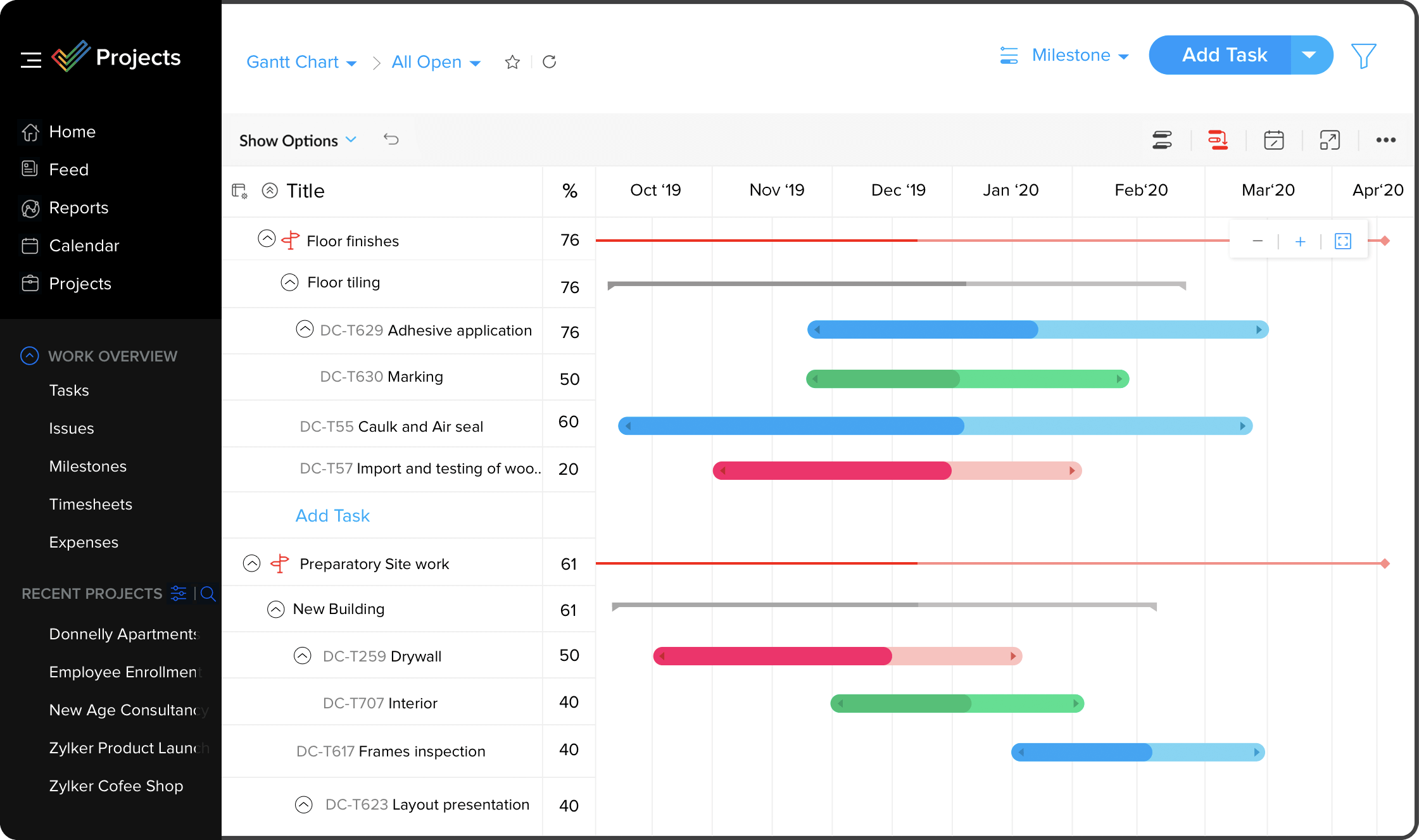
- Gantt Charts: Essential for waterfall projects, providing a timeline view of dependencies and milestones.
- Scrum Boards: Specifically designed for sprint-based work, helping teams manage backlogs and velocity.
- Table and List Views: Best for high-density data entry and sorting across hundreds of variables.
Resource Allocation and Capacity Planning
Managing "who does what" is often more difficult than tracking "what needs to be done." Web-based tools in 2026 include sophisticated resource management modules. These features allow managers to see the workload of every team member across multiple projects. If an employee is over-allocated, the system provides visual cues (such as heat maps) to suggest redistribution, thereby preventing burnout and ensuring realistic deadlines.
Real-Time Collaboration and Document Management
Unlike traditional software, web-based platforms allow multiple users to edit the same project plan simultaneously. Furthermore, these systems act as centralized repositories for project documentation. Rather than hunting through email threads for the latest version of a design brief, team members can find files attached directly to the relevant task. Integration with cloud storage providers like Google Drive, OneDrive, and Dropbox is now a standard expectation for any enterprise-grade web-based tool.
Key Benefits: Why Teams Move to the Cloud
The shift toward web-based project management is driven by several tangible business advantages that on-premise solutions cannot match.
- Lower Barrier to Entry (OpEx vs. CapEx): Traditional software required significant upfront investment in licenses and server hardware (Capital Expenditure). Web-based tools typically use a monthly or annual subscription model (Operating Expenditure), allowing businesses to scale their costs based on their actual headcount.
- Universal Accessibility: As long as there is an internet connection and a modern browser, the team can work. This eliminates the need for complex VPNs or remote desktop setups, which often hinder productivity.
- Automatic Updates and Security Patches: In the SaaS model, the software provider handles all maintenance. Users always have access to the latest features and the most robust security protocols without needing to involve their internal IT department for manual updates.
- Cross-Platform Compatibility: Web-based tools are inherently agnostic to operating systems. A designer on macOS, a developer on Linux, and a manager on Windows can all use the same interface without compatibility issues.
Strategic Comparison: Web-Based vs. On-Premise Solutions
Deciding between a cloud-hosted web-based tool and a self-hosted on-premise solution requires evaluating several operational factors.
| Feature | Web-Based (SaaS) | On-Premise (Self-Hosted) |
|---|---|---|
| Deployment Time | Instant; typically minutes to set up. | Days or weeks; requires server configuration. |
| Upfront Cost | Low; subscription-based. | High; license fees and hardware costs. |
| Maintenance | Handled by the vendor. | Managed by internal IT staff. |
| Customization | High (via APIs and settings). | Very High (direct database/code access). |
| Data Privacy | Vendor-managed; subject to TOS. | Full internal control. |
| Offline Access | Limited (requires internet). | Full access via local network. |
| Scalability | High; add users with a click. | Moderate; requires additional hardware. |
Essential Selection Criteria for 2026
When choosing a web-based project management tool in 2026, several critical factors must be evaluated to ensure the platform can grow with the organization.
AI and Automation Capabilities
By 2026, artificial intelligence is no longer a luxury feature. Leading web-based platforms now use Generative AI to draft project plans, summarize long comment threads, and predict project delays before they occur. Automation engines (often "if-this-then-that" logic) allow teams to automate repetitive tasks, such as moving a task to "Done" when a pull request is merged or sending a notification when a budget threshold is reached.
Security and Compliance Standards
Since sensitive company data lives on a third-party server, security is the highest priority. Enterprise-grade tools should at minimum offer SOC 2 Type II compliance, ISO 27001 certification, and adherence to GDPR or CCPA regulations. Multi-factor authentication (MFA) and Single Sign-On (SSO) integration are essential for maintaining a secure perimeter around organizational data.
Integration Ecosystems
No project management tool is an island. The value of a web-based platform is significantly enhanced by its ability to communicate with other tools in the tech stack. This includes CRM systems (like Salesforce), communication tools (like Slack or Microsoft Teams), and specialized software (like Figma for designers or GitHub for developers). A robust Public API is a key indicator that a platform can be customized and integrated deeply into business workflows.
Implementation Challenges and How to Overcome Them
Despite the advantages, transitioning to a web-based project management system presents specific hurdles.
Subscription Fatigue and Cost Creep: Many organizations find that while individual tool costs are low, the cumulative cost of multiple SaaS subscriptions can exceed the original budget. To mitigate this, companies should perform semi-annual audits of user seats and consolidate tools where possible.
Data Silos and Fragmentation: If a team uses multiple "best-of-breed" web tools that do not talk to each other, data becomes fragmented. Implementing a "master" web-based project management tool that acts as the central hub for all other integrations is the most effective way to maintain data integrity.
User Adoption and Training: A tool is only as good as the data entered into it. Resistance to change is common. Successful organizations overcome this by appointing "tool champions" in every department and providing structured onboarding that focuses on the benefits to the individual user, rather than just the benefit to the management.
Future Trends: The Road Ahead
As we look toward the later half of the decade, web-based project management is moving toward Hyper-Personalization. Interfaces will automatically adjust based on the user's role—showing a high-level dashboard to an executive and a granular task list to a technician.
Furthermore, the integration of Extended Reality (XR) is beginning to take root. Web-based platforms are starting to offer virtual project rooms where distributed teams can interact with 3D representations of project data, further bridging the gap between remote workers.
Frequently Asked Questions
Is web-based project management secure for sensitive government or medical data? Yes, but it requires specific configurations. Most major web-based providers offer specialized "Government Cloud" or "HIPAA-compliant" instances. These environments meet more stringent security standards, such as FedRAMP in the United States, and ensure that data encryption and access logs meet legal requirements for sensitive information.
Can I work offline with web-based project management tools? Many modern web-based tools offer limited offline modes through "Progressive Web App" (PWA) technology. This allows users to view their tasks and make edits while offline; these changes are then synchronized to the cloud automatically once an internet connection is re-established. However, real-time collaboration features will remain disabled until the user is back online.
What is the average cost per user for an enterprise web-based platform? In 2026, pricing generally falls into three tiers. A basic tier is often free for small teams (up to 5-10 users). Professional tiers typically range from $10 to $25 per user per month. Enterprise tiers, which include advanced security, unlimited automation, and dedicated support, often range from $30 to $60 per user per month, usually billed annually.
How does AI actually help in project management? AI currently assists in three primary ways: Predictive Analytics (analyzing past performance to predict future completion dates), Automated Documentation (summarizing meetings or project status into reports), and Smart Scheduling (automatically finding time on team members' calendars for project meetings based on task urgency).
Do web-based tools work well for very small businesses? Web-based tools are arguably the best option for small businesses because they require no IT infrastructure. Many providers offer "Free Forever" plans that include basic task management and file sharing, which is often sufficient for startups or small agencies before they need to scale to paid features.
Practical Recommendation
For organizations looking to implement or switch to a web-based project management system in 2026, the first step is to define your primary methodology (Agile, Waterfall, or Hybrid). Once the methodology is clear, sign up for a 14-day trial of a platform that supports that specific workflow. Focus the trial on a single "pilot" project with a small team to test the integration capabilities and user interface before committing to a company-wide rollout.
Image Gallery