Continuous Integration for iOS: Why It Matters and How to Do It Right
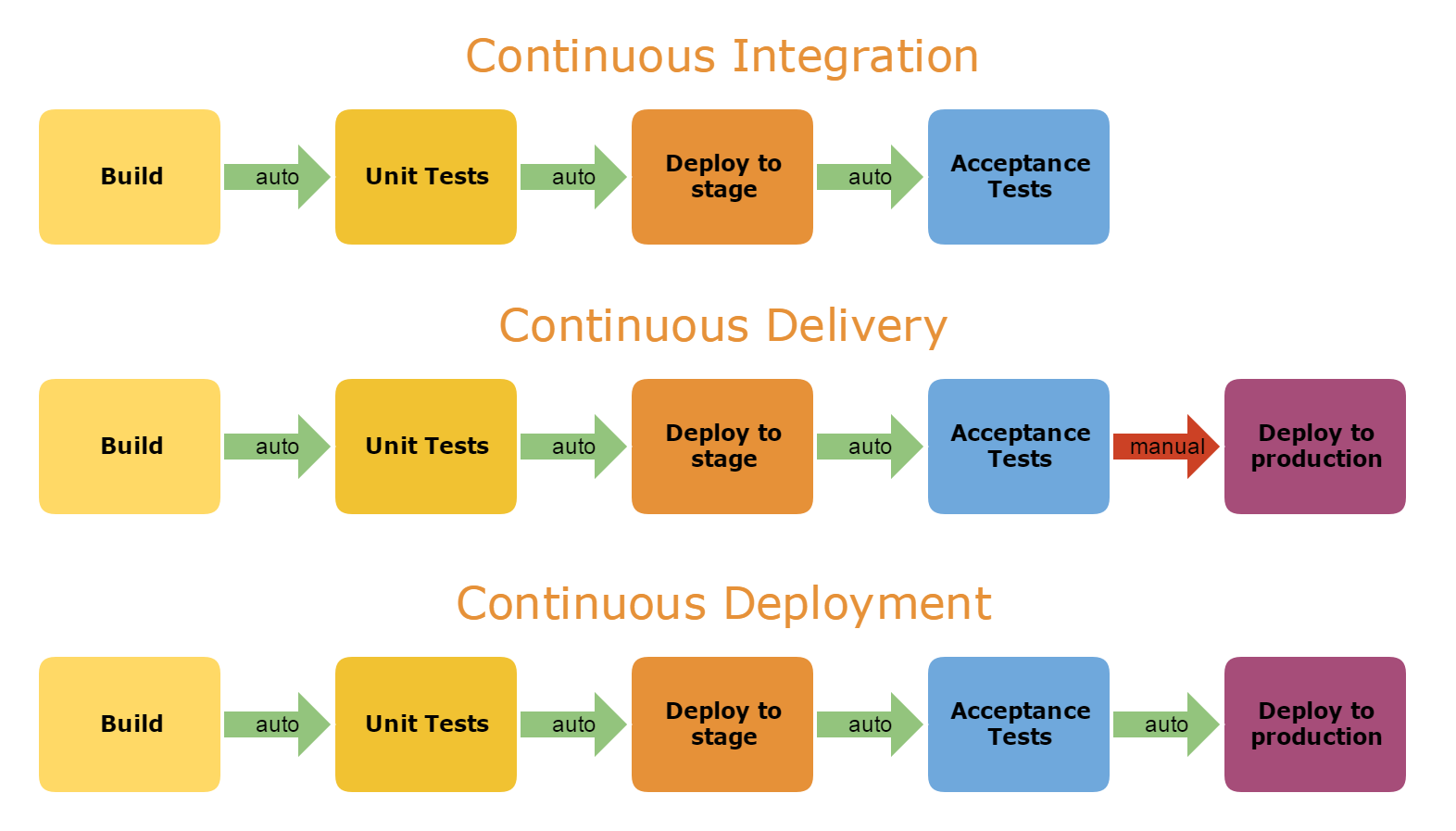
Continuous Integration (CI) for iOS automates building, testing, and verifying Swift and Objective-C applications every time code changes are pushed to a repository. By eliminating manual Xcode compilation and automating code signing,...
Continuous Integration (CI) for iOS automates building, testing, and verifying Swift and Objective-C applications every time code changes are pushed to a repository. By eliminating manual Xcode compilation and automating code signing, an effective iOS CI pipeline catches regressions early, standardizes test environments, and accelerates releases to TestFlight and the App Store.
Contents
Why Continuous Integration for iOS Is Unique (and Challenging)
Building continuous integration pipelines for iOS presents engineering challenges that differ significantly from web or backend microservice environments. While backend services can compile inside lightweight, headless Linux containers on virtually any cloud architecture, iOS development is bound to Apple’s proprietary ecosystem.
(Note: Avoiding code fences per formatting guidelines.)
1. Hard macOS Hardware Dependencies
iOS applications require Apple's compiler toolchains, SDKs, and simulator frameworks, which run exclusively on macOS. This constraint limits infrastructure options:
- macOS Virtual Machines & Silicon Hardware: CI jobs must run on physical Mac hardware or virtualized macOS instances on Apple Silicon (such as M1/M2/M3 Mac minis or Mac Studio clusters).
- Higher Compute Costs: Cloud providers charge higher rates for macOS runners compared to Linux containers due to hardware licensing and orchestration complexity.
2. Complex Code Signing and Provisioning
Code signing ensures that code running on physical iOS devices originates from a verified developer. Managing code signing automatically in an isolated CI runner involves multiple components:
- Development and Distribution Certificates: Cryptographic key pairs generated through the Apple Developer Portal.
- Provisioning Profiles: Cryptographically signed manifests linking App IDs, device Identifiers (UDIDs), and development certificates.
- Keychains and Entitlements: CI runners require secure, non-interactive macOS Keychains to store distribution certificates and private keys without manual administrator intervention.
3. Swift Compilation Overhead and SPM Dependency Management
Swift's strong type system and modern language features require significant compilation overhead. Large projects with heavy dependency chains using Swift Package Manager (SPM) or CocoaPods can suffer from inflated CI duration:
- Module Indexing and Type Checking: Complex SwiftUI layouts and generic type inference can slow compilation times if build artifacts are discarded after every job.
- DerivedData Management: Xcode caches intermediate build artifacts in the
DerivedDatadirectory. In clean CI environments, rebuilt frameworks consume excess compute time unless explicit caching rules are defined.
Key Benefits of Implementing CI/CD in iOS Teams
Adopting an automated CI system transforms how mobile development teams ship software. Manual builds created on local developer machines introduce hidden variables, uncommitted local changes, and inconsistent toolchain versions.
Eliminating "It Works on My Machine" Syndrome
Local developer machines accumulate cached dependencies, custom environment variables, and varying Xcode patch versions. A headless CI environment enforces build reproducibility:
- Every build executes from a clean repository clone on a deterministic Xcode environment.
- Compiler warnings and strict Swift linting rules (via tools like SwiftLint) are applied universally before pull requests are merged.
Automated Quality Assurance via XCTest and XCUITest
Automated testing in iOS encompasses unit tests, integration tests, and UI interaction tests. A CI pipeline executes these tests automatically across multiple iOS simulator configurations:
- XCTest Framework: Runs unit tests for business logic, view models, and domain layers in parallel.
- XCUITest Framework: Launches the application in an iOS Simulator to test user journeys (such as login flows and checkout processes).
- Code Coverage Reporting: Tracks code coverage trends over time to prevent coverage regressions.
Streamlined Beta Distribution and App Store Submissions
Packaging an .ipa file for distribution manually via Xcode’s Archiver requires several manual steps. CI/CD pipelines automate packaging, signing, and uploading directly to App Store Connect or TestFlight, enabling continuous delivery to external QA testers and beta user groups.
Choosing the Right iOS CI/CD Platform
Selecting the right platform depends on team size, security requirements, build volume, and existing cloud infrastructure.
Xcode Cloud
Apple’s native CI/CD service, Xcode Cloud, is integrated directly into Xcode and App Store Connect.
- Pros: Deep integration with Apple Developer tooling; zero manual code-signing setup; automatic TestFlight triggering.
- Cons: Less customization for multi-platform projects (e.g., combined React Native or Flutter backends); limited third-party integrations compared to general-purpose platforms.
GitHub Actions (macOS Runners)
GitHub Actions offers native macOS runners on Apple Silicon, making it popular for teams hosting code on GitHub.
- Pros: Declarative YAML workflows; wide ecosystem of marketplace actions; seamless pull-request integration.
- Cons: Higher per-minute costs for macOS runners relative to Linux instances.
Bitrise
Bitrise is a dedicated mobile DevOps platform tailored for iOS and Android application lifecycles.
- Pros: Extensive visual workflow builder; pre-configured steps for Fastlane, code signing, and simulator execution; out-of-the-box caching.
- Cons: SaaS lock-in; higher cost tiers for concurrent enterprise pipelines.
Self-Hosted Runners (Buildkite, GitLab CI, Jenkins)
For enterprise teams with strict data security policies or high build volume, running dedicated Apple Silicon Mac minis on-premises or via bare-metal cloud providers offers performance advantages.
- Pros: Full root control; persistent caching across builds; lower marginal cost for high build volumes.
- Cons: Requires dedicated DevOps staff to manage macOS updates, Xcode software upgrades, and infrastructure maintenance.
Platform Comparison Matrix
| CI/CD Platform | Infrastructure Type | Code Signing Setup | Best Suitability | Xcode Integration |
|---|---|---|---|---|
| Xcode Cloud | Apple-Managed Cloud | Automatic (App Store Connect Native) | Pure Swift/iOS projects seeking native tooling | Deeply integrated into Xcode IDE |
| GitHub Actions | Hosted Cloud or Self-Hosted | Manual or via Fastlane Match | Teams managing code and workflows on GitHub | Xcode CLI via xcodebuild |
| Bitrise | Dedicated Mobile SaaS | Semi-Automated (Bitrise Code Signing Step) | Mobile-first teams requiring turnkey UI workflows | Xcode CLI via pre-built steps |
| Self-Hosted (Buildkite / GitLab) | On-Premises / Dedicated Hardware | Manual (Fastlane Match / Secure Keychains) | Enterprise teams with massive build concurrency | Custom scripts calling xcodebuild |
Step-by-Step Guide: How to Implement iOS CI the Right Way
Setting up a robust iOS CI/CD pipeline requires configuring repository structures, managing code signing credentials securely, and scripting build commands.
Step 1: Standardize Xcode Schemes and Project Settings
Before writing pipeline scripts, ensure your Xcode project is configured for automated execution:
- Share Xcode Schemes: Open Xcode, navigate to Product > Scheme > Manage Schemes, and check the Shared box for your main app target and test targets. Commit the resulting
.xcodeproj/xcshareddata/xcschemes/files to Git. - Specify Explicit Tool Versions: Add a
.xcode-versionfile to the root of your repository (e.g., containing16.2) to force CI runners to select the correct Xcode toolchain version. - Manage Dependencies Explicitly: Check in your
Package.resolvedfile when using Swift Package Manager to enforce deterministic dependency resolution across local environments and CI runners.
Step 2: Automate Code Signing with Fastlane Match
Code signing is the primary failure point for iOS CI pipelines. Using manual provisioning profiles causes build breakage whenever certificates expire. Apple’s automatic signing fails in headless environments without local credentials.
The industry-standard solution is Fastlane Match, which implements the "Codesigning Guide" philosophy recommended by the community.
Fastlane Match Encrypted Certificate Workflow Architecture: [Developer / CI Runner] <---> [Private Encrypted Git Repo] <---> [Apple Developer Portal]
- Create a dedicated private Git repository to store encrypted certificates and profiles.
- Generate an App Store Connect API Key (Issuer ID, Key ID, and
.p8private key file) in App Store Connect under Users and Access. - Initialize Fastlane Match in your project root using the Fastlane command line tool:
fastlane match init. - Run
fastlane match appstorelocally to generate necessary distribution certificates and provisioning profiles, which are encrypted using an encryption passphrase and pushed to your secure private Git repository. - In your CI workflow, pass the passphrase via an environment variable (
MATCH_PASSWORD) to allow the runner to decrypt certificates into a temporary keychain on the fly.
Step 3: Write Standardized Build Pipelines using Fastlane
Instead of embedding long xcodebuild shell commands directly into CI configuration files, encapsulate build logic inside a Fastfile. This allows developers to run identical build targets locally for debugging.
A typical Fastfile configuration defines distinct lanes for testing and deployment:
- Test Lane: Executes unit and UI tests against designated iOS simulators using
run_tests(Scan). - Beta Lane: Syncs code signing credentials via
match, increments the build number, builds the.ipaarchive usingbuild_app(Gym), and uploads it to TestFlight viaupload_to_testflight(Pilot).
Step 4: Configure the CI Runner Pipeline Script
Whether using GitHub Actions, Bitrise, or GitLab CI, structure the job pipeline into clean execution stages:
- Environment Setup: Select the Xcode version and import secure environment secrets (App Store Connect API keys, Match passphrases).
- Dependency Resolution: Fetch Swift packages or CocoaPods dependencies using cached storage where available.
- Code Quality Checks: Run static code analysis tools (such as SwiftLint) to check style compliance.
- Automated Testing: Trigger Fastlane test lanes on an iOS Simulator target (e.g.,
platform=iOS Simulator,name=iPhone 16,OS=latest). - Archiving & Artifact Storage: Package the release build and upload
dSYMdebug symbol files to error reporting tools (e.g., Firebase Crashlytics or Sentry).
Caching and Performance Optimization Strategies
Because macOS compute minutes are resource-intensive, optimizing execution speed directly reduces operating costs and developer feedback cycles.
Caching Swift Package Manager and CocoaPods
Re-downloading and re-indexing dependencies on every build adds unnecessary overhead.
- SPM Cache Path: Configure your CI configuration to cache derived SPM build folders located at
~/Library/Caches/org.swift.swiftpm/and.build/. - CocoaPods Cache: Cache the
Pods/directory alongside the local CocoaPods spec repository at~/.cocoapods/.
Leveraging DerivedData Caching with Caution
Caching Xcode’s DerivedData folder between pipeline runs speeds up incremental compilation. However, corrupted DerivedData caches can cause intermittent, hard-to-debug compilation errors.
- Cache module caches (
DerivedData/ModuleCache.noindex) rather than the entire build product tree. - Implement a weekly scheduled CI build that performs a clean build without cache keys to ensure baseline reliability.
Using Tuist or Bazel for Enterprise Codebases
For large iOS codebases containing dozens of modular targets, standard Xcode project files suffer from merge conflicts and slow build graph generation.
- Tuist: A command-line tool that generates Xcode projects dynamically from Swift manifest files. Tuist provides binary artifact caching, allowing CI runners to download pre-compiled binaries for modules that haven't changed.
- Bazel: An enterprise build system used by large engineering organizations to achieve fine-grained task caching and distributed remote execution.
Common Pitfalls in iOS CI and How to Avoid Them
1. Flaky XCUITest UI Tests
UI tests that interact with screen elements often fail due to asynchronous animations, delayed network responses, or simulator state issues.
- Fix: Mock network layer responses using local stubs or stubbing protocols (
URLProtocol) instead of hitting live staging APIs during CI runs. Use explicitXCTWaiterconditions rather than hardcoded sleep delays (Thread.sleep).
2. Expired Certificates and Inconsistent Provisioning Profiles
Pipelines fail when Apple Developer distribution certificates expire annually.
- Fix: Configure automated alerts 30 days prior to certificate expiration. When using Fastlane Match, rotating certificates requires running
fastlane match nukefor the target environment, followed by re-generating profiles viafastlane match appstore.
3. Missing dSYM Files for Crash Reporting
When building apps on CI, debug symbol files (.dSYM) are generated. If these files are not archived and uploaded to symbolication services, production crash reports will show unreadable memory addresses.
- Fix: Ensure your release pipeline explicitly collects
.dSYMbundles from the build directory and uploads them directly to your crash tracking provider using specialized Fastlane plugins.
Frequently Asked Questions
Can I run iOS CI pipelines on Linux or Windows servers?
No, standard iOS app compilation requires Xcode and the iOS SDK, which run exclusively on macOS. While non-native cross-platform frameworks (like Flutter or React Native) can compile non-iOS application logic on Linux, final iOS binary compilation, code signing, and packaging must execute on a macOS environment.
What is the primary difference between Xcode Cloud and third-party CI platforms like Bitrise or GitHub Actions?
Xcode Cloud is deeply integrated into the Apple ecosystem, providing automatic code signing management and zero-configuration TestFlight distribution directly from Xcode. Third-party platforms like Bitrise or GitHub Actions offer broader flexibility, custom runner configuration, extensive integration libraries, and unified workflows for multi-platform projects.
How does Fastlane Match simplify code signing across dev teams and CI runners?
Fastlane Match centralizes code signing by storing encrypted certificates and provisioning profiles in a private Git repository. Instead of each developer and CI server generating unmanaged certificates in the Apple Developer Portal, every build agent pulls and decrypts the same standardized keys using a single passphrase.
How can mobile teams reduce long iOS CI build execution times?
Teams can optimize build times by using Apple Silicon-powered macOS runners, caching Swift Package Manager dependencies, parameterizing simulator test execution, modularizing the app architecture with binary caching tools like Tuist, and running unit and UI test suites in parallel across multiple simulators.
Next Actions for Building Your iOS Pipeline
To construct a reliable, automated continuous integration workflow for your iOS app, follow this implementation roadmap:
- Standardize Build Configuration: Ensure all Xcode schemes are shared, dependencies are locked, and your project compiles cleanly via the command line using standard
xcodebuildinvocations. - Automate Certificate Management: Set up an App Store Connect API key and initialize Fastlane Match with a private Git repository to manage development and distribution credentials securely.
- Script Your Workflows: Implement a
Fastfiledefining dedicated lanes for pull-request testing and TestFlight beta distribution. - Deploy on a Scalable Provider: Integrate your Fastlane configuration into your chosen CI platform (Xcode Cloud, GitHub Actions, or Bitrise) with robust caching strategies for SPM dependencies.
Image Gallery