AWS Cloud Security Monitoring Tools: A Practical Guide
To secure an AWS environment in 2026, organizations must implement a multi-layered monitoring strategy centered on AWS Security Hub, which aggregates findings from GuardDuty, Inspector, and Config. By integrating these native tools wit...
To secure an AWS environment in 2026, organizations must implement a multi-layered monitoring strategy centered on AWS Security Hub, which aggregates findings from GuardDuty, Inspector, and Config. By integrating these native tools with automated remediation through Amazon EventBridge, teams can identify vulnerabilities, detect active threats, and maintain compliance across complex multi-account architectures in real-time.
Contents
Effective cloud security monitoring is no longer a luxury but a fundamental operational requirement. As cloud environments scale, the volume of logs and the surface area for potential attacks grow exponentially. AWS provides a sophisticated suite of tools designed to provide visibility into every layer of the infrastructure, from API calls and network traffic to resource configurations and data access patterns. This guide provides a practical framework for selecting, configuring, and optimizing these tools to protect your cloud-native assets.
The Foundation of AWS Security Visibility
Before deploying specific tools, it is vital to understand the AWS Shared Responsibility Model. While AWS manages the security of the cloud (the physical infrastructure and virtualization layer), customers are responsible for security in the cloud. This includes protecting data, managing identities, and monitoring resource configurations. Monitoring is the mechanism through which you verify that your responsibilities are being met.
In 2026, the primary challenge is not a lack of data, but the "signal-to-noise" ratio. A single AWS account can generate millions of log entries daily. A practical monitoring strategy focuses on centralized ingestion and automated analysis, ensuring that security engineers are only alerted to high-fidelity, actionable incidents.
Essential Native AWS Security Monitoring Tools
AWS offers a range of purpose-built services that function as the building blocks of a security operations center (SOC).
AWS CloudTrail: The Audit Trail
AWS CloudTrail is the most critical monitoring service for any AWS account. It records every API call made in the environment, providing a detailed history of who did what, from where, and when. In 2026, CloudTrail remains the primary source for forensic investigations.
- Management Events: These capture control plane operations, such as creating an S3 bucket or launching an EC2 instance.
- Data Events: These capture high-volume resource operations, such as S3 object-level access (Get/Put) or Lambda function executions. Because of the volume, these are often enabled selectively for sensitive resources.
- Insights: CloudTrail Insights uses machine learning to identify unusual API activity patterns, such as a sudden spike in
TerminateInstancescalls, which could indicate a compromised credential or a malicious insider.
AWS Config: Configuration and Compliance
AWS Config provides a detailed inventory of your AWS resources and their configuration history. It allows you to define "Rules" that represent your desired security posture. For example, a rule might state that no S3 buckets should be publicly readable.
If a resource configuration changes in a way that violates a rule, AWS Config flags it as non-compliant. This provides a continuous compliance monitoring capability that is far superior to periodic manual audits. By 2026, the use of AWS Config Aggregators is standard practice for multi-account organizations, allowing a central security account to view the compliance status of thousands of accounts from a single dashboard.
Amazon GuardDuty: Managed Threat Detection
Amazon GuardDuty is a continuous security monitoring service that analyzes massive streams of data from CloudTrail, VPC Flow Logs, and DNS logs. It uses threat intelligence feeds and machine learning to identify suspicious activity, such as:
- Unauthorized Access: Unusual login patterns or API calls from known malicious IP addresses.
- Compromised Instances: EC2 instances communicating with command-and-control (C&C) servers or performing crypto-mining.
- S3 Protection: Detection of anomalous data access patterns that suggest potential data exfiltration.
GuardDuty is "one-click" to enable and requires no infrastructure to manage, making it a highly cost-effective first line of defense.
Amazon Inspector: Vulnerability Management
Amazon Inspector is an automated vulnerability management service that continually scans AWS workloads for software vulnerabilities and unintended network exposure. In 2026, its capabilities have expanded to cover not just EC2 instances, but also ECR container images and Lambda functions.
Unlike traditional scanners that require manual scheduling, Inspector is event-driven. When a new CVE (Common Vulnerabilities and Exposures) is published or a new instance is launched, Inspector automatically assesses the environment and provides a prioritized risk score based on the exploitability and impact of the vulnerability.
Centralizing Insights with AWS Security Hub
The most significant advancement in AWS security management is the role of AWS Security Hub. Without Security Hub, security teams would have to jump between multiple service consoles to understand their risk.
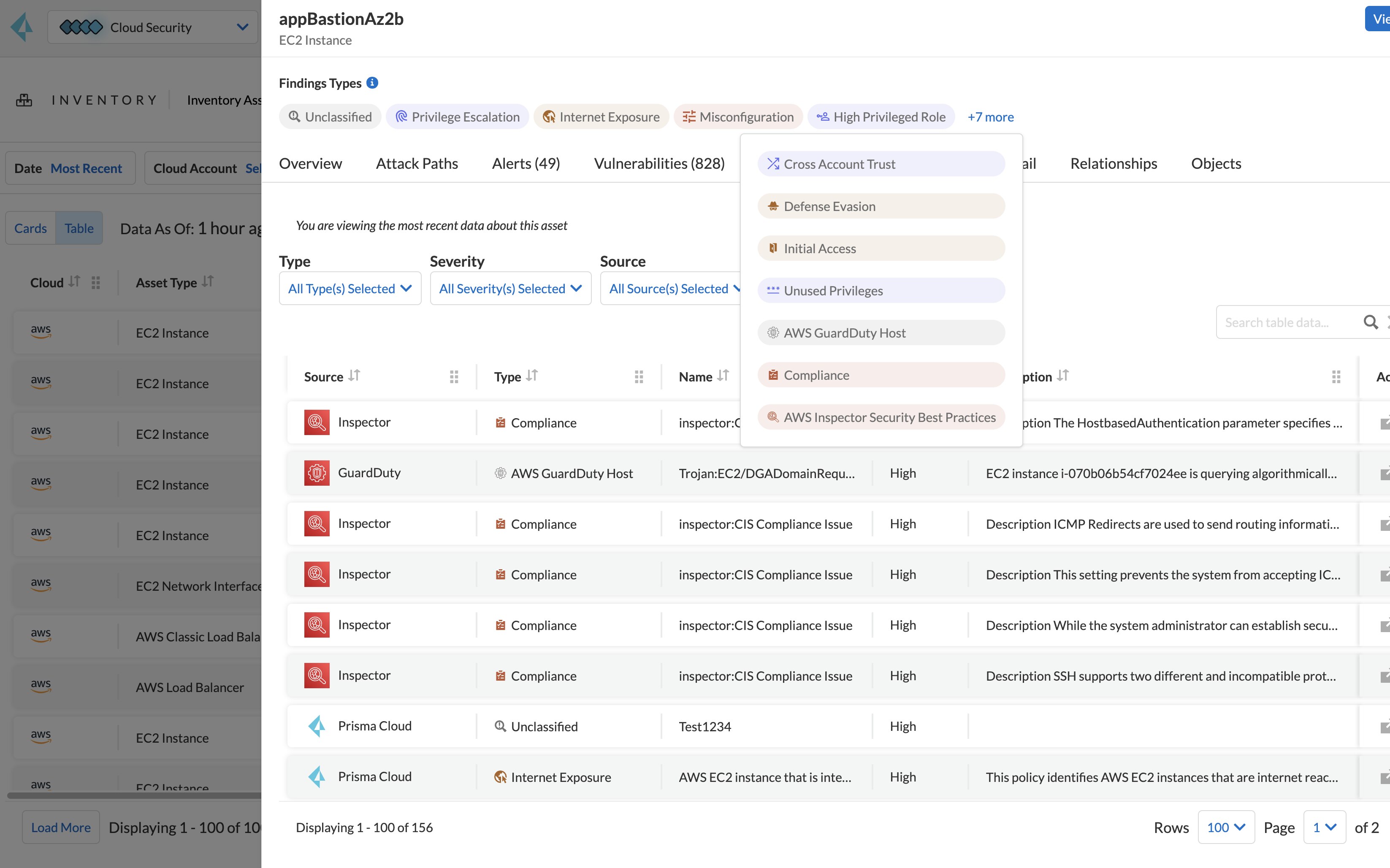
Security Hub acts as the "central pane of glass." It ingests findings from GuardDuty, Inspector, Macie, IAM Access Analyzer, and even third-party security products using the AWS Security Finding Format (ASFF). It then normalizes this data so it can be viewed and prioritized in one place.
Furthermore, Security Hub provides automated security checks based on industry standards, such as the CIS AWS Foundations Benchmark and the AWS Foundational Security Best Practices. This allows organizations to measure their security posture against established frameworks in real-time.
Comparison of Primary AWS Security Monitoring Tools
| Tool | Primary Purpose | Data Sources | Best For |
|---|---|---|---|
| AWS CloudTrail | API Auditing | API Call History | Forensic investigations and change tracking. |
| AWS Config | Compliance & Inventory | Resource Configurations | Enforcing "Golden Image" configs and compliance rules. |
| Amazon GuardDuty | Threat Detection | VPC Flow Logs, DNS, CloudTrail | Detecting active attacks and compromised accounts. |
| Amazon Inspector | Vulnerability Scanning | OS Packages, Network Reachability | Identifying unpatched software and open ports. |
| Amazon Macie | Data Privacy | S3 Objects | Discovering and protecting PII or sensitive data. |
| Security Hub | Posture Management | Findings from all other tools | Centralized alerting and compliance benchmarking. |
Practical Implementation: Building an Automated Response Pipeline
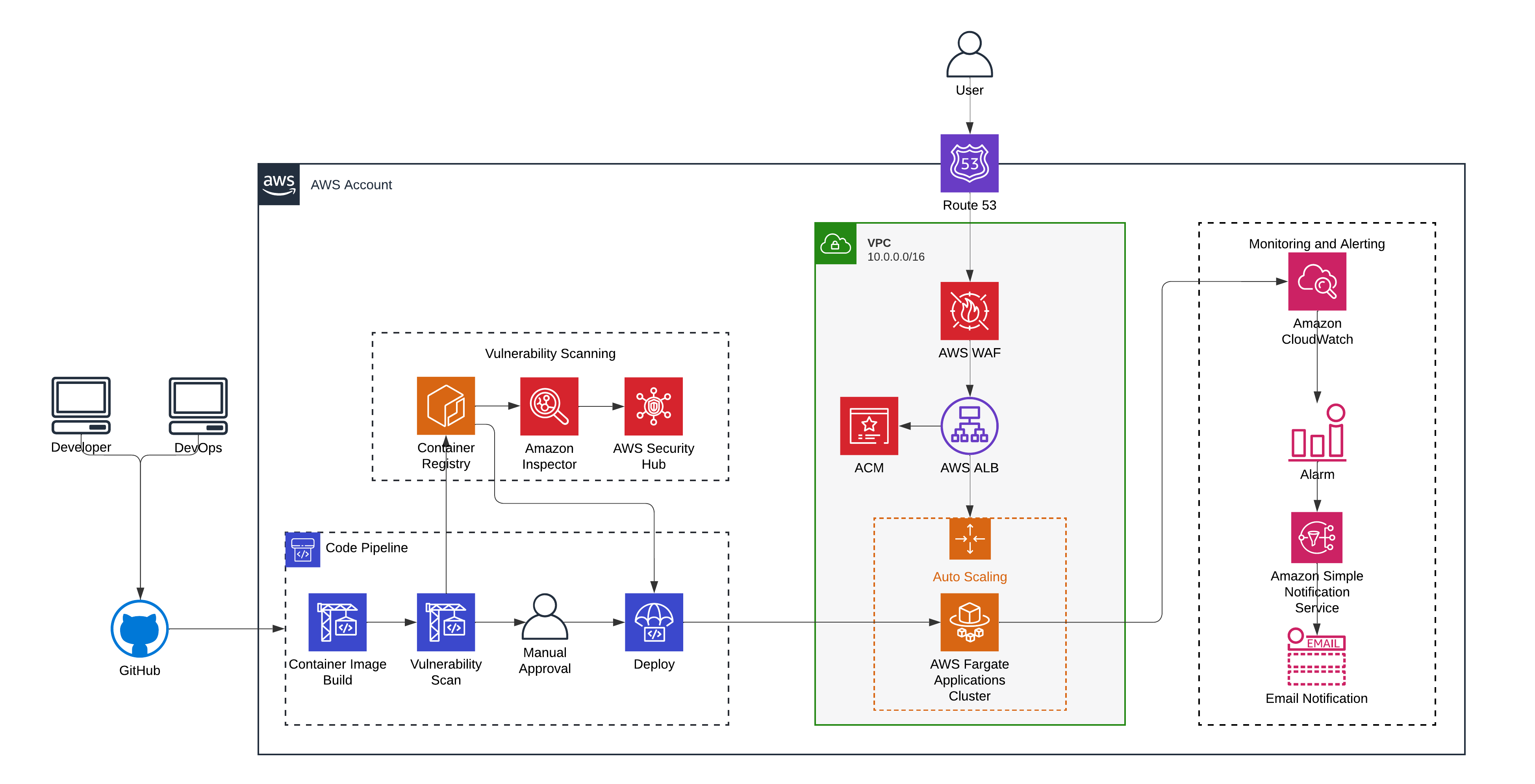
Monitoring is only effective if it leads to action. A practical guide to AWS security must include the architecture for automated remediation. In 2026, relying solely on human intervention for every alert is a recipe for disaster.
Step 1: Aggregation
Enable AWS Security Hub in your primary security account. Use AWS Organizations to automatically enable Security Hub and GuardDuty across all existing and future member accounts. This ensures there are no "dark corners" in your cloud footprint.
Step 2: Filtering and Prioritization
Not all alerts require an immediate page. Use Security Hub's filtering capabilities to suppress low-severity findings. Focus on "Critical" and "High" severity findings that have a direct impact on data sovereignty or infrastructure integrity.
Step 3: Automation via Amazon EventBridge
When a finding is generated in Security Hub, it is automatically sent to Amazon EventBridge. You can create rules in EventBridge to trigger specific actions based on the finding type:
- Notification: Send a high-priority alert to a Slack channel or a PagerDuty service via an SNS (Simple Notification Service) topic.
- Enrichment: Trigger an AWS Lambda function to gather more context about the resource (e.g., who created it, what tags it has) and attach it to the ticket.
- Remediation: For clear-cut violations—such as an S3 bucket becoming public—trigger a Lambda function to immediately revert the setting to private.
Monitoring for Specific Threats in 2026
IAM and Credential Abuse
Identity is the new perimeter. Use IAM Access Analyzer to monitor for policies that grant public or cross-account access to your resources. Additionally, integrate CloudWatch Alarms to trigger if "Root" account activity is detected, as the root user should never be used for daily tasks.
Modern Compute: Containers and Serverless
Monitoring EC2 instances is no longer sufficient for most organizations. Security teams must monitor Amazon EKS (Elastic Kubernetes Service) audit logs through GuardDuty and ensure that Lambda functions are scanned by Inspector for vulnerable code dependencies. In 2026, the focus has shifted toward "Runtime Protection," where GuardDuty monitors the system-level behavior of containers to detect fileless malware or reverse shells.
Troubleshooting Common Monitoring Gaps
Even with the best tools, gaps can emerge. Common issues include:
- Missing Logs: Ensure that VPC Flow Logs are enabled for all critical subnets. Without these, GuardDuty cannot analyze network traffic patterns.
- Permission Errors: Security Hub requires specific Service-Linked Roles to function. If these are deleted or modified, findings will stop flowing.
- Cost Management: Services like CloudTrail Data Events and Amazon Macie can become expensive if applied to every single S3 bucket. Target these tools specifically at "Crown Jewel" data stores.
- Alert Fatigue: If your team receives 500 alerts a day, they will ignore the one that matters. Use Security Hub "Insights" to group related findings into single incidents.
Frequently Asked Questions
Do I need a third-party SIEM if I use AWS Security Hub?
While AWS Security Hub is excellent for AWS-native environments, many large enterprises still use a third-party SIEM (Security Information and Event Management) like Splunk or Sentinel. This is typically done to correlate AWS data with on-premises logs or other SaaS providers. In 2026, most organizations use Security Hub to "filter" and "clean" AWS findings before sending only the relevant, high-fidelity data to their SIEM to save on ingestion costs.
How does AWS monitoring handle multi-region architectures?
Most AWS security services are regional. To get a global view, you must enable these services in every region where you have resources. Security Hub supports "Cross-Region Aggregation," which allows you to designate a primary region where all findings from all other regions are consolidated. This is essential for maintaining a unified security posture.
Is Amazon GuardDuty enough to stop ransomware?
GuardDuty is a detection tool, not a prevention tool. It can identify the signs of ransomware, such as unusual data encryption patterns or communication with known attacker infrastructure. However, stopping ransomware requires preventative controls like IAM least-privilege, AWS WAF (Web Application Firewall), and immutable backups via AWS Backup. Monitoring tells you that you are under attack; your architecture determines if that attack succeeds.
What is the cost impact of enabling all these monitoring tools?
Costs vary based on volume. GuardDuty is priced per GB of logs analyzed, while Config is priced per configuration item recorded. For most workloads, security monitoring accounts for 3-5% of the total AWS bill. This is widely considered a necessary investment compared to the potential cost of a data breach or regulatory fine.
Practical Recommendation
For organizations starting their journey, the most effective first step is to enable AWS Security Hub and Amazon GuardDuty via AWS Organizations. This provides immediate visibility into the most common threats and misconfigurations. Once visibility is established, focus on building automated responses for the top five most common findings in your environment. Security in the cloud is not a static state but a continuous process of monitoring, refining, and automating.
Image Gallery