How to Interpret an IP Address: A Comprehensive Guide
An Internet Protocol (IP) address functions as the digital equivalent of a home street address, providing a unique numerical identifier that allows devices to locate and communicate with each other across the internet. To interpret an...
An Internet Protocol (IP) address functions as the digital equivalent of a home street address, providing a unique numerical identifier that allows devices to locate and communicate with each other across the internet. To interpret an IP address, one must distinguish between the two primary standards currently in use—IPv4 and IPv6—and understand the hierarchy of network segments, public versus private ranges, and the roles of subnet masks in determining local versus remote traffic.
Contents
Understanding the Dual Standards: IPv4 and IPv6
The landscape of IP addressing is currently dominated by two protocols. Understanding which version you are looking at is the first step in interpretation.
IPv4 (Internet Protocol version 4) is the legacy standard that remains ubiquitous. It is represented as a 32-bit numerical address, written as four decimal numbers ranging from 0 to 255, separated by periods (e.g., 192.168.1.1). Because each octet is 8 bits, the total structure accommodates approximately 4.3 billion unique addresses. Due to the exhaustion of this pool, techniques like Network Address Translation (NAT) are used to allow multiple devices to share a single public IPv4 address.
IPv6 (Internet Protocol version 6) was developed to solve the address exhaustion problem of IPv4. It uses a 128-bit address, which allows for a vastly larger pool of unique identifiers (roughly 340 undecillion addresses). IPv6 addresses are written as eight groups of four hexadecimal digits, separated by colons (e.g., 2001:0db8:85a3:0000:0000:8a2e:0370:7334). You can often identify IPv6 addresses by their inclusion of letters (a–f) and the colon separators.
The Anatomy of an IPv4 Address
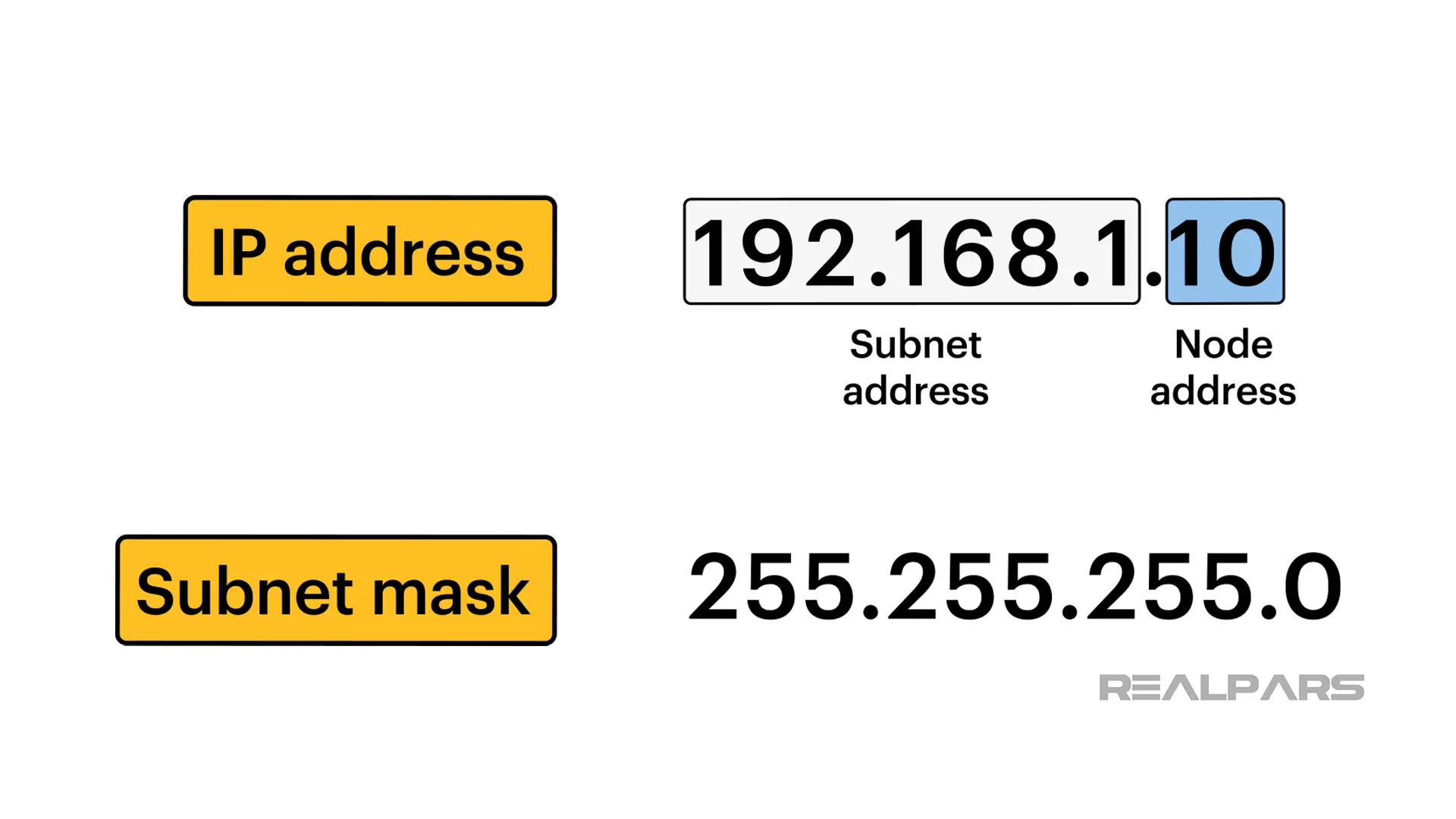
To interpret an IPv4 address effectively, you must understand that it is not just a random string of numbers; it is a composite of a Network ID and a Host ID. The boundary between these two parts is determined by the subnet mask.
- Network ID: This portion identifies the specific network to which the device belongs. All devices on the same local network share the same Network ID.
- Host ID: This identifies the specific device (the host) within that network.
The subnet mask (e.g., 255.255.255.0) acts as a filter. When a computer communicates with another IP address, it performs a bitwise logical AND operation between its own IP address and its subnet mask. If the result matches the Network ID of the target device, the computer knows the target is on the local network. If it does not match, the traffic is sent to the default gateway (the router) to be routed to the external internet.
Distinguishing Public vs. Private IP Addresses
When diagnosing network issues or configuring firewalls, distinguishing between public and private addresses is vital.
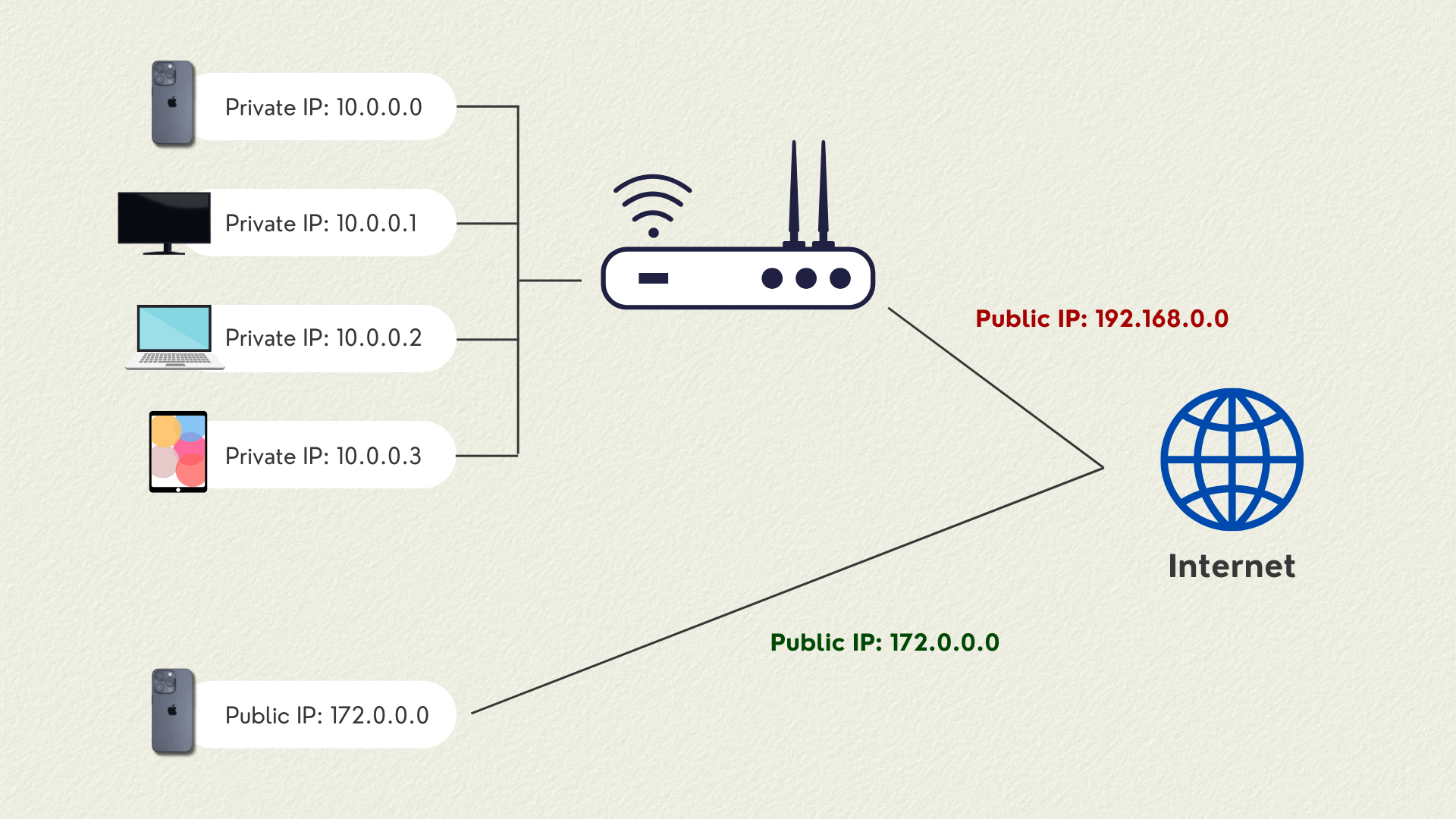
- Public IP Addresses: These are globally unique and routable across the public internet. They are assigned by Internet Service Providers (ISPs) to routers and are visible to external servers. If you are checking "what is my IP," you are looking at your public IP.
- Private IP Addresses: These are reserved for internal use within a local network (such as a home or office). They are not routable on the internet. Organizations use private IP ranges so that internal devices do not require a unique public IP for every single machine.
Common Private IP Address Ranges
| Class | Range | Typical Use |
|---|---|---|
| Class A | 10.0.0.0 – 10.255.255.255 | Large enterprise networks |
| Class B | 172.16.0.0 – 172.31.255.255 | Medium-sized corporate networks |
| Class C | 192.168.0.0 – 192.168.255.255 | Home and small office routers |
| Loopback | 127.0.0.0 – 127.255.255.255 | Testing internal host connectivity |
The Role of Subnetting and CIDR Notation
Beyond the standard "dotted decimal" notation, you will frequently encounter Classless Inter-Domain Routing (CIDR) notation, which looks like an IP address followed by a slash and a number (e.g., 192.168.1.0/24).
The number after the slash represents the number of bits in the subnet mask set to "1." A /24 means the first 24 bits are the Network ID, leaving 8 bits for the Host ID. A /24 is equivalent to a subnet mask of 255.255.255.0. Interpreting CIDR notation allows you to quickly determine how large a network is and how many devices can be connected within that range. As the number after the slash increases, the network size decreases, providing more specific segmentation for security and performance management.
Troubleshooting: Common Steps to Identify Your IP
If you need to interpret your own network configuration, you can use built-in system tools:
- Windows (Command Prompt): Type
ipconfig. Look for "IPv4 Address" and "Subnet Mask" under your active network adapter. - macOS/Linux (Terminal): Type
ifconfigorip addr. - Cross-Platform: Access your router's web interface (typically by typing its gateway IP into a browser). The status page usually displays both your WAN (Public) IP and your LAN (Private) IP.
If you encounter an IP address beginning with 169.254.x.x, this indicates an APIPA (Automatic Private IP Addressing) address. This means your device failed to receive a valid configuration from a DHCP server (the service that automatically assigns IPs). This is a strong indicator of a configuration error or a disconnected cable.
FAQ: Frequently Asked Questions
Why does my IP address change periodically? Most ISPs use Dynamic IP addressing. Your router leases an IP address from the provider for a specific period. When the lease expires, the provider's DHCP server may assign your router a different address from their available pool.
Can I track a person's physical location using their IP address? An IP address can generally reveal a user's country, region, and ISP. However, it rarely provides an exact physical street address. Location data associated with IP addresses is usually approximate, based on the ISP's regional distribution nodes.
What is a Default Gateway? The default gateway is the IP address of the router that serves as the "doorway" between your local network and the internet. All traffic destined for an external IP address is sent to this gateway first.
Are IPv6 addresses required for all new networks in 2026? While IPv4 remains functional due to legacy support, most modern network infrastructure and mobile carrier networks prioritize or mandate IPv6 support to ensure compatibility and performance. It is now the standard for scalable internet architecture.
Does a VPN hide my real IP address? Yes. When connected to a VPN, your traffic is routed through a remote server. The websites you visit see the IP address of the VPN server rather than your local public IP address, masking your true network origin.
Next Steps for Network Management
If you are interpreting IP addresses for security or administration purposes, begin by documenting your network topology using CIDR notation to define boundaries clearly. Ensure your internal assets use static IPs for critical servers (like local file shares or printers) while allowing your general user devices to utilize DHCP. For deeper network analysis, utilize tools like ping to test reachability or tracert (Windows) / traceroute (Linux/macOS) to visualize the path packets take through intermediate routers to reach a destination. If your network requires complex routing, consult the documentation provided by your router manufacturer or your organization's network architect to ensure your segmentation strategy aligns with current security standards.
Image Gallery