Automate Email: A Practical Reference for Workflow Efficiency
Automating email is the strategic process of using software triggers, rules, and scripts to handle repetitive messaging tasks, such as transactional notifications, lead nurturing, and internal alerts. By moving from manual drafting to...
Automating email is the strategic process of using software triggers, rules, and scripts to handle repetitive messaging tasks, such as transactional notifications, lead nurturing, and internal alerts. By moving from manual drafting to automated workflows, organizations and individuals can ensure consistent communication delivery while significantly reducing operational overhead and the risk of human error in high-volume settings.
Contents
Understanding the Scope of Email Automation
Email automation exists on a spectrum ranging from basic inbox management to complex, data-driven marketing orchestration. At its core, the objective is to eliminate the need for manual intervention when sending predictable or trigger-based emails. Whether you are managing customer service tickets, shipping notifications, or periodic reports, the fundamental architecture remains the same: a specific trigger event (like a new database entry or a time-based interval) initiates an action (sending an email) via a configured delivery mechanism.
For most modern businesses, automation is not merely a convenience but a necessity. High-volume communications, such as password resets, subscription renewals, or personalized sales outreach, cannot scale effectively through manual labor. A practical reference for this process requires identifying which tasks are routine enough to codify and which require a human touch to ensure quality and brand voice.
Prerequisites and Infrastructure Requirements
Before implementing any automated email system, you must establish the technical and operational foundation. Automation relies on data integrity and reliable delivery paths.
1. Reliable SMTP Infrastructure
You cannot effectively automate email using a standard personal webmail account. Automated systems require an Simple Mail Transfer Protocol (SMTP) service or a dedicated Email Service Provider (API-based) to handle high volumes, ensure proper authentication (SPF, DKIM, DMARC), and manage bounce rates. Popular providers such as SendGrid, Amazon SES, and Postmark offer the deliverability infrastructure necessary to prevent your automated messages from being flagged as spam.
2. Data Connectivity
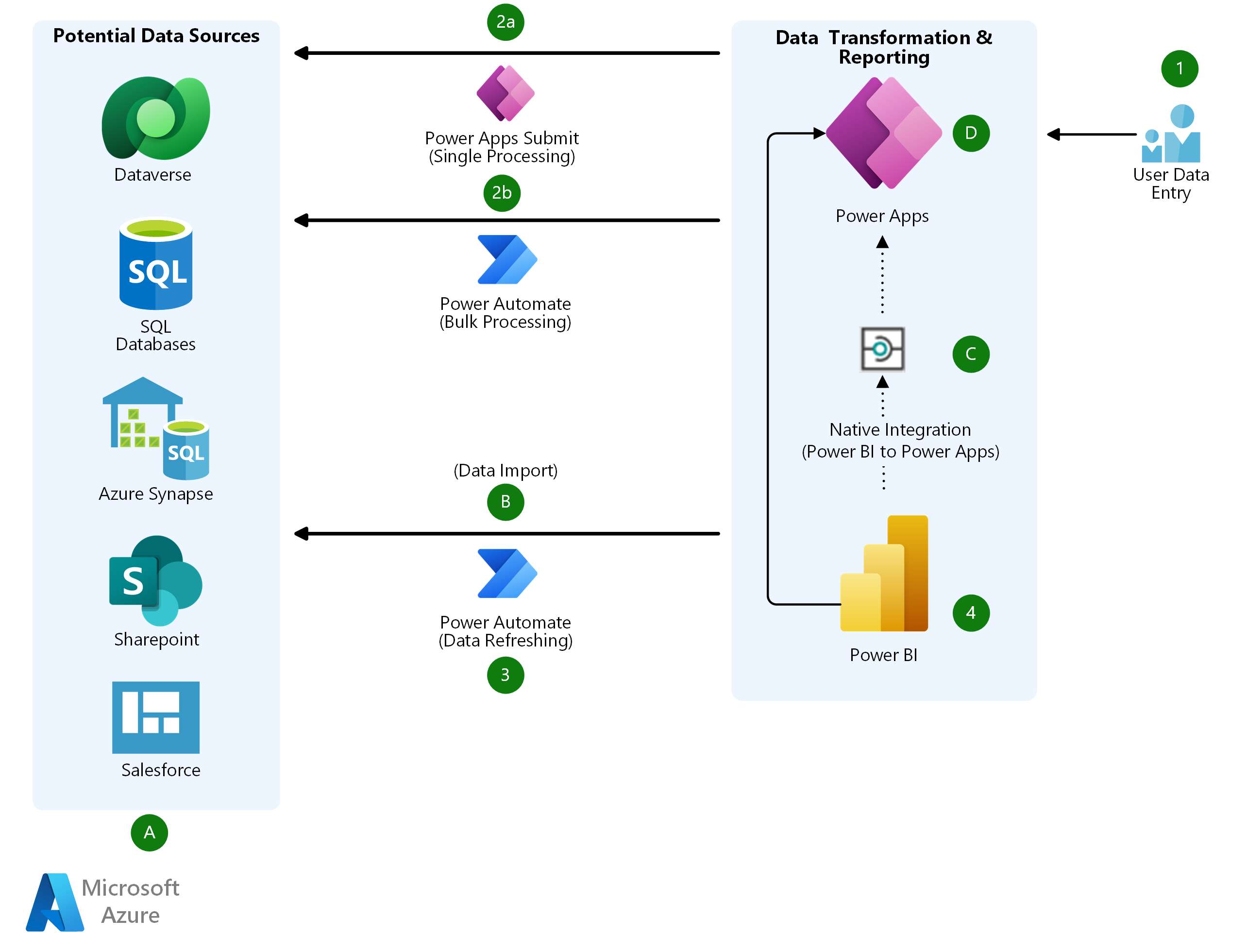
Automation is only as good as the data it consumes. You must define where your triggers originate. This might be a CRM (Customer Relationship Management) system, an e-commerce database, or an event-bus like Zapier or Make. Ensure your data source is structured; an email automation tool cannot parse messy, unstructured, or missing data points effectively.
3. Compliance Frameworks
Automated emails are subject to strict regulations, including the CAN-SPAM Act in the United States and GDPR in Europe. Your infrastructure must include mechanisms for users to unsubscribe, provide clear identification of the sender, and ensure that automated contact lists are updated in real-time. Failing to integrate these compliance requirements into your automation logic can lead to severe legal and reputational consequences.
Common Strategies for Email Automation
Depending on your specific goals, automation usually falls into three primary categories. Selecting the right approach prevents "over-automation," where cold, robotic messaging damages customer relationships.
Transactional Automation
These are messages triggered by a user action. Examples include order confirmations, shipping updates, or account security alerts. These should be immediate, functional, and devoid of marketing fluff. Because they are expected, they boast the highest open rates.
Behavioral/Nurture Automation
This category involves logic-based sequences. If a user performs action A (e.g., clicks a link in a newsletter), the system performs action B (e.g., sends a follow-up email 24 hours later). This requires a robust tagging system within your database to track user intent and history.
Time-Based Automation
Often referred to as drip campaigns, these are static sequences triggered by dates or calendar intervals. These are useful for newsletters, renewal reminders, or onboarding tutorials. While they are the easiest to set up, they provide the least amount of personalization.
Comparison of Automation Implementation Methods
| Method | Complexity | Best For | Technical Barrier |
|---|---|---|---|
| No-Code Platforms | Low | Small teams, simple workflows | Low |
| Built-in CRM Tools | Moderate | Sales teams, customer support | Moderate |
| Custom Scripting/API | High | Enterprise needs, high volume | High |
Implementation Steps: From Logic to Launch
- Map the Trigger: Identify the exact moment the email should be sent. Is it a time-based trigger or a data-change trigger?
- Define the Payload: Determine what information must be included. Dynamic variables (e.g.,
{first_name},{order_total}) are essential for personalization. - Configure Authentication: Ensure your domain is verified via DKIM and SPF to ensure your automated emails land in the inbox rather than the junk folder.
- Testing Environment: Always route test emails to an internal alias first. Check for broken links, incorrect variable rendering, and mobile responsiveness.
- Soft Launch: Start with a small cohort. Monitor for bounce-backs or support tickets indicating confusion before enabling the automation for your full database.
- Continuous Monitoring: Automation is not a "set and forget" process. Periodically audit your templates and verify that the trigger conditions are still relevant to your business needs.
Troubleshooting Common Issues
Even the most robust systems encounter failures. The most common point of failure is "silence," where the automation stops triggering without an obvious error message.
- The "Silent Failure" Trap: Check your logs to see if the trigger conditions are being met. Often, an update to a database field name breaks the API connection between your source and your email provider.
- Deliverability Spikes: If your bounce rate suddenly increases, your automation may be sending to a list that hasn't been cleaned. Always implement "hard bounce" suppression.
- Variable Mismatch: If users receive emails with broken placeholders (e.g., "Hello [null]"), your data mapping is failing. Use fallback text (e.g., "Hello there") in your template logic to mitigate this.
Frequently Asked Questions
How do I prevent my automated emails from going to spam? The most effective way to avoid spam filters is to maintain clean sender authentication (SPF, DKIM, and DMARC records). Additionally, maintain a low complaint rate by ensuring your recipients actually opted into your communications.
Is it better to build a custom solution or use a third-party tool? For most organizations, third-party tools are superior because they handle the heavy lifting of ISP relations, blacklists, and regulatory compliance. Build a custom solution only if your business logic requires highly specific integrations that off-the-shelf tools cannot support.
Can I automate cold outreach emails? Yes, but exercise caution. Cold outreach is highly sensitive to spam filters. You must ensure you are not violating regional anti-spam laws, such as GDPR, and that you have a clear way for recipients to opt out.
How often should I review my automated email templates? At a minimum, perform a quarterly audit. Business branding, product links, and even legal disclaimers change over time. Stale templates are a leading cause of decreased engagement.
What is the most important metric to track in automated campaigns? While open rates are common, the "Action Completion Rate"—the number of users who actually took the desired action after clicking the link—is the most accurate indicator of the effectiveness of your automated workflow.
Final Recommendation
Start by automating your highest-volume, lowest-risk transactional emails. Once you have a stable infrastructure and a clear understanding of your data triggers, you can layer in more complex behavioral nurturing. Focus on maintaining a clean database; no amount of automation can compensate for poor-quality contact lists.
Image Gallery