How to Write an Address Line: Complete Formatting Guide for Mail and Online Forms
To write an address line correctly, place the primary street number and street name on Address Line 1 (e.g., 123 Main Street). Use Address Line 2 exclusively for secondary unit designators such as apartment, suite, unit, or floor numbe...
To write an address line correctly, place the primary street number and street name on Address Line 1 (e.g., 123 Main Street). Use Address Line 2 exclusively for secondary unit designators such as apartment, suite, unit, or floor numbers (e.g., Apt 4B or Suite 200). City, state, and postal codes belong in their designated separate fields.
Contents
Understanding Address Line Architecture
Whether you are filling out an e-commerce checkout form, setting up a shipping system, or addressing an envelope, knowing what information goes into each specific address line prevents package delays, returned mail, and order processing failures.
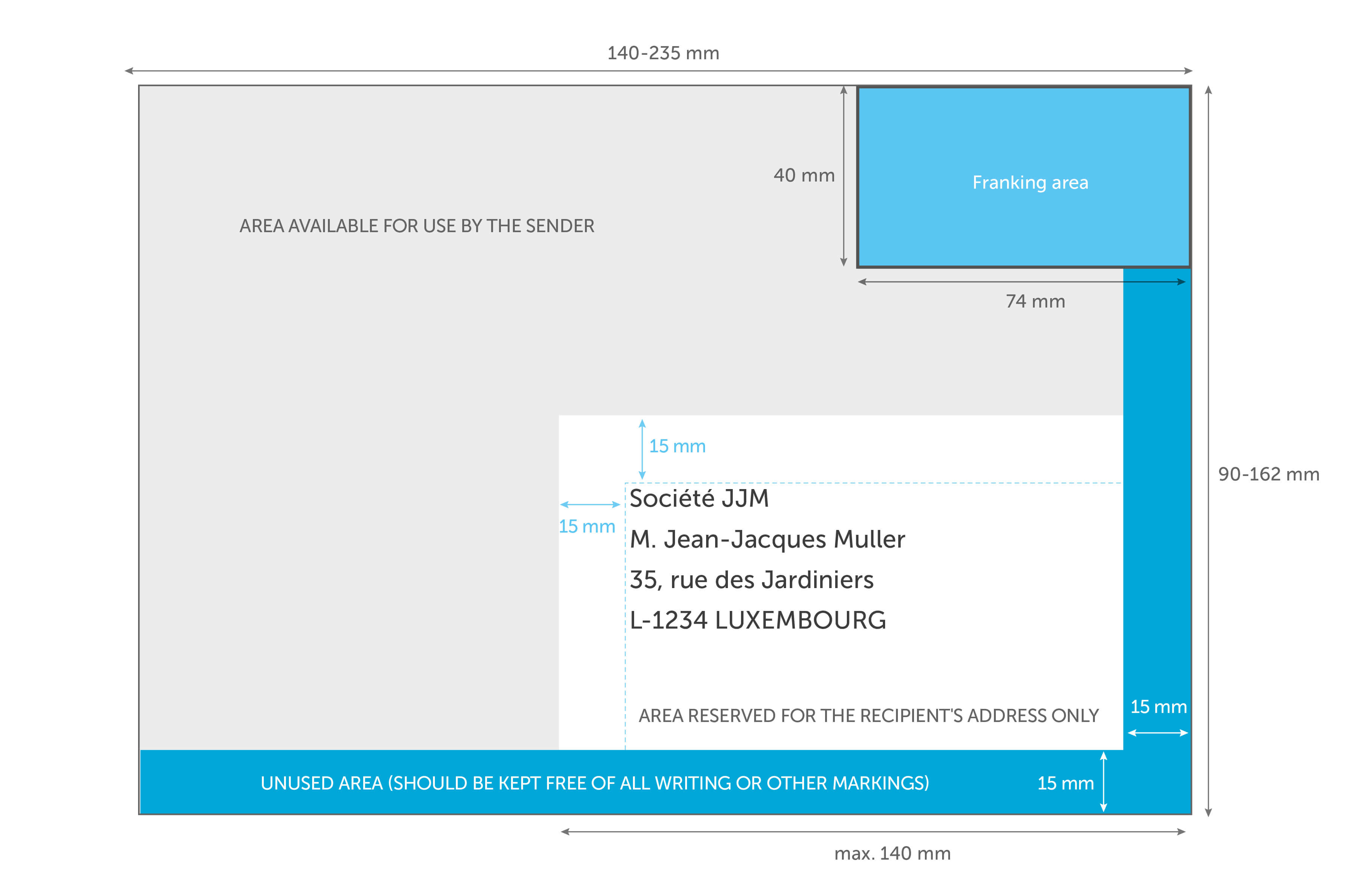
Postal systems rely on high-speed Optical Character Recognition (OCR) scanners to read and process millions of pieces of mail per day. These automated systems read addresses from the bottom up, searching for key structural markers in predictable locations. When components are mixed across lines, automated sorting machines can misread the delivery destination or flag the piece for manual review.
Recipient Name / Business Name Attention / Department (Optional Address Line 3) Address Line 1: Primary Street Number + Street Name + Directional + Suffix Address Line 2: Secondary Unit Type + Unit Number City, State/Province Postal Code Country (for international mail)
What Belongs on Address Line 1?
Address Line 1 is reserved for the primary delivery address. It provides the core physical identifier for the building or lot on a specific street segment.
Essential components of Address Line 1 include:
- House or Building Number: The numerical designation assigned to the physical structure (e.g., 742).
- Pre-Directional Indicator: Cardinal directions that precede the street name (e.g., North, N., West, W.).
- Street Name: The official named identifier of the thoroughfare (e.g., Oak, Martin Luther King Jr.).
- Street Suffix: Standardized abbreviations describing the roadway type (e.g., Street / St, Avenue / Ave, Boulevard / Blvd, Road / Rd, Court / Ct).
- Post-Directional Indicator: Cardinal directions that follow the street suffix to specify a geographical quadrant (e.g., NW, SE).
Example Address Line 1: 1044 N Washington Blvd NW
If space allows on a physical envelope or database field, secondary unit designators (like apartment or suite numbers) may follow Address Line 1 on the same horizontal line. However, in standard digital entry fields, secondary units should be placed in Address Line 2.
What Belongs on Address Line 2?
Address Line 2 captures secondary delivery identifiers within a larger structure. If a delivery driver reaches the main building at Address Line 1, Address Line 2 tells them exactly which internal door, office, or space to access.
Information appropriate for Address Line 2 includes:
- Apartment Numbers:
Apt 3BorApartment 12 - Suite Numbers:
Suite 400orSte 100 - Unit Identifiers:
Unit 5 - Building Designators:
Bldg BorBuilding 4 - Floor Identifiers:
Fl 3orFloor 12 - Space / Lot Numbers:
Sp 14orLot 88 - Department Identifiers:
Dept 402
Do not place city names, state codes, ZIP codes, cross streets, or delivery instructions (such as "Leave on back porch") into Address Line 2. Delivery instructions belong in dedicated order note fields, while geographical regions belong in their respective dedicated fields.
When to Use Address Line 3
Address Line 3 is less common in everyday consumer forms but remains essential in corporate logistics, institutional mailing, and international trade.
Address Line 3 is used for:
- Care Of (c/o) designations:
c/o John Doe - Corporate Attention Lines:
Attn: Billing Department - Complex Enterprise Sites:
Sub-Building 4, Receiving Dock B - Additional Institutional Hierarchy:
School of Engineering, Department of Materials Science
In standard 2-line web forms, secondary corporate descriptors (like Attention lines or Care Of instructions) are placed above Address Line 1, immediately below the recipient's name.
Official Postal Standards: USPS Publication 28 Guidelines
In the United States, official postal address rules are governed by USPS Publication 28 - Postal Addressing Standards. Adhering to these standards ensures that automated sorting machines can interpret address records rapidly without human intervention.
Standardization Rules for Maximum Deliverability
- Standardize Abbreviations: USPS encourages standardized abbreviations for street suffixes and unit types. Use
STinstead ofStreet,AVEinstead ofAvenue,BLVDinstead ofBoulevard,APTinstead ofApartment, andSTEinstead ofSuite. - Omit Punctuation: For official mail automation, USPS recommends omitting all periods, commas, hyphens, and apostrophes, except when part of a recognized hyphenated street name or ZIP+4 code.
- Use Uppercase Text: Modern OCR equipment reads uppercase characters most reliably. While mixed-case text is widely accepted on personal mail, standard corporate and bulk mail streams format addresses entirely in CAPITAL LETTERS.
- Maintain Left Alignment: Align all address lines flush left. Centered address blocks force machine cameras to re-index each line, which increases processing error rates.
PREFERRED USPS AUTOMATION FORMAT: JOHN DOE 123 MAIN ST APT 4B ANYTOWN NY 12345-6789
Step-by-Step Examples by Scenario
Address structure varies depending on the destination type, organizational complexity, and delivery mechanism.
1. Single-Family Residential Address
For single-family homes, Address Line 2 is intentionally left blank.
- Recipient: Jane Smith
- Address Line 1: 458 Maple Road
- Address Line 2: (Leave Blank)
- City: Columbus
- State: OH
- ZIP Code: 43215
2. Apartment or Multi-Unit Residential Address
When living in a multi-unit complex, always specify both the unit designator and the specific number.
- Recipient: Marcus Vance
- Address Line 1: 884 West End Avenue
- Address Line 2: Apt 12C
- City: New York
- State: NY
- ZIP Code: 10025
3. Commercial or Corporate Office Address
Corporate environments often require Attention lines or department designations to ensure internal mailrooms deliver packages to the correct person.
- Recipient / Business: Acme Logistics Corp
- Address Line 1 (or Line 3): Attn: Accounts Payable
- Address Line 1: 1200 Enterprise Parkway
- Address Line 2: Suite 500, Floor 5
- City: Austin
- State: TX
- ZIP Code: 78759
4. Post Office Boxes (P.O. Box)
When shipping to a Post Office Box, the P.O. Box number serves as the primary street delivery line. You must not list a physical street address and a P.O. Box on the exact same line, as automated sorting equipment cannot determine which delivery point takes precedence.
- Recipient: Sarah Jenkins
- Address Line 1: PO Box 4589
- Address Line 2: (Leave Blank)
- City: Denver
- State: CO
- ZIP Code: 80204
Note on Street Addressing for PO Boxes: Some USPS locations offer "Street Addressing Service" (PBSAR), allowing boxholders to use the post office's physical street address followed by # and the box number on Address Line 2. Check with your local post office before using this format.
5. Military Addresses (APO / FPO / DPO)
Military mail uses standardized abbreviations to route mail through overseas military postal channels managed by the Department of Defense.
- Recipient: SGT David Miller
- Address Line 1: Unit 2050 Box 4190
- Address Line 2: (Leave Blank)
- City / APO: APO (Army Post Office) or FPO (Fleet Post Office)
- State Code: AA (Armed Forces Americas), AE (Armed Forces Europe/Middle East/Africa), or AP (Armed Forces Pacific)
- ZIP Code: 09309
6. International Addresses
International address structures must conform to the standards of the destination nation while explicitly identifying the destination country on the bottom line in English. The Universal Postal Union maintains international postal addressing frameworks for worldwide delivery accuracy.
- Line 1 (Recipient): Hans Müller
- Line 2 (Street & House Number): Goethestr. 14
- Line 3 (Postal Code & City): 10115 Berlin
- Line 4 (Country): GERMANY
Address Line Comparison Across Scenarios
The following table demonstrates how to populate form fields across common delivery scenarios:
| Scenario Type | Recipient Field | Address Line 1 | Address Line 2 | City / State / ZIP Fields |
|---|---|---|---|---|
| Standard House | Robert Chen | 1428 Elm Street | (Blank) | Dallas, TX 75201 |
| Apartment Complex | Maria Garcia | 500 Grand Ave | Apt 304 | Chicago, IL 60611 |
| Corporate Office | Apex Financial Group | 700 Louisiana St | Suite 2800 | Houston, TX 77002 |
| P.O. Box | Alex Taylor | PO Box 1029 | (Blank) | Seattle, WA 98111 |
| Private Mailbox (PMB) | Jordan Lee | 110 S Mary Ave | PMB 210 | Sunnyvale, CA 94086 |
| Military Destination | CPT Amanda Ross | PSC 473 Box 99 | (Blank) | FPO, AP 96349 |
| UK Residence | Oliver Smith | 10 Downing Street | (Blank) | London SW1A 2AA, UNITED KINGDOM |
Formatting for Online Checkout Forms vs. Envelopes
While physical envelopes and digital checkout forms share the same underlying postal logic, their layout and field handling differ in key operational ways.
PHYSICAL ENVELOPE (3-4 LINES TOTAL) -------------------------------------------------- Return Address Area (Top Left) Recipient Name Address Line 1 (Street) Address Line 2 (Unit/Ste) City, State ZIP Code --------------------------------------------------
Digital Checkout Forms
Online web forms split addresses into individual micro-fields to sanitize data, validate components using API lookups, and verify billing details against credit card issuer databases (Address Verification System, or AVS).
When completing online checkout forms:
- Never combine fields: Do not type your city or state into Address Line 2 simply because the box looks large. Address validation algorithms (such as USPS CASS-certified tools) execute regex parses on individual fields. Injecting city or state data into Address Line 2 breaks database field mapping.
- Handle character limits: Most e-commerce systems enforce a 35-character limit per address line to maintain compatibility with shipping carrier label printers. If your primary street address exceeds 35 characters, use official USPS standard abbreviations (e.g., change
BoulevardtoBLVD,NorthwesttoNW). - Respect Address Line 2 optionality: Address Line 2 is almost universally marked as optional. If you live in a single-family home with no unit, apartment, or suite number, leave Address Line 2 completely blank. Do not type "N/A", "None", or "House".
Common Address Line Mistakes That Cause Delivery Delays
Avoiding key formatting errors reduces shipping delays, administrative surcharges, and lost packages.
1. Placing Unit Information on Address Line 1 incorrectly
- Incorrect:
123 Main Street Apartment 4B(Exceeds printer line bounds or confuses legacy parsers) - Correct:
- Line 1:
123 Main Street - Line 2:
Apt 4B
- Line 1:
2. Confusing Private Mailboxes (PMB) with USPS PO Boxes
Commercial mail receiving agencies (CMRAs) such as The UPS Store or Mail Boxes Etc. provide physical street addresses with private mailbox numbers. Federal law prohibits using the term "PO Box" or "P.O. Box" for non-USPS facilities.
- Incorrect:
PO Box 105, 400 E Main St - Correct:
- Line 1:
400 E Main St - Line 2:
PMB 105or# 105
- Line 1:
3. Misplacing the Pound Sign (#)
If using the # symbol to designate an apartment or suite, always leave a space between the symbol and the number, or format it with standard unit text.
- Incorrect:
123 Main St.#4B - Correct:
123 Main St Apt 4Bor123 Main St # 4B
4. Inserting Delivery Instructions in Address Lines
Entering notes such as "Leave at front door" or "Ring bell twice" inside Address Line 2 interferes with carrier validation software. Carriers may reject the address as unverified. Place access codes and delivery preferences in the designated "Delivery Notes" field during checkout.
Frequently Asked Questions
What should I put in Address Line 2 if I don't have an apartment number?
If you live in a single-family residential home or standalone building without a secondary unit identifier, leave Address Line 2 completely blank. Do not type words like "None," "N/A," or "Same."
Is Address Line 2 mandatory for online orders?
No. Address Line 2 is optional. It is only required if your physical delivery location requires a secondary designator—such as an apartment, unit, suite, floor, or building number—to route mail to your specific door.
Can I write my city and state in Address Line 2?
No. City, State, and ZIP Code must always be entered into their own dedicated fields on online forms, or written on the final line of a physical envelope. Placing city and state details in Address Line 2 causes automated validation scripts to fail.
What is the difference between Address Line 1 and Address Line 2?
Address Line 1 contains the primary street location (street number, street name, and directionals). Address Line 2 contains secondary unit identifiers that specify an interior destination within that primary building (such as suite, apartment, floor, or unit numbers).
How do I abbreviate apartment and suite numbers on address lines?
Use official postal abbreviations: APT for Apartment, STE for Suite, UNIT for Unit, BLDG for Building, FL for Floor, and RM for Room. Omitting punctuation (e.g., writing APT 4B instead of Apt. #4-B) aligns with automated scanning preferences.
What should I do if my address is too long for Address Line 1?
If your address exceeds standard length rules (typically 35 characters), abbreviate street types and directionals (e.g., change Northwest to NW and Parkway to PKWY). If necessary, move secondary details like building numbers or suite designations to Address Line 2.
Summary Checklist for Addressing
Before submitting an online order or printing a shipping label, verify your address against this final checklist:
- Address Line 1 contains only the primary street number, directional indicators, street name, and street suffix.
- Address Line 2 contains only secondary unit specifications (
Apt,Ste,Unit,Bldg,Fl) and is left blank if no secondary unit exists. - City, State, and ZIP/Postal Codes are located exclusively in their designated input fields or on the final line above the country name.
- Abbreviations conform to standard postal codes (
St,Ave,Blvd,Rd,Apt,Ste). - Unnecessary Punctuation and special characters (like extra commas or periods) are omitted where possible.
- Delivery Notes (e.g., gate codes or drop-off instructions) are placed in carrier instruction fields, not in Address Line 1 or 2.
Following these standardized guidelines ensures your mail and package shipments move through automated postal sorting networks efficiently without delivery delays or administrative rejections.
Image Gallery