How to Choose a Professional Convert Photos to Digital Images Service in 2026
To preserve your physical legacy, a professional convert photos to digital images service uses high-speed, archival-grade scanners to transform prints, slides, and negatives into high-resolution files. These services provide expert han...
To preserve your physical legacy, a professional convert photos to digital images service uses high-speed, archival-grade scanners to transform prints, slides, and negatives into high-resolution files. These services provide expert handling, color correction, and AI-enhanced restoration, ensuring your memories are protected against physical decay and easily accessible on modern devices and cloud storage.
Contents
The transition from physical to digital is no longer just about convenience; it is a critical step in historical preservation. As we move through 2026, the chemistry of mid-to-late 20th-century photography is reaching a tipping point where organic dyes are fading and paper bases are becoming brittle. Utilizing a professional service ensures that the conversion process captures the maximum amount of data from the original medium before these chemical processes render the images unrecoverable.
Why Professional Conversion Outperforms DIY Solutions in 2026
While consumer-grade flatbed scanners and smartphone apps have improved, they cannot match the throughput and precision of industrial digitization hardware used by professional services. In 2026, the technology gap has widened due to the integration of specialized AI hardware within professional scanning pipelines. Professional services utilize "wet-mount" scanning for negatives to hide scratches and high-bit-depth sensors that capture shadow details a home scanner would simply render as black.
Beyond the hardware, the primary advantage of a professional service is the labor-intensive preparation. Professionals perform anti-static cleaning, dust removal using compressed ionized air, and manual orientation correction. For individuals with thousands of photos, the time required to perform these tasks manually—often estimated at 3-5 minutes per photo when including metadata entry—makes DIY conversion impractical for large family archives.
Technical Standards for Digital Archiving
When selecting a service to convert photos to digital images, understanding the technical specifications is vital to ensure you do not have to repeat the process in a decade. Digital standards have evolved, and what was considered "high resolution" in 2010 is now insufficient for 8K displays and modern printing requirements.
Resolution and DPI
For standard 4x6 inch prints, 300 DPI (dots per inch) is the bare minimum for digital viewing, but 600 DPI is the current industry standard for archival preservation. If you intend to enlarge the photos later, some services offer 1200 DPI scanning. For 35mm slides and negatives, the requirements are much higher; because the original medium is so small, they must be scanned at 3000 to 4000 DPI to produce a clear, printable digital image.
File Formats: TIFF vs. JPEG
Most consumers are familiar with JPEG files, which are excellent for sharing on social media or via email due to their small size. However, JPEGs use "lossy" compression, meaning some data is discarded to save space. For archival purposes, you should ensure your service offers TIFF (Tagged Image File Format). TIFFs are "lossless" and preserve every bit of data captured by the scanner, making them the preferred format for the National Archives and Records Administration (NARA) and professional historians.
Color Depth
Modern professional services in 2026 typically offer 24-bit or 48-bit color depth. A higher bit depth allows for smoother gradients and more accurate color reproduction, which is especially important when restoring faded photos. This extra data allows AI restoration tools to more effectively "guess" the original colors of a sunset or a skin tone that has shifted toward magenta or yellow over time.
Key Features to Look for in a Service Provider
Not all conversion services are equal. The market is divided between high-volume "automated" labs and "white-glove" boutique services. Your choice should depend on the value and fragility of your collection.
- Safety and Tracking: Look for services that provide door-to-door tracking and use secure, climate-controlled facilities. Some providers offer "concierge" shipping kits that include reinforced boxes and waterproof liners to protect against transit damage.
- AI-Assisted Restoration: By 2026, standard services should include basic AI-driven scratch removal and color balancing. Premium services offer manual "digital surgery" to repair tears, remove stains, or reconstruct missing parts of an image.
- Metadata and Organization: A pile of digital files is useless if you cannot find what you are looking for. Top-tier services now offer AI-tagging, which identifies faces, locations, and dates (if written on the back of the photo) and embeds this information into the file’s EXIF data.
- Cloud Integration: Directly uploading your digitized library to encrypted cloud storage (such as Google Photos, iCloud, or specialized archival clouds) is a standard expectation in 2026, facilitating immediate sharing with family members.
Comparison of Digital Conversion Service Tiers
| Feature | Economy/Bulk Service | Professional Archival Service | Boutique/Museum Quality |
|---|---|---|---|
| Best For | Large "shoebox" collections | Important family albums | High-value, fragile, or rare items |
| Scanning Resolution | 300 DPI (Prints) | 600 DPI (Prints) | 1200+ DPI / Multi-exposure |
| File Format | JPEG only | JPEG + TIFF options | TIFF (RAW available) |
| Restoration | Automated/Batch AI | Manual + AI Correction | Frame-by-frame manual repair |
| Handling | Automated Feeders | Flatbed/Manual Handling | White-glove, non-destructive |
| Price Range | $0.25 - $0.40 per photo | $0.50 - $0.95 per photo | $2.00+ per photo |
The Logistics of the Conversion Process
Understanding the workflow of a "convert photos to digital images service" helps manage expectations regarding turnaround times and safety. Most professional workflows follow a standardized five-step process:
1. Intake and Inventory
Upon arrival, your items are barcoded and logged. This creates a chain of custody that ensures your physical originals are never lost. Many services in 2026 provide a customer portal where you can see exactly which stage of the process your photos are in.
2. Preparation and Cleaning
Photos are cleaned of surface dust using non-abrasive methods. Adhesives from old "sticky" albums are carefully neutralized. If photos are stuck together, professional technicians use specialized solvents to separate them without peeling the emulsion.
3. Digitization
The images are scanned according to your selected resolution. For slides, "Digital ICE" technology is often used, which uses infrared light to detect and automatically remove dust and scratches from the digital file without affecting the underlying image.
4. Post-Processing and Quality Control
Technicians review the digital outputs. This is where horizontal flipping, cropping of borders, and color stabilization occur. In 2026, this stage often involves an AI pass to upscale low-resolution originals to 4K or 8K standards for modern television viewing.
5. Delivery and Return
The digital files are delivered via a secure download link or a physical USB drive. Simultaneously, your original physical photos are packed and shipped back to you. It is highly recommended to choose a service that does not dispose of your originals, as the physical print remains the "gold standard" backup.
Managing Costs and Volume
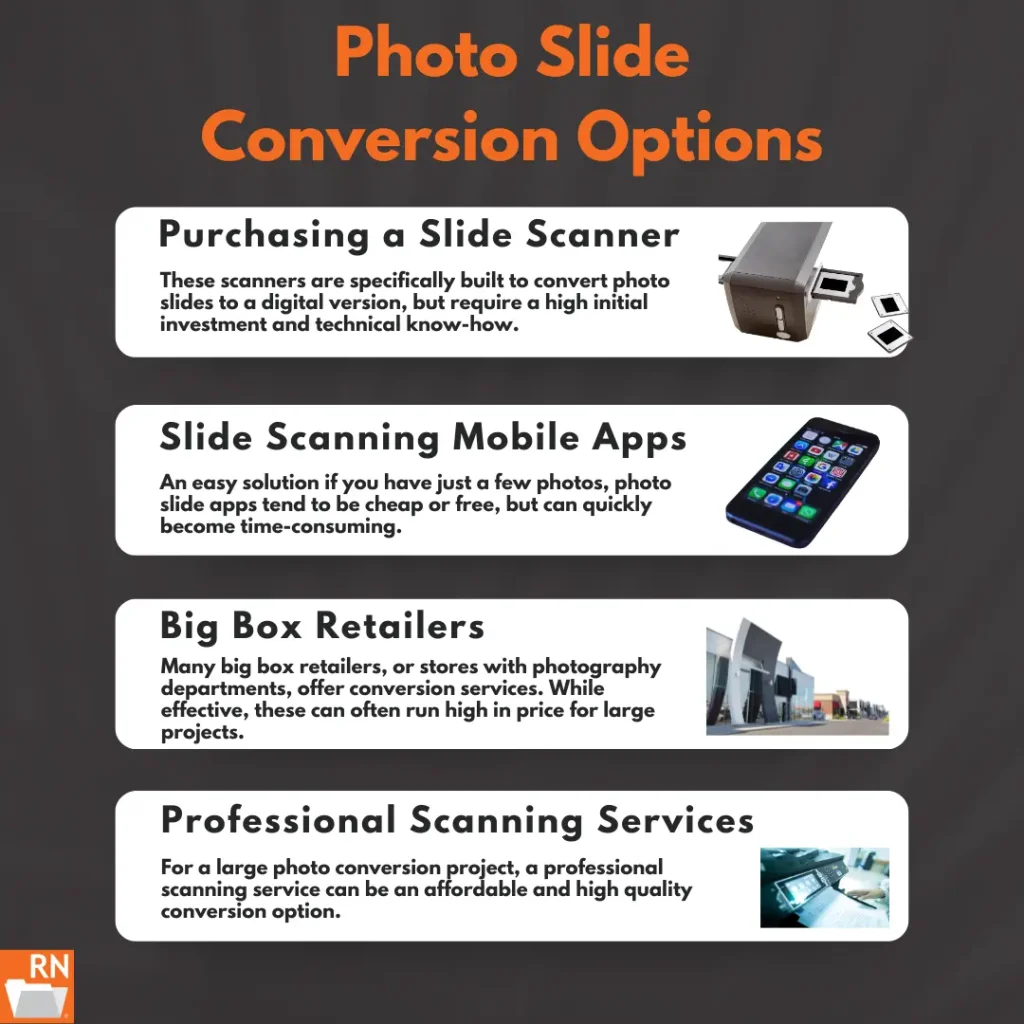
The cost of converting photos to digital images is primarily driven by labor. To keep costs manageable, many consumers utilize a "hybrid" approach. They use a bulk service for the thousands of snapshots of scenery or generic events, while reserving a professional archival service for weddings, portraits, and historically significant documents.
In 2026, most services offer "pre-paid boxes." You pay a flat fee for a box that fits a certain number of items (e.g., 500 or 1,000 photos). This is often more cost-effective than per-item pricing for large archives. However, be wary of "unlimited" claims, as these often involve lower-quality automated scanning that may crop edges or ignore color shifts.
Security, Privacy, and Ethical Considerations
When you send your photos to a service, you are handing over your private history. It is essential to review the privacy policy of the conversion provider. Ensure they do not claim any ownership rights to your images and that they delete their local copies of your files after a set period (usually 30 to 90 days) following your confirmation of receipt.
Furthermore, ensure the service complies with modern data protection standards. If you are digitizing sensitive documents or photos for a business or legal estate, look for services that are SOC 2 compliant or have similar security certifications.
Frequently Asked Questions
What is the best resolution to convert old photos to digital?
For standard prints, 600 DPI is the optimal balance between file size and detail. For 35mm slides or negatives, you should aim for at least 3200 DPI. These resolutions ensure that the digital file captures all the grain and detail present in the original physical medium, allowing for high-quality reprints and viewing on high-definition screens.
Will the scanning process damage my original photos?
Professional services use "cool-lamp" LED scanners and non-destructive handling techniques designed specifically for fragile materials. Unlike old heat-intensive scanners, modern professional equipment will not warp or fade your photos during the scan. However, you should always inform the service if your photos are particularly brittle or suffer from "vinegar syndrome" (chemical decay).
How long does it typically take to get my photos back?
Turnaround times in 2026 vary by service level and volume. Bulk mail-in services typically take 4 to 8 weeks, while premium "white-glove" services may offer 2-week turnaround times. Many providers offer "expedited processing" for a fee if you need the digital images for a specific event, such as a memorial service or anniversary.
Can professional services digitize photos still in albums?
Yes, many services now offer "album scanning" where they digitize the entire page as it appears, as well as individual photos on the page. This preserves the context of your handwritten notes and the original arrangement. This is often more expensive than scanning loose photos because it requires manual flatbed scanning rather than high-speed document feeders.
Should I get my photos back after they are digitized?
Absolutely. You should always choose a service that returns your original physical items. A digital file can be corrupted, deleted, or lost in a cloud provider's outage. Your physical photos, if stored in a cool, dry, and dark environment, serve as the ultimate "analog backup" for your family's history.
Recommendations for Moving Forward
If you are ready to preserve your collection, begin by sorting your photos into three categories: "Essential/High-Quality," "General Memories," and "Discard." Focus your budget on the "Essential" category first, opting for a service that provides TIFF files and manual restoration. For large volumes of "General Memories," a reputable bulk mail-in service using 600 DPI JPEG standards is usually sufficient. Before shipping your entire collection, consider sending a small "test batch" of 20-30 photos to verify that the service's quality and color accuracy meet your expectations.
Image Gallery