Evaluating the Best Paid Android Antivirus Solutions from 2019
The best paid Android antivirus solutions of 2019 provided essential mobile security by shifting beyond simple malware scanning to include robust anti-theft, web protection, and privacy-focused features. Market leaders like Bitdefender...
The best paid Android antivirus solutions of 2019 provided essential mobile security by shifting beyond simple malware scanning to include robust anti-theft, web protection, and privacy-focused features. Market leaders like Bitdefender, Kaspersky, and Norton defined this era by integrating real-time protection with minimal battery consumption, offering a comprehensive shield against the sophisticated mobile threats prevalent during that year.
Contents
The Landscape of Android Security in 2019
In 2019, the Android ecosystem faced a diverse array of security challenges. As users increasingly relied on mobile devices for banking, shopping, and managing sensitive personal data, cybercriminals pivoted toward more complex attack vectors. Beyond traditional malware, the primary threats included aggressive adware, sophisticated phishing campaigns masquerading as legitimate apps, and spyware capable of harvesting location data and contact lists.
For consumers, the "best" antivirus was no longer just about the detection rate of virus signatures. Instead, the value shifted toward proactive security layers. Paid subscriptions from 2019 became synonymous with features that offered peace of mind, such as "App Lock" functionality, Wi-Fi security scanners that checked for encryption weaknesses in public hotspots, and remote tracking features that could locate, lock, or wipe a device in the event of theft.
Evaluating Performance and Security Metrics
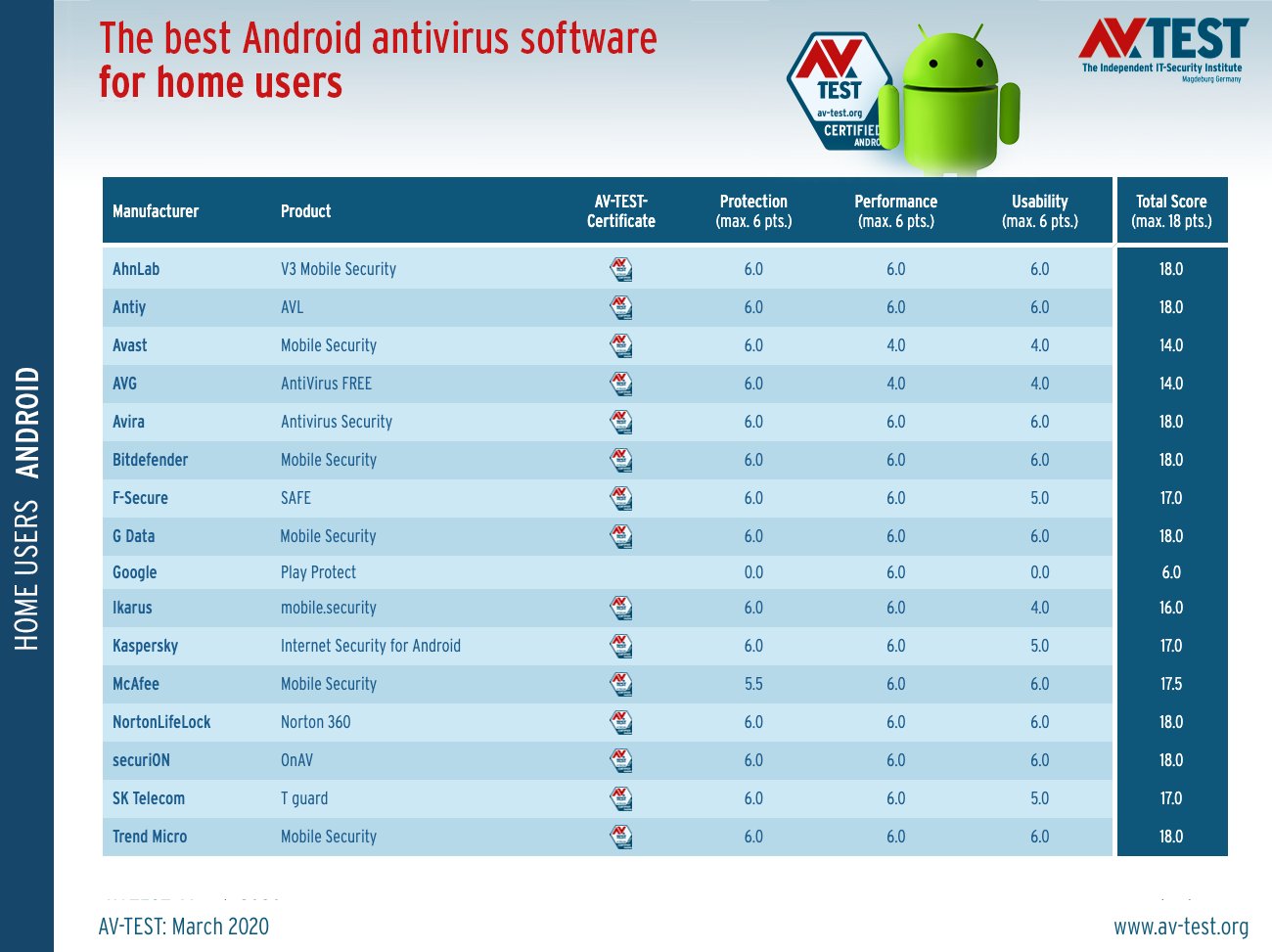
When reviewing the performance of paid antivirus software from 2019, security analysts typically focused on two main pillars: protection efficacy and system performance. The best products managed to achieve near-perfect detection rates in independent lab tests—such as those conducted by AV-TEST—without significantly impacting the device’s processing speed or battery life.
Key Security Components
- Real-time Protection: The engine that scans new apps during installation and blocks malicious websites before a user can navigate to them.
- Anti-Theft Suites: These tools were critical in 2019, allowing users to remotely lock their smartphones, sound an alarm, or wipe data if the phone was physically compromised.
- Privacy Advisers: Tools that audited installed applications to determine which ones had excessive permissions, such as access to the camera, microphone, or SMS, often identifying "grayware" that leaked personal data.
- Web Shielding: Protection against malicious URLs, which were frequently distributed via SMS (smishing) or social engineering tactics.
Comparing Top-Tier Paid Antivirus Solutions
In 2019, several vendors stood out for their consistent performance. While many companies offered free versions, the paid iterations typically unlocked features such as automated background scans and advanced web protection that were vital for high-risk users.
| Security Vendor | Primary Strengths in 2019 | Performance Impact |
|---|---|---|
| Bitdefender | Exceptional malware detection; low battery impact. | Minimal |
| Kaspersky | Advanced web filtering; strong anti-theft controls. | Moderate |
| Norton | Comprehensive identity protection; App Advisor features. | Moderate |
| Trend Micro | Robust privacy scanning and protection against ransomware. | Low |
| ESET | High customization; detailed reporting for power users. | Minimal |
Prerequisites and Implementation
To effectively deploy a paid antivirus solution in 2019, users needed to consider several prerequisites. First, the device needed to be running a supported version of Android. While many security apps were backward compatible, the most advanced features often required Android 5.0 (Lollipop) or newer.
Installation was generally straightforward, involving a subscription purchase through the vendor’s portal or the Google Play Store. Once installed, the critical step was granting the application "Accessibility" and "Device Administrator" permissions. Without these, the software could not monitor app installations in real-time or perform remote wipe commands. Many users failed to realize that failing to authorize these specific permissions significantly crippled the effectiveness of the security software.
Common Operational Limitations
Even the most reputable software had boundaries. Paid antivirus solutions could not guarantee absolute protection against every zero-day threat—a vulnerability that is unknown to the software vendor at the time of an attack. Furthermore, the effectiveness of remote tracking and wiping tools was inherently dependent on the device maintaining a stable internet connection. If a thief turned off the mobile data or Wi-Fi immediately upon stealing a device, the remote command queue would remain pending until the device reconnected.
Additionally, some users encountered conflicts with battery optimization settings. Android’s aggressive background process management often killed antivirus services to save energy. Ensuring that the antivirus app was added to the "Battery Optimization Exception" list was a recurring requirement for users who wanted consistent, round-the-clock protection.
Addressing Privacy Concerns
A recurring question in 2019 centered on whether a security app that requires high-level permissions could itself be a privacy risk. It is important to note that reputable, established security vendors (like those mentioned in the table above) adhered to strict privacy policies. Unlike "cleaner" or "battery booster" apps that were frequently identified as having malicious intent, established antivirus companies primarily derived value from the subscription fee rather than by harvesting user data. Users were always encouraged to verify the publisher's history and avoid third-party, "cracked" versions of premium software, which were often trojanized and intended to infect the user's device.
Frequently Asked Questions
Did paid antivirus software significantly slow down Android devices in 2019? Generally, no. By 2019, most top-tier providers had optimized their code to run efficiently. Heavy performance degradation usually occurred only on low-end hardware with limited RAM or in cases where multiple security apps were running simultaneously.
Was it necessary to have a paid antivirus on Android if I only downloaded apps from the Google Play Store? While the Google Play Protect service provided a baseline level of security, paid solutions added a depth of protection—such as phishing link filtering and advanced anti-theft—that went beyond what the standard operating system utilities offered. For users who frequently sideloaded applications, a paid, active scanner was considered essential.
Can I still use these 2019 versions of antivirus software in 2026? No. Utilizing legacy versions of security software from 2019 is strongly discouraged. Security definitions and engines require constant updates to combat evolving threats. A security app that has not been updated since 2019 will fail to recognize modern malware and may be incompatible with current Android security architectures.
What happens if I forget my master password for the antivirus app? Most vendors provided a recovery mechanism via the email address associated with the account. If access to the recovery email was lost, many providers required proof of purchase or identity verification through customer support to regain control over the locked device.
Final Recommendation
For those looking back at the 2019 security standard, the primary takeaway is that paid mobile protection required active management, proper permission authorization, and a commitment to keeping the software updated. The most effective users were those who paired premium software with cautious browsing habits and avoided unverified sources. If you are seeking to secure a device today, move beyond legacy options and invest in current-year software suites that offer modern protection against contemporary threats like AI-driven phishing and advanced credential harvesting.
Image Gallery