How SaaS Integration Shapes Business Success
SaaS integration shapes business success by connecting disparate cloud applications into a unified, automated operational ecosystem. By eliminating data silos, synchronizing real-time information across systems, and automating manual w...
SaaS integration shapes business success by connecting disparate cloud applications into a unified, automated operational ecosystem. By eliminating data silos, synchronizing real-time information across systems, and automating manual workflows, integrated SaaS tools lower operational expenses, reduce human error, accelerate customer fulfillment, and provide executives with accurate, actionable insights for data-driven strategic decisions.
Contents
The Strategic Importance of SaaS Integration in Enterprise Architecture
Modern companies rely on dozens—and often hundreds—of specialized Software-as-a-Service (SaaS) applications. A typical enterprise may use Salesforce for customer relationship management (CRM), NetSuite for Enterprise Resource Planning (ERP), Workday for human capital management, and Zendesk for customer support. While specialized cloud tools offer best-in-class functionality for specific departments, using them in isolation creates severe operational friction known as application sprawl.
When SaaS applications operate as disconnected silos, employee productivity drops significantly. Staff members spend hours manually copying data between systems, re-entering invoice information, or reconciling discrepancy-ridden spreadsheets. This manual intervention introduces errors, delays operational output, and distorts executive reporting.
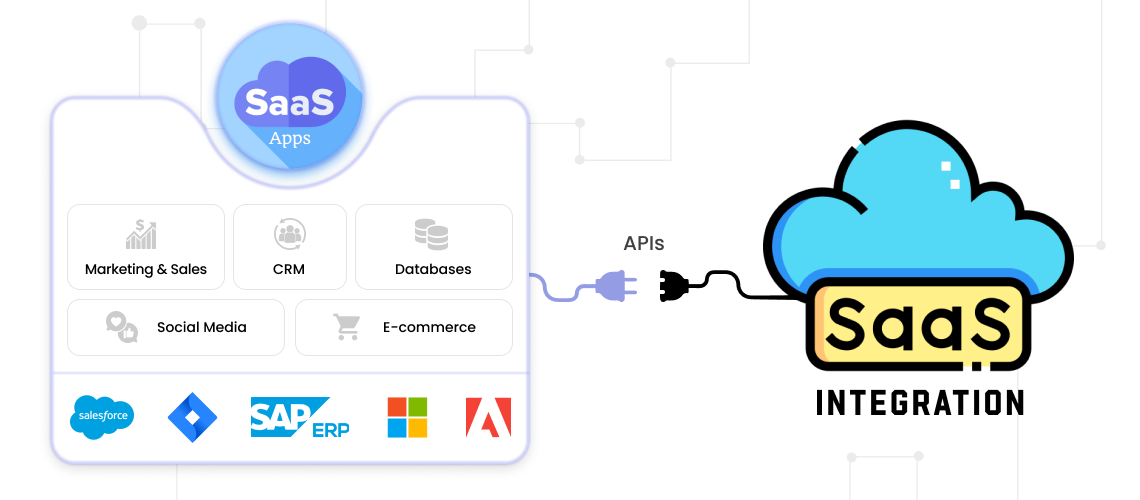
SaaS integration resolves application sprawl by creating reliable, continuous communication channels between distinct cloud applications. Rather than treating each tool as an isolated system, integrated architecture transforms your technology stack into an interconnected framework. Data generated in one department instantly updates across all relevant enterprise applications. This real-time visibility enables organizations to respond rapidly to changing market conditions, streamline customer journeys, and maintain operational agility as business volume expands.
- Disconnected System
- Workflow: CRM to ERP via Manual Entry, then to BI via Spreadsheet export
- Impact:
- High error rates
- Stale data
- Redundant overhead
- Integration Architecture
- Workflow: CRM and ERP synchronized via iPaaS / Webhook Automated Sync, feeding into Unified BI / Analytics
- Impact:
- Zero manual re-entry
- Real-time metrics
- Instant alignment
Primary Methodologies for Integrating SaaS Applications
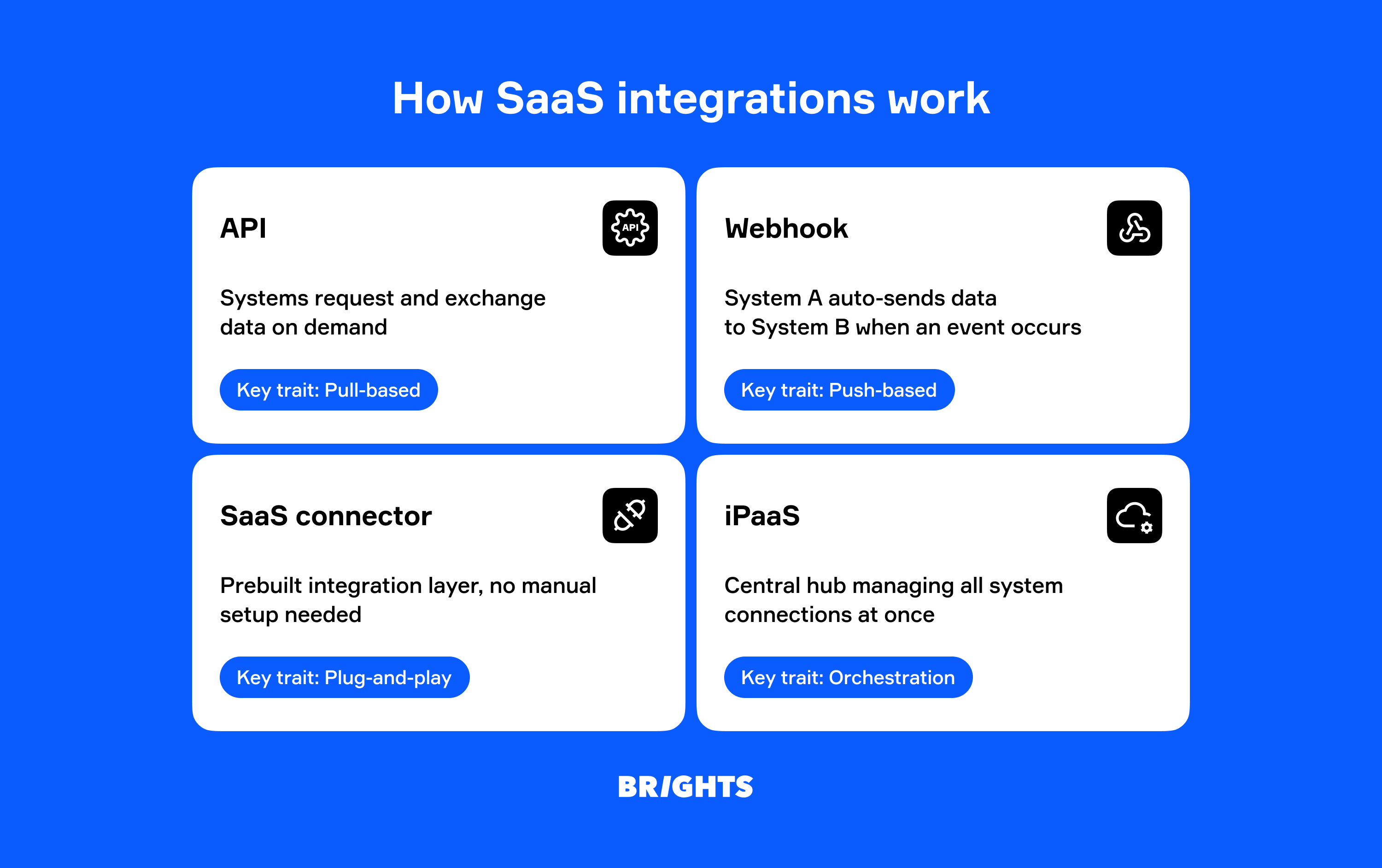
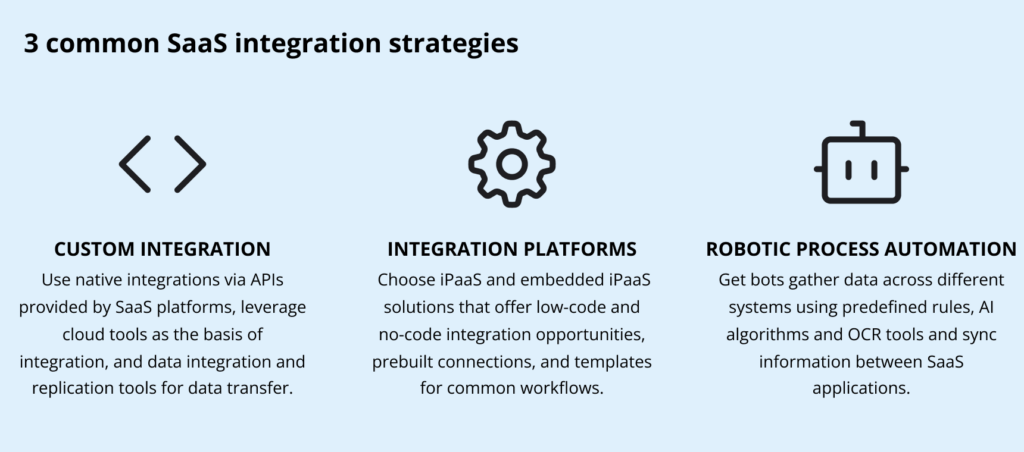
Connecting cloud tools requires selecting an architectural approach tailored to your company's technical resources, security standards, and operational complexity. Organizations typically rely on four main SaaS integration methodologies.
1. Integration Platform as a Service (iPaaS)
iPaaS solutions provide cloud-managed platforms designed to build, execute, and govern integration flows between disparate systems. Vendors like MuleSoft, Workato, and Boomi offer pre-built connectors, low-code workflow builders, and centralized governance features. iPaaS is ideal for mid-sized to enterprise-level organizations that need to orchestrate complex multi-step workflows across legacy systems and modern SaaS tools without building custom infrastructure from scratch.
2. Native (Out-of-the-Box) Integrations
Many SaaS vendors build direct, pre-packaged integrations with major software platforms. For instance, a marketing automation tool might offer an out-of-the-box sync with HubSpot or Salesforce. Native integrations are cost-effective, quick to configure, and require minimal technical expertise. However, they are often rigid, offering limited customization for non-standard fields or enterprise-specific rules.
3. Custom API Development
When off-the-shelf connectors fail to satisfy unique business logic, engineering teams build custom integrations directly against application programming interfaces (APIs). Using standard protocols like REST or GraphQL, developers create tailored pipelines for data exchange. While custom API connections offer total flexibility and optimization control, they demand substantial software engineering expertise and continuous maintenance to handle API version changes and infrastructure updates.
4. Event-Driven Webhooks and Microservices
For applications requiring immediate, event-triggered updates, webhooks push data to listening servers the moment a specific event occurs—such as a completed transaction or updated record. Combined with microservice architectures, event-driven integrations ensure minimal latency, low bandwidth consumption, and high scalability across high-volume digital platforms.
Key Ways SaaS Integration Shapes Business Success
Eliminating Data Silos and Improving Accuracy
Data silos undermine organizational efficiency by creating competing versions of operational metrics. When financial teams view different customer billing histories than the account management team, operational missteps follow. SaaS integration establishes a single source of truth across the enterprise. Master Data Management (MDM) principles integrated into automated sync flows ensure that master records—such as customer contact details, inventory counts, and financial contracts—remain identical across every platform.
Automating End-to-End Workflows
Integrated systems automate routine business processes, transferring tasks between systems automatically based on business rules.
- Quote-to-Cash Automation: A sales representative closes a deal in the CRM system. The integration engine automatically creates the customer account in the ERP, generates an invoice in the accounting tool, notifies the customer success manager via Slack, and provisions platform licenses for the client.
- Employee Onboarding: HR enters a new hire's details into Workday. The integration system automatically creates their Google Workspace email account, provisions software entitlements in Okta, orders hardware through IT service desk tools, and enrolls them in payroll platforms.
Automating these workflows eliminates administrative friction, allowing teams to dedicate their time to strategic, revenue-generating tasks.
Driving Financial Efficiency and Scalability
Scaling operations manually requires hiring additional administrative personnel proportionally as business volume grows. Integrated SaaS architectures enable non-linear growth: transaction volumes can double or triple while operating expenses remain stable. Automated data flows handle increased loads without extra headcount, directly driving margin expansion.
Furthermore, SaaS integration improves software spend efficiency. According to technical standards established by organizations like the National Institute of Standards and Technology (NIST), systematic access controls and centralized management reduce security overhead and redundant resource allocation. Integrated SSO (Single Sign-On) and identity management platforms make it easy to audit unused SaaS licenses, identifying unnecessary software expenditures.
Enhancing Customer Experience and Retention
Modern business clients expect fast, personalized interactions. When customer service platforms integrate with financial systems, product analytics, and communications infrastructure, support agents gain immediate access to full account histories. Agents can resolve tickets faster without forcing customers to repeat basic information.
In B2B environments, automated usage tracking triggers proactive retention alerts. If a client's application activity drops below target thresholds, the integration engine alerts the account team to intervene before account churn occurs.
Comparing SaaS Integration Strategies
Selecting the right integration pattern requires balancing flexibility, deployment speed, maintenance demands, and overall cost.
| Strategy | Technical Complexity | Time to Deployment | Initial Cost | Ongoing Maintenance | Ideal Use Case |
|---|---|---|---|---|---|
| Native / Turnkey | Low (No-code) | Hours to Days | Low / Included | Low (Managed by vendor) | Standard data syncs between popular cloud applications. |
| iPaaS Platform | Medium (Low-code/Pro-code) | Weeks | Medium to High | Low to Medium | Mid-market and enterprise cross-departmental automation. |
| Custom API | High (Engineering team) | Weeks to Months | High | High (In-house responsibility) | Proprietary software systems and unique enterprise business logic. |
| Webhook / Event-Driven | Medium to High | Days to Weeks | Medium | Medium | Real-time notifications and event-triggered automated flows. |
Strategic Roadmap: Implementing SaaS Integrations
To ensure integration initiatives deliver measurable return on investment, organizations must follow a structured implementation methodology.
- Phase 1: Architecture Audit & Data Mapping
- Catalog software assets, assess API endpoints, define master data sources.
- Phase 2: Integration Strategy & Platform Selection
- Determine iPaaS vs. Native vs. Custom API approach based on security and scale.
- Phase 3: Security & Governance Configuration
- Enforce OAuth 2.0, enterprise encryption standards, and strict role access.
- Phase 4: Staging Development & Sandbox Testing
- Execute edge-case testing, data validation runs, and load testing.
- Phase 5: Deployment, Monitoring & Governance
- Establish automated error logging, rate-limit tracking, and API monitoring.
Step 1: Inventory Enterprise Applications and Map Data Pipelines
Catalog every software application across business units. Identify data flows, master data repositories, and application dependencies. Map data schema fields explicitly to resolve naming differences between platforms (for example, mapping "Client_Name" in a CRM to "Customer_Org" in an ERP).
Step 2: Establish Governance, Security, and Compliance Controls
Integrations open communication channels across internal systems, requiring strict data protection protocols.
- Authentication Standards: Use secure identity standards like OAuth 2.0 for API requests instead of hardcoded API keys.
- Encryption Protocols: Mandate TLS 1.3 encryption for data in transit and AES-256 for resting data log stores.
- Regulatory Compliance: Verify that cross-system data transfer mechanisms comply with regional regulations like GDPR and CCPA, as well as industry standards such as HIPAA or PCI-DSS.
Step 3: Build in Staging Environments and Test Edge Cases
Develop integration flows inside isolated sandbox environments. Perform comprehensive validation testing to ensure payload schemas process correctly. Include edge-case testing for unexpected data formats, missing fields, network timeouts, and application rate limits.
Step 4: Deploy with Automated Logging and Observability
Once deployed to production environments, configure centralized logging and real-time monitoring tools. Instrument error notifications to alert IT operations teams immediately when sync failures occur. Use automated retry strategies with exponential backoff algorithms to recover smoothly from temporary network outages.
Mitigating Common SaaS Integration Pitfalls
Despite clear strategic advantages, SaaS integration projects can encounter technical obstacles if planned improperly.
Managing API Version Deprecation
SaaS providers frequently update their REST and GraphQL APIs. When a provider deprecates an API version, legacy integration flows can break without warning.
- Mitigation Strategy: Establish an API lifecycle management process. Monitor vendor developer roadmaps closely and choose iPaaS vendors that automatically handle version updates.
Preventing API Rate Limiting and Performance Throttling
Cloud application vendors enforce strict API rate limits to prevent system overloads. High-volume integrations that poll endpoints constantly risk reaching these limits, causing sync failures across critical business systems.
- Mitigation Strategy: Use event-driven webhooks instead of continuous polling. Implement message queuing systems (such as Apache Kafka or RabbitMQ) to smooth out data spikes and throttle outgoing requests within vendor limits.
Data Pollution and Circular Sync Loops
Poorly constructed bi-directional sync rules can create infinite loops where System A updates System B, which then triggers System B to update System A continuously. This wastes API quotas and corrupts data records.
- Mitigation Strategy: Establish clear Master Data Management guidelines. Define one application as the authoritative source of truth for each specific data field, and use state flags to prevent recursive updates.
Frequently Asked Questions
What is the primary difference between native integration and iPaaS?
Native integration is a direct, pre-built connection developed by software vendors to link two specific applications with minimal setup. iPaaS (Integration Platform as a Service) is a enterprise cloud engine that lets organizations connect, automate, and govern custom data workflows across hundreds of disparate applications within one platform.
How does SaaS integration improve cybersecurity compliance?
Integrated SaaS architectures centralize data access management using single sign-on (SSO) and unified access rules. This reduces credential exposure, prevents unauthorized shadow IT usage, ensures consistent encryption across applications, and creates detailed audit trails for regulatory compliance reviews.
What causes SaaS integration projects to fail?
Integration projects typically fail due to poor initial data mapping, lack of clear master data ownership, inadequate error-handling rules, and ignoring API rate limits. Failing to account for long-term API maintenance and vendor updates can also lead to integration failures over time.
How do custom API integrations compare to low-code iPaaS solutions in overall cost?
While custom API integrations avoid platform subscription fees, they carry high initial development costs and require ongoing engineering resources to maintain. Low-code iPaaS solutions require recurring subscription fees, but significantly reduce time-to-market, maintenance overhead, and operational costs.
What is bi-directional data synchronization?
Bi-directional data synchronization is an integration pattern where changes made in one application automatically update in another system, and vice versa. This keeps data synchronized across platforms in real time, but requires careful configuration to avoid circular sync loops and conflicting records.
Actionable Next Steps for Technology Leaders
Building an integrated, scalable cloud technology ecosystem requires careful planning and systematic execution.
- Conduct an Application Audit: Map your company's complete software inventory. Identify disconnected systems, manual data transfer tasks, and high-frequency data entry errors across departments.
- Standardize Master Data Rules: Clearly define which platform acts as the authoritative source of truth for key records, including customer accounts, product catalogs, and invoice records.
- Evaluate Integration Options: Compare out-of-the-box connectors, iPaaS platforms, and custom engineering based on your data volume, security guidelines, and available technical resources.
- Deploy Monitoring and Governance Tools: Build error-logging pipelines, continuous API health checks, and role-based access rules into every integration to maintain system reliability, security, and performance.
Image Gallery