Time Warner VoIP Overview: Legacy TWC Voice, Spectrum Migration, and Technical Specifications
Time Warner VoIP—originally marketed as Time Warner Cable (TWC) Digital Phone and currently operating under Charter Communications' Spectrum Voice brand—delivers digital voice telephony over a managed coaxial/fiber broadband network. U...
Time Warner VoIP—originally marketed as Time Warner Cable (TWC) Digital Phone and currently operating under Charter Communications' Spectrum Voice brand—delivers digital voice telephony over a managed coaxial/fiber broadband network. Unlike unmanaged over-the-top (OTT) voice services, this Voice over Internet Protocol system utilizes dedicated private IP bandwidth to ensure crystal-clear call quality, reliable E911 emergency location mapping, and seamless integration with existing telephone equipment.
Contents
Understanding Time Warner VoIP: Architecture and Managed IP Delivery
Voice over Internet Protocol (VoIP) converts traditional analog voice signals into digital data packets for transmission over IP networks. While standard consumer VoIP applications route voice data across the public internet, the legacy Time Warner Cable VoIP architecture—and its modern continuation, Spectrum Voice—operates on a managed IP network.
- Standard Phone / PBX
- RJ-11 / PRI
- eMTA / Voice Modem
- DOCSIS Protocol
- Coaxial / Fiber Hybrid Network
- Private PacketCable Core
- Public Switched Telephone Network (PSTN)
PacketCable Standards and DOCSIS Layering
The service relies heavily on PacketCable standards, an initiative led by CableLabs to define interoperability guidelines for IP multimedia services over cable plant infrastructure. The system leverages Data Over Cable Service Interface Specification (DOCSIS) protocols to prioritize voice traffic at the physical and transport layers:
- Quality of Service (QoS): When a call is placed, the Embedded Multimedia Terminal Adapter (eMTA) signals the Cable Modem Termination System (CMTS) at the local headend. The CMTS dynamically reserves a dedicated, high-priority bandwidth slice exclusively for voice data.
- Latency and Jitter Control: By reserving channel capacity through packet classification and scheduling, voice packets bypass general web browsing and video streaming traffic. This design holds network latency under 150 milliseconds and minimizes packet loss, preventing audio choppy noise, dropped calls, or echo.
- CODEC Utilization: The system primarily uses the G.711 audio codec (offering uncompressed 64 kbps pulse-code modulation per channel) for maximum voice fidelity and full compatibility with legacy fax machines and security systems. For bandwidth optimization in select trunking environments, the compressed G.729 codec may be deployed.
Managed IP vs. Unmanaged Over-the-Top (OTT) VoIP
Understanding the distinction between managed cable VoIP and unmanaged third-party providers (such as Vonage, Ooma, or Skype) is critical for evaluating operational reliability:
- Bandwidth Reservation: OTT services share identical priority with routine downloads, making call quality vulnerable to local network congestion. Time Warner/Spectrum VoIP reserves a private virtual circuit isolated from public internet consumption.
- Emergency Service Accuracy: Managed cable VoIP ties the physical address of the installed modem directly to the public safety answering point (PSAP) database, enabling precise Enhanced 911 (E911) dispatching without relying on self-reported user address updates.
- Fax and Security System Compatibility: Because unmanaged OTT services employ aggressive compression and packetization, analog signaling (such as DTMF tones, credit card terminals, fax machines, and monitored alarm systems) frequently fails. A managed G.711 cable connection maintains signal integrity for analog peripherals.
Evolution of the Service: From Time Warner Cable to Spectrum
In May 2016, Charter Communications completed its acquisition of Time Warner Cable and Bright House Networks, consolidating all residential and commercial telecommunications under the Spectrum brand name.
Legacy TWC Digital Phone vs. Modern Spectrum Voice
Subscribers who originally established service under Time Warner Cable experienced a gradual transition in billing, service tiers, and customer premises equipment (CPE):
- Residential Legacy Plans: TWC Digital Phone originally featured tiered calling plans (e.g., Nationwide Unlimited, Local Only, or International Metered). Charter streamlined these tiers into a single unlimited nationwide plan that includes calls to the United States, Canada, Mexico, Puerto Rico, and select US territories.
- Hardware Modernization: Legacy TWC installations relied on older DOCSIS 2.0 or early DOCSIS 3.0 eMTAs with built-in Wi-Fi routers (gateway units). Spectrum replaced these combo devices with standalone DOCSIS 3.1 voice modems paired with separate high-performance Wi-Fi routers to decouple voice signaling from local wireless networking.
- SIP and Business Services: Legacy TWC Business Class offered basic multi-line telephone adapters (MTA) alongside traditional Primary Rate Interface (PRI) trunks for on-premises PBX systems. Spectrum Business Voice expanded these offerings to include fully hosted Cloud PBX solutions, business trunking, and softphone desktop/mobile applications.
Technical Specifications and Hardware Requirements
Operating a Time Warner / Spectrum VoIP service requires specialized hardware designed to translate analog telephony signals into digital PacketCable frames.
Key Equipment & Interface Layer
- Incoming Cable Line (Coaxial)
- DOCSIS 3.1 eMTA Modem (Integrated Battery Backup Slot)
- RJ-11 Port 1/2: Analog Telephones / Punch-down Panel
- RJ-45 Ethernet: Dedicated Wireless Router / Switch
The Embedded Multimedia Terminal Adapter (eMTA)
The core component of any cable VoIP installation is the eMTA modem. Popular manufacturers historically and currently supplied include Arris, Technicolor, Hitron, and Motorola.
- Physical Interfaces: The eMTA features an F-connector coaxial input, one or two RJ-11 telephone jacks (Tel 1 / Tel 2), and an RJ-45 Gigabit Ethernet port for internet routing.
- Backfeeding Home Wiring: Technicians can connect the Tel 1 port directly into an existing interior wall jack, propagating the dial tone across every RJ-11 phone outlet in the home or office. Crucial Requirement: The exterior telephone company drop line at the Network Interface Device (NID) must be physically disconnected from the premises wiring to prevent high-voltage interference or equipment failure.
Emergency Power and Battery Backup Units (BBU)
Because traditional landlines receive minimal direct current power over copper wires directly from the central office, traditional phones function during utility power outages. VoIP modems, however, rely on commercial AC power.
Under Federal Communications Commission (FCC) guidelines, cable providers must offer customers optional backup power solutions for voice modems:
- 8-Hour Standby Batteries: Standard internal lithium-ion or sealed lead-acid battery packs designed to fit directly into the eMTA bay, powering emergency 911 calls during brief outages.
- 24-Hour External Backup Options: Extended battery enclosures or external Uninterruptible Power Supplies (UPS) designed for commercial accounts or residential users with heightened emergency readiness requirements.
Residential and Business Feature Comparison
Whether deployed as legacy TWC Digital Phone or modern Spectrum Voice, the underlying platform provides distinct features tailored to residential users and enterprise commercial accounts.
| Feature / Dimension | Residential Spectrum / TWC Voice | Spectrum Business Voice (SMB) | Spectrum Enterprise SIP / PRI |
|---|---|---|---|
| Primary Target | Single-family homes, apartments | Small-to-medium businesses | Large enterprises, call centers |
| Underlying Protocol | PacketCable / DOCSIS | PacketCable or SIP Trunking | Native SIP / ISDN PRI |
| Max Lines Supported | 1–2 Lines per eMTA | 1–8 Lines (Analog/eMTA) | 6 to 300+ Concurrent Channels |
| PBX Integration | Not Supported | Optional Hosted Cloud PBX | Direct On-Premises PBX Integration |
| Included Calling | Unlimited US, CA, MX, PR | Unlimited Nationwide Calling | Customized Minute / Channel Pooling |
| Core Calling Features | Caller ID, Call Waiting, Forwarding | Auto-Attendant, Hunt Groups, Ring Groups | DID Management, Bursting Channels |
| Emergency Backup | Optional 8/24-Hr Battery Backup | Optional Commercial UPS | Redundant Trunk Routing & UPS |
Advanced Business Features
For enterprise environments migrating from legacy TWC Business Class Phone:
- Hosted Call Center & Auto-Attendant: Automated multi-tier IVR (Interactive Voice Response) menus route incoming customer calls without requiring a receptionist.
- Sequential and Simultaneous Ringing: Incoming lines can be configured to ring multiple extension desk phones simultaneously or sequentially across remote offices.
- Readable Voicemail: Audio messages are automatically transcribed into text and emailed directly to designated staff members as MP3 or WAV attachments.
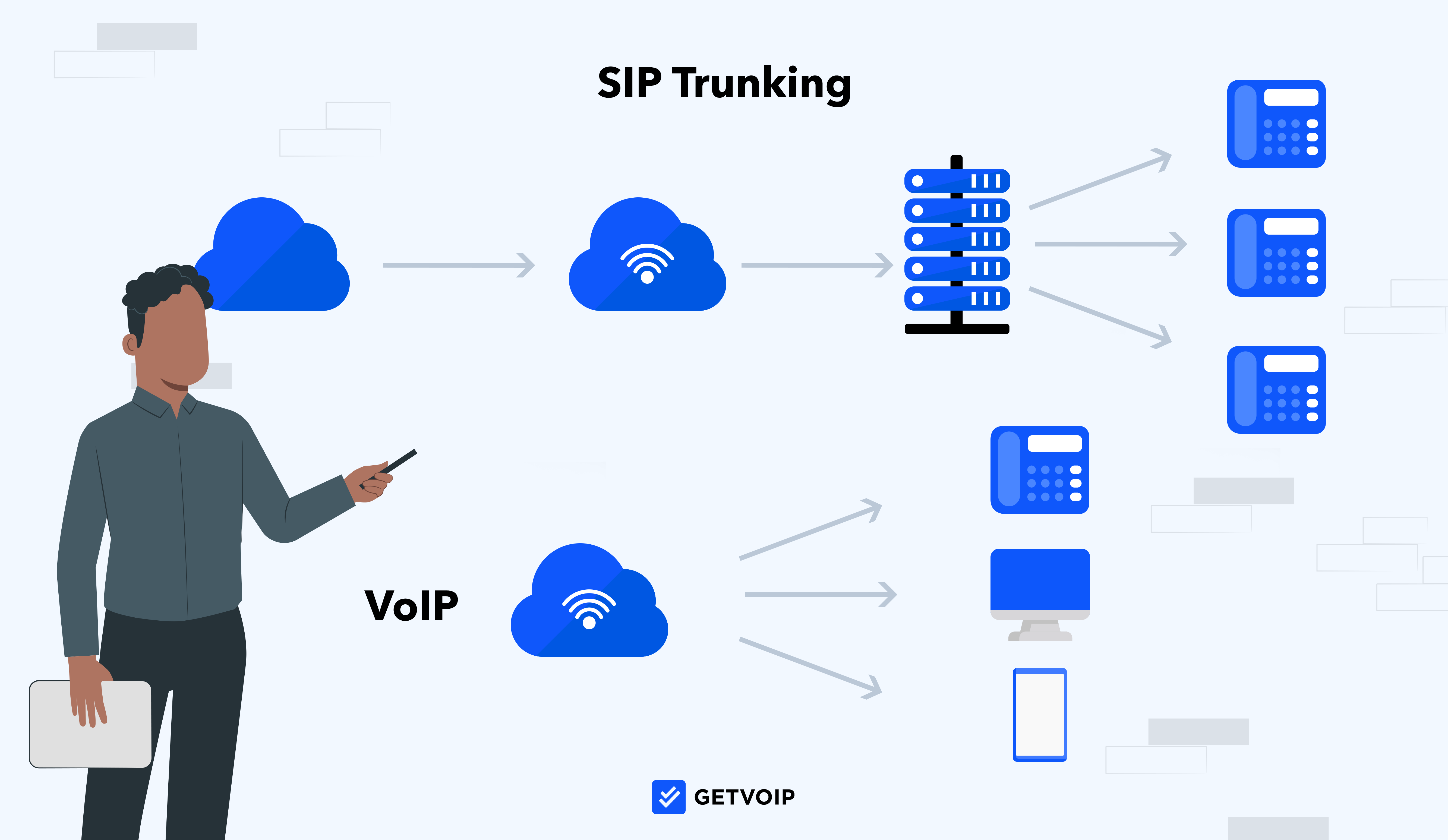
- SIP Trunking Direct Connectivity: Allows an enterprise to link an existing IP-PBX (such as Asterisk, Cisco Unified Communications Manager, or Avaya) directly to the cable network over an IP handoff, maintaining internal extension dials while cutting external PSTN transport costs.
Step-by-Step Installation and Activation Guide
Setting up or replacing a Time Warner / Spectrum VoIP modem involves specific physical connections and network provisioning steps to register the device MAC address with the headend switches.
Step 1: Disconnect External Telephony Drops
If backfeeding the voice signal into existing premises wall jacks, verify that the legacy telephone company (ILEC) copper wire at the outside Network Interface Device (NID) panel is completely disconnected. Leaving this live loop connected can destroy the eMTA or create high levels of line noise.
Step 2: Establish Cable and Power Connections
- Connect a high-grade RG6 coaxial cable from the cable wall outlet directly to the CABLE input on the eMTA modem. Avoid unrated coax splitters, which degrade signal levels below the required operational threshold (-7 to +7 dBmV).
- Insert the AC power adapter into the modem and plug it into a surge protector or UPS unit.
- Wait 5–10 minutes for the modem front panel lights to stabilize. The ONLINE indicator must display a solid green or blue light, confirming DOCSIS sync.
Step 3: Connect Analog Telephones
- Plug a standard RJ-11 telephone cord from the primary base station or wall jack into the TEL 1 port on the rear of the eMTA.
- If the line has been provisioned, the TEL 1 LED light on the front panel will illuminate solid.
- Pick up the handset; you should hear a clear, standard continuous dial tone.
Step 4: Device Activation and Provisioning
If replacing hardware or installing self-service equipment, the eMTA's embedded MTA MAC address must be bound to your account profile.
- Access the online activation portal via a connected web browser or contact customer support.
- Provide the MTA MAC Address (distinct from the Cable Modem MAC address, typically listed on a sticker on the bottom or back of the unit).
- The system pushes an updated configuration file to the modem, triggering an automated reboot cycle before full voice service becomes active.
Troubleshooting Common VoIP Performance Issues
Although managed cable networks provide high voice stability, local hardware failures, wiring faults, or network degradation can impact performance.
VoIP Troubleshooting Matrix
| Symptom | Possible Cause | Recommended Action |
|---|---|---|
| No Dial Tone | 1. Unprovisioned MAC2. Loose RJ-11 cable3. Unhooked handset | 1. Verify TEL 1 LED status2. Check wall jack wiring3. Reboot eMTA modem |
| Static / Line Noise | 1. Coax signal degradation2. NID loop not isolate3. Bad telephone handset | 1. Check RF signal power2. Disconnect ILEC drop3. Test direct at TEL 1 |
| One-Way Audio | 1. Corrupted SIP state2. Incorrect NAT settings on custom router | 1. Power-cycle gateway2. Disable SIP ALG on third-party router |
| Dropped / Choppy Calls | 1. High packet loss/jitter2. Headend RF noise | 1. Inspect splitters/coax2. Contact tech support |
Resolving One-Way Audio and NAT Issues
One-way audio—where one caller can hear the other, but speech isn't returned—frequently stems from Session Initiation Protocol (SIP) routing errors or firewalls on user-owned routers connected behind the eMTA.
- SIP ALG Interference: Many consumer Wi-Fi routers include a feature called SIP Application Layer Gateway (SIP ALG) enabled by default. While designed to assist voice traffic, it frequently alters IP packet headers incorrectly. Access your third-party router’s administrative settings and toggle SIP ALG to Disabled.
- Double NAT Configuration: If running an enterprise IP-PBX or third-party VoIP adapter behind a Spectrum modem that also acts as a router, assign a true passthrough public IP address to the voice gateway or place the secondary router into Bridge Mode.
Eliminating Static, Echo, and Packet Loss
Unlike standard internet browsing, voice traffic is highly sensitive to network degradation. Packet loss above 1% or jitter exceeding 30ms results in severe robotic distortion or dropped syllables.
- Test at the Demarcation Point: Unplug all internal house wiring and plug a single, non-cordless analog telephone directly into the TEL 1 port on the back of the modem. If dial tone and call quality are perfectly clear, the issue resides within the building's interior copper wiring or damaged wall jacks.
- Inspect RF Coaxial Signal Levels: Access the modem diagnostic page (often at
192.168.100.1or192.168.0.1in a browser) to inspect downstream and upstream signal metrics. Ensure downstream power levels rest between -7 dBmV and +7 dBmV, and upstream power levels remain under 51 dBmV. Values outside these parameters indicate degraded coaxial connections, bad splitters, or line noise requiring a service technician visit.
Service Surcharges, Fees, and Regulatory Compliance
When reviewing monthly statements for legacy Time Warner or current Spectrum VoIP accounts, total costs include base line fees alongside mandated government surcharges.
- E911 Service Fee: A state- and county-mandated surcharge levied directly on local voice connections to fund emergency 911 dispatch infrastructure and call centers.
- Telecommunications Relay Service (TRS) Fund: A federal contribution used to support nationwide telecommunications facilities for hearing- and speech-impaired individuals under the Americans with Disabilities Act (ADA).
- Federal Universal Service Fund (USF): A charge assessed on telecommunication providers offering interstate voice services, used to subsidize rural and low-income telecommunication access.
- Kari’s Law and RAY BAUM’S Act Compliance: Enterprise VoIP deployments (including Spectrum Business Voice and Hosted PBX) must adhere to strict federal safety mandates:
- Kari's Law: Mandates that multi-line telephone systems (MLTS) allow users to dial
911directly without first dialing a prefix (such as9or8) to reach an outside line. It also requires automated notifications to an on-site office monitor or security desk. - RAY BAUM'S Act: Dictates that every 911 call transmitted must transmit a detailed "dispatchable location" to the PSAP, specifying the street address, building floor, suite number, or room identifier.
- Kari's Law: Mandates that multi-line telephone systems (MLTS) allow users to dial
Practical Recommendations for Legacy and Current Users
To ensure optimal performance, hardware longevity, and emergency readiness with Time Warner / Spectrum VoIP services, consider the following technical action items:
- Audit Legacy Equipment: If still utilizing a legacy Time Warner Cable eMTA modem (such as an older DOCSIS 2.0 or 3.0 Arris unit), request a free swap at a local Spectrum store for a modern DOCSIS 3.1 MTA. Upgrading ensures full compatibility with ongoing network plant upgrades and higher signal reliability.
- Install Battery Protection: Verify your voice modem is connected to a dedicated battery backup unit. For critical business lines or residential accounts in storm-prone regions, install an external 1500VA Uninterruptible Power Supply (UPS) to guarantee extended telephone operation during power grid outages.
- Isolate Custom Networks: If using a high-end mesh router or corporate firewall behind the provider modem, turn off SIP ALG on the router and ensure the eMTA is configured solely as a passthrough device to eliminate voice packet corruption.
- Keep E911 Records Updated: If moving your modem to a new physical address or relocating a business office, notify customer service immediately. Because managed VoIP relies on system database location mapping rather than GPS, failing to update your service address can delay emergency first responders.
Image Gallery