Mastering Regex Replace in Alteryx for Data Cleaning and Transformation
The Regex Replace function in Alteryx allows users to perform advanced string manipulation by searching for specific patterns and replacing them with a designated target string. By utilizing the Regex tool or the Regex_Replace() functi...
The Regex Replace function in Alteryx allows users to perform advanced string manipulation by searching for specific patterns and replacing them with a designated target string. By utilizing the Regex tool or the Regex_Replace() function within a Formula tool, analysts can standardize formats, extract specific data segments, or remove unwanted characters across large datasets efficiently.
Contents
Understanding the Role of Regular Expressions in Alteryx
Regular Expressions, or Regex, provide a powerful syntax for pattern matching within text data. In Alteryx, this capability is not just an optional enhancement; it is a fundamental requirement for cleaning messy, unstructured, or semi-structured data. Unlike simple Find and Replace tools that look for static character sequences, Regex looks for logic—such as "any five-digit number," "an email address format," or "any character following a specific delimiter."
When you use Regex Replace, you are essentially telling the Alteryx engine to scan a field, identify every instance where the data matches a defined pattern, and substitute that match with a new value. This is critical for data normalization in enterprise workflows, where variations in user input (e.g., "St.", "Street", "Str") must be reconciled into a single, unified format before downstream analysis.
Accessing Regex Functionality
Alteryx provides two primary ways to utilize Regex Replace, each suited to different stages of a workflow:
1. The Regex Tool
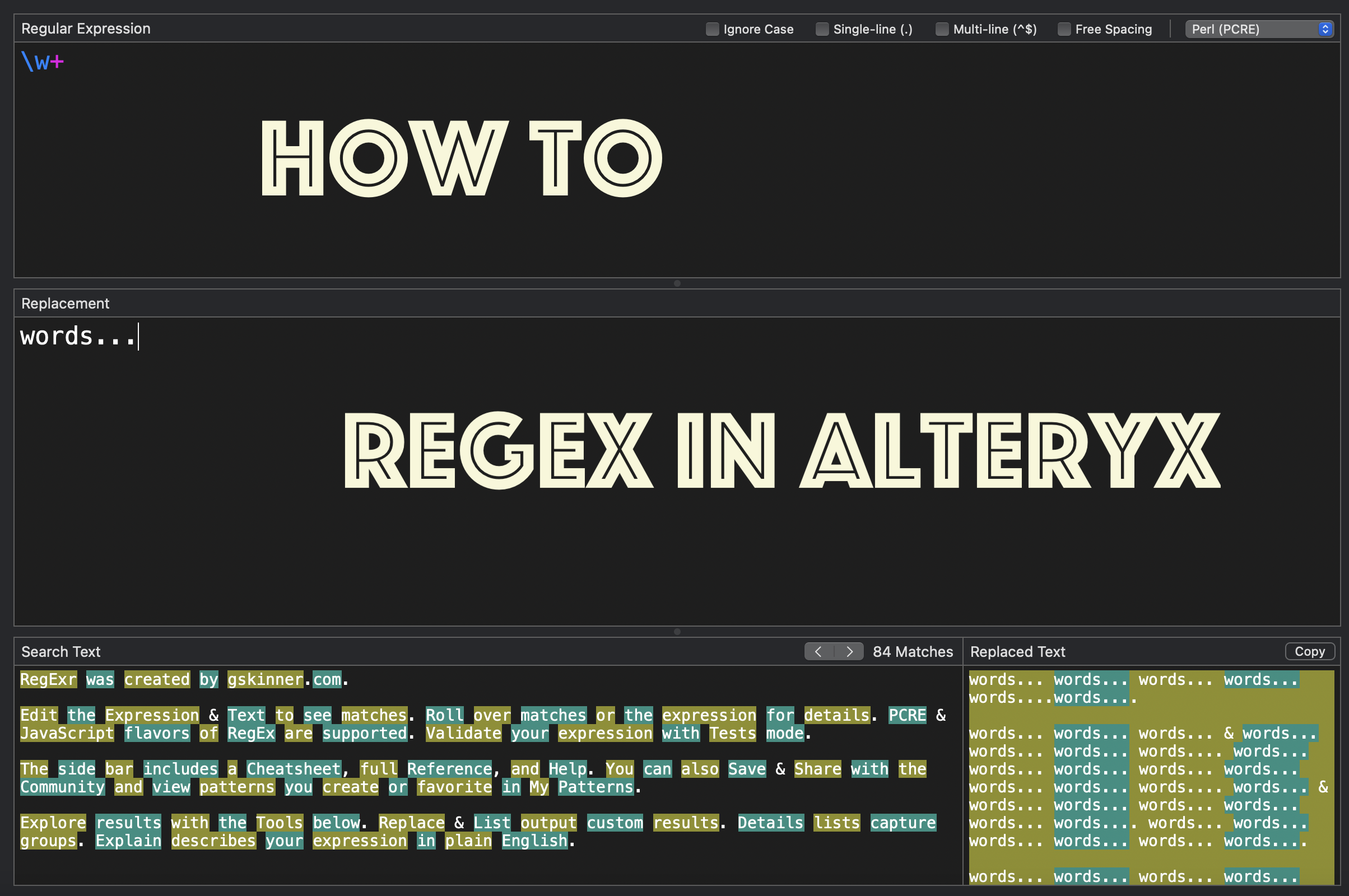
Located in the Parse tool palette, the Regex tool is designed for visual, configuration-based data processing. When you choose the "Replace" method within this tool, you provide the Regular Expression pattern in the "Regular Expression" window and the replacement text in the "Replacement text" window. This is ideal for bulk operations on a single column where you want to keep the process visible in the workflow canvas.
2. The Formula Tool
For more complex transformations, such as conditional logic where the replacement value depends on other columns, the REGEX_REPLACE function is used within the Formula tool. The syntax follows this structure:
REGEX_REPLACE([Field], "Pattern", "Replacement")
This approach is highly efficient for multi-column transformations or scenarios where you are incorporating data from other fields into your replacement string.
Core Concepts for Building Patterns
To use Regex Replace effectively, you must understand the basic building blocks of pattern construction. Alteryx utilizes the PCRE (Perl Compatible Regular Expressions) engine, which is the industry standard for depth and flexibility.
- Anchors: Symbols like
^(start of string) and$(end of string) define where the match must occur. - Quantifiers: Symbols like
*(zero or more),+(one or more), and{n}(exactly n times) allow you to specify the frequency of the preceding character or group. - Character Classes: Using
\drepresents any digit,\wrepresents any word character, and\srepresents any whitespace. Brackets like[A-Z]allow you to define custom ranges of characters. - Groups: Parentheses
()allow you to group parts of a pattern. This is particularly useful in Regex Replace, as you can refer back to captured groups in your replacement string using$1,$2, and so on.
Comparing Regex Replace Methods
Choosing the right approach depends on the complexity of the transformation and the layout of your workflow.
| Method | Best Use Case | Performance Consideration |
|---|---|---|
| Regex Tool | Single column cleanup, visual auditing | Lower overhead for simple replacements |
| Formula Tool | Conditional logic, multi-field workflows | High flexibility; useful for dynamic strings |
| Data Cleansing Tool | Standardizing case, removing punctuation | Easiest for non-technical users |
Step-by-Step Guide to Executing a Regex Replace
If you are looking to standardize a phone number format, for example, follow these procedural steps:
- Identify the Input: Ensure your data is in a string format. Use the Select tool to change numeric fields to strings if necessary.
- Define the Pattern: If you want to replace everything except digits in a string, your pattern would be
\D. - Set the Replacement: In the replacement field, leave it empty if you are deleting the matched characters, or input a replacement string like a hyphen or comma if you are restructuring.
- Test with a Filter: Before applying the change to the entire dataset, use a Filter tool to view a sample of the data to ensure the regex pattern does not accidentally capture unintended characters.
- Validation: Use the Browse tool to examine the output column. Check for edge cases, such as null values or strings that do not contain the pattern, to ensure the tool handles these gracefully.
Common Pitfalls and Troubleshooting
Even experienced users encounter issues when working with Regex in Alteryx. Common mistakes include:
- Greedy vs. Non-Greedy Matching: By default, quantifiers are "greedy," meaning they try to match as much text as possible. If your replacement is consuming too much of your string, add a
?after the quantifier (e.g.,.*?) to make it non-greedy. - Escaping Special Characters: Characters like
.,*,+, and(have special meanings in Regex. If you are searching for a literal period, you must escape it with a backslash:\.. - Case Sensitivity: Regex patterns are case-sensitive by default. If your data contains inconsistent casing, ensure your pattern accounts for both upper and lower case, or use the
(?i)flag at the beginning of your expression to enable case-insensitive matching.
Advanced Data Transformation Strategies
Beyond simple replacements, Regex Replace in Alteryx allows for powerful data restructuring. For example, if you have a list of full names in "Last, First" format and you need to switch them to "First Last," you can capture the names using groups:
- Pattern:
(\w+), (\w+) - Replacement:
$2 $1
The engine will identify the group before the comma as $1 and the group after as $2, then reorder them instantly. This demonstrates the "Power of Groups" in Regex—an essential skill for any advanced Alteryx user.
Frequently Asked Questions
Why does my Regex Replace not return any changes?
The most common reason is a mismatch between the pattern and the actual data. Ensure there are no hidden leading or trailing spaces. Use the "Trim Whitespace" Data Cleansing tool before running your Regex Replace to ensure consistency.
Can I use Regex Replace to handle null values?
The Regex engine usually skips nulls. If you need to replace nulls with a default value, do so before the Regex tool using the "Imputing Values" feature in the Data Cleansing tool or a standard Formula tool.
Is Regex Replace slower than other Alteryx tools?
Regex is computationally intensive compared to simple functions like Replace(). If you are processing millions of records, prioritize simpler string functions when possible. Reserve Regex for scenarios where the pattern is complex or variable.
How do I debug a complex Regex pattern?
Break the pattern down into smaller, logical chunks. Test each part in a text editor or a Regex testing website before moving it into the Alteryx Regex tool. This confirms the logic works as expected on the raw text.
Can I reference other columns inside a Regex Replace?
Yes, when using the REGEX_REPLACE function within a Formula tool, you can concatenate other columns into your replacement string. For example: REGEX_REPLACE([Field], "Pattern", [OtherField] + "Replacement").
Next Steps for Improving Workflow Performance
To master Regex Replace, practice is essential. Start by creating a small workflow with a Text Input tool containing various string formats. Test your regex patterns against these records and observe how the output changes. As you become more comfortable, integrate Regex into your production workflows to automate the normalization of inconsistent user data. For complex pattern requirements, always document your regex logic in a Comment tool within Alteryx so that other team members can maintain your workflow in the future.
Image Gallery