NOCO Boost Plus GB40 Charge Time Explained: How Long It Takes and Why
The NOCO Boost Plus GB40 takes anywhere from 3 hours to 12 hours to fully charge from complete depletion, depending on the amperage output of your USB power source. When charged using a 2.1-Amp (10-Watt) high-output USB adapter, the de...
The NOCO Boost Plus GB40 takes anywhere from 3 hours to 12 hours to fully charge from complete depletion, depending on the amperage output of your USB power source. When charged using a 2.1-Amp (10-Watt) high-output USB adapter, the device reaches 100% capacity in approximately 3 hours. Using a standard 1.0-Amp wall charger extends charge time to 6 hours, while a low-output 0.5-Amp computer USB port requires roughly 12 hours.
Contents
Understanding NOCO Boost Plus GB40 Charge Times
The NOCO Boost Plus GB40 is powered by an internal 24 Watt-hour (Wh) lithium-ion battery designed to deliver up to 1,000 peak amps for jump-starting dead 12-volt lead-acid batteries. Because the GB40 relies on a Micro-USB input port rated for a maximum charge current of 2.1 Amps at 5 Volts (5V DC), the overall charging duration is directly constrained by the power delivery rating of your wall adapter, car charger, or USB port.
Many vehicle owners assume their GB40 is defective when it takes several hours to recharge, but in reality, the device is limited by standard USB charging technology. Unlike newer power banks that feature USB Power Delivery (USB-PD) fast charging over USB-C, the GB40 utilizes a regulated Micro-USB charging protocol.
The device draws power at a rate determined by the lowest common denominator between the power supply (the USB wall adapter or car port) and its internal battery management system (BMS).
- Power Source: 5V Adapter (0.5A - 2.1A Output)
- Micro-USB Cable (Resistance Loss)
- GB40 BMS Controller (5V / 2.1A Max Input)
- 24Wh Lithium Cells (Internal Battery)
To achieve the fastest possible charge rate, you must connect the GB40 to a power source capable of supplying a continuous 2.1 Amps at 5 Volts (10.5 Watts). If you plug the unit into a basic 5-Watt phone charger (5V, 1A) or an older computer USB 2.0 port (5V, 0.5A), the internal charging circuit will throttle the input current to match the source, dramatically increasing the time required to top off the cells.
NOCO GB40 Charge Time Comparison Table
The table below outlines the expected recharge times for a fully discharged NOCO Boost Plus GB40 across common USB power sources:
| Power Source Type | Output Voltage & Amperage | Wattage Rating | Approximate Charge Time (0% to 100%) | Recommended Use Case |
|---|---|---|---|---|
| High-Output Wall Charger | 5V DC @ 2.1A – 2.4A | 10.5W – 12W | 3 Hours | Optimal / Preferred Fast Charge |
| 12V USB Car Adapter | 5V DC @ 2.1A | 10.5W | 3 Hours | Emergency In-Vehicle Charging |
| Standard Mobile Phone Adapter | 5V DC @ 1.0A | 5.0W | 6 Hours | Overnight / Standard Charging |
| Computer USB 3.0 Port | 5V DC @ 0.9A | 4.5W | 7 Hours | Secondary Desk Option |
| Computer USB 2.0 Port | 5V DC @ 0.5A | 2.5W | 12 Hours | Emergency / Slow Maintenance Only |
| Unpowered USB Hub | 5V DC @ 0.1A – 0.5A | <2.5W | 12+ Hours (May Fail) | Not Recommended |
Note: Charging times are based on an ambient room temperature of 68°F to 77°F (20°C to 25°C). Cold or hot ambient environments will prolong charge cycles due to internal thermal management.
Reading the NOCO GB40 Charge Status LED Indicators
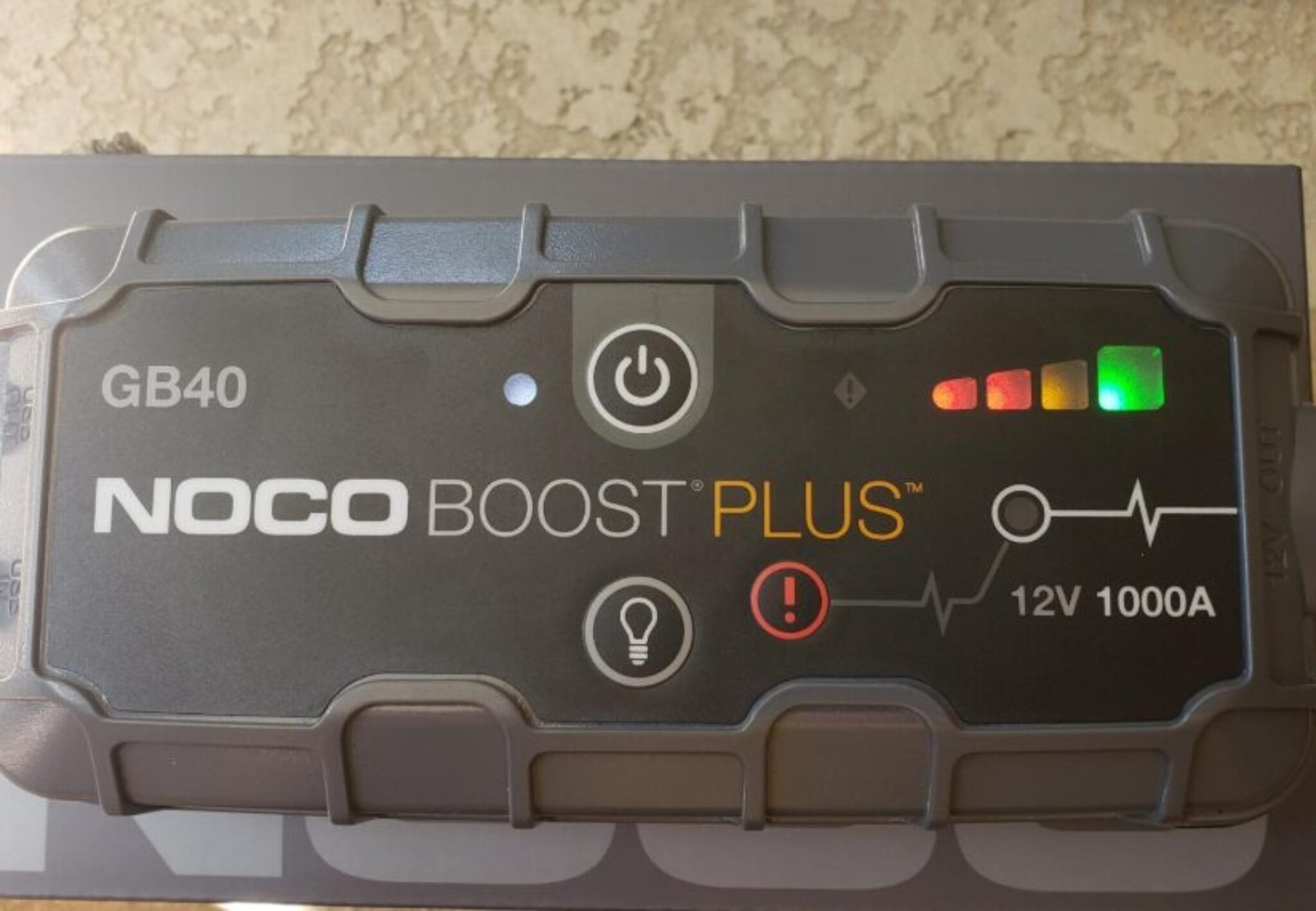
Understanding the behavior of the LED indicator lights on the face of the GB40 is essential for verifying charge progress and diagnosing potential hardware or environmental issues. The unit features four primary state-of-charge (Charge LEDs) alongside dedicated diagnostic lights.
- 25% (Red LED)
- 50% (Red LED)
- 75% (Yellow LED)
- 100% (Green LED)
The 4 State-of-Charge LEDs
- 25% Charge LED (Red): When the battery is below 25% capacity, the 25% Red LED will slowly pulse on and off. Once 25% charge is reached, this light becomes solid red, and the 50% light begins to pulse.
- 50% Charge LED (Red): Pulses red while charging between 25% and 50% capacity. It becomes solid red once 50% is achieved.
- 75% Charge LED (Yellow): Pulses yellow while charging between 50% and 75% capacity. It turns solid yellow once 75% is achieved.
- 100% Charge LED (Green): Pulses green while charging between 75% and 99% capacity.
What Full Charge Light Behavior Means
When the GB40 reaches 100% full capacity:
- The 100% Green LED turns solid green.
- The 25%, 50%, and 75% LEDs turn off to conserve energy and provide a clean visual indicator that charging is complete.
- The internal charging circuit automatically drops into maintenance mode (trickle charge) to prevent overcharging and thermal buildup.
Diagnostic & Warning LEDs
- Hot/Cold Error LED: If the internal lithium battery drops below 32°F (0°C) or rises above 104°F (40°C) during charging, the Hot/Cold LED will illuminate solid red or amber. The internal Battery Management System (BMS) temporarily suspends current intake to prevent cell degradation until the unit returns to safe operational temperatures.
- Error LED (Solid Red): Indicates reverse polarity connection when attached to a car battery, or a detected short-circuit.
- Error LED (Blinking Red): Indicates that the internal battery voltage is too low to be detected by standard charging protocols, requiring manual reset or deep recovery procedures.
Key Factors That Affect GB40 Charging Speed
While the maximum theoretical charge rate is 3 hours at 2.1A, several physical and environmental variables can alter the actual charge duration of your NOCO GB40.
1. Amperage Rating of the Power Supply
The single most critical factor determining charge speed is the current output rating of the USB charger connected to the Micro-USB cable. Standard legacy phone bricks supply only 1.0 Amp (5W), which doubles the charging time to 6 hours. Modern high-power USB-A bricks (often labeled as "Fast Charge" or 2.1A/2.4A) provide the full 10.5W required to achieve the 3-hour charge time.
2. Cable Resistance and Port Wear
Micro-USB cables experience wear over time. High internal wire resistance, loose connectors, or thin gauge copper wiring inside cheap third-party cables cause a significant voltage drop over the length of the cable. If the voltage drops below 4.75V at the input jack, the GB40's BMS automatically reduces intake current to prevent brownout conditions, stretching charge times past 8 to 10 hours even when plugged into a 2.1A power brick.
3. Ambient Temperature Extremes
Lithium-ion cells rely on chemical reactions that are highly sensitive to ambient temperatures:
- Cold Temperatures (Below 32°F / 0°C): Lithium plating can occur on the battery anodes if charged at freezing temperatures. The BMS slows down current transfer or halts charging completely.
- High Heat (Above 104°F / 40°C): Heat increases internal resistance and accelerates cell aging. The BMS will throttle charging speeds to limit heat dissipation.
For maximum charging efficiency, always charge the GB40 inside a climate-controlled room between 60°F and 80°F (15°C to 27°C).
4. Battery Age and Depth of Discharge
As lithium-ion batteries age through repeated discharge cycles, their internal electrochemical resistance increases. An older unit that has undergone hundreds of charge cycles may take longer to reach the final 100% stage, as the BMS must taper off the current more gradually during the constant-voltage phase of the charging curve.
Step-by-Step Guide: How to Safely Charge Your GB40 Jump Starter
Follow these procedures to ensure fast charging performance and maximize the lifespan of your unit's internal lithium pack.
- Step 1: Select 2.1A Adapter
- Step 2: Connect Micro-USB
- Step 3: Monitor LED Progress
- Step 4: Disconnect at Solid Green
Step 1: Select a High-Output USB Adapter
Choose a USB wall adapter or car plug rated for 5V at 2.1A (10.5W) minimum. Check the fine print on the back of your USB power adapter to verify its output specifications.
Step 2: Inspect and Connect the Micro-USB Cable
Inspect the included NOCO Micro-USB cable for physical damage or debris in the connector tips. Plug the Micro-USB connector firmly into the "IN" port located under the protective silicone port cover on the side of the GB40.
Step 3: Connect to Power and Monitor LEDs
Plug the USB-A end of the cable into your powered wall adapter. Observe the LED display on the front face of the GB40:
- The 25% LED should begin pulsing red immediately.
- If the Hot/Cold light turns on, relocate the unit to a room-temperature environment and wait 15 minutes before re-plugging.
Step 4: Verify Full Charge and Store
Allow the unit to charge uninterrupted until the 100% Green LED turns solid. Once solid green appears, unplug the charging cable and firmly close the rubber port covers to preserve moisture resistance (IP65 rating).
Troubleshooting Common GB40 Charging Issues
If your NOCO Boost Plus GB40 is not charging properly or appears stuck at a specific battery level, work through the following troubleshooting steps to resolve the issue.
Issue 1: GB40 Stuck on the 25% Red Light (Will Not Advance)
If the 25% LED continues to flash red after more than 6 to 8 hours of charging:
- Cause A: Insufficient Current. You are likely using a low-output 0.5A or 1.0A adapter that cannot deliver enough power to push the battery past the initial bulk charging threshold. Switch to a verified 2.1A wall brick.
- Cause B: Severely Depleted Cells. If the GB40 sat discharged for months, the cell voltage may have dropped into deep discharge mode. Leave the unit on a 2.1A charger for up to 12 continuous hours to allow the BMS to perform a low-current trickle recovery.
- Cause C: Faulty Cable. Replace the Micro-USB cable with a short, high-quality, heavy-gauge cable to rule out voltage drop.
Issue 2: Hot/Cold Indicator Light Is On
If the red or amber Hot/Cold icon lights up:
- Solution: Disconnect the charger immediately. Move the unit into a room-temperature space (around 70°F / 21°C). Let the unit rest for 30 to 60 minutes until its internal temperature stabilizes, then reconnect the charger.
Issue 3: Unit Gets Extremely Warm While Charging
It is normal for the internal transformer and battery pack to feel warm to the touch during peak fast-charging cycles (especially between 0% and 75%). However, if the case becomes too hot to comfortably touch or smells like melted plastic:
- Solution: Unplug the unit immediately. This indicates a potential thermal runaway condition or hardware fault. Discontinue use and contact NOCO Technical Support.
Issue 4: The 100% Green Light Never Turns Solid
If the 75% light is solid and the 100% green light pulses indefinitely:
- Cause: The BMS is performing balance charging across the internal cells. Toward the end of the charge cycle, the BMS slowly balances cell voltages. This constant-voltage phase can take up to 1 hour by itself. Allow an extra 60 minutes for balancing to complete.
Best Practices for Long-Term Battery Maintenance
Lithium-ion jump starters require minimal maintenance, but improper storage can permanently degrade cell capacity or render the unit useless when an emergency arises.
| DO | DON'T |
|---|---|
| Recharge the unit every 3 to 6 months. | Leave plugged into a charger indefinitely. |
| Store at 50%–70% charge if storing long-term. | Leave in a hot glovebox or trunk during peak summer heat. |
| Keep in a cool, dry place between 50°F and 77°F (10°C to 25°C). | Store completely dead (0% charge) for extended periods. |
1. Maintain Periodic Top-Ups
Self-discharge in modern lithium-ion packs is low, but the GB40’s internal safety logic slowly drains power over time. Recharge the GB40 every 3 to 6 months, even if it has not been used to jump-start a vehicle.
2. Avoid Thermal Extremes in Vehicle Storage
Leaving your GB40 in an enclosed vehicle trunk during hot summer months (where cabin temperatures can easily exceed 140°F / 60°C) permanently degrades cell capacity and increases self-discharge rates. In extreme summer heat, store the GB40 indoors when the vehicle is parked at home for extended periods.
3. Ideal Long-Term Storage Level
If storing the GB40 without use for more than six months, store it at approximately 50% to 75% charge (two to three LEDs lit) rather than 100% or 0%. Storing lithium cells at 100% capacity under heat stress accelerates chemical breakdown, while storing at 0% risks causing the battery to enter an unrecoverable deep-discharge state.
Frequently Asked Questions
Can I leave the NOCO GB40 plugged in overnight or permanently?
Yes. The NOCO GB40 features an integrated Battery Management System (BMS) with overcharge protection. Once the unit reaches 100% capacity (solid green light), the charger automatically drops into a safe maintenance mode. However, for general electrical safety and cell longevity, it is best practice to unplug the unit once full charge is achieved.
Can I charge the GB40 using a 12V cigarette lighter port in my car?
Yes, provided you use a 12V USB car adapter rated for 5V, 2.1A output. When connected to a high-output 12V USB adapter, the GB40 recharges in the same 3-hour timeframe as it would using a 2.1A AC wall adapter.
Why didn’t my GB40 come with a wall charger block?
NOCO packages the Boost Plus GB40 with a standard USB-A to Micro-USB cable and a 12V car plug (in select kits), but omits the AC wall brick to reduce electronic waste. You can use any high-quality USB wall adapter from a smartphone or tablet, provided it meets the recommended 2.1A (10.5W) output spec.
Can I use a fast charger (USB-PD or QuickCharge) to charge the GB40 faster than 3 hours?
No. High-speed protocols like USB Power Delivery (USB-PD) or Qualcomm QuickCharge scale up voltage to 9V, 12V, or 20V. Because the GB40’s input port is limited to 5V DC at 2.1A max, connecting it to a USB-PD charger will simply cause the charger to default to standard 5V operation. The charge time will remain approximately 3 hours.
How many jump starts can I get on a single full charge?
On a full charge, the NOCO GB40 is rated to deliver up to 20 jump-start attempts. However, actual performance depends on engine size, ambient temperature, and how depleted the vehicle’s 12V battery is. Larger gasoline engines (up to 6.0L) or small diesels (up to 3.0L) draw more current, reducing the total number of starts per charge cycle.
Final Recommendations for GB40 Owners
To ensure your NOCO Boost Plus GB40 is always ready when you experience a dead battery, follow this operational checklist:
- Equip your kit with a 2.1A (10W+) AC wall block: Avoid relying on basic 0.5A computer ports or old phone chargers that take up to 12 hours to replenish the pack.
- Set a quarterly calendar reminder: Check the charge status of your GB40 every 90 to 180 days and top off the unit until the solid green 100% light appears.
- Inspect your cable regularly: Keep a dedicated high-quality Micro-USB cable inside the included microfiber storage bag to avoid using degraded cables that throttle charging speeds.
Image Gallery