How to Build a Successful CRM: A Comprehensive Guide for 2026
To build a successful CRM, you must align your technical architecture with specific business workflows while prioritizing data integrity and user adoption. Success depends on selecting a scalable tech stack, integrating AI-driven autom...
To build a successful CRM, you must align your technical architecture with specific business workflows while prioritizing data integrity and user adoption. Success depends on selecting a scalable tech stack, integrating AI-driven automation for actionable insights, and ensuring the platform solves specific pain points rather than just acting as a static database.
Contents
Customer Relationship Management (CRM) systems have evolved far beyond digital address books. In 2026, a successful CRM serves as the central nervous system of an organization, synthesizing data from marketing, sales, and customer service to drive revenue and retention. Whether you are building a custom solution from scratch or configuring a highly modular enterprise platform, the principles of success remain rooted in strategic planning, technical precision, and human-centric design.
Defining the Strategic Vision and Objectives
Before writing a single line of code or evaluating vendors, you must define what "success" looks like for your specific organization. A generic CRM often fails because it attempts to cater to everyone while serving no one effectively. Building a successful CRM starts with a discovery phase that identifies the primary business problems the system must solve.
Organizations typically pursue a new CRM for three reasons: improving operational efficiency, increasing sales velocity, or enhancing customer experience. By identifying which of these is the priority, you can allocate resources more effectively. For instance, a firm focused on sales velocity will prioritize lead scoring and pipeline visualization, while a service-oriented firm will focus on ticket management and knowledge base integration.
Stakeholder interviews are critical during this phase. You must consult with the end-users—the sales reps and support agents—rather than just executive leadership. A system that looks great in a boardroom but adds thirty minutes of manual data entry to a salesperson's day will inevitably fail due to low adoption rates.
Choosing Between Custom Development and Enterprise Platforms
In 2026, the "build vs. buy" debate has shifted toward a "build vs. assemble" model. Organizations must decide whether to develop a proprietary system or leverage a platform-as-a-service (PaaS) model.
Custom CRM Development
Building a custom CRM provides total control over the data schema and user interface. This is often the preferred route for companies with highly specialized workflows or strict regulatory requirements that off-the-shelf software cannot meet. However, custom development requires a significant upfront investment and a long-term commitment to maintenance, security patches, and feature updates.
Enterprise SaaS and Low-Code Platforms
Modern enterprise platforms offer high degrees of extensibility. Using APIs and low-code frameworks, developers can build "custom" functionality on top of a stable, managed infrastructure. This reduces time-to-market and shifts the burden of core security and uptime to the provider. The risk here is "vendor lock-in" and potential escalations in seat-based pricing as the organization grows.
Essential Core Features for 2026
To remain competitive, a CRM must go beyond basic contact management. The following features are non-negotiable for a successful implementation in the current landscape:
- Unified Customer Profile: A single source of truth that aggregates data from every touchpoint, including website visits, social media interactions, purchase history, and support tickets.
- AI-Driven Predictive Analytics: Modern CRMs must use machine learning to predict customer behavior. This includes identifying "at-risk" customers before they churn and suggesting the "next best action" for sales representatives.
- Omnichannel Communication: The ability to communicate with customers via email, SMS, WhatsApp, and live chat directly within the CRM interface, with all history logged automatically.
- Advanced Automation Engines: Moving beyond simple "if-this-then-that" rules to complex workflow orchestration that can handle multi-step processes across different departments.
- Mobile-First Design: In a hybrid work environment, sales and service teams require full system functionality on mobile devices, including offline data entry capabilities.
Technical Architecture and Data Governance
The technical foundation of your CRM determines its scalability and performance. A successful CRM architecture must be modular, allowing for easy updates and integrations without breaking core functionality.
Backend Infrastructure
Most successful CRMs in 2026 utilize a microservices architecture. This allows different components—such as the reporting engine, the communication module, and the database—to scale independently. For the database, a relational system like PostgreSQL is often used for structured customer data, while NoSQL databases like MongoDB may be utilized for unstructured interaction logs.
API-First Approach
Your CRM cannot exist in a vacuum. It must communicate with your ERP, marketing automation tools, and accounting software. An API-first design ensures that other internal and external systems can easily push and pull data. Utilizing GraphQL or RESTful APIs with comprehensive documentation is standard practice for ensuring long-term flexibility.
Security and Compliance
Data privacy is a cornerstone of CRM success. The system must be designed with Privacy by Design principles, ensuring compliance with global regulations such as the General Data Protection Regulation (GDPR) and the California Consumer Privacy Act (CCPA). Key technical requirements include:
- End-to-end encryption for data in transit and at rest.
- Role-Based Access Control (RBAC) to ensure users only see the data necessary for their job function.
- Audit logging to track every change made to customer records.
Comparison of CRM Implementation Approaches
| Feature | Custom Build | Enterprise SaaS (e.g., Salesforce/HubSpot) | Low-Code Frameworks |
|---|---|---|---|
| Initial Cost | High | Moderate to High (Licensing) | Moderate |
| Time to Market | 6–12 Months | 1–3 Months | 2–4 Months |
| Customization | Unlimited | High (within ecosystem) | High |
| Maintenance | Internal Team Required | Vendor Managed | Shared Responsibility |
| Scalability | Manual | Automatic | Semi-Automatic |
| Data Ownership | Total | Subject to Terms | Total |
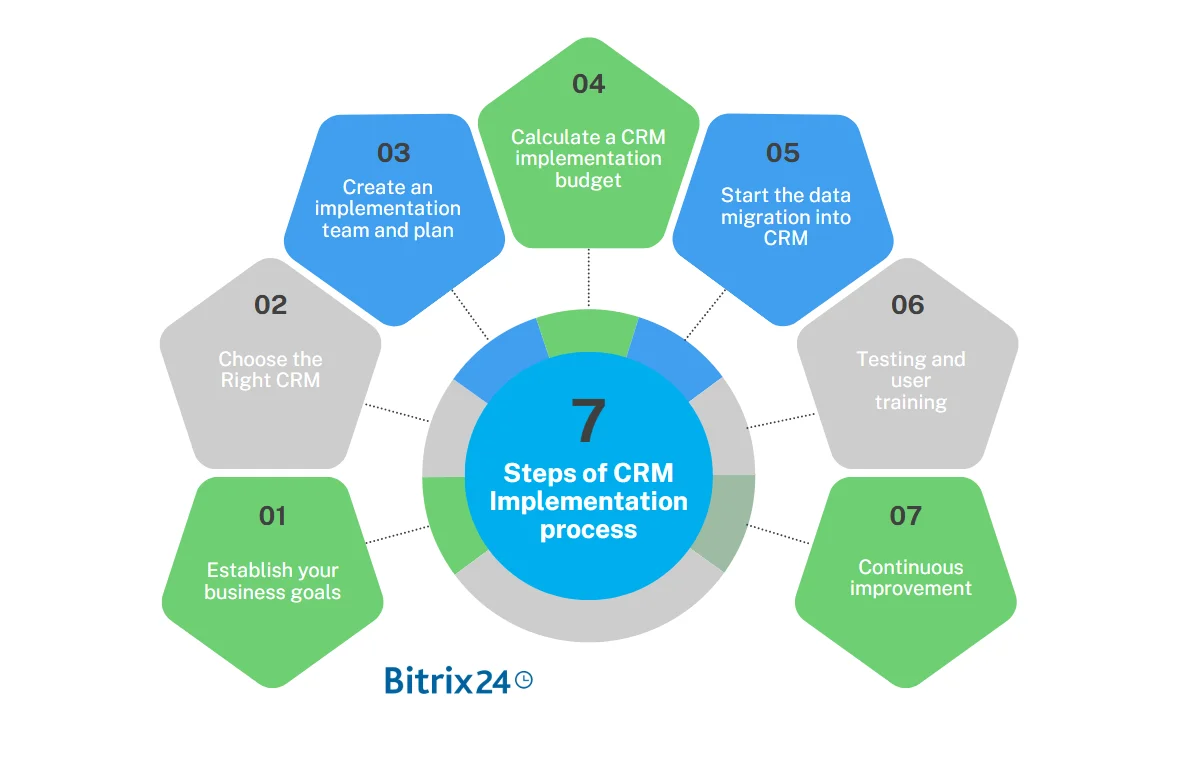
The Development and Implementation Lifecycle
Building a successful CRM is an iterative process. Using an Agile methodology allows you to release a Minimum Viable Product (MVP) and refine it based on real-world usage.
- Discovery & Requirements Gathering: Define user personas, map customer journeys, and document technical constraints.
- Data Modeling: Design a clean data schema. Decide how leads, contacts, accounts, and opportunities will relate to one another.
- MVP Development: Build the core features—contact management, lead tracking, and basic reporting.
- Integration Phase: Connect the CRM to essential third-party tools like email servers and calendar systems.
- User Acceptance Testing (UAT): Have a small group of "power users" test the system in their daily workflow to identify bugs and UX friction points.
- Data Migration: Cleanse your old data before importing it. Moving "dirty" data into a new system is one of the fastest ways to kill CRM success.
- Deployment & Training: Roll out the system in phases, accompanied by comprehensive training sessions.
Ensuring High User Adoption
The most sophisticated CRM in the world is useless if the staff refuses to use it. User adoption is the ultimate metric of a successful CRM build. To ensure high adoption:
- Prioritize UX/UI: The interface should be intuitive and require minimal clicks to complete common tasks. If a user has to navigate through five screens to log a call, they won't do it.
- Demonstrate Value Immediately: Show users how the CRM makes their lives easier, such as through automated follow-up reminders or instant report generation.
- Gamification: Implement leaderboards or achievement badges for data entry and pipeline management to encourage consistent usage.
- Continuous Feedback Loops: Establish a formal process for users to request features or report issues. When users see their feedback implemented, they feel a sense of ownership over the platform.
Common Pitfalls to Avoid
Even with a strong technical team, several common mistakes can derail a CRM project.
Scope Creep: Trying to build every possible feature in version 1.0 often leads to delays and a bloated, confusing interface. Stick to the MVP and iterate. Poor Data Quality: Without validation rules, users may enter incomplete or duplicate data. Implement strict data entry standards and automated de-duplication scripts from the start. Lack of Executive Buy-in: If leadership doesn't use the CRM for their own reporting and decision-making, the rest of the organization will see it as optional. Ignoring the Mobile Experience: In 2026, a desktop-only CRM is a failed CRM. Ensure the mobile application is as robust as the web version.
Frequently Asked Questions
Is it better to build a custom CRM or use an existing platform in 2026?
It depends on your unique needs. Custom builds offer total control and no per-user licensing fees, making them cost-effective for very large organizations with unique processes. However, for most small to mid-sized businesses, the speed and security of a modern SaaS platform or a low-code framework outweigh the benefits of building from scratch.
How much does it cost to build a successful CRM?
Costs vary wildly. A custom-built enterprise CRM can cost anywhere from $100,000 to over $500,000 for the initial development, plus ongoing maintenance. Configuring a major SaaS platform may cost $20,000 to $100,000 in implementation fees, plus monthly subscription costs that can range from $50 to $300 per user.
How long does it take to implement a new CRM?
A simple SaaS implementation can be completed in 4 to 8 weeks. A complex, custom-built CRM usually takes 6 to 12 months from the initial discovery phase to full organization-wide deployment.
How does AI improve CRM success?
AI contributes to CRM success by automating mundane tasks like data entry and transcription, providing sentiment analysis on customer communications, and offering predictive insights that help teams focus on the leads most likely to convert.
How do I handle data migration from my old system?
Successful data migration requires a "clean-first" approach. You should audit your existing data, remove duplicates, and standardize formats before the move. Use ETL (Extract, Transform, Load) tools to map the old data fields to the new schema accurately.
Final Recommendations
To build a successful CRM in 2026, start small and focus on the user. Begin by identifying the single most significant bottleneck in your current sales or service process and design the CRM to solve that problem first. Invest heavily in data governance and security from day one, as trust is the foundation of any customer management system. Finally, treat the CRM as a living product rather than a one-time project; regular updates based on user feedback and emerging AI capabilities will ensure the system continues to drive value for years to come.
Image Gallery