Comprehensive Internet Explorer Browser Test Strategies for 2026
To perform an Internet Explorer browser test in 2026, developers and QA teams primarily utilize Microsoft Edge’s "IE Mode," cloud-based cross-browser testing platforms like BrowserStack or LambdaTest, or localized virtual machines. The...
To perform an Internet Explorer browser test in 2026, developers and QA teams primarily utilize Microsoft Edge’s "IE Mode," cloud-based cross-browser testing platforms like BrowserStack or LambdaTest, or localized virtual machines. These methods allow you to render legacy websites using the Trident (MSHTML) engine, ensuring compatibility for systems that still require ActiveX or legacy scripts.
Contents
Despite the official retirement of the Internet Explorer 11 (IE11) desktop application on June 15, 2022, the necessity for IE-specific testing persists into 2026. Many enterprise-level organizations, government agencies, and industrial sectors continue to rely on legacy web applications built on proprietary technologies that only function correctly within the IE ecosystem. Understanding how to simulate this environment accurately is critical for maintaining business continuity and ensuring security compliance within modern operating systems.
The State of Internet Explorer Compatibility in 2026
By 2026, Internet Explorer exists not as a standalone browser, but as a legacy compatibility layer. Microsoft has integrated the core IE engine (Trident/MSHTML) into Microsoft Edge to support "IE Mode." This functionality is currently guaranteed through at least 2029, providing a bridge for organizations transitioning away from antiquated codebases.
Testing for IE in this era is less about supporting the general public and more about Internal Enterprise Compatibility. Most modern web traffic has migrated to Chromium-based browsers or Safari. However, if your "Internet Explorer browser test" is motivated by a requirement to support legacy banking portals, medical record systems, or specialized hardware interfaces, you must use specific tools that can replicate the quirks and limitations of the Trident engine.
Method 1: Microsoft Edge IE Mode Configuration
The most accessible way to conduct a localized Internet Explorer browser test is through Microsoft Edge. This method uses the actual MSHTML engine found within Windows to render pages exactly as IE11 would.
Enabling IE Mode for Manual Testing
To manually test a site, you must first enable the feature within the Edge settings:
- Open Microsoft Edge and navigate to Settings.
- Select Default browser from the left-hand sidebar.
- Under the "Internet Explorer compatibility" section, set Allow sites to be reloaded in Internet Explorer mode to "Allow."
- Restart the browser.
Once enabled, you can right-click any tab and select Reload tab in Internet Explorer mode. This provides a visual confirmation of how the site behaves. A small IE logo will appear in the address bar to signify the compatibility engine is active.
Enterprise Site List Manager
For organizations that need to test hundreds of internal URLs, the Enterprise Site List Manager is the standard tool. This allows administrators to create an XML schema that tells Edge exactly which sites should open in IE mode and which specific IE version (IE7, IE8, or IE11) should be emulated. This is the most authentic way to test internal "Intranet" environments without maintaining unpatched, insecure versions of Windows 7 or 8.
Method 2: Cloud-Based Cross-Browser Testing Platforms
For professional QA environments, localized testing is often insufficient because it does not account for different operating system configurations or screen resolutions. Cloud platforms have become the gold standard for an "Internet Explorer browser test" in 2026.
Why Use Cloud Testing?
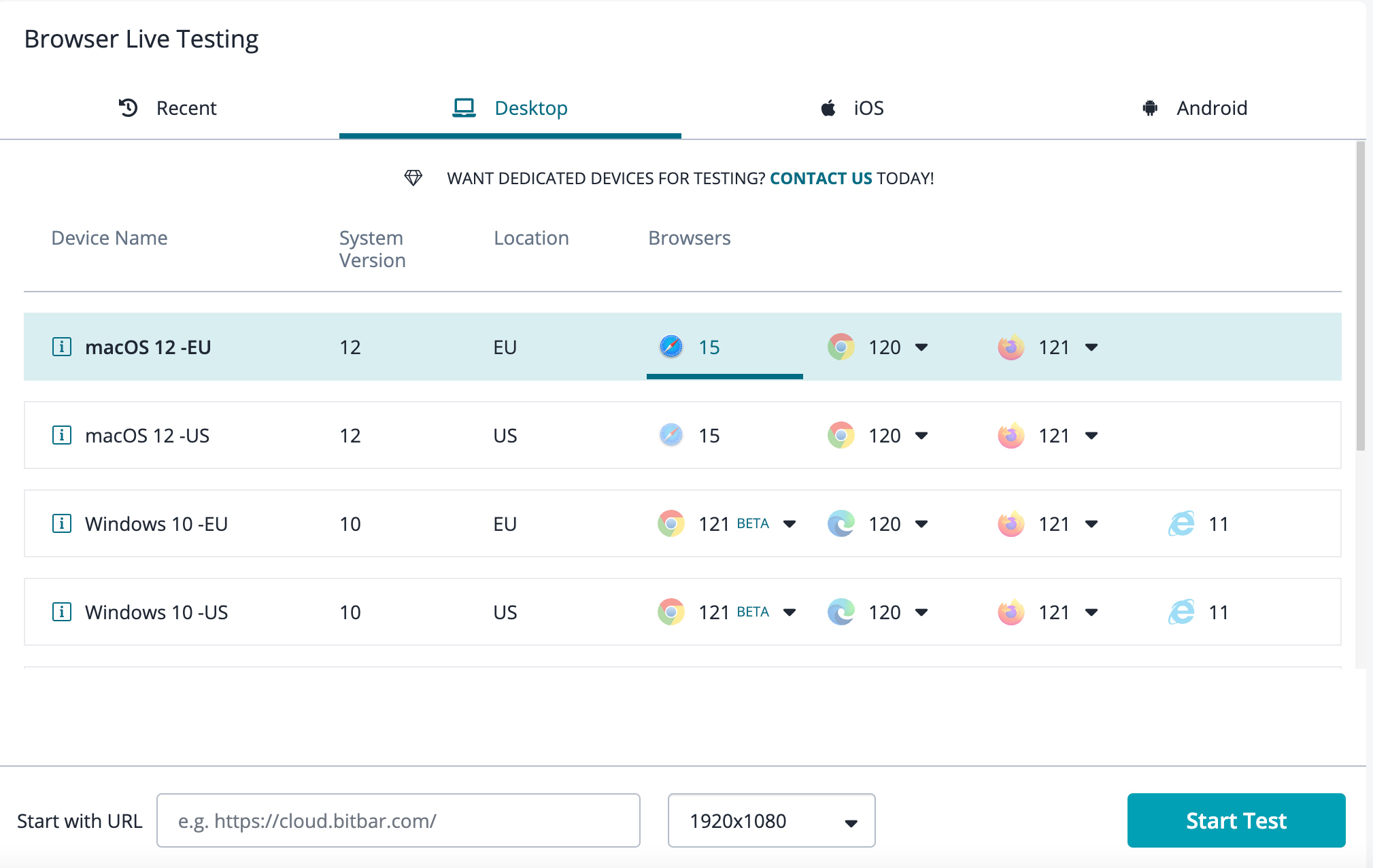
Platforms such as BrowserStack, LambdaTest, and Sauce Labs maintain massive "device farms." When you request an IE11 test, these services spin up a genuine virtual machine running a legacy version of Windows with IE11 installed. This is superior to simple emulation because:
- True Rendering: It uses the actual binary of the browser, not just a compatibility layer.
- Developer Tools: These platforms often provide tunneled access to their own developer tools, making it easier to debug CSS failures or JavaScript errors that are specific to the Trident engine.
- Parallel Testing: You can run automated scripts (via Selenium or Playwright) across multiple IE versions simultaneously.
In 2026, these services are essential because they allow developers on macOS or Linux to perform an Internet Explorer browser test without needing access to a physical Windows machine.
Method 3: Virtual Machines and Dev Center Images
If cloud costs are a concern or if the application being tested is behind a highly restrictive firewall that forbids external tunneling, using a local Virtual Machine (VM) is the next best option.
Microsoft historically provided free, time-limited VM images for testing. While these are less common in 2026, many IT departments maintain "Golden Images" of Windows 10 (Version 20H2 or earlier) or Windows Server instances where IE11 was still a primary component.
Setting Up a Legacy VM
To ensure an accurate test, the VM should be isolated from the broader internet to prevent security vulnerabilities. Use software like VMware or VirtualBox to host the image. This environment is particularly useful for testing ActiveX controls or Java Applets, which often fail in browser-based emulators or cloud environments due to security sandboxing.
| Testing Method | Accuracy | Ease of Use | Best For |
|---|---|---|---|
| Edge IE Mode | High (Trident Engine) | Excellent | Quick manual checks and internal enterprise apps. |
| Cloud Platforms | 100% Native | Good | Professional QA, automated regression, and cross-OS testing. |
| Local VMs | 100% Native | Difficult | Testing ActiveX, local hardware integrations, and high-security apps. |
| Browser Extensions | Low (Emulation) | Very Easy | Surface-level visual checks; not recommended for functional testing. |
Technical Checklist for IE Compatibility Testing
When performing an Internet Explorer browser test, you are likely looking for specific "breaking points." The Trident engine lacks support for almost all modern web standards introduced in the last decade.
1. JavaScript Support (ES6+)
Internet Explorer 11 does not support ES6 (ECMAScript 2015) or any subsequent updates. If your code uses arrow functions, classes, const, or let, the script will fail immediately in IE.
- Solution: Use a transpiler like Babel to convert your modern JavaScript into ES5-compatible code.
2. CSS Grid and Flexbox Quirks
While IE11 has a preliminary implementation of CSS Grid, it follows an older specification and requires the -ms- prefix. Many modern Flexbox properties, such as gap, do not work at all.
- Verification: During your test, check for overlapping elements or containers with zero height, which are common symptoms of failed layout engines in IE.
3. SVG and Image Rendering
IE has notorious issues with scaling SVGs and does not support the WebP image format natively. If your site uses modern image compression, an IE browser test will likely reveal broken image icons unless you have provided fallback formats (like PNG or JPEG).
4. Security Headers and TLS
By 2026, most web servers require TLS 1.3. However, older versions of IE on unpatched systems may only support TLS 1.0 or 1.1. If your site fails to load entirely with a "Connection Refused" error, the issue might be at the server's handshake level rather than the browser's rendering engine.
Common Troubleshooting Steps
If your application fails an Internet Explorer browser test, follow these steps to isolate the cause:
- Check Document Mode: Press
F12to open Developer Tools (in Edge IE Mode or a VM). Look at the "Emulation" tab. Ensure the Document Mode is set to "11 (Default)." Sometimes IE defaults to IE7 or IE5 (Quirks Mode) if the site is detected as a local intranet site. - Clear Cache and Cookies: IE's caching mechanism is significantly more aggressive and error-prone than Chromium's. Always clear the cache before a re-test.
- Disable "Display Intranet Sites in Compatibility View": This setting, found in "Compatibility View Settings," often forces sites into an older rendering engine (IE7), breaking modern layouts.
- Inspect Console Errors: Look for "Object doesn't support property or method." This almost always indicates a missing Polyfill for a modern JavaScript feature.
The Role of Automated Testing in 2026
Even though IE usage is minimal, automated testing remains a requirement for "Legacy-Critical" industries. In 2026, Selenium WebDriver remains the primary tool for this. While modern frameworks like Cypress and Playwright focus on Evergreen browsers (Chrome, Firefox, Safari, Edge), Selenium's InternetExplorerDriver still allows for programmatic interaction with the Trident engine.
When setting up an automated Internet Explorer browser test:
- Ensure "Protected Mode" settings are identical for all zones in the IE security settings.
- Set the browser zoom level to 100%, as the driver will fail to click elements correctly at other scales.
- Use a dedicated "Grid" to manage the execution, as IE tests are significantly slower than their Chromium counterparts.
FAQ
Is Internet Explorer still available for download in 2026?
No, Microsoft has removed the standalone IE11 installer from its official sites. The browser is now strictly a component of the Windows operating system accessed via Microsoft Edge's IE Mode. Users should not attempt to download "standalone" IE versions from third-party sites, as these are often bundled with malware.
Can I test IE11 on a Mac or Linux machine?
You cannot run IE natively on these operating systems. To perform an Internet Explorer browser test on a Mac or Linux machine in 2026, you must use a cloud-based service like LambdaTest or run a Windows Virtual Machine using software like Parallels or VirtualBox.
Why does my website look different in Edge IE Mode compared to real IE11?
While Edge IE Mode uses the Trident engine, it operates within a Chromium "wrapper." This can occasionally lead to differences in how pop-up windows, print dialogs, and certain security certificates are handled. For 99% of web styling and logic, however, the rendering is identical.
Do I still need to use Polyfills for IE in 2026?
Yes. If you are committed to supporting IE, you must include polyfills for features like Promises, Fetch API, and Array.from(). Most developers use a service like Polyfill.io (self-hosted for security) or include specific packages via npm to ensure their modern code remains functional during an IE test.
How do I stop my site from being opened in Internet Explorer?
If your browser test reveals that the experience is too broken to fix, you can implement a "No-IE" script. This detects the User-Agent string (looking for Trident/ or MSIE) and redirects the user to a landing page recommending a modern browser like Microsoft Edge or Google Chrome.
Final Recommendation for 2026
For the vast majority of users, a Microsoft Edge IE Mode check is sufficient to verify that a site remains functional. However, if you are a developer or QA professional working in a regulated industry, investing in a cloud-based testing platform is the only way to ensure 100% accuracy and security. As we move closer to the 2029 end-of-support date for IE Mode, the focus should shift from "testing for compatibility" to "testing the migration" of these legacy assets into modern web frameworks.
Image Gallery