How Electronic Deposit Works at Chase: Setup, Processing Times, and Limits
Electronic deposit at Chase moves money into your checking or savings account digitally through systems like the Automated Clearing House (ACH) network, mobile check image capture, wire networks, or peer-to-peer payment channels. Depos...
Electronic deposit at Chase moves money into your checking or savings account digitally through systems like the Automated Clearing House (ACH) network, mobile check image capture, wire networks, or peer-to-peer payment channels. Deposits process automatically after a payer initiates a transfer or when you upload a check photo via the Chase Mobile app, with funds typically posting within zero to two business days.
Contents
Understanding Electronic Deposits at Chase Bank
An electronic deposit eliminates the need for physical cash handling or paper check handoffs at a brick-and-mortar branch. JPMorgan Chase Bank, N.A. processes millions of digital transactions daily by linking account records to national clearinghouses and interbank communications networks.
When money is sent electronically to a Chase account, the transaction relies on specialized financial protocols depending on the payment source:
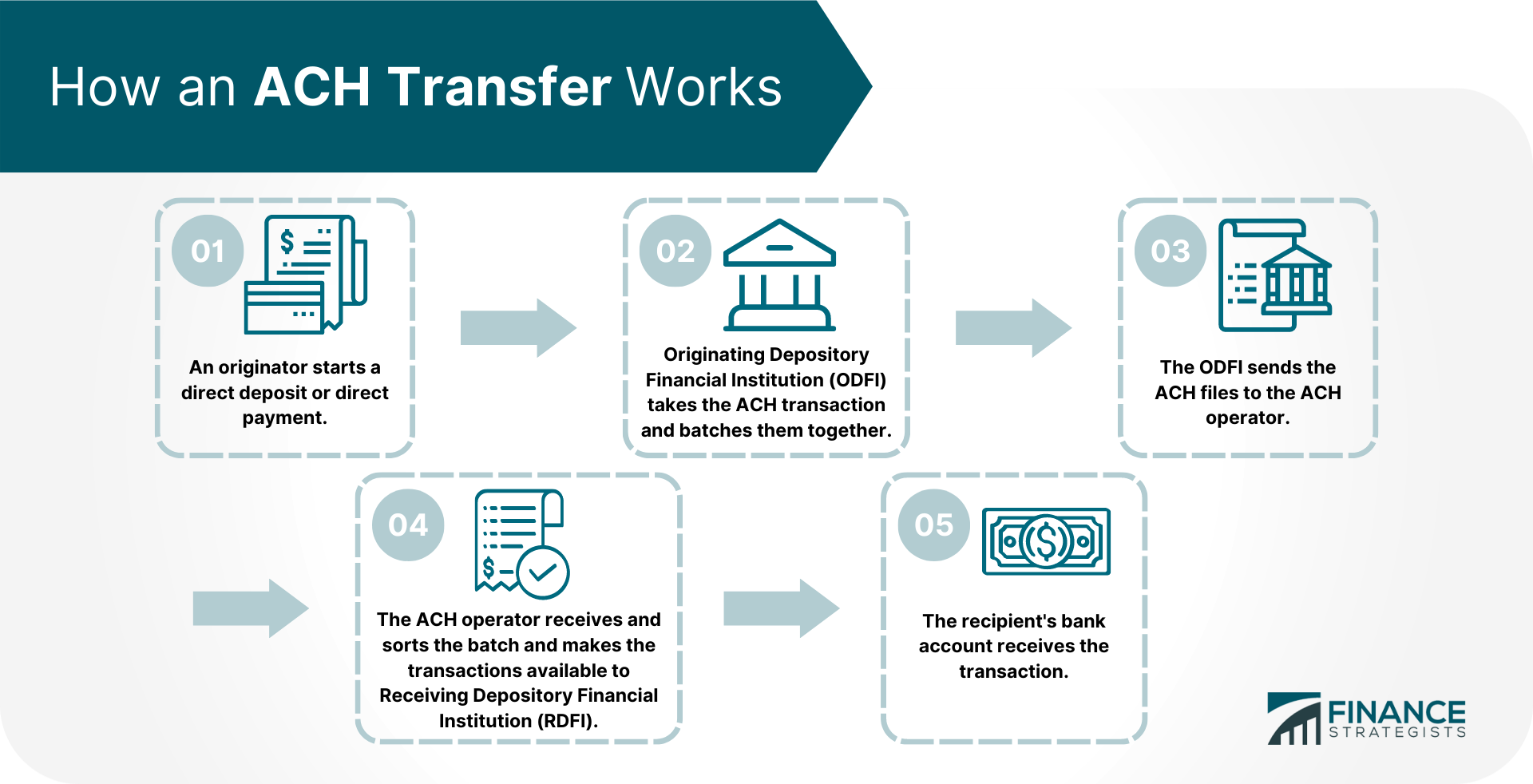
- Automated Clearing House (ACH) Transfers: Used primarily for payroll direct deposits, government benefit payments, tax refunds, and external bank-to-bank transfers. ACH transfers process in batches through the Federal Reserve Banks or The Clearing House.
- Chase QuickDeposit (Mobile Check Processing): Converts a physical check into an electronic Image Replacement Document (IRD) using Check 21 Act standards, submitting the digital image directly into the clearing system.
- Wire Transfers: Executed through Fedwire (for domestic transfers) or SWIFT (for international transfers). Wires are gross-settlement transfers designed for high-value or urgent payments.
- Peer-to-Peer (P2P) Services (Zelle): Real-time payments processed across participating financial institutions, allowing immediate transfer between bank accounts using an email address or mobile phone number.
Understanding how each channel operates helps you anticipate when funds will post, manage account cash flow, and prevent unnecessary deposit delays or holds.
How Chase Direct Deposit Works
Direct deposit is an ACH credit payment authorized by a payer—such as an employer, government agency, or investment broker—to transfer funds straight into your Chase checking or savings account.
Direct Deposit Process Flow
- Payer / Employer
- Initiates payroll instructions
- Originating Bank (ODFI)
- Batch file sent via NACHA network
- Clearing House / Federal Reserve
- Settlement file transmitted
- Chase (RDFI)
- Credits customer checking/savings account
- Available Funds in Chase Account
1. Step-by-Step Setup Process
To establish direct deposit with an employer or payer, you must provide specific routing and account details:
- Locate Account Credentials: Access your account details by signing into the Chase Mobile app or Chase online banking. Select the target checking or savings account to view your 9-digit Routing Transit Number (RTN) and unique account number.
- Generate a Pre-Filled Direct Deposit Form: Chase provides a customized direct deposit authorization form within online banking. Navigate to account services, select Direct Deposit Form, and download a pre-filled PDF containing your routing number, account number, and bank address.
- Submit to Your Payer’s Payroll Department: Deliver the completed form along with a voided check (if requested) to your employer’s HR or payroll provider.
2. Early Direct Deposit Features
Chase offers early direct deposit availability on select accounts, such as Chase Secure Banking℠. Under this feature, ACH payroll payments may be credited up to two business days before the scheduled payment date.
Early availability depends on when the payer's bank submits the ACH payment file to Chase. If the employer sends the payment file early with a future effective settlement date, Chase can credit the account ahead of time. However, if the employer submits the file on the actual payday, early credit cannot occur.
How Chase QuickDeposit Works
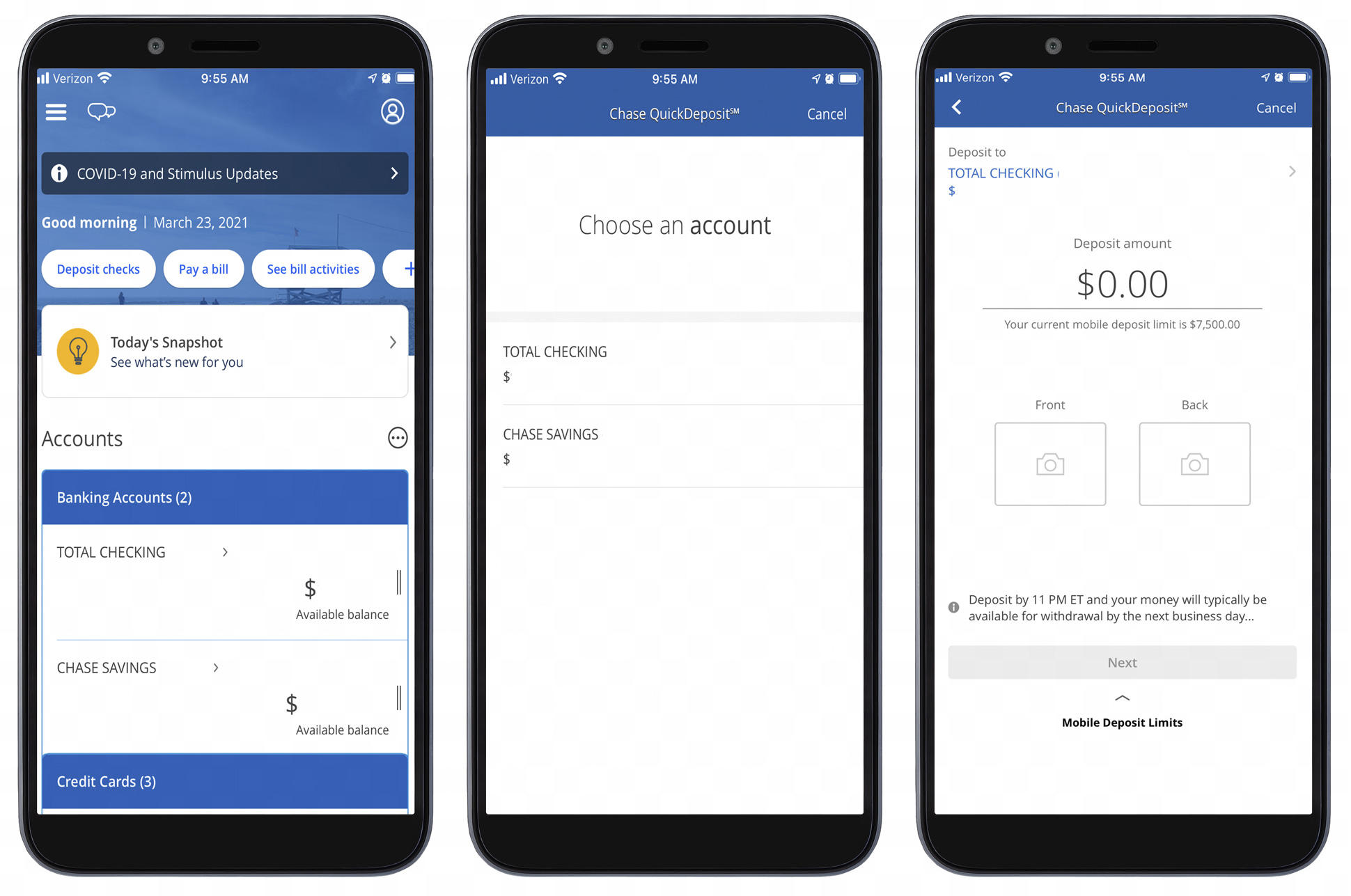
Chase QuickDeposit allows account holders to deposit paper checks electronically using an iOS or Android smartphone. The feature transforms a physical paper check into a digital image that enters the banking clearing stream.
Chase QuickDeposit Workflow
- Sign check back: Signature + "For Mobile Deposit Only at Chase"
- Log in to Chase Mobile App
- Select "Pay & Transfer"
- Tap "Deposit checks"
- Select target account
- Enter exact check dollar amount
- Snap clear photos of front and back against dark background
- Review details and tap "Deposit check"
- Hold physical check securely until verified, then destroy
Endorsement Requirements
Proper endorsement is essential for mobile check processing. Chase mandates that the payee sign the back of the check and explicitly write:
"For Mobile Deposit Only at Chase"
If the check is payable to multiple individuals (e.g., "John Doe AND Jane Doe"), both payees must sign the back of the check. Omitting the required restrictive wording can cause the automated optical character recognition system or manual review team to reject the deposit.
Step-by-Step Mobile Deposit Instructions
- Open the Chase Mobile app and sign in with your username, password, or biometric authorization (Face ID / Touch ID).
- Tap Pay & Transfer from the main navigation menu, then choose Deposit checks.
- Select the designated account for the funds.
- Type the exact numerical amount written on the check face.
- Position the front of the check within the camera view finder on a flat, well-lit, dark surface. The app automatically captures the image when correctly aligned.
- Turn the check over and repeat the image capture process for the endorsed back side.
- Verify all information on the confirmation screen, then tap Deposit check.
Retain the physical paper check in a secure location for at least two weeks until the deposit confirmed status appears on your statement. Once fully cleared, shred the physical check to prevent duplicate submission.
Processing Times and Funds Availability Rules
The availability of deposited funds at Chase is governed by federal guidelines—specifically Federal Reserve Regulation CC (Expedited Funds Availability Act)—and the bank's deposit account agreement.
Deposit Cut-Off Times
Transactions initiated before published cut-off times begin processing on the same business day. Transactions completed after these cut-off times, or on weekends and federal holidays, begin processing on the following business day.
- Chase QuickDeposit (Mobile): 11:00 PM Eastern Time (ET) on a business day.
- Branch and ATM Deposits: Generally 8:00 PM local time (or branch closing time, whichever is earlier).
- Wire Transfers (Incoming Domestic): Processed throughout the day until approximately 6:00 PM ET.
- ACH External Transfers (Inbound): Initiated online before 8:00 PM ET process the same day.
Funds Availability Schedule
| Deposit Type | Availability Schedule | Notes / Exceptions |
|---|---|---|
| Direct Deposit (ACH Credit) | Same business day (or up to 2 days early on select accounts) | Available immediately upon receipt of effective settlement file. |
| Electronic Wire Transfer | Same business day | Funds are available immediately upon final processing by Chase. |
| Chase QuickDeposit (Mobile Check) | Next business day | First $225 is usually available next business day; remaining balance follows standard holds. |
| Cash Deposits (ATM/Branch) | Same business day | Instant availability for automated cash counting machines. |
| U.S. Treasury / State Government Checks | Next business day | Must be deposited into an account owned by the designated payee. |
Business Days vs. Calendar Days
Chase defines a business day as Monday through Friday, excluding official federal bank holidays recognized by the Federal Reserve System. If you make a mobile deposit at 11:30 PM ET on Friday night, the transaction processes on Monday, making funds available according to the standard schedule starting Tuesday morning.
Comparison of Chase Electronic Deposit Methods
Understanding the distinctions among electronic deposit options helps you select the best method for your timeline and transaction size.
| Electronic Deposit Method | Operating Network | Standard Processing Time | Standard Daily / Monthly Limits | Standard Incoming Fees | Primary Best Use Case |
|---|---|---|---|---|---|
| Direct Deposit | ACH Network | 1–2 Business Days | No fixed maximum set by bank | $0 | Employer salary, pension, government benefits |
| Chase QuickDeposit | Check Image Clearing | 1–2 Business Days | Varies by account age & history (e.g., $2,000–$10,000/day) | $0 (Personal accounts) | Depositing paper paychecks, personal checks, refunds |
| External Bank Transfer | ACH Network | 1–3 Business Days | Set by sending or receiving account tier | $0 standard transfer | Moving personal funds between different bank institutions |
| Domestic Incoming Wire | Fedwire | Same Day | No practical maximum limit | $15 fee (waived on Premium / Private Banking) | Real estate closings, high-value commercial payments |
| Zelle P2P Deposit | Real-Time Network | Minutes | Daily limits apply (e.g., $500–$5,000 depending on account) | $0 | Receiving small cash payments from friends/family |
Common Electronic Deposit Issues and Troubleshooting
While electronic deposits post automatically in most cases, processing issues can cause temporary delays or rejections.
Deposit Hold & Rejection Causes
- Deposit Submitted
- Check Image Blurring / Unreadable Text
- App Error: Re-shoot under bright lighting
- Missing "For Mobile Deposit Only at Chase"
- Rejected by Manual Review Team
- Large Check Amount (> $5,500)
- Regulation CC Exception Hold Placed
- Name Mismatch (Payee Name != Account Title)
- Returned Item / Deposit Reversed
- Check Image Blurring / Unreadable Text
1. Extended Deposit Holds
Chase may place a temporary hold on a portion or the entirety of an electronic check deposit under Regulation CC exception rules. Common triggers for exception holds include:
- Depositing a single check exceeding $5,500 in value.
- Accounts open for fewer than 30 days (new account exception).
- Accounts that have been repeatedly overdrawn in the past six months.
- Reasonable cause to doubt the collectibility of the underlying funds (e.g., suspected check fraud or unverified paying institution).
When a hold is applied, Chase issues a Notice of Hold indicating the date the full amount will become available. Partial funds (such as the standard $225 regulation requirement) may be released first, with the balance released after 2 to 7 business days.
2. Mobile Check Rejections
If a mobile check deposit fails within the app, review these frequent causes:
- Glare or Shadow: Ensure lighting is even across the entire check face.
- Faded Ink: If the written numerical value or signature is too light, optical scanners cannot read the document.
- Missing Restricted Endorsement: Ensure you write "For Mobile Deposit Only at Chase" beneath your signature.
- Exceeded Mobile Deposit Limit: Check your individual daily and 30-day mobile deposit limits under the app’s deposit screen menu.
3. Name Mismatch Restrictions
An electronic deposit or direct deposit must match the legal name on your Chase account statement. If a third party attempts to send a direct deposit or wire transfer to your account under a different name, Chase may reject the ACH credit and return the funds to the originating institution.
Security Protocols Safeguarding Electronic Deposits
Electronic transactions at Chase rely on multi-layered security measures to protect consumer account assets.
FDIC Insurance Coverage
Funds deposited electronically into Chase checking, savings, or certificate of deposit (CD) accounts are insured by the Federal Deposit Insurance Corporation (FDIC) up to the legal statutory limit of $250,000 per depositor, per ownership category (FDIC Certificate #8517).
Fraud Monitoring and Encryption
- 256-Bit Financial-Grade Encryption: Protects real-time mobile app and web browser sessions during transmission.
- Real-Time Automated Fraud Alerts: Chase tracks transaction behaviors. If an unusual electronic deposit or incoming wire pattern occurs, the system flags the item for fraud prevention verification.
- Two-Factor Authentication (2FA): Secures portal access to prevent unauthorized updates to direct deposit routing destinations.
Disclaimer: Terms, fees, deposit limits, and availability rules are subject to change by JPMorgan Chase Bank, N.A. Account holders should review their specific Account Deposit Agreement and Fee Schedule for exact rules governing their accounts.
Frequently Asked Questions
What time of day does direct deposit post to Chase?
Direct deposits generally post to Chase accounts overnight between 12:00 AM and 6:00 AM local time on the scheduled settlement date. If your account qualifies for early direct deposit, funds may post up to two business days earlier, as soon as the sender’s bank transmits the payment instructions.
Why is my Chase mobile check deposit held as pending?
A mobile deposit stays in "pending" status while Chase verifies the check details and collects funds from the issuing bank. If the check amount is large, drawn on a foreign bank, or submitted to a newly opened account, Chase may apply a temporary hold to ensure collectibility under federal banking standards.
Does Chase charge a fee for receiving electronic direct deposits?
No, Chase does not charge account holders a fee to receive standard ACH direct deposits or mobile check deposits. However, incoming domestic wire transfers incur a fee (typically $15) unless your specific account tier waives wire transaction fees.
How do I find my Chase routing number for direct deposit?
Log into the Chase Mobile app or Chase online banking, select your checking or savings account, and view the account details tab. Alternatively, look at the bottom-left corner of a physical check linked to the account; the 9-digit routing number is the first group of numbers printed on the left side.
What is the maximum daily mobile deposit limit on Chase?
Mobile deposit limits at Chase vary based on your account type, account age, and overall banking relationship history. Daily limits often range from $2,000 to $10,000 for standard personal accounts, with higher limits available for business banking clients. You can view your current daily and monthly limits on the QuickDeposit screen in the mobile app.
Next Steps for Managing Your Electronic Deposits
To manage your electronic deposits at Chase efficiently:
- Verify Your Credentials: Log into the Chase Mobile app to record your correct routing number and account number before initiating setup with employers or brokerage firms.
- Review Account Terms: Check your current account tier in online banking to determine whether you qualify for early direct deposit or reduced wire transfer fees.
- Endorse Checks Correctly: Always include your signature and "For Mobile Deposit Only at Chase" on the back of paper checks before capturing photos in the app.
- Set Up Alerts: Enable real-time push notifications or email alerts within account settings to receive an immediate alert whenever an electronic deposit or ACH transfer credits your balance.
Image Gallery