A Comprehensive Guide to Using the Delaware County Docket Search
Accessing the Delaware County docket search allows legal professionals, researchers, and residents to view public records regarding civil, criminal, and family court proceedings. The system serves as a digital gateway to court activity...
Accessing the Delaware County docket search allows legal professionals, researchers, and residents to view public records regarding civil, criminal, and family court proceedings. The system serves as a digital gateway to court activity, enabling users to verify case status, track filings, and locate hearing dates for proceedings handled by the Delaware County Court of Common Pleas and its associated magisterial district courts.
Contents
Understanding the Role of the Docket Search
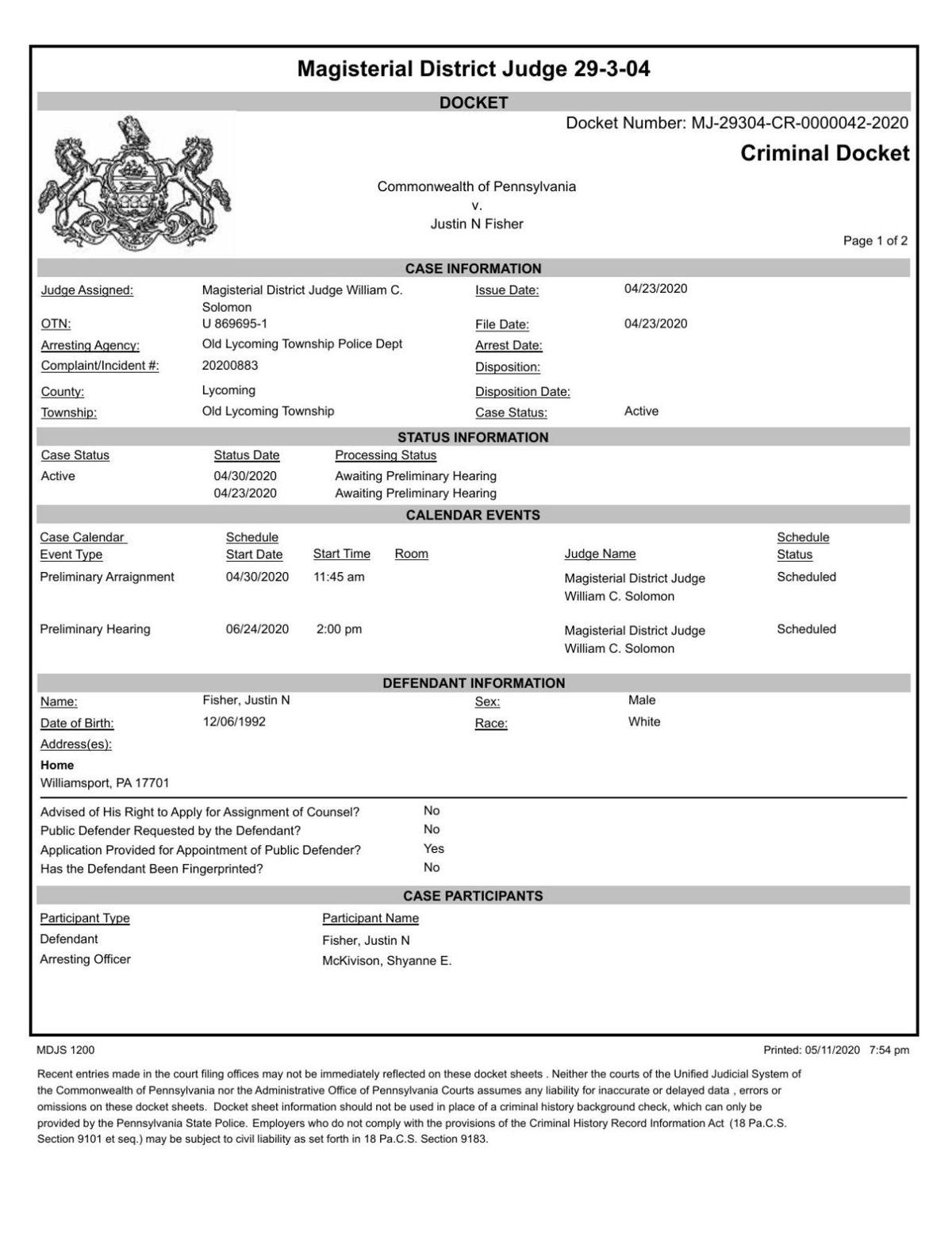
The term "docket" refers to the official summary of proceedings in a court of law. In Delaware County, this system acts as a repository for judicial information. It is crucial to understand that while the system provides substantial transparency into the judicial process, it is not a complete evidentiary file. Users typically use the docket to identify case numbers, the presiding judge, the names of parties involved, and a chronological history of documents filed—such as motions, orders, and sentences.
In Pennsylvania, judicial records are managed under the Unified Judicial System (UJS). Therefore, the Delaware County docket search often integrates with the statewide Pennsylvania UJS Portal, which functions as the primary interface for most public record inquiries. Recognizing this distinction is vital: you are often accessing a county-specific filtered view of a statewide database.
Prerequisites for Accessing Records
To effectively navigate the docket search, you must have specific identifiers. Searching by name alone often yields excessive results, particularly for common surnames. Before initiating your search, attempt to gather one or more of the following:
- Case Number: This is the most efficient search parameter. It is a unique alphanumeric string assigned by the court system upon the initiation of a case.
- Participant Name: The full legal name of the defendant, plaintiff, or petitioner.
- Date Range: If the exact filing date is unknown, narrowing your search by year or specific timeframe significantly reduces the volume of irrelevant results.
- Magisterial District Court Number: Knowing the specific jurisdiction within Delaware County can help filter results to only those originating from a particular local magistrate.
Step-by-Step Guide to the Search Process
Accessing the UJS portal for Delaware County records requires a systematic approach. Follow these steps to ensure you retrieve the most accurate information:
- Navigate to the Official Portal: Access the Pennsylvania Unified Judicial System Portal. Avoid third-party "background check" sites that aggregate public data; these are often outdated and may charge fees for information that is available to the public for free through official channels.
- Select the Court Type: Determine if your inquiry relates to a "Common Pleas" case (typically more serious criminal or major civil matters) or a "Magisterial District Court" case (lower-level offenses, summary traffic citations, or minor civil disputes).
- Input Search Criteria: Enter your gathered identifiers into the designated fields. If searching by name, ensure the spelling matches the exact formatting used in legal documents.
- Execute the Query: Review the results list. If multiple matches appear, cross-reference the date of birth or the municipality to confirm you have identified the correct case.
- Review the Docket Sheet: Once the correct case is selected, click on the document icon to view the PDF "Docket Sheet." This document is the primary source of truth for the case’s procedural history.
Distinguishing Between Case Types
The nature of the record often dictates how it appears in the docket. Understanding these distinctions prevents errors in data interpretation:
| Case Category | Typical Oversight Body | Scope of Records |
|---|---|---|
| Criminal (Common Pleas) | Delaware County Court of Common Pleas | Felony and misdemeanor charges, trial dates, sentencing. |
| Civil (Common Pleas) | Delaware County Court of Common Pleas | Lawsuits, contract disputes, torts, family law orders. |
| Magisterial District | Local Magisterial District Judge | Traffic citations, landlord-tenant disputes, preliminary hearings. |
Limitations and Legal Disclaimers
While the docket search is an invaluable tool for public transparency, it is subject to several operational and legal constraints. First, the data contained in the online portal is subject to the administrative timing of court clerks. A filing might occur in a physical courtroom but take 24 to 48 hours to appear in the digital portal.
Second, certain records are "expunged" or "sealed" by court order. If a case was dismissed or if an expungement was granted, that information will not appear in the public docket search. Furthermore, the electronic records system may not contain sensitive documents such as medical reports or private financial statements, which are often redacted or held as confidential physical files. For legal advice regarding the contents of a docket, it is always necessary to consult with a licensed attorney in Pennsylvania.
Troubleshooting Common Search Issues
If your search yields no results, consider the following common issues:
- Incorrect Name Format: Try variations of the name. If the person has a hyphenated last name or a suffix (e.g., Jr. or III), the system may require those characters to be included or excluded for a match to occur.
- Jurisdictional Errors: You may be searching the wrong court level. If a traffic ticket was issued, it will likely appear in the Magisterial District system, not the Common Pleas system.
- Pending Updates: If you know a court session happened earlier today, the digital docket may not be updated until the following business day.
- Browser Compatibility: The UJS portal uses standard web technologies, but security software or overly restrictive privacy settings in your browser can occasionally interfere with the generation of PDF docket sheets.
Frequently Asked Questions
Can I view the actual evidence from a case using the docket search? No. The docket search provides a summary of procedural events and filings. To view specific evidence, such as police reports, physical exhibits, or transcripts, you must generally file a formal request with the Clerk of Courts or visit the Delaware County Courthouse in person.
Is there a fee to search the Delaware County docket? No, the public portal provided by the Pennsylvania Unified Judicial System is free to use. If you encounter a website asking for a credit card to perform a search for Delaware County records, you are likely on a third-party commercial site, not the official government portal.
How far back do these records go? The digital record-keeping system covers a substantial history, but availability varies by the specific court and the age of the case. Records from several decades ago may only exist in physical paper form at the county archives.
Does the docket show if a person is currently in jail? The docket shows the sentencing information and hearing history, which can indicate if a person was remanded to custody. However, for real-time inmate status, you should check the dedicated inmate locator tool provided by the Delaware County Sheriff or the correctional facility.
Final Next Action
For most users, the recommended next step is to visit the Pennsylvania UJS Case Information portal directly. Before beginning, ensure you have the full, legal spelling of the party’s name or the specific case number. If you are researching a pending matter, treat the electronic docket as a starting point, but always verify critical deadlines or status changes with your legal representative or the clerk’s office if the information appears ambiguous or outdated.
Image Gallery