How to Ensure Secure Attachments in Email: A Comprehensive Guide for 2026
To ensure secure attachments in email, you must utilize a combination of end-to-end encryption (E2EE), secure file-transfer portals, and robust identity verification. Moving beyond standard SMTP, security-conscious users should impleme...
To ensure secure attachments in email, you must utilize a combination of end-to-end encryption (E2EE), secure file-transfer portals, and robust identity verification. Moving beyond standard SMTP, security-conscious users should implement S/MIME or PGP for direct encryption, or leverage cloud-based links with multi-factor authentication (MFA) and expiration dates to maintain control over sensitive data.
Contents
The landscape of digital communication in 2026 demands more than just basic password protection. As cyber threats become more sophisticated, the "send and forget" nature of traditional email attachments has become a significant liability for both individuals and enterprises. Ensuring that a file reaches its intended recipient—and only that recipient—without being intercepted or altered requires a multi-layered defense strategy.
Understanding the Risks of Standard Email Attachments
The fundamental problem with email is its architecture. Original email protocols were designed for interoperability and ease of use, not security. When you attach a file to a standard email, it is typically converted into a text-based format (Base64) and sent across various mail transfer agents (MTAs).
While most modern providers use Transport Layer Security (TLS) to encrypt the connection between servers, this only protects the data "in transit" between those specific points. If a server along the path is compromised, or if the recipient’s mailbox is accessed by an unauthorized party, the attachment is often sitting in cleartext or is easily decryptable. Furthermore, standard attachments lack "revocability." Once you click send, you cannot take back the file or prevent it from being forwarded to unauthorized third parties.
Implementing End-to-End Encryption (E2EE)
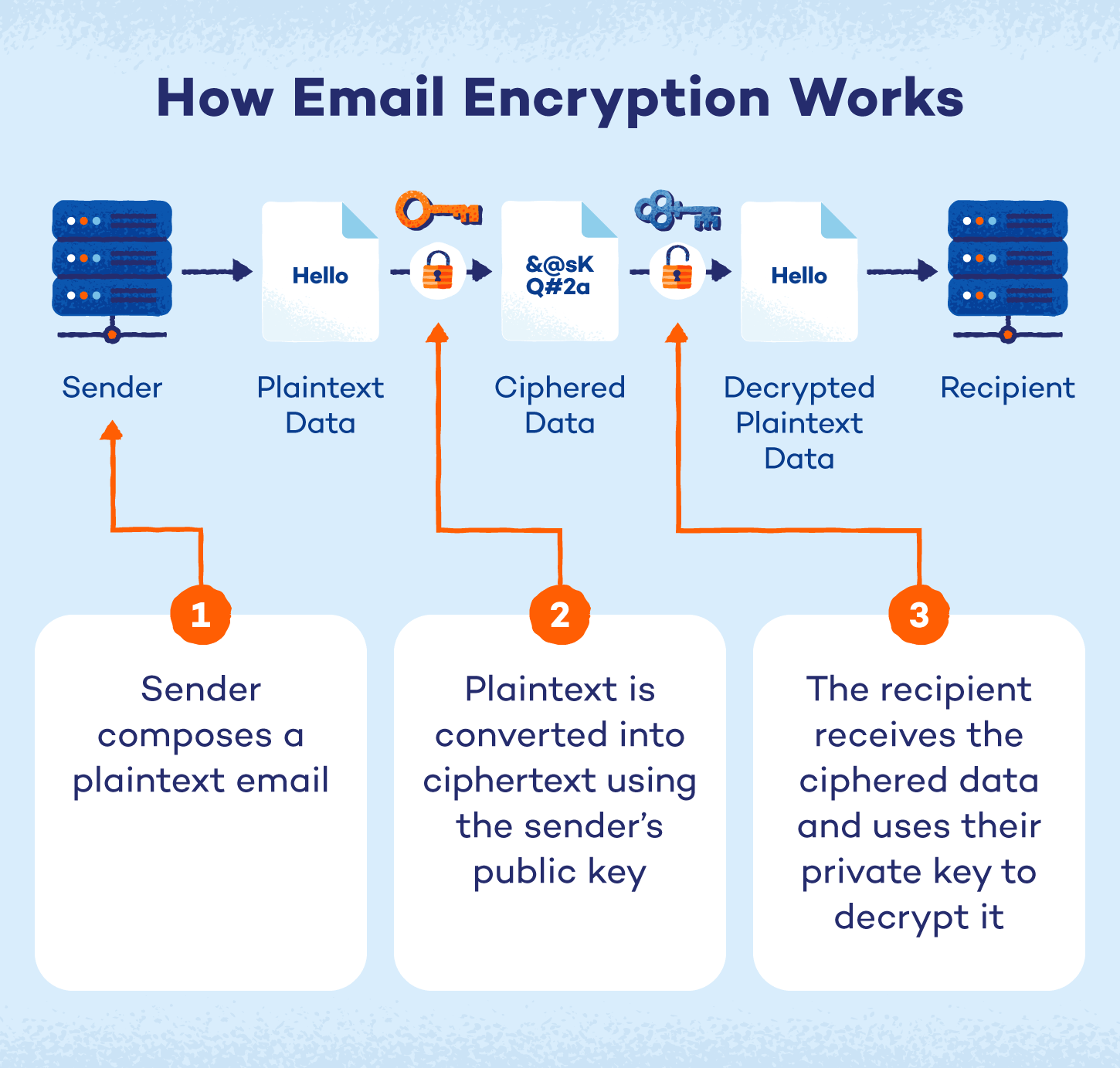
End-to-end encryption is the gold standard for attachment security because it ensures that only the sender and the recipient hold the keys to decrypt the content. Even if the email service provider is breached, the data remains unreadable.
S/MIME (Secure/Multipurpose Internet Mail Extensions)
S/MIME is the most common enterprise standard for encrypting email. it relies on a Public Key Infrastructure (PKI) where users are issued digital certificates by a Certificate Authority (CA).
- How it works: When you send an S/MIME encrypted email, your mail client uses the recipient's public key to encrypt the attachment. Only the recipient’s private key can unlock it.
- Prerequisites: Both the sender and the recipient must have S/MIME certificates installed in their mail clients (such as Outlook or Apple Mail).
- Benefit: It provides both encryption and non-repudiation, meaning the recipient can verify with certainty that the attachment came from you and was not tampered with.
PGP (Pretty Good Privacy)
PGP is an alternative to S/MIME that does not rely on a centralized CA. Instead, it uses a "Web of Trust" model. While more common in technical and privacy-focused circles, it requires more manual setup for key management. In 2026, many browser-based PGP extensions have simplified this process, but it remains less user-friendly for the average corporate employee than S/MIME.
Transitioning to Secure File-Sharing Portals
By 2026, the trend of attaching raw files directly to emails has largely shifted toward using secure file-sharing portals. This method involves uploading the file to a hardened cloud environment and sending a secure, trackable link to the recipient.
Why Portals Outperform Direct Attachments
The primary advantage of a portal is centralized control. When you send a link via a service like Microsoft OneDrive, Google Drive, or specialized platforms like Box and Tresorit, the file never actually "leaves" the secure environment in a vulnerable state.
- Granular Access Control: You can restrict access to specific email addresses, preventing the file from being accessed if the email is forwarded.
- Multi-Factor Authentication (MFA): You can require the recipient to enter a code sent to their mobile device or a secondary email before they can view the attachment.
- Expiration Dates: You can set the link to expire after a few hours or days, reducing the "attack surface" over time.
- Audit Trails: Portals provide logs showing exactly when the file was accessed and by which IP address.
- Remote Revocation: If you realize you sent the wrong file or the wrong person was copied, you can disable the link immediately, rendering the "attachment" inaccessible.
Malware Scanning and Content Disarm & Reconstruction (CDR)
Security is not just about keeping your data in; it is also about keeping threats out. Attachments are a primary vector for ransomware and spyware. To ensure an attachment is secure for the recipient, it must be rigorously scanned.
Advanced Threat Protection (ATP)
Modern email gateways now use AI-driven sandboxing. When an attachment is received, the system "detonates" the file in a virtual environment to observe its behavior. If the file attempts to modify system registries or connect to a known command-and-control (C2) server, it is blocked.
Content Disarm and Reconstruction (CDR)
For high-security environments, CDR is the preferred method. Instead of scanning for known signatures of viruses, CDR assumes all attachments are untrusted. It breaks the file down into its core components, removes any executable code or macros (which are often used for malicious payloads), and rebuilds a clean version of the file (e.g., converting a Word doc to a flattened PDF). This ensures that the recipient receives the information without the risk of embedded malware.
Comparison of Secure Attachment Methods
| Method | Security Level | Best Use Case | Key Limitation |
|---|---|---|---|
| Standard TLS | Low | Low-risk, everyday communication | No protection against server-side breaches. |
| Password-Protected ZIP (AES-256) | Medium | Ad-hoc sharing with non-technical users | Passwords must be shared via a secondary channel. |
| S/MIME / PGP | High | Legal, Government, and Executive comms | Requires certificate management by both parties. |
| Secure Link (Portal) | Very High | PII, Financial records, Large datasets | Requires recipient to have internet access to view. |
| Managed File Transfer (MFT) | Highest | Automated B2B data exchanges | High cost and complex implementation. |
Data Loss Prevention (DLP) Policies
Organizations must implement Data Loss Prevention (DLP) to automate the security of attachments. DLP software scans outgoing emails and their attachments for sensitive patterns, such as:
- Social Security Numbers (SSNs)
- Credit card numbers (PCI data)
- Proprietary source code
- Protected Health Information (PHI)
When a violation is detected, the system can automatically encrypt the attachment, block the email, or alert the security team. By 2026, DLP systems have integrated advanced "contextual awareness," allowing them to distinguish between a legitimate business invoice and a sensitive data leak, reducing the number of false positives that frustrate employees.
Professional Limitation and Best Practices
While the methods described above significantly enhance security, no system is impenetrable. These guidelines are intended for general information security and do not constitute legal advice regarding compliance with specific regulations like GDPR, HIPAA, or CCPA. Users should consult with their IT department or a cybersecurity professional to ensure their chosen method meets specific jurisdictional and industry requirements.
Step-by-Step Recommendation for Sending a Secure Attachment
- Classify the Data: Determine if the attachment contains sensitive, confidential, or public information.
- Select the Tool: For highly sensitive data, use a secure link with MFA. For standard business data, ensure S/MIME is active.
- Use Strong Encryption: If sending a standalone file, use a tool that supports AES-256 bit encryption. Avoid the legacy .ZIP format, which has weak encryption standards.
- Verify the Recipient: Double-check the email address. In 2026, many email clients use "Verified Sender" icons to help prevent look-alike domain spoofing.
- Communicate Passwords Separately: Never send a file-encryption password in the same email as the file itself. Use a secure messaging app or a phone call.
- Monitor Access: If using a portal, check the access logs to confirm the intended recipient downloaded the file.
Frequently Asked Questions
Are password-protected ZIP files still secure enough for business?
Only if you use AES-256 encryption. Most modern archiving utilities like 7-Zip or WinZip offer this. However, the legacy "Zip 2.0" encryption found in older operating systems is easily cracked by modern hardware in minutes. Additionally, you must communicate the password via a separate "out-of-band" channel, such as an encrypted chat or voice call, to ensure the password isn't intercepted along with the email.
What is the difference between encryption in transit and encryption at rest?
Encryption in transit (like TLS) protects the data while it is moving across the internet between servers. Encryption at rest protects the data while it is stored on a server or a hard drive. To truly secure an attachment, it should be encrypted in both states, ensuring that even if a hacker gains access to the recipient's physical server, they cannot read the file.
Do Gmail and Outlook automatically encrypt my attachments?
They use TLS to encrypt the "tunnel" through which your email travels. While this is better than nothing, it is not end-to-end encryption. If the recipient's email provider does not support TLS, the email may be sent in cleartext. For true security, you must use a dedicated encryption feature (like "Encrypt" in Outlook or "Confidential Mode" in Gmail) which adds a layer of protection beyond standard transmission.
Can I revoke an attachment after I have sent it?
You can only revoke an attachment if you sent it as a cloud-based link (e.g., SharePoint, Google Drive, or a secure portal). If you attached the actual file directly to the email, you cannot "un-send" it once it has reached the recipient's mail server. This is why using secure links is the preferred method for sensitive data in 2026.
How does "Confidential Mode" work in modern email services?
Confidential Mode (standard in Gmail and similar in Outlook) doesn't actually send the content to the recipient's inbox. Instead, it sends a link to the content stored on the provider's server. This allows the sender to set expiration dates and prevents the recipient from forwarding, copying, or downloading the attachment, providing a significant boost to security for casual users.
Final Recommendation
For maximum security in 2026, avoid direct file attachments for any sensitive data. Instead, utilize a secure file-sharing portal that requires Multi-Factor Authentication (MFA) for the recipient and provides an audit log of access. For internal corporate communication, ensure S/MIME is enabled by default to provide a seamless layer of encryption and identity verification for every document shared.
Image Gallery