USB C Maximum Power Explained: Understanding Wattage, Voltage, and Charging Limits
USB-C maximum power delivery depends heavily on the specific USB Power Delivery (USB PD) specification version, cable quality, and the communication chips embedded inside the connected devices. While early iterations maxed out at a mod...
USB-C maximum power delivery depends heavily on the specific USB Power Delivery (USB PD) specification version, cable quality, and the communication chips embedded inside the connected devices. While early iterations maxed out at a modest 15 watts, modern standards support up to 240 watts, enabling users to power everything from smartphones and tablets to high-performance gaming laptops and external monitors with a single universal cable format.
Contents
The Evolution of USB-C Power Capabilities
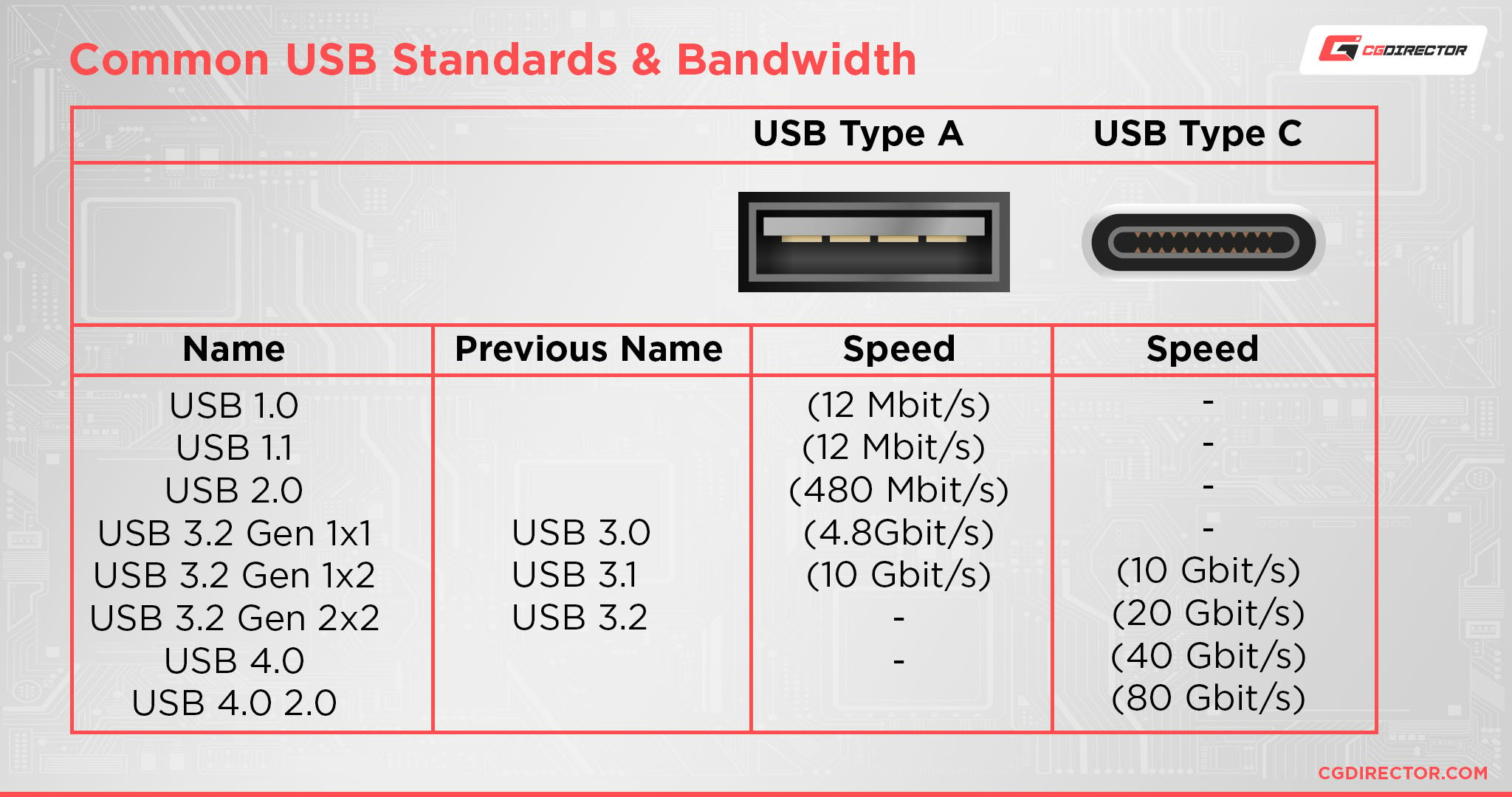
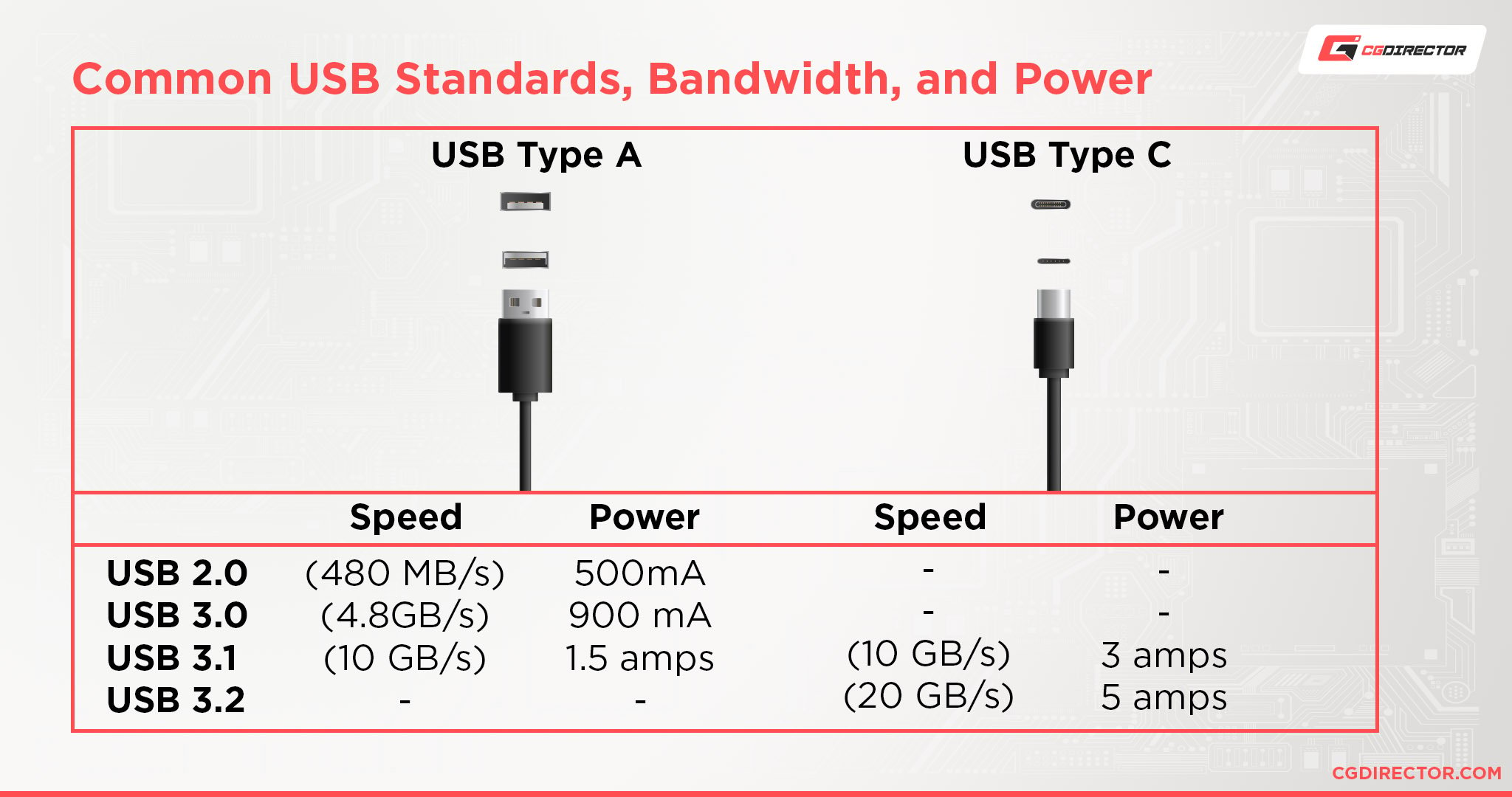
The Universal Serial Bus Type-C connector has fundamentally transformed how consumer electronics manage power and data transfer. In its earliest legacy implementations, USB ports provided a meager 2.5 watts (5 volts at 500 milliamps) or 4.5 watts (5 volts at 900 milliamps) primarily meant for data synchronization and slow peripheral charging. As mobile devices grew more power-hungry and manufacturers sought to eliminate proprietary charging bricks, the USB Implementers Forum (USB-IF) introduced structured power protocols to safely push electrical current far beyond traditional limits.
Understanding USB-C maximum power requires separating the physical connector from the electrical protocols running through it. The physical oval-shaped port and cable pin configuration can handle significantly more electrical current than standard USB connections of the past, but raw physical compatibility does not guarantee high-wattage output. Safe high-wattage delivery relies on a digital "handshake" between the power source, the cable, and the receiving device to negotiate the exact voltage and amperage required without damaging sensitive hardware.
How USB Power Delivery (USB PD) Works
At the heart of high-wattage USB-C charging is USB Power Delivery, a protocol standard that dynamically negotiates power over the connection. Instead of relying on a fixed voltage like standard chargers, a USB PD-compliant system initiates a communication sequence immediately upon connection.
During this handshake, the charger and the device exchange capabilities data packets over the Configuration Channel (CC) pins inside the cable. The device requests a specific voltage and amperage profile from the charger's supported menu. If both ends agree, the power supply adjusts its output in real-time. This negotiation process protects lower-powered accessories, such as wireless earbuds or older smartphones, from receiving dangerous voltage spikes that could ruin their internal batteries or trigger thermal runaway events.
Breaking Down USB PD Specifications and Wattage Tiers
The USB-IF has expanded the USB PD standard across multiple generational releases, progressively increasing the ceiling for maximum power delivery. Navigating these tiers is essential for purchasing compatible accessories that can properly fuel heavy-duty gear.
USB PD 2.0 and 3.0 (The 100W Era)
For many years, the benchmark for high-power USB-C was capped at 100 watts (20 volts at 5 amps). Under USB PD 2.0 and 3.0, chargers could scale through mandatory and optional voltage profiles (5V, 9V, 15V, and 20V). This threshold was sufficient for ultraportable laptops, tablets, and mid-range smartphones. However, as mobile workstations and gaming laptops began demanding 130W, 150W, or even 240W to operate under full load, the 100W ceiling created a bottleneck.
USB PD 3.1 and Extended Power Range (EPR)
To accommodate power-hungry enterprise hardware, the USB-IF introduced USB PD 3.1, featuring the Extended Power Range (EPR) architecture. EPR pushes the absolute maximum power limit of USB-C to 240 watts (48 volts at 5 amps). To reach these higher tiers safely, the specification introduces new fixed voltage steps at 28V, 36V, and 48V, along with an Adjustable Voltage Supply (AVS) mode that allows fine-grained voltage adjustments in 100-millivolt increments.
| Specification Standard | Maximum Voltage | Maximum Amperage | Maximum Power Limit | Primary Target Devices |
|---|---|---|---|---|
| Legacy USB (BC 1.2) | 5.0V | 1.5A | 7.5W | Feature phones, basic peripherals |
| USB PD 2.0 / 3.0 (Standard) | 20.0V | 5.0A | 100W | Smartphones, tablets, thin laptops |
| USB PD 3.1 (EPR) | 48.0V | 5.0A | 240W | Gaming laptops, mobile workstations, docking stations |
The Critical Role of E-Marker Chips in Cables
A common misconception is that any USB-C cable can handle maximum power limits as long as the charger and device support them. In reality, standard USB-C cables without specialized internal hardware are generally rated for a maximum of 3 amps, limiting standard cables to 60W (at 20V) under older specs.
To safely cross the 3-amp threshold or handle high-voltage EPR profiles up to 48V, a cable must include an E-Marker (Electronically Marked) chip. This tiny integrated circuit acts as an electronic passport, informing the connected charger and device about the cable's internal wire gauge, maximum voltage rating, current handling capacity, and data transfer speeds. If a cable lacks an E-Marker chip or fails to report adequate ratings, the power source will automatically restrict output to safe defaults, typically 60W or lower, regardless of how powerful the wall charger or laptop might be.
Programmable Power Supply (PPS) and Efficiency
Modern fast-charging protocols increasingly rely on Programmable Power Supply (PPS), an optional protocol introduced in USB PD 3.0 and integrated into PD 3.1. PPS allows a charger to modify its voltage and current continuously in real-time—in increments as small as 20 millivolts—while matching the exact demands of a device's battery management system.
Traditional charging steps can create excess heat as voltage is stepped down inside the device. PPS minimizes thermal loss by matching the charger's output voltage directly to the battery's current state of charge. This efficiency reduces device temperatures during fast charging phases, preserves long-term battery health, and allows manufacturers to achieve rapid 0-to-50% charge cycles without triggering thermal throttling safeguards.
Common Pitfalls and Troubleshooting Power Issues
When a setup fails to deliver maximum wattage, diagnosing the root cause requires isolating each link in the power chain: the wall adapter, the cable, and the end device.
- Mismatching Ratings: Plugging a 240W laptop into a 30W phone charger will result in painfully slow charging or no charge at all under load, because the power source cannot supply the minimum amperage profile required by the computer.
- Using Non-Compliant Cables: Cheap, unbranded cables purchased online frequently omit E-Marker chips or use thin copper wiring that cannot handle high currents safely. This can lead to severe voltage drop, overheating, or melting connectors.
- Shared Power Ports: Many multi-port desktop and wall chargers dynamically redistribute their total wattage output when multiple devices are plugged in simultaneously. A 100W multi-port charger might drop a primary port down to 65W or 45W the moment a second device is connected.
Practical Recommendations for Maximizing USB-C Power
To ensure safe, high-speed power delivery across all personal electronics, follow these best practices when purchasing and deploying charging gear:
- Audit Your Hardware: Check the power brick requirements printed on your laptop or tablet's original manufacturer power adapter to identify its exact voltage and wattage needs.
- Invest in Certified EPR Cables: Look for cables explicitly labeled as supporting 240W (5A) and featuring certified USB-IF logos to guarantee they contain active E-Marker chips.
- Verify Multi-Port Allocations: Read the fine print on multi-port USB-C wall chargers to understand how wattage splits when charging more than one device at a time.
- Prioritize PPS Support: When buying replacement smartphone chargers, select adapters that explicitly list Programmable Power Supply (PPS) compatibility to ensure optimal charging speeds for modern mobile handsets.
Image Gallery