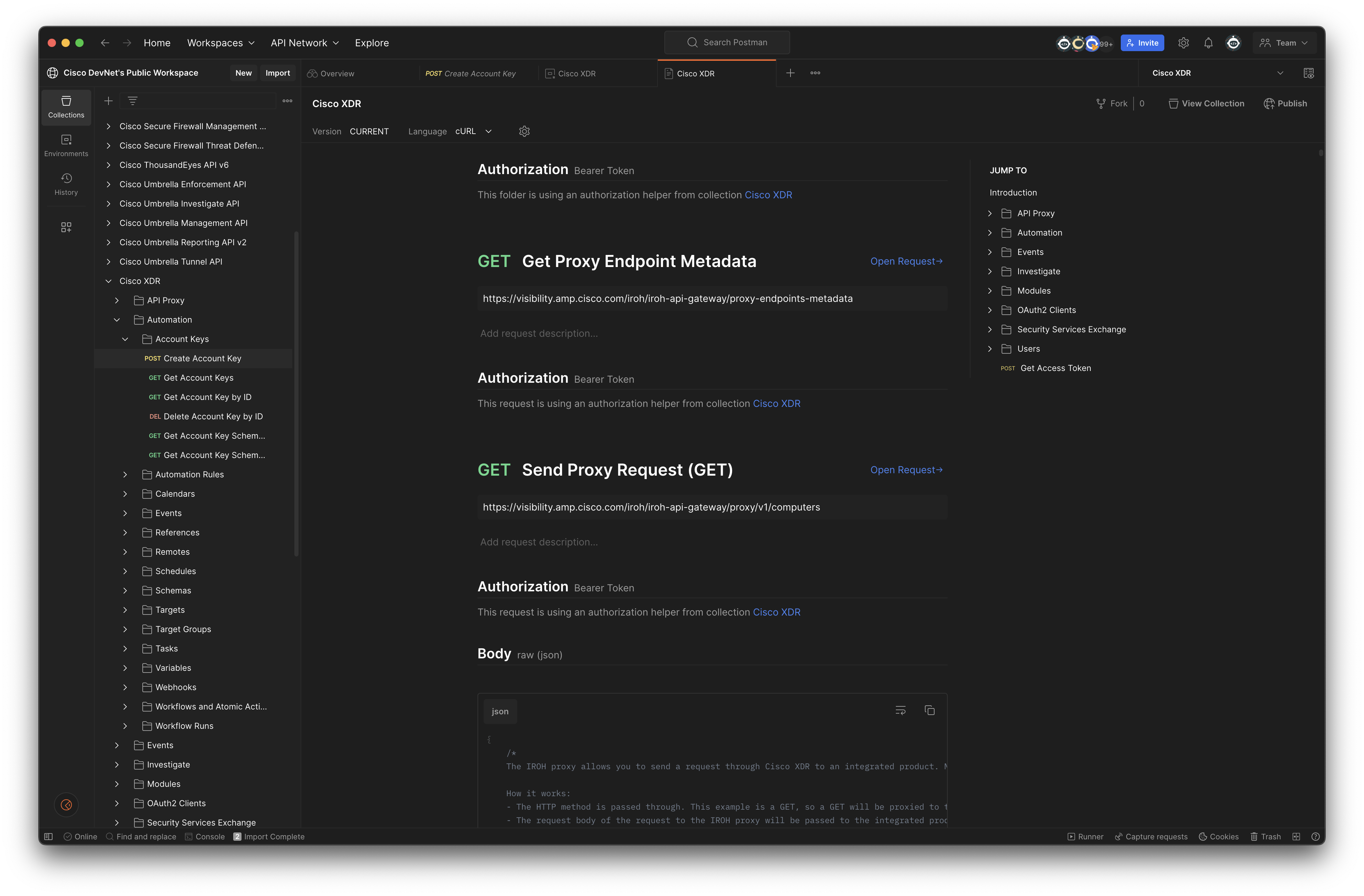
Cisco Cloud Security API Postman Collection: A Practical Overview
A Cisco Cloud Security API Postman collection provides pre-configured HTTP requests, environment variables, and authentication scripts designed to interact with Cisco cloud security platforms like Cisco Umbrella and Cisco Secure Access...
A Cisco Cloud Security API Postman collection provides pre-configured HTTP requests, environment variables, and authentication scripts designed to interact with Cisco cloud security platforms like Cisco Umbrella and Cisco Secure Access. It simplifies administrative automation, policy enforcement, and threat reporting by allowing security teams to test, iterate, and deploy API workflows without writing custom integration code from scratch.
Contents
Understanding Cisco Cloud Security APIs and Postman Integration
Modern cloud security management demands rapid responsiveness, programmatically scalable configurations, and seamless integration across enterprise Security Operations Center (SOC) tooling. Cisco provides a robust suite of REST APIs across its cloud security portfolio—most notably Cisco Umbrella and Cisco Secure Access (Security Service Edge / SSE)—to give administrators programmatic access to core features. These include DNS layer security, cloud-delivered firewall settings, secure web gateway rules, and centralized activity logging.
Integrating these APIs directly into enterprise scripts can be daunting without preliminary testing. This is where a Postman collection serves as an indispensable bridge. Postman is an industry-standard API platform that bundles API requests, header schemas, authentication workflows, and environment variables into structured collections.
By leveraging an official or customized Cisco Cloud Security Postman collection, network engineers and security analysts can:
- Validate Authentication: Test OAuth 2.0 authorization flows before embedding credentials in orchestration tools.
- Inspect Request/Response Schemas: Examine real-time JSON responses, header requirements, and HTTP status codes.
- Accelerate Automation: Standardize operations such as bulk domain blocking, IPsec tunnel monitoring, and user role updates before migrating logic into production Python, PowerShell, or SOAR playbooks.
Core Prerequisites and Credential Setup
Before importing and executing requests within a Cisco Cloud Security API Postman collection, you must establish the appropriate access credentials within your cloud administration console. Cisco APIs mandate centralized management of API keys and client credentials to enforce strict Role-Based Access Control (RBAC).
Key Prerequisites
- Administrative Access: An active administrative account in Cisco Umbrella or Cisco Secure Access with full organization management rights.
- Postman Desktop Client or Web Workspace: A registered Postman workspace running the desktop client (recommended for local network debugging) or cloud web application.
- API Key Generation: Dedicated API client credentials (Client ID and Client Secret) created through the API Key Management dashboard.
Steps to Generate Credentials in Cisco Umbrella or Secure Access
- Log into your Cisco Umbrella or Cisco Secure Access portal.
- Navigate to Admin > API Keys or Management > API Credentials.
- Select Add API Key or Create Client.
- Assign the appropriate key scope based on your operational needs. Key scopes include:
- Deployments: Read/Write access to destination lists, roaming computers, and network sites.
- Reports: Read-only access to DNS, web, and IP threat reporting endpoints.
- Policies: Configuration management for firewall and web proxy rules.
- Admin Logs: Access to audit trail records and login events.
- Save the generated Client ID and Client Secret in a secure password manager. Note that Cisco displays the Client Secret only once upon creation.
Importing and Configuring the Postman Workspace
Setting up the Postman environment correctly ensures that authorization tokens are fetched automatically and passed seamlessly across all subsequent API endpoints.
Step 1: Importing the Collection
You can obtain the Cisco Cloud Security API Postman collection directly from the Cisco DevNet Portal or from the official Cisco DevNet GitHub repositories.
- Open Postman and navigate to your desired workspace.
- Click the Import button in the top left navigation pane.
- Select File to upload a downloaded JSON collection file, or choose Link to paste the URL of the public Postman collection.
- Confirm the import to populate your sidebar with grouped API folders (e.g., Management, Reports, Admin, Tunnels).
Step 2: Configuring Environment Variables
Rather than hardcoding credentials into individual requests, use a Postman Environment. Create a new environment named "Cisco Cloud Security Production" and define the following key-value pairs:
- baseUrl:
https://api.umbrella.com(or your platform-specific tenant base URL) - tokenUrl:
https://api.umbrella.com/oauth/v2/token - clientId: Your generated Client ID
- clientSecret: Your generated Client Secret
- accessToken: Leave empty (populated dynamically by script)
Step 3: Setting Up Automated OAuth 2.0 Token Generation
Cisco Cloud Security APIs use the OAuth 2.0 Client Credentials Grant flow. To prevent manually copying access tokens every hour, configure a Pre-request Script on the collection root or execute an explicit "Get Token" request.
The "Get Token" request sends an HTTP POST request to the token URL using Basic Authentication (where the username is your clientId and password is your clientSecret) or passing client credentials in the form-data request body.
Upon receiving a successful JSON response containing an access_token and expires_in duration, a Postman tests script saves the token automatically into the environment variable:
pm.environment.set("accessToken", responseData.access_token);
Subsequent API calls in the collection use the authorization header Bearer {{accessToken}} to authenticate securely.
Essential API Endpoints and Functional Modules
The Cisco Cloud Security API Postman collection organizes capabilities into distinct functional modules. The table below outlines the primary API endpoints, their functions, authentication requirements, and common enterprise use cases.
| API Module | Endpoint Path | Key Capabilities | Auth Method | Enterprise Use Case |
|---|---|---|---|---|
| Destination Lists | /deployments/v2/destinationlists |
Add, update, delete, or inspect blocked and allowed domain lists | OAuth 2.0 Bearer | Automating high-frequency threat intelligence feed updates |
| Activity Reporting | /reports/v2/activity |
Retrieve granular DNS, URL, and IP activity events | OAuth 2.0 Bearer | Exporting threat logs to custom SIEM or data lake platforms |
| Network Tunnels | /deployments/v2/tunnels |
Query status and health metrics for IPsec cloud tunnels | OAuth 2.0 Bearer | Real-time tunnel status monitoring and operational alerting |
| Roaming Computers | /deployments/v2/roamingcomputers |
List, rename, or delete registered endpoint security clients | OAuth 2.0 Bearer | Auditing stale enterprise assets and user endpoints |
| Audit Logs | /admin/v1/auditlogs |
Extract administrative changes and policy modifications | OAuth 2.0 Bearer | Compliance auditing and regulatory change-tracking |
| User Management | /admin/v1/users |
Manage administrative tenant users and role assignments | OAuth 2.0 Bearer | Centralizing admin identity provisioning and deprovisioning |
Step-by-Step Practical Workflows
To demonstrate how the collection is used in practice, the following workflows illustrate two common scenarios: updating custom destination lists for threat response and querying reporting data for SOC analysis.
Workflow 1: Rapid Incident Response via Destination Lists
When an enterprise SOC identifies an active malicious domain or indicator of compromise (IOC), security analysts must block the domain enterprise-wide immediately.
- Locate Destination List ID: Expand the Deployments folder in Postman and select
GET /deployments/v2/destinationlists. Click Send. Identify theidcorresponding to your custom block list (e.g.,123456). - Add Malicious Domains: Select
POST /deployments/v2/destinationlists/{destinationListId}/destinations. - Configure Payload: In the request body (JSON format), specify the domains and comment metadata:
- Specify the destination string (e.g.,
malicious-domain.example.com). - Add a descriptive comment referencing the SOC incident ticket ID.
- Specify the destination string (e.g.,
- Execute and Verify: Click Send. Review the HTTP status code. A
200 OKor201 Createdstatus confirms that the domain has been added and queued for global policy push across Cisco cloud edge nodes.
Workflow 2: Extracting Granular Activity Logs
Security analysts often need to query DNS requests originating from specific internal IP addresses during an investigation.
- Select Reporting Endpoint: Expand the Reporting folder and open
GET /reports/v2/activity/dns. - Set Query Parameters: Under the Postman Params tab, configure key filters:
- from: Start timestamp in epoch milliseconds or ISO format.
- to: End timestamp.
- limit: Maximum record count (e.g.,
100). - verdict: Filter by
blockedorallowed.
- Analyze Response: Click Send. Postman renders the returned JSON array detailing client IP, internal IP, query domain, threat category, and applied policy rules.
Troubleshooting Common API and Postman Errors
Working with REST APIs inevitably involves handling HTTP errors and operational bottlenecks. The following list identifies common error scenarios and actionable solutions.
- HTTP 401 Unauthorized
- Check if Bearer token is missing, expired, or invalid.
- Re-run "Get Token" request to refresh
{{accessToken}}.
- HTTP 403 Forbidden
- Verify API key scope permissions in Cisco Cloud Admin console.
- Ensure the endpoint matches your tenant product subscription (Umbrella vs. Secure Access).
- HTTP 429 Too Many Requests
- Rate limit exceeded (typically 100-500 requests/minute depending on tier).
- Introduce pause/delay in Postman Collection Runner or code loop.
- HTTP 400 Bad Request
- Check JSON payload formatting and required path parameters (e.g., valid list ID).
Rate Limiting and Backoff Strategies
Cisco Cloud Security APIs enforce rate limits to protect infrastructure stability. Response headers include critical throttling metadata:
X-RateLimit-Limit: Maximum allowable requests per window.X-RateLimit-Remaining: Remaining request count in the current window.X-RateLimit-Reset: Seconds remaining until the rate counter resets.
When using Postman Collection Runner for batch operations, configure a delay (e.g., 200–500 ms) between requests to prevent triggering 429 Too Many Requests responses.
Production Best Practices for Security Automation
While Postman is ideal for interactive testing and workflow validation, transitioning automation workflows into production environments requires adherence to enterprise security best practices.
1. Zero-Trust Secrets Management
Never commit environment files containing active clientId or clientSecret values to public code repositories, Git repositories, or unencrypted local disks. Use Postman's variable types to mark sensitive credentials as Secret variables, masking them on screen.
2. Environment Segregation
Maintain separate Postman environment profiles for developer lab environments, staging tenants, and production deployment environments. Always test bulk updates (such as policy deletions or massive list changes) in a non-production lab prior to execution.
3. Transitioning from Postman to Code
Once an API workflow is validated in Postman, use Postman's built-in Code Snippet feature (located in the right sidebar) to generate production-ready code in Python (requests), PowerShell (Invoke-RestMethod), Go, or Node.js. This ensures smooth handoff to DevOps and automation engineers building production pipelines.
Frequently Asked Questions
Where can I find the official Cisco Cloud Security Postman collections?
Official Postman collections and OpenAPI specifications are published through the Cisco DevNet Developer Portal and the Cisco DevNet GitHub organization. You can also search for official Cisco workspaces directly within the Postman Public API Network.
How long do OAuth 2.0 access tokens remain valid?
Access tokens generated by Cisco Cloud Security authentication endpoints generally remain valid for 3,600 seconds (1 hour). After expiration, authentication requests return an HTTP 401 response, requiring the execution of a new OAuth token request using your client credentials.
Can I automate Postman collections in CI/CD pipelines?
Yes. You can export Postman collections and environment files to run them headlessly using Newman, Postman's command-line collection runner. Newman integrates directly into CI/CD tools such as Jenkins, GitHub Actions, and GitLab CI for automated regression testing and deployment validation.
What is the difference between legacy Cisco Umbrella API keys and OAuth 2.0 credentials?
Legacy Cisco Umbrella API keys relied on static key-and-secret HTTP headers with broad tenant permissions. The modern OAuth 2.0 architecture utilizes granular client scopes, limited-lifetime bearer tokens, and enhanced audit logging, providing significantly stronger security controls.
Does the Postman collection support both Cisco Umbrella and Cisco Secure Access?
Yes. While Cisco Umbrella and Cisco Secure Access share many underlying API modules (such as destination management and reporting), Cisco Secure Access introduces dedicated endpoints for Security Service Edge (SSE), Zero Trust Network Access (ZTNA), and advanced cloud firewall controls included in updated collection suites.
Recommended Next Actions
To start building and running your cloud security workflows:
- Log in to your Cisco Umbrella or Cisco Secure Access portal and generate a dedicated set of read/write API client credentials.
- Download or fork the latest Cisco Cloud Security API collection from the official Cisco DevNet repository.
- Import the collection into Postman, configure your environment variables, and run the automated token generation request.
- Test basic reporting or destination list requests in a lab environment before exporting the working requests into your enterprise SOAR, Python, or PowerShell automation tools.
Image Gallery