Comprehensive List of Top POS Systems: Features, Pricing, and Selection Guide
Selecting the right Point of Sale (POS) system depends directly on your business model, transaction volume, and operational requirements. Industry leaders include Square for versatile micro-merchant setups; Toast for specialized restau...
Selecting the right Point of Sale (POS) system depends directly on your business model, transaction volume, and operational requirements. Industry leaders include Square for versatile micro-merchant setups; Toast for specialized restaurant management; Shopify POS for unified e-commerce retail; Lightspeed for multi-location inventory depth; and Clover for hardware-focused app ecosystems.
Contents
Navigating the Modern POS Landscape
Point of Sale platforms have evolved from basic cash registers into central operational hubs. Modern systems integrate sales processing, real-time inventory management, customer relationship management (CRM), employee scheduling, and financial analytics into a unified cloud interface. Choosing software requires evaluating how well its underlying architecture aligns with your daily operations.
Cloud-Native vs. Hybrid Architectures
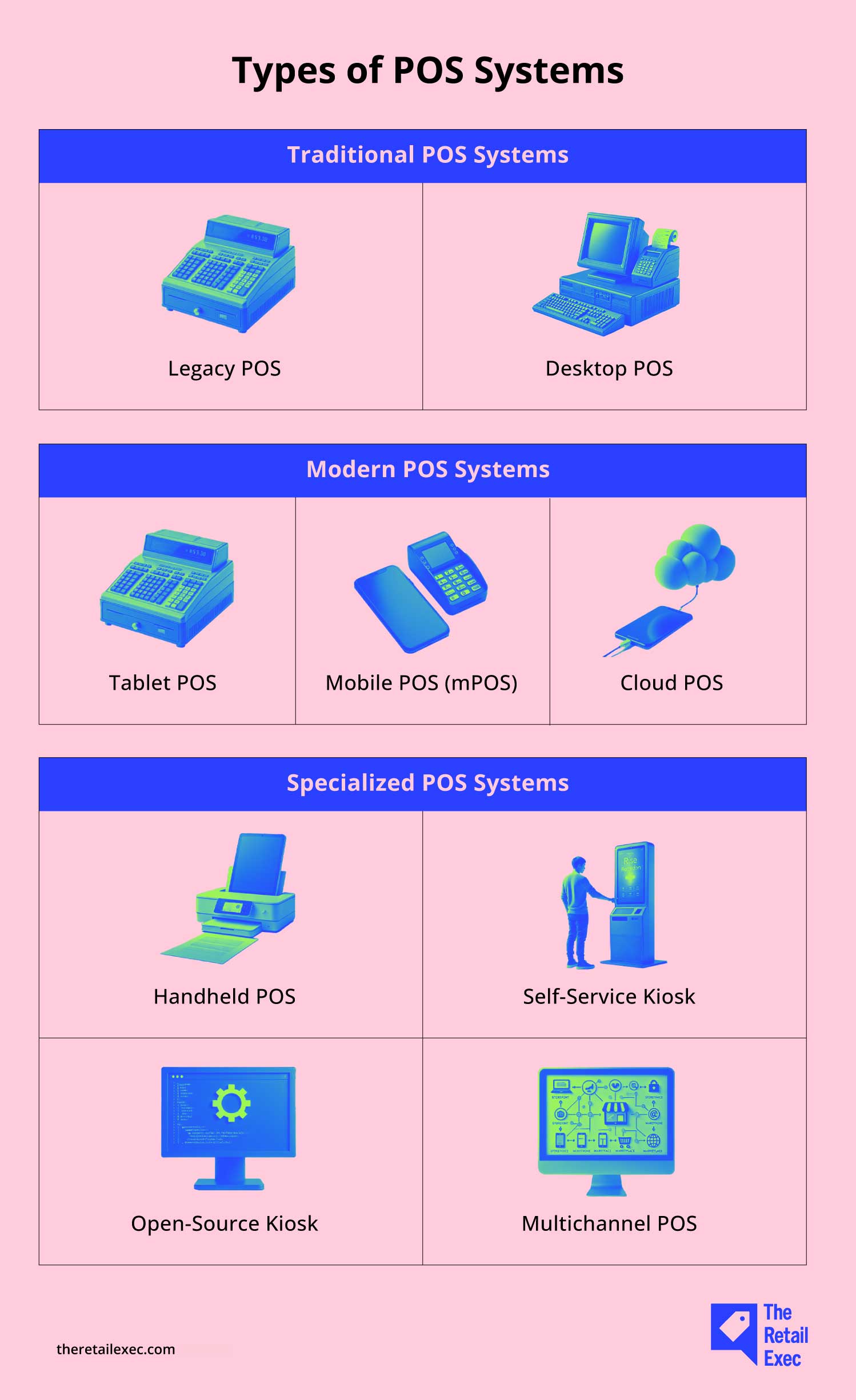
The distinction between cloud-native, legacy on-premise, and hybrid network architectures dictates system reliability and maintenance requirements:
- Cloud-Native POS Systems: Execute all logic and data persistence via remote servers. They offer real-time updates across multiple devices and locations, minimal upfront hardware investment, and automatic security patches. However, they rely heavily on continuous internet connectivity unless built with robust offline caching.
- Hybrid POS Systems: Run core transactional logic locally on local hardware (such as an iPad or local server hub) while periodically syncing data to the cloud. This structure ensures that offline credit card processing, table management, and kitchen printing continue without interruption during internet outages.
- Legacy On-Premise Systems: Store data on local servers located physically inside the venue. While offering total data control, they carry high maintenance overhead, lack modern mobility, and require manual software updates.
Leading POS Systems by Industry & Primary Use Case
POS System Architecture:
- Retail-Centric
- Shopify POS
- Lightspeed Retail
- Food & Beverage
- Toast POS
- TouchBistro
- Hybrid / General Purpose
- Square POS
- Clover POS
Different industries demand distinct functionality. A retail store prioritizes stock matrixing and e-commerce synchronization, whereas a full-service restaurant requires floor plan mapping, seat ordering, and kitchen display integration.
1. Square POS: Best Overall for Micro-Merchants and Versatile Businesses
Square popularized mobile card processing and remains a leading choice for new, mobile, and small-scale operations. Its platform operates without monthly software fees for basic tier usage, charging flat-rate processing fees per transaction.
- Core Strengths: No monthly software subscription required for basic functionality; intuitive interface; rapid onboarding with no contract commitments; transparent flat-rate payment processing.
- Key Features: Built-in payment gateway, basic inventory tracking, customer contact directory, digital receipts, and free online store integration.
- Hardware Ecosystem: Options range from mobile headphone-jack/Bluetooth card readers to standalone terminal hardware (Square Terminal) and full dual-screen setups (Square Register).
- Operational Limitations: Flat-rate payment processing costs become economically inefficient for high-volume operations compared to interchange-plus merchant accounts. Account freezing protocols are automated, which can lead to unexpected fund holds during volume spikes.
2. Toast POS: Best Dedicated System for Restaurants and Food Service
Toast is an Android-based POS built specifically for the food and beverage industry. It handles everything from quick-service counters to complex multi-room fine dining environments.
- Core Strengths: Deep restaurant-specific feature set, customized hardware designed to withstand kitchen environments (spills, heat), and robust offline transactional syncing.
- Key Features: Kitchen Display System (KDS) routing, table management, menu engineering (item variations, modifiers), online ordering, line busting, and built-in guest delivery management.
- Hardware Ecosystem: IP-rated splash-resistant terminals, handheld ordering tablets (Toast Go), KDS screens, and customer-facing displays.
- Operational Limitations: Requires committing to Toast's proprietary payment processor, preventing businesses from shopping around for lower credit card processing rates. Term contracts often carry early termination fees.
3. Shopify POS: Best for Omnichannel Retail and E-Commerce Integration
Shopify POS bridges physical retail stores with digital storefronts. It serves businesses that sell products simultaneously through physical stores, pop-up events, and e-commerce websites.
- Core Strengths: Unified single-database stock control across physical locations and online sales channels; centralized customer profiles and loyalty tracking; native access to the Shopify App Store.
- Key Features: Buy-online-pickup-in-store (BOPIS) capabilities, centralized return/exchange processing, unified customer order history, and localized inventory tracking across multiple warehouses.
- Hardware Ecosystem: Shopify Tap & Chip card readers, custom tablet stands, fully integrated barcode scanners, and receipt printers.
- Operational Limitations: Advanced POS functionality requires subscribing to higher-tier Shopify monthly plans. Using third-party payment processors incurs additional transaction surcharges on top of standard gateway rates.
4. Lightspeed POS: Best for Complex Retail Inventory and Multi-Location Operations
Lightspeed specializes in complex retail inventory structures, such as apparel, sports gear, jewelry, and multi-location franchises requiring detailed catalog controls.
- Core Strengths: Industry-leading inventory management capabilities; built-in vendor catalog integrations allowing purchase order generation directly inside the POS system.
- Key Features: Matrix inventory management (sizing, colors, materials), purchase order generation, vendor management, multi-store stock transfers, and automated reorder points.
- Hardware Ecosystem: Compatible with standard iPad hardware setups and select desktop terminal configurations.
- Operational Limitations: Higher entry price point and steeper learning curve compared to turn-key solutions like Square. Requires dedicated staff training for advanced features.
5. Clover POS: Best for Custom Hardware and App Market Flexibility
Clover, developed by Fiserv, combines custom-engineered payment hardware with an open app marketplace, letting merchants customize software modules for specialized workflows.
- Core Strengths: High-quality, durable proprietary terminal hardware; vast app marketplace allowing users to add specialized features (e.g., appointment scheduling, commission tracking).
- Key Features: Flexible app integration, employee shift management, customizable reward programs, and broad processor availability through various merchant service providers (MSPs).
- Hardware Ecosystem: Proprietary line of sleek hardware including Clover Station Solo/Duo, Clover Flex (handheld), and Clover Mini.
- Operational Limitations: Clover hardware is generally locked to the seller/reseller from whom it was purchased. Re-keying hardware to switch payment processors can be difficult or impossible, leading to potential hardware lock-in.
6. TouchBistro POS: Best for Independent Full-Service Restaurants
TouchBistro is an iPad-based system engineered specifically for restaurant workflows. It combines intuitive touchscreen interfaces with localized server hardware to ensure continuous operation without cloud dependency.
- Core Strengths: Runs on a local iPad network infrastructure (using a local server), making it exceptionally fast and resilient to internet outages.
- Key Features: Floor plan customization, table-side ordering, bill splitting capabilities, menu modification tags, and detailed staff performance tracking.
- Hardware Ecosystem: Standard Apple iPads paired with commercial-grade enclosures, cash drawers, and network-connected thermal receipt printers.
- Operational Limitations: Cloud reporting features require active internet access, and multi-terminal setups necessitate installing and maintaining a physical Mac computer as the local network server hub.
Detailed POS System Feature & Cost Comparison
The following matrix compares baseline configurations, hardware lock-in risk, and pricing structures across the top POS solutions:
| POS System | Target Industry | Base Monthly Software Fee | Processing Pricing Model | Offline Capability Level | Hardware Locking Risk |
|---|---|---|---|---|---|
| Square | Micro-SMB / Multi-use | $0 – $89/month per location | Flat-Rate (e.g., 2.6% + 10¢) | Moderate (Limited duration store-and-forward) | Low (Non-proprietary readers available) |
| Toast | Restaurants & Bars | $0 – $165+/month per terminal | Bundled/Exclusive Processor | High (Local network transaction caching) | High (Proprietary Android hardware) |
| Shopify POS | Omnichannel Retail | $39 – $399+/month (Includes e-commerce) | Integrated or Custom (Fee applies for 3rd party) | Basic (Offline payments require reconnect) | Low (Uses standard iOS/Android platforms) |
| Lightspeed | Complex Retail & Enterprise | $89 – $269+/month | Integrated or Interchange-Plus option | Moderate (Local database buffer) | Medium (Supports standard peripherals) |
| Clover | General Retail & Services | $14.95 – $94.95+/month (Via reseller) | Varies by Merchant Processor | High (Local hardware processing) | Very High (Hardware tethered to reseller) |
| TouchBistro | Food Service & Dining | $69+/month | Payment Agnostic (Choose partner) | High (Local iPad Server Architecture) | Low (Standard iPad hardware) |
Crucial Technical & Operational Features to Evaluate
When evaluating hardware and software specs, focus on core operational metrics rather than marketing claims:
POS Selection Criteria:
- Payment Model
- Flat Rate
- Custom IC+
- Network Res.
- Local Cache
- Sync Protocols
- Data Security
- PCI DSS
- P2PE Encryption
1. Payment Processing Architecture & Hidden Fees
Payment processing represents one of the largest ongoing expenses for high-volume businesses. Software vendors structure processing agreements in three primary ways:
- Flat-Rate Pricing: A fixed percentage plus a fixed transaction fee (e.g., 2.6% + 10¢). Ideal for low average ticket sizes or businesses processing under $10,000 monthly due to predictable costs and zero monthly gateway fees.
- Interchange-Plus Pricing: Passes through the direct cost from credit card networks (Visa, Mastercard) plus a transparent provider markup (e.g., Interchange + 0.20% + 10¢). This model is almost always cheaper for businesses processing over $15,000 to $20,000 monthly.
- Tiered Pricing: Classifies transactions into Qualified, Mid-Qualified, and Non-Qualified tiers. This structure often conceals true transaction costs and should generally be avoided.
Watch for forced processor bundling. Systems that require you to use their in-house payment processor effectively lock your business into non-negotiable processing rates.
2. Network Offline Reliability Protocols
An internet outage should not halt payment processing or kitchen orders. Review how prospective platforms handle offline scenarios:
- Store-and-Forward Encrypted Payments: Terminal captures card data locally in an encrypted state and submits transactions once connectivity returns. Note that business owners bear the financial risk if an offline transaction is declined later.
- Local Area Network (LAN) Inter-Device Sync: Terminals communicate with each other and printers over the local Wi-Fi router even when the main internet link drops out completely.
3. Data Security and Compliance Standard Constraints
POS software and hardware store and transmit sensitive cardholder data, requiring strict adherence to regulatory standards:
- PCI DSS Compliance: Systems must meet the Payment Card Industry Data Security Standard (PCI DSS) requirements. Top-tier providers handle the bulk of compliance at the platform layer via hardware-level encryption.
- Point-to-Point Encryption (P2PE): Ensure hardware utilizes hardware-level P2PE. This prevents credit card data from ever entering your local network memory unencrypted, protecting your business from potential malware and data breaches.
Common Implementation Pitfalls to Avoid
Deploying point-of-sale hardware without thorough planning can disrupt operations and result in unbudgeted costs:
- Ignoring Hardware Compatibility & Lock-In: Purchasing proprietary terminals (such as Clover or Toast) prevents you from moving software platforms without completely discarding your hardware investment. Selecting non-proprietary hardware (like standard iPads and network thermal printers) preserves operational flexibility.
- Underestimating Local Network Requirements: Cloud and hybrid POS configurations require stable internal network setups. Using consumer-grade routers for multi-terminal installations leads to dropped kitchen prints and payment processing delays. Establish dedicated VLAN networks exclusively for POS devices.
- Failing to Audit Inventory Data Before Migration: Exporting incorrect stock levels, duplicate SKUs, or messy product descriptions into a new platform will cause tracking errors across all channels. Clean legacy database records prior to system import.
Step-by-Step Selection Protocol
- Step 1: Operational Audit
- Step 2: Architecture Selection
- Step 3: RFP & Demos
- Step 4: Pilot Test
To choose the optimal POS system for your business, follow this operational roadmap:
- Document Your Feature Requirements: List your non-negotiable functional needs (e.g., barcode generation, tip-splitting rules, variant matrixing, multi-warehouse sync).
- Calculate Your Total Cost of Ownership (TCO): Sum hardware expenses, monthly software subscription costs, payment processing fees (based on your average ticket price and monthly volume), and app add-on costs over a 36-month timeline.
- Request Live Environment Demos: Test transaction workflows using realistic operational scenarios (e.g., voiding a line item, processing a split payment across cash and card, applying custom discounts).
- Verify Hardware Compatibility: Confirm whether existing thermal printers, cash drawers, barcode scanners, and network switches will interface directly with the candidate system.
- Run a Pilot Phase: Deploy the platform at a single workstation or location prior to a full multi-store rollout to identify network bottlenecks and menu training gaps.
Frequently Asked Questions
What is the average cost of a complete POS system?
Small business single-terminal setups typically range from $0 to $100 per month for software, with hardware costs between $300 and $1,500 upfront. Multi-terminal enterprise or restaurant setups range from $150 to $500+ per month in software fees, with hardware packages costing $2,000 to $6,000+.
Can I switch my payment processor while keeping my POS hardware?
It depends on the platform. Platforms built around open hardware standards (such as standard iPads, Star Micronics receipt printers, or Socket Mobile scanners) let you change software and processing partners easily. Platforms with integrated payment ecosystems (such as Toast or Clover) tether hardware directly to their software and processing services.
What happens if the internet goes down while processing sales?
Modern POS software uses an encrypted "store-and-forward" mode or local network caching to queue transactions offline. Once internet connectivity is restored, the platform processes the stored authorizations automatically. Note that merchants accept the risk of potential card declines for payments accepted offline.
What is the difference between flat-rate and interchange-plus payment processing?
Flat-rate processing charges a static fee for every transaction (e.g., 2.6% + 10¢), regardless of card type. Interchange-plus processing passes through the exact wholesale fee from credit card networks (Visa, Mastercard) plus a small fixed broker fee (e.g., Interchange + 0.25%). Interchange-plus is usually much more cost-effective for businesses processing higher monthly volumes.
How do omnichannel POS systems synchronize online and store inventory?
Omnichannel POS systems rely on a single centralized cloud database. When an item sells inside a physical store, the POS decrements inventory in real time across connected e-commerce sites (such as Shopify or WooCommerce), preventing accidental online sales of out-of-stock items.
Strategic Next Steps
To upgrade or implement a Point of Sale system efficiently, focus on these initial actions:
- Gather Sales Processing Data: Pull 3 to 6 months of processing statements to establish your average ticket size, card-present versus card-not-present split, and total monthly transaction volume.
- Map Network Capabilities: Evaluate your site's network topology to ensure you have structured Ethernet drops and adequate Wi-Fi coverage for wireless terminals.
- Schedule Standardized Demos: Test top POS candidates using identical operational workflows to perform an accurate side-by-side evaluation.
EDITORIAL CATEGORY METADATA:
Image Gallery