How to Open a Hyundai Key Fob: A Comprehensive Guide
Opening a Hyundai key fob is a straightforward process that requires minimal tools, typically just a small flat-head screwdriver. By removing the mechanical key blade and gently prying apart the seam of the fob casing, you can access t...
Opening a Hyundai key fob is a straightforward process that requires minimal tools, typically just a small flat-head screwdriver. By removing the mechanical key blade and gently prying apart the seam of the fob casing, you can access the internal battery compartment to perform a replacement or internal cleaning without damaging the sensitive electronic components.
Contents
Understanding Your Hyundai Key Fob Architecture
Modern Hyundai vehicles utilize a variety of key fob designs, ranging from the classic "flip-out" key style to the more streamlined smart proximity fobs found in models like the Palisade, Ioniq, or Sonata. While the external aesthetics differ across model years and trims, the underlying engineering remains consistent. Most Hyundai fobs consist of a two-piece plastic shell held together by internal friction clips.
The goal when opening these devices is to bypass these clips without snapping the plastic housing. Because key fobs are sealed to protect against dust and moisture, they often feel resistant to opening. Recognizing that these are consumer-serviceable items is the first step in performing the task safely. If you are operating on a newer vehicle under warranty, understand that while changing a battery is a standard maintenance task, prying with excessive force can cause cosmetic damage to the casing, which may not be covered under factory protection plans.
Essential Tools and Safety Precautions
Before attempting to open your key fob, ensure you have a clean, well-lit workspace. Working on a dark surface, such as a black mat, is recommended to prevent the loss of small internal components like the rubber contact pad or the small spring mechanism in flip-style keys.
Required Tools:
- Precision Flat-Head Screwdriver: A jeweler's screwdriver or a small eyeglasses repair tool is ideal. Avoid using wide, heavy-duty flat-head screwdrivers, as they provide too much leverage and can crack the plastic housing.
- Replacement Battery: Most Hyundai key fobs utilize a CR2032 3V coin-style battery. Verify your specific battery type by checking the markings on the old battery once you have opened the unit.
- Soft Cloth or Microfiber Towel: Placing the fob on a soft surface prevents scratching the exterior finish.
Safety Notes: If you have a history of hand tremors or difficulty with fine motor skills, consider using a plastic pry tool rather than metal to minimize the risk of slipping and scratching your skin or the device. Furthermore, ensure you are not working in an environment with high static electricity, as the fob’s circuit board (PCB) is sensitive to electrostatic discharge.
Step-by-Step Procedure: Opening the Fob
The following steps apply to the most common Hyundai proximity and remote-entry fobs.
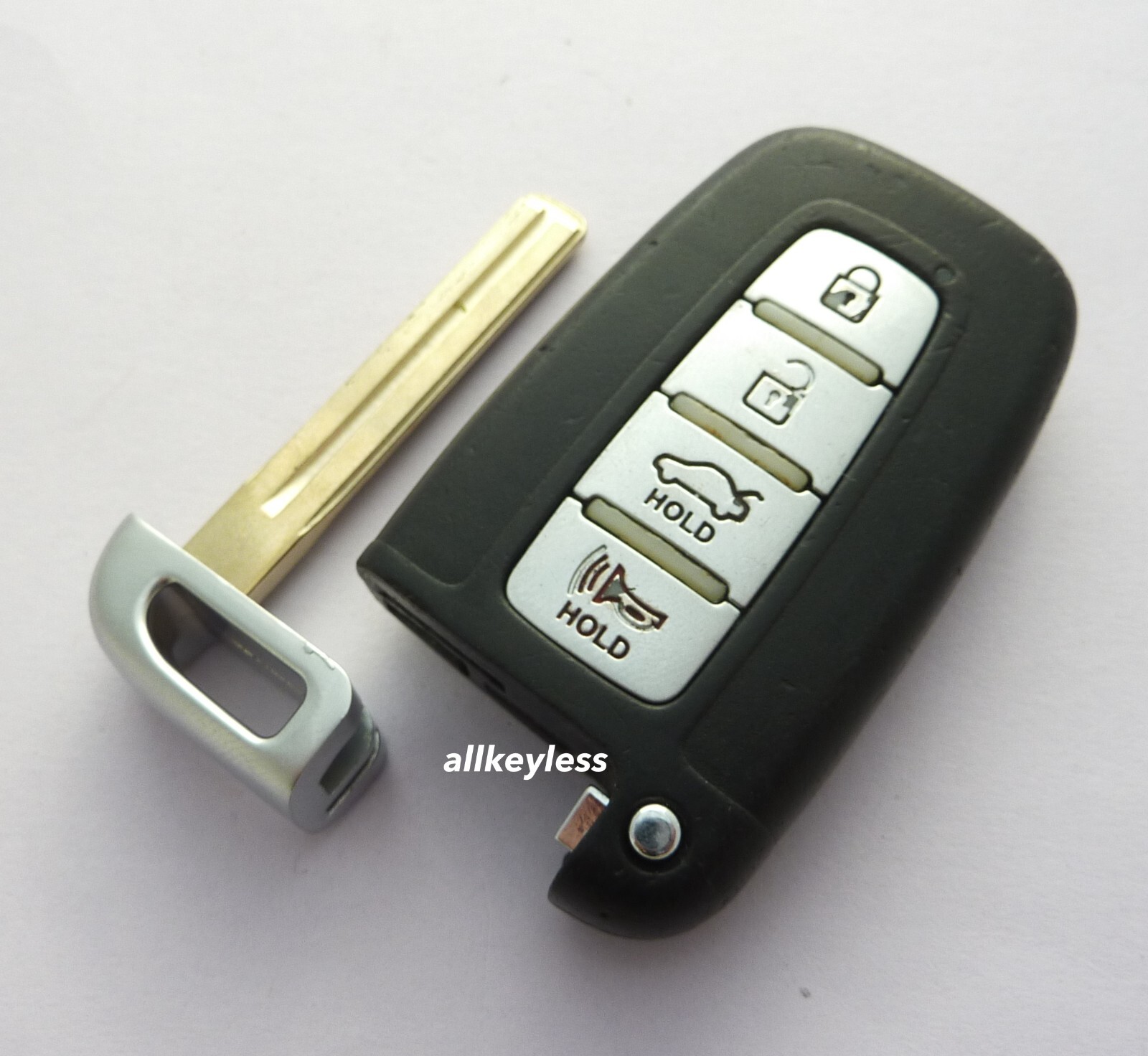
- Extract the Mechanical Key: Locate the small release button or switch on the side or bottom of the fob. Depress this button and pull the metal key blade out of the housing. This step is mandatory, as the metal key often acts as a physical anchor for the internal plastic clips.
- Identify the Seam: Once the key is removed, look into the cavity where the metal key was housed. You will typically see a small notch or a specific wider slot where you can insert your flat-head screwdriver.
- Applying Leverage: Insert the flat-head screwdriver into the identified notch. Gently twist the screwdriver handle; do not pry outward in a stabbing motion. The twisting motion uses the mechanical advantage of the tool to push the two halves of the casing apart.
- Circumnavigate the Casing: As the seam begins to separate, work the screwdriver slowly around the perimeter of the fob. You will hear a series of small "clicks" as the internal plastic tabs release.
- Separate the Halves: Once the clips are disengaged, lift the back cover of the fob away. Note the orientation of the circuit board—do not touch the golden contacts on the board, as oils from your skin can cause connectivity issues over time.
Troubleshooting and Battery Replacement
Once the fob is open, you will see the circular battery resting in a retainer. If you are replacing the battery, slide it out carefully. If the battery is stuck, use the tip of your screwdriver to gently lift the edge.
Common Issues:
- Fob Fails to Work After Battery Change: Ensure the battery is installed with the positive (+) side facing the correct direction, as indicated by the markings on the fob's battery cradle.
- Intermittent Signal: Check if the rubber button pad has shifted. If the buttons are misaligned, the electronic switch on the PCB will not register the press.
- Damaged Clips: If you break a plastic tab, the fob may feel loose. A small piece of double-sided adhesive or specialized plastic glue can be used, though be extremely careful not to let glue enter the internal electronics.
Comparison of Hyundai Fob Types
| Fob Type | Opening Mechanism | Common Battery | Notable Characteristic |
|---|---|---|---|
| Flip Key | Remove key, pry side notch | CR2032 | Contains spring mechanism |
| Proximity Smart Key | Remove key, pry interior slot | CR2032 | No physical ignition use |
| Old Style Remote | Screw-fastened back | CR2016 or CR2032 | Requires Phillips head driver |
Frequently Asked Questions
Will opening my Hyundai key fob void my vehicle warranty? Generally, no. Replacing a key fob battery is considered a routine owner maintenance task. However, if you cause physical damage to the internal electronics or the housing during the process, that specific damage would not be covered under the Hyundai limited warranty.
What should I do if the fob still doesn't work after a battery change? If the battery is fresh and the fob is unresponsive, the device may have become desynchronized from the vehicle’s receiver. You may need to consult your owner's manual for the "fob reset" procedure or visit a dealership to have the key re-coded to the vehicle's immobilizer system.
Can I use a different battery size if I don't have a CR2032? No. You must use the exact battery model specified in your owner’s manual or printed on the original battery. Using a different voltage or physical size can damage the circuitry or fail to provide the necessary power to the transmitter.
How often should the key fob battery be replaced? On average, a Hyundai key fob battery lasts between 2 and 3 years. Factors such as proximity to the vehicle and signal interference can shorten this lifespan. If you notice you must be closer to the car than usual to unlock the doors, the battery is likely nearing the end of its life.
Is it safe to touch the circuit board inside? Avoid touching the circuit board as much as possible. If you must touch it, hold it by the edges. Skin oils and moisture can create a film on the contacts, which might lead to oxidation or signal degradation over time.
Next Steps and Professional Assistance
If you find that your key fob casing is severely cracked, or if the internal battery contacts have corroded due to moisture, you may need to purchase a replacement fob shell. These are widely available as aftermarket parts. If you are unable to successfully open or repair your unit, contact your local Hyundai service department. They can perform a diagnostic test on the key's signal strength and, if necessary, provide a genuine replacement programmed specifically to your vehicle's VIN. Always keep your secondary key in a safe place to ensure you are never locked out during a maintenance attempt.
Image Gallery