How to Transfer Your Number from T-Mobile to Verizon: The Complete 2026 Guide
To transfer your phone number from T-Mobile to Verizon, you must obtain your T-Mobile account number and a specific 6-digit Number Transfer PIN via the T-Mobile app or website. Provide these details to Verizon when purchasing a new pla...
To transfer your phone number from T-Mobile to Verizon, you must obtain your T-Mobile account number and a specific 6-digit Number Transfer PIN via the T-Mobile app or website. Provide these details to Verizon when purchasing a new plan or device. Keep your T-Mobile service active until the porting process is fully completed.
Contents
The process of moving a mobile number between carriers, technically known as "porting," is governed by Federal Communications Commission (FCC) regulations designed to ensure consumer flexibility. As of 2026, the transition from T-Mobile to Verizon has become increasingly streamlined due to the widespread adoption of eSIM technology and automated porting interfaces. However, while the digital handshake between carriers is faster than ever, specific security protocols remain in place to prevent "SIM swapping" and unauthorized number transfers. Success depends entirely on having the correct credentials before you initiate the request with Verizon.
Pre-Transfer Requirements: What You Need from T-Mobile
Before you contact Verizon or visit a retail store, you must gather specific data points from your T-Mobile account. Attempting to port a number with incorrect information is the primary cause of "port-out" delays and service interruptions.
1. The T-Mobile Account Number
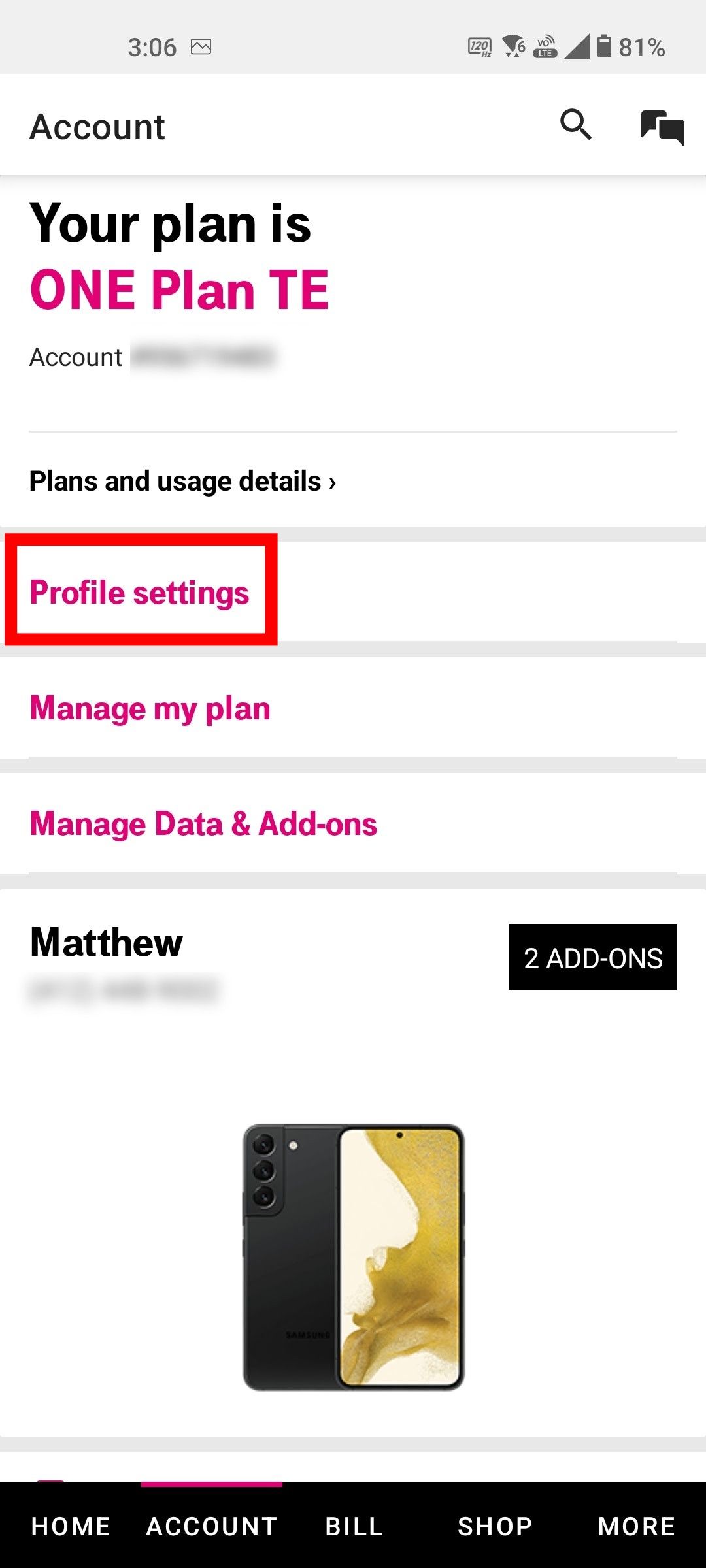
Your account number is not your phone number. It is a unique 9-digit or 12-digit identifier found at the top of your T-Mobile billing statement or within the "Profile" section of the T-Mobile app. Ensure you are using the primary account holder's number if you are part of a family plan.
2. The Number Transfer PIN (Not the Account PIN)
For security reasons, T-Mobile requires a temporary Number Transfer PIN to authorize the move. This is different from the seasonal PIN or password you use to log into your account or speak with customer service.
- How to get it: Log into the T-Mobile app or website, navigate to "Account," then "Profile Settings," and select "Line Settings." Choose "Request a transfer PIN."
- Validity: These PINs are typically valid for 7 days. If you do not complete the transfer within this window, you must generate a new one.
3. Device Unlock Status
If you intend to bring your current T-Mobile phone to Verizon (Bring Your Own Device or BYOD), the hardware must be "unlocked." T-Mobile generally requires that a device be paid in full and has been active on their network for at least 40 days before they will grant an unlock request. You can check your unlock status in your phone’s settings under "About Phone" (Android) or "General > About > Carrier Lock" (iOS).
Assessing Device Compatibility for Verizon’s Network
By 2026, the technical gap between T-Mobile and Verizon has narrowed significantly as both carriers have fully transitioned to 5G Standalone (5G SA) architectures and phased out legacy CDMA/GSM technologies. However, frequency band compatibility still matters for optimal performance on Verizon’s 5G Ultra Wideband network.
Verizon primarily utilizes C-Band (3.7 GHz) and mmWave spectrum for its high-speed tiers. While most flagship devices from 2023 onwards (such as the iPhone 15/16/17 series and Samsung Galaxy S24/S25/S26) are "universal" and support these bands, some budget-tier devices sold specifically by T-Mobile may lack the specific antennas required for Verizon’s mmWave nodes. Always use the Verizon IMEI Checker to verify that your specific hardware will receive full service on the Verizon network.
Step-by-Step Porting Process
Once you have your credentials and have verified your device's compatibility, follow these steps to execute the transfer.
Step 1: Choose Your Verizon Plan
Select a Verizon plan that fits your data needs. In 2026, Verizon’s "myPlan" structure allows users to customize their perks (such as streaming bundles or cloud storage). During the checkout process—whether online, in-store, or over the phone—you will be asked if you want to keep your current number.
Step 2: Provide Porting Credentials
When prompted, enter your T-Mobile account number and the Number Transfer PIN. You will also need to provide the billing ZIP code associated with your T-Mobile account. Accuracy is critical; a single digit error in the account number will result in a "Port Trigger Rejection."
Step 3: Choose Your SIM Type (eSIM vs. Physical SIM)
- eSIM (Recommended): Most modern smartphones now support eSIM. This allows for near-instant activation. Verizon will send a digital push notification or a QR code to your device, and the number will transfer over the air.
- Physical SIM: If you prefer a physical card or use an older device, Verizon will mail you a SIM card or provide one in-store. The transfer will not complete until the new SIM is inserted and powered on.
Step 4: The Handshake Period
Once Verizon submits the request, T-Mobile receives a notification to release the number. During this time (which usually takes between 10 minutes and 24 hours), your T-Mobile phone will continue to work. When the T-Mobile signal bars disappear or show "No Service," it indicates the number has successfully moved to Verizon.
| Feature | T-Mobile Requirements | Verizon Action |
|---|---|---|
| Account Status | Must be active and in good standing | Initiates "Port-In" request |
| Authorization | 6-digit Number Transfer PIN | Validates PIN with T-Mobile |
| Hardware | Must be carrier-unlocked for BYOD | Verifies IMEI compatibility |
| Timeline | 10 minutes to 24 hours (Wireless) | Sends activation confirmation |
| Final Bill | Generated after transfer completes | May offer "Switching" credits |
Financial Considerations and Potential Costs
Switching carriers involves more than just a change in monthly premiums. You should be aware of the following financial impacts:
- Verizon Activation Fees: Verizon typically charges a one-time activation fee per line (standardized at approximately $35 in 2026), though this is often waived for online orders or specific promotional periods.
- T-Mobile Final Statement: T-Mobile does not pro-rate your final month of service. If you switch five days into a new billing cycle, you will likely be charged for the full month. It is often most cost-effective to initiate the transfer 3-5 days before your T-Mobile billing cycle ends.
- Device Balance: If you owe money on a device "Equipment Installment Plan" (EIP) at T-Mobile, the remaining balance will become due immediately upon cancellation of the line.
- Trade-In Credits: If you are receiving monthly credits for a device at T-Mobile, those credits will cease the moment the number is transferred.
Troubleshooting Common Porting Issues
Most transfers from T-Mobile to Verizon are seamless, but technical snags can occur.
Delayed Transfers and "Mixed Service"
If you find that you can make outgoing calls but cannot receive incoming calls, you are experiencing "Mixed Service." This happens when the porting process is 90% complete but the global routing tables haven't updated. This usually resolves itself within 2 hours. If it persists beyond 4 hours, contact the Verizon Port-In Department directly.
Port Protection/Account Takeover Protection
T-Mobile offers a security feature called "Account Takeover Protection." If this is enabled on your line, the port request will be automatically blocked, regardless of whether the PIN is correct. You must log into your T-Mobile account and manually toggle this feature "OFF" before Verizon can successfully pull the number.
Incorrect Billing Information
If the name or ZIP code on your Verizon application does not match the T-Mobile records exactly, the transfer may be flagged for manual review. Always ensure you are using the address where the T-Mobile bill is actually delivered.
Frequently Asked Questions
How long does it take to transfer a number from T-Mobile to Verizon? For most wireless-to-wireless transfers, the process takes between 10 and 60 minutes. However, FCC guidelines allow up to 24 business hours for standard mobile ports. If you are transferring a landline or VOIP number to Verizon, it can take 5 to 7 business days.
Will I lose my text messages and contacts during the switch? No. Transferring a number only changes the carrier providing the service. Your contacts and messages are stored on your phone's hardware or cloud storage (iCloud/Google Account) and are independent of your carrier. However, you should back up your device before switching just in case you need to perform a factory reset for network troubleshooting.
Can I transfer my number if I have an unpaid balance with T-Mobile? Legally, T-Mobile cannot refuse to port your number due to an outstanding balance. However, they will still hold you responsible for the debt, and failing to pay it could result in the account being sent to collections, which may negatively impact your credit score.
Do I need to call T-Mobile to cancel my service? No. Once your number successfully activates on the Verizon network, the T-Mobile line will automatically cancel. In fact, calling to cancel before the port is complete is a major mistake, as a deactivated number cannot be transferred.
What happens to my voicemails? Voicemails are stored on the carrier's servers. When you switch to Verizon, your T-Mobile voicemail box is deleted. Be sure to save any important voice messages to your phone’s local storage or email them to yourself before initiating the port.
Final Recommendation
For the smoothest experience, generate your T-Mobile Transfer PIN immediately before starting your Verizon order. Use eSIM for near-instant activation, and perform the transfer on a weekday during business hours. This ensures that if a "Port Trigger Rejection" occurs, both T-Mobile and Verizon’s porting departments are staffed and available to resolve the issue in real-time.
Image Gallery