How to Identify the Strongest VPN for Your Specific Needs
Identifying the strongest Virtual Private Network (VPN) requires evaluating providers based on their verifiable privacy policies, encryption standards, server infrastructure, and sustained performance under real-world conditions. Rathe...
Identifying the strongest Virtual Private Network (VPN) requires evaluating providers based on their verifiable privacy policies, encryption standards, server infrastructure, and sustained performance under real-world conditions. Rather than relying on marketing claims, users must examine independent security audits, the provider’s jurisdictional transparency, and their ability to maintain consistent connection speeds without compromising anonymity or data integrity.
Contents
Understanding the Core Components of VPN Security
A VPN serves as an encrypted tunnel between your device and the internet. To identify the "strongest" option, you must look past simple aesthetic interfaces and evaluate the underlying protocols and infrastructure that secure your traffic.
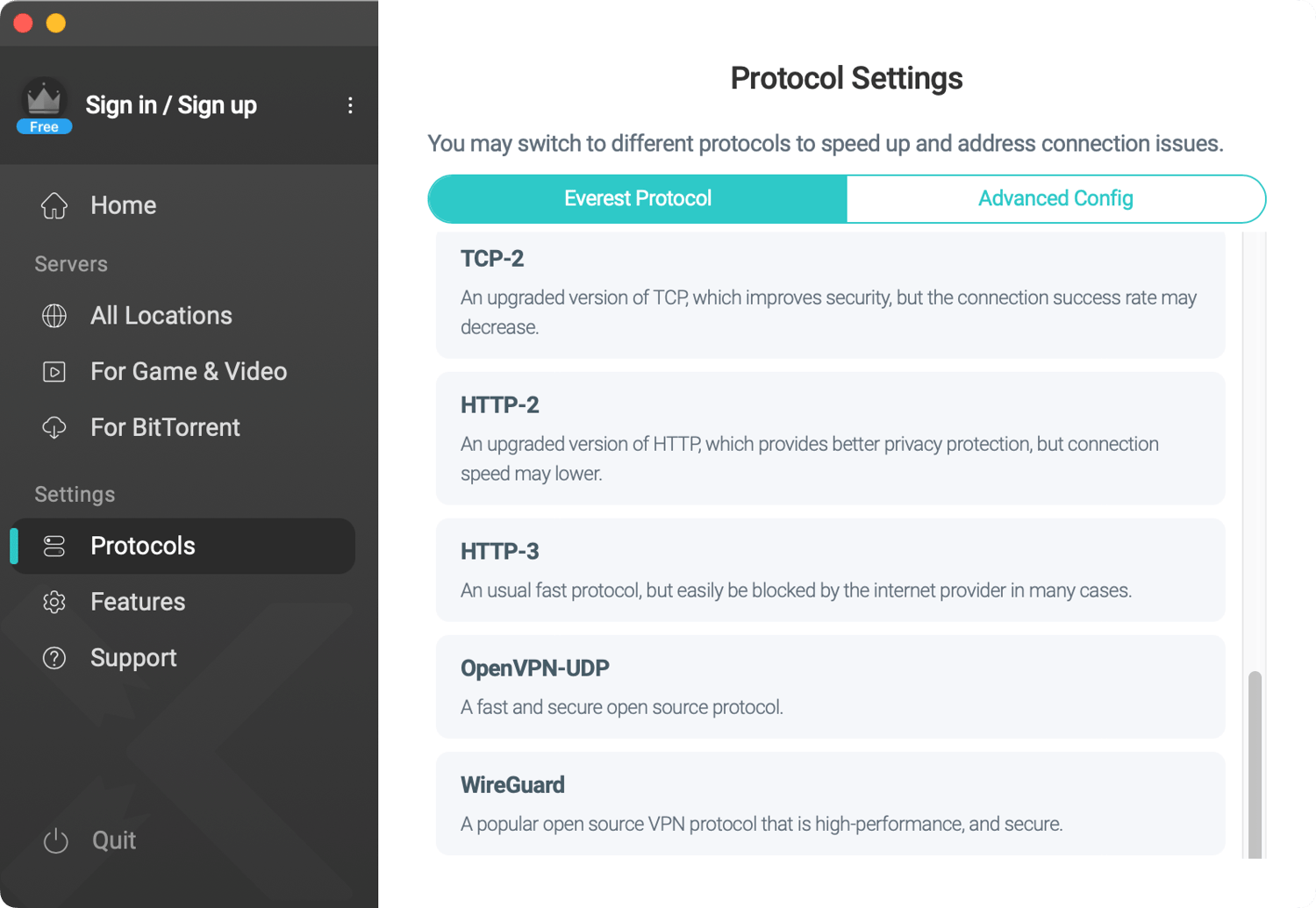
The foundation of any robust VPN is its encryption suite. As of 2026, the industry standard is AES-256 (Advanced Encryption Standard with a 256-bit key). This is widely considered quantum-resistant and is the benchmark for government-grade security. Beyond encryption, you should prioritize providers that support modern, efficient protocols like WireGuard or OpenVPN. WireGuard is particularly favored for its lean codebase, which is easier to audit for vulnerabilities compared to the older, more complex IPsec or L2TP standards.
Jurisdiction and Privacy Policies
A VPN provider’s legal standing is often more critical than its technical specifications. If a company is incorporated in a country with intrusive intelligence-sharing agreements, such as those belonging to the Five Eyes or Fourteen Eyes alliances, they may be legally compelled to provide user data to government agencies.
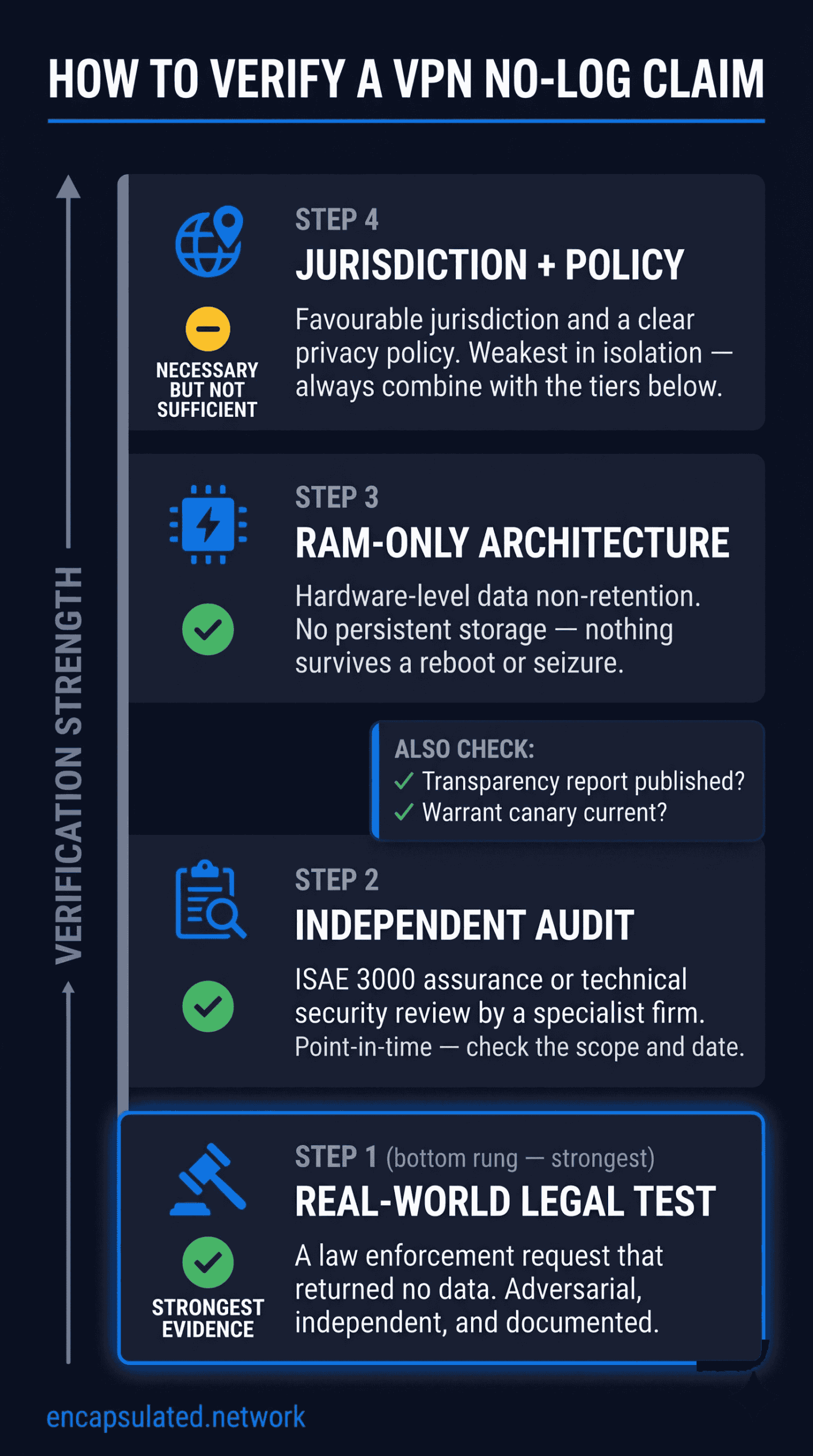
When evaluating a provider, investigate their "No-Logs" policy. A true no-logs policy means the provider does not record your IP address, browsing history, connection timestamps, or bandwidth usage. However, be aware that "no-logs" is a marketing term. You must look for providers that have undergone third-party, independent audits by reputable cybersecurity firms. These audits verify that the provider’s operational practices align with their privacy promises. Look specifically for reports that confirm the company does not store identifiable data on their diskless RAM-only servers.
RAM-Only Infrastructure and Server Ownership
The strongest VPNs prioritize diskless infrastructure. In a traditional setup, servers store data on hard drives, which can potentially be seized or forensically analyzed. RAM-only servers (often called "volatile memory" servers) operate entirely in memory. Every time the server reboots or loses power, all data stored in that memory is wiped instantly. This technical design significantly reduces the risk of long-term data exposure.
Furthermore, consider whether a provider uses "virtual" or "physical" servers. While physical servers located in the country you intend to connect to are generally preferred for performance, virtual servers can still provide adequate masking. The key is transparency; a premium provider will clearly label which servers are physical and which are virtual, ensuring you know exactly where your traffic is being routed.
Performance: Throughput and Latency
Security is meaningless if the service is unusable. The strongest VPNs balance protection with speed. When testing or comparing providers, focus on two metrics: throughput (download/upload speed) and latency (ping).
- Throughput: High-quality VPNs invest heavily in 10Gbps+ server backbones. If you are performing bandwidth-intensive tasks, such as 4K streaming or large file transfers, the VPN’s ability to prevent bottlenecks is essential.
- Latency: Critical for gaming and real-time communication. Look for providers that offer a high density of servers in your target region. The closer the server is to your physical location, the lower the latency will be.
| Feature | Importance Level | Why it Matters |
|---|---|---|
| AES-256 Encryption | Essential | The gold standard for securing data against decryption. |
| Third-Party Audits | Essential | Verifies that technical claims match actual operations. |
| RAM-Only Servers | High | Ensures no data is stored permanently on physical drives. |
| Kill Switch | High | Prevents data leaks if the VPN connection drops suddenly. |
| Jurisdiction | Moderate | Influences legal pressure to hand over user data. |
Practical Steps to Evaluate a Provider
Before committing to a subscription, follow this systematic approach to verify the service:
- Read the Latest Independent Audit: Search the provider's website for "Security Audit" or "Privacy Audit." Ensure the document is recent and conducted by a recognized third party, such as Cure53 or PricewaterhouseCoopers (PwC).
- Verify the Kill Switch: Download the app and test the "Kill Switch" feature. This feature should automatically block all internet traffic if the VPN connection is lost. If the internet remains active when the VPN is disabled or crashes, the provider is failing a critical security requirement.
- Check for DNS Leaks: Use online tools like DNSLeakTest or BrowserLeaks. These services will show you if your ISP can still see the websites you are visiting even when the VPN is active. A strong VPN will route all DNS requests through their own encrypted tunnel, preventing "leaks" that reveal your browsing habits.
- Analyze Support Channels: A "strong" service is also a responsive one. Test their live chat support with a specific technical question about their protocols or server locations to gauge their competence and availability.
Common Pitfalls to Avoid
Avoid providers that offer "Free" services without clear revenue models. Providing VPN infrastructure is expensive; if you aren't paying for the product, you are often the product. Many free VPNs monetize user activity by tracking browsing habits and selling that data to third-party advertisers.
Additionally, be wary of "lifetime" subscription offers. These are often indicators of unsustainable business practices that may lead to the sudden closure of the service or a decline in server quality. Stick to transparent, subscription-based models that allow the provider to maintain updated hardware and software.
Frequently Asked Questions
Does a VPN make me completely invisible? No. A VPN masks your IP address and encrypts your traffic, but it does not prevent browser fingerprinting, cookies, or tracking through your Google or social media accounts. You remain identifiable if you log into personal accounts while using the VPN.
How does a VPN affect my internet speed? All VPNs introduce some speed loss due to the overhead of encryption and the distance data must travel to reach the VPN server. The strongest providers minimize this impact by using lightweight protocols like WireGuard and optimizing their network routing.
What is a "Kill Switch" and why is it necessary? A kill switch is a security feature that disconnects your device from the internet if the VPN tunnel drops. Without it, your device would automatically revert to your ISP’s standard connection, potentially exposing your true IP address and sensitive data during the outage.
Can I use a VPN for all my devices? Yes, most top-tier providers offer apps for Windows, macOS, iOS, Android, and Linux. For devices that do not support VPN apps directly, such as some smart TVs or gaming consoles, you can often configure the VPN directly on your home router.
Are there legal restrictions on using a VPN? In most countries, using a VPN is perfectly legal. However, using a VPN for illegal activities remains illegal. Always ensure you are following local laws and your organization’s acceptable use policies if you are on a work-provided device.
Recommendation for Selection
To identify the strongest VPN for your needs, create a short-list of providers that have published independent, third-party security audits from the last 18 months. Evaluate these against your specific performance needs—whether that is gaming, streaming, or general privacy—and utilize their money-back guarantee period to perform your own DNS leak and throughput testing. Prioritize providers that maintain a clear, transparent history and operate on a RAM-only infrastructure.
Image Gallery