Choosing the Right Virtual Machine for Your Workload: A Technical Guide
Selecting the appropriate virtual machine for your workload requires balancing compute, memory, storage, and networking requirements against performance targets and cost constraints. Cloud providers offer diverse instance families—opti...
Selecting the appropriate virtual machine for your workload requires balancing compute, memory, storage, and networking requirements against performance targets and cost constraints. Cloud providers offer diverse instance families—optimized for general-purpose computing, memory-intensive applications, high-performance storage, or compute-heavy tasks—meaning that a misaligned choice can lead to degraded application performance or inflated infrastructure spend.
Contents
Understanding Workload Profiles and Requirements
Before selecting a virtual machine (VM) instance type, you must dissect the resource consumption patterns of your application. Workloads are rarely balanced across all resource dimensions; instead, they typically exhibit constraints or bottlenecks tied to a specific system component. Analyzing historical telemetry data, profiler outputs, and peak traffic patterns allows architects to map application demands directly to cloud provider instance families.
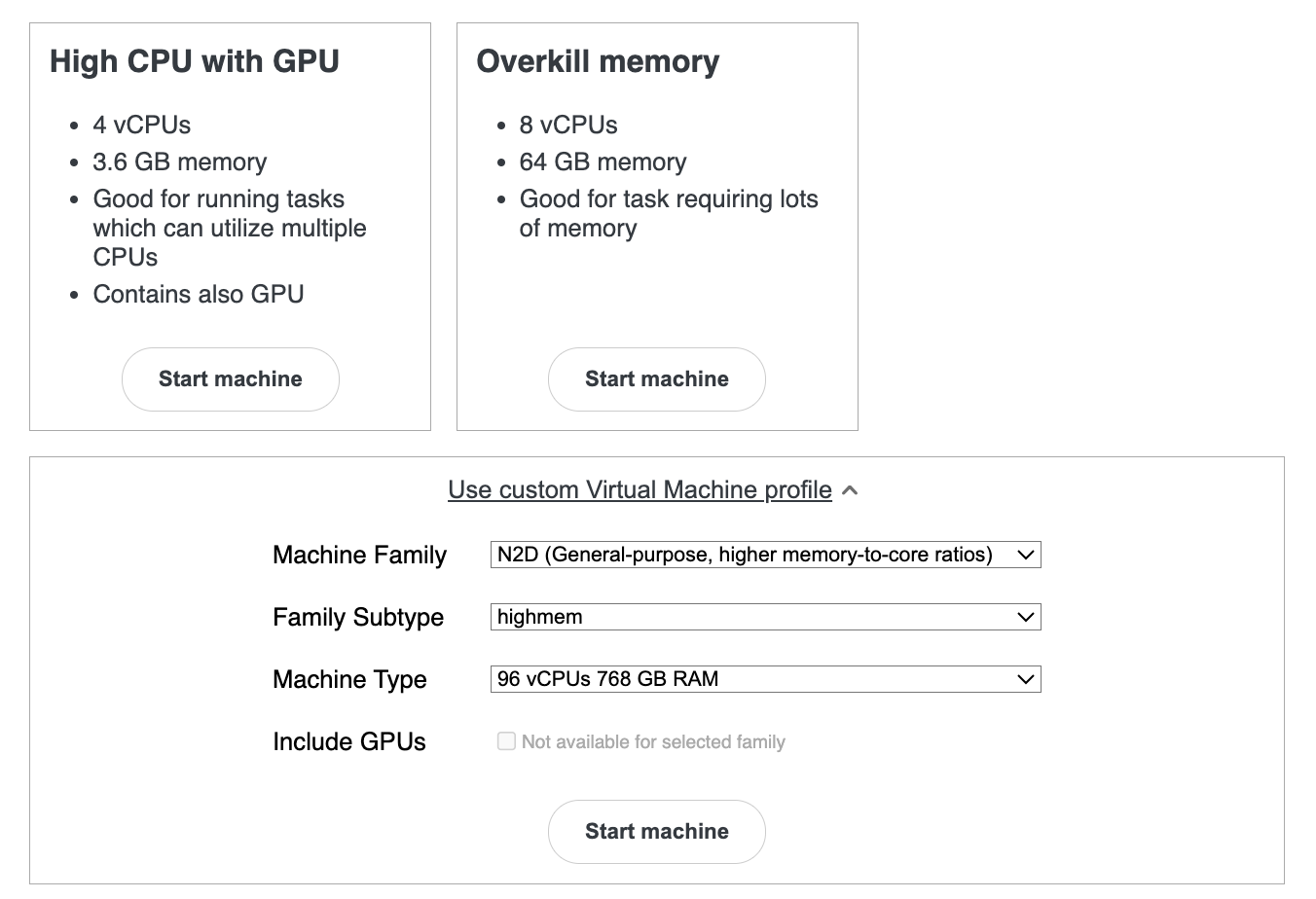
Compute-bound workloads—such as batch processing, high-performance computing (HPC), gaming servers, and complex scientific modeling—require high clock speeds and large numbers of physical or logical cores. For these tasks, instance families featuring high vCPU-to-memory ratios are ideal. Conversely, memory-bound workloads, including relational database management systems (RDBMS), in-memory caches like Redis or Memcached, and real-time analytics engines, demand expansive RAM footprints and high memory bandwidth to prevent swapping and latency spikes.
Input/Output (I/O) bound applications, such as large-scale distributed databases, transactional logging systems, and content management systems with heavy read/write profiles, rely heavily on fast storage subsystems. These environments benefit from instances that support non-volatile memory express (NVMe) direct-attached storage or high-throughput network-attached block storage. Network-bound workloads, such as distributed proxies, load balancers, and video streaming endpoints, require high packet-per-second (pps) performance and enhanced networking capabilities like Single Root I/O Virtualization (SR-IOV).
Evaluating Cloud Instance Families
Major cloud hyperscalers categorize virtual machines into distinct instance families based on their primary performance characteristics. Understanding these categories ensures that infrastructure provisioning matches the operational profile of the software stack.
General-Purpose Instances
General-purpose instances provide a balanced ratio of compute, memory, and networking resources. They serve as the default choice for web servers, containerized microservices, small-to-medium databases, and development environments. These instances scale linearly with size, making them predictable choices when workload resource profiles are not entirely clear or subject to steady, moderate growth.
Compute-Optimized Instances
Engineered for compute-intensive applications, these virtual machines offer high performance per vCPU. They are frequently deployed for video encoding, high-performance web servers, scientific simulations, and machine learning model training phases that rely heavily on CPU execution rather than heavy memory allocations.
Memory-Optimized Instances
Memory-optimized instances deliver a high memory-to-vCPU ratio, enabling fast processing of large datasets resident entirely in RAM. Enterprise applications, in-memory databases, and large-scale graph processing engines utilize these instances to eliminate disk latency bottlenecks during execution.
Storage and Accelerated Computing Instances
Storage-optimized instances feature optimized access to local NVMe storage devices, delivering tens of thousands of random input/output operations per second (IOPS) with minimal latency. Accelerated instances incorporate Graphics Processing Units (GPUs) or Field Programmable Gate Arrays (FPGAs) to handle parallel processing tasks, including deep learning inference, graphical rendering, and financial risk modeling.
Technical Comparison of VM Instance Categories
| Instance Category | Primary Resource Focus | Ideal Workload Examples | Key Architectural Advantage |
|---|---|---|---|
| General-Purpose | Balanced CPU and RAM | Web apps, microservices, dev/test | Predictable baseline performance and flexible scaling |
| Compute-Optimized | High vCPU performance | Batch processing, gaming, scientific modeling | High clock speeds and favorable vCPU-to-memory ratios |
| Memory-Optimized | High RAM capacity | In-memory databases, large caches, analytics | Low latency and rapid data access via expansive RAM |
| Storage-Optimized | High IOPS and local NVMe | NoSQL databases, data warehousing, logging | Direct-attached high-speed storage with minimal disk latency |
| Accelerated Computing | GPUs, TPUs, or FPGAs | Machine learning, rendering, financial modeling | Massive parallel processing power for specialized computations |
Matching Virtual Machine Sizing to Scale
Once an instance family is selected, determining the correct size (e.g., small, medium, large, or specific vCPU and RAM counts) prevents both over-provisioning and resource starvation. Sizing should be driven by capacity planning metrics gathered during load testing under realistic production conditions.
Vertical scaling—often referred to as scaling up—involves moving from a smaller instance size to a larger one within the same family when a workload outgrows its current resource envelope. While straightforward, vertical scaling has architectural limits dictated by the maximum available instance size in a cloud region and often requires scheduled downtime. Horizontal scaling—scaling out—distributes the workload across multiple smaller instances behind a load balancer, providing greater fault tolerance and elasticity for stateless web applications.
Monitoring CPU steal time, memory page faults, disk queue lengths, and network interface card (NIC) saturation during peak load tests helps refine instance sizing. If CPU utilization remains below 20 percent while memory is exhausted, shifting from a general-purpose instance to a memory-optimized instance is more efficient than simply doubling the size of the current general-purpose instance.
Cost Optimization and Pricing Models
Infrastructure costs scale directly with virtual machine sizing and provisioning models. Selecting the appropriate pricing structure is as critical to a successful deployment as matching the technical specifications of the workload.
- On-Demand Pricing: Offers maximum flexibility with no long-term commitment, making it ideal for unpredictable workloads, short-term testing, or development environments. However, it carries the highest hourly cost.
- Reserved Instances and Savings Plans: Provide significant discounts—often up to 40 to 60 percent—in exchange for a one- or three-year commitment to a specific instance family or compute spend level. These models suit steady-state production workloads with predictable long-term utilization.
- Spot Instances: Leverage spare capacity within cloud data centers, offering discounts of up to 90 percent off On-Demand rates. Because cloud providers can reclaim spot instances with short notice, they are best suited for fault-tolerant, interruptible workloads such as batch data processing, containerized CI/CD pipelines, and rendering jobs.
Common Pitfalls in VM Selection
Misconfigurations during the VM selection process frequently lead to performance degradation or budget overruns. Avoiding these errors requires rigorous testing and continuous monitoring.
One common mistake is relying solely on theoretical peak specifications rather than empirical load testing data. Manufacturers' benchmark numbers rarely reflect the nuances of custom application code, database query efficiency, or operating system overhead. Another pitfall is ignoring network throughput limitations associated with smaller instance sizes. In cloud environments, network bandwidth is frequently tied directly to instance size; a small instance may throttle network traffic, creating an artificial bottleneck for distributed applications even if CPU and memory utilization appear normal.
Additionally, failing to account for burstable performance credit depletion on entry-level instance families can cause unexpected application latency spikes. Workloads that sustain high CPU utilization beyond their baseline allowance on burstable instances will experience throttling unless correctly reconfigured or migrated to fixed-performance instance types.
Frequently Asked Questions
How do I know if my workload is CPU-bound or memory-bound?
Monitoring resource utilization metrics under peak load reveals the primary bottleneck. If CPU utilization consistently hovers near 100 percent while memory usage remains low, the workload is CPU-bound. If the application frequently triggers swapping, exhibits high page-fault rates, or crashes due to out-of-memory errors while CPU usage is modest, it is memory-bound.
What is the difference between vertical scaling and horizontal scaling?
Vertical scaling involves increasing the compute, memory, or storage capacity of a single virtual machine instance. Horizontal scaling adds more virtual machine instances to a pool, sharing the workload across them via a load balancer. Horizontal scaling is generally preferred for stateless applications to improve redundancy and scalability.
When should I use local NVMe storage instead of network-attached storage?
Local NVMe storage provides ultra-low latency and very high IOPS because it is physically attached to the host machine hosting the VM. It is ideal for temporary scratch space, distributed caches, and databases that handle extreme transaction volumes. Network-attached storage provides better durability and data persistence across instance stops and hardware failures.
Are spot instances safe for production databases?
No. Spot instances can be reclaimed by the cloud provider with minimal warning when capacity is needed for on-demand customers. They should never be used for primary stateful workloads, relational databases, or non-fault-tolerant applications unless the architecture is explicitly designed to handle sudden node termination.
How does instance size affect network performance?
Cloud providers typically scale network bandwidth, maximum packet rates, and support for enhanced networking features proportionally with instance size. Smaller instances often experience strict network bandwidth caps, which can bottleneck data-intensive microservices or distributed storage clusters.
Conclusion and Next Actions
Choosing the right virtual machine for your workload requires a methodical evaluation of resource consumption patterns, hardware instance capabilities, scalability requirements, and financial constraints. Begin by profiling your application under realistic load conditions to identify precise CPU, memory, storage, and networking bottlenecks. Map these requirements to the appropriate cloud instance family, leverage empirical testing to determine optimal sizing, and align your provisioning strategy with flexible pricing models to maintain cost efficiency.
Image Gallery