What the Drive Recovery Service Means for Businesses
A drive recovery service provides specialized data extraction, media repair, and file restoration techniques to retrieve lost, corrupted, or inaccessible information from malfunctioning hard disk drives, solid-state drives, and enterpr...
A drive recovery service provides specialized data extraction, media repair, and file restoration techniques to retrieve lost, corrupted, or inaccessible information from malfunctioning hard disk drives, solid-state drives, and enterprise storage arrays, directly safeguarding corporate continuity and minimizing financial downtime.
Contents
For any modern commercial enterprise, data is the fundamental bedrock of daily operations, legal compliance, and customer trust. When a mission-critical storage medium suffers a catastrophic mechanical failure, firmware corruption, or accidental deletion, the resulting loss can paralyze organizational workflows. Understanding drive recovery services—how they operate, when they are necessary, and how they integrate into an overarching IT strategy—is essential for risk management and business survival. This article examines the mechanics of professional data recovery, its operational implications for companies, and how organizations can navigate catastrophic data loss scenarios safely and efficiently.
The Core Definition of Enterprise Drive Recovery
At its core, a drive recovery service is an advanced engineering and technical process designed to extract and rebuild readable data from storage media that standard operating systems and built-in diagnostic tools can no longer access. Unlike basic consumer software tools that simply undelete files from a functioning volume, professional drive recovery targets deep-level hardware failures, controller board damages, read/write head crashes, and severe logical corruption.
Enterprise recovery differs significantly from consumer-level recovery because business storage environments are rarely simple desktop hard drives. Modern businesses rely on complex multi-drive configurations, including Network Attached Storage (NAS) devices, Storage Area Networks (SANs), Redundant Array of Independent Disks (RAID arrays), and high-capacity Solid-State Drives (SSDs). When a server array or an encrypted corporate laptop fails, the recovery process requires cleanroom environments, specialized hardware tools, and proprietary software algorithms capable of reconstructing missing parity data, bypassing damaged sector maps, and decrypting enterprise-grade security protocols.
Why Drive Failures Occur in Business Environments
To appreciate what a recovery service means for an organization, one must understand the vulnerability vectors that threaten corporate storage infrastructure. Hardware degradation typically falls into two major categories: mechanical and logical failures.
Mechanical failures are particularly common in traditional Hard Disk Drives (HDDs) that feature spinning magnetic platters and moving read/write heads. Over time, bearings wear out, motors seize, and physical shocks—such as a server rack being bumped or a laptop being dropped—can cause the read/write head to strike the platter surface, destroying data tracks.
Solid-State Drives (SSDs), while lacking moving parts, are equally susceptible to sudden failure. Electrical surges, sudden power cuts during write cycles, firmware bugs, and NAND flash memory wear-out can render an SSD completely unresponsive, often locking the drive in a read-only or completely dead state.
Logical failures, on the other hand, occur when the hardware itself is functional, but the file system, partition table, or volume boot record is damaged. This can be caused by malware infections, ransomware attacks, corrupted database transactions, or human error such as accidental formatting or partition deletion. While logical failures sometimes respond to advanced software utilities, severe corruption requires specialized engineering intervention to reconstruct file tables and database structures safely.
The Professional Recovery Process: Step-by-Step
Engaging a professional drive recovery service is a structured, highly methodical process designed to maximize the chances of data retrieval without causing further damage to the media. Reputable data recovery laboratories follow a strict sequence of engineering protocols:
- Initial Evaluation and Diagnostics: The damaged drive is received at a secure facility where engineers perform a non-destructive assessment to determine the exact nature of the failure—whether mechanical, electronic, or logical.
- Quotation and Approval: The provider details the likelihood of recovery, the specific data that can be restored, and the associated costs. Work proceeds only after explicit authorization from the business.
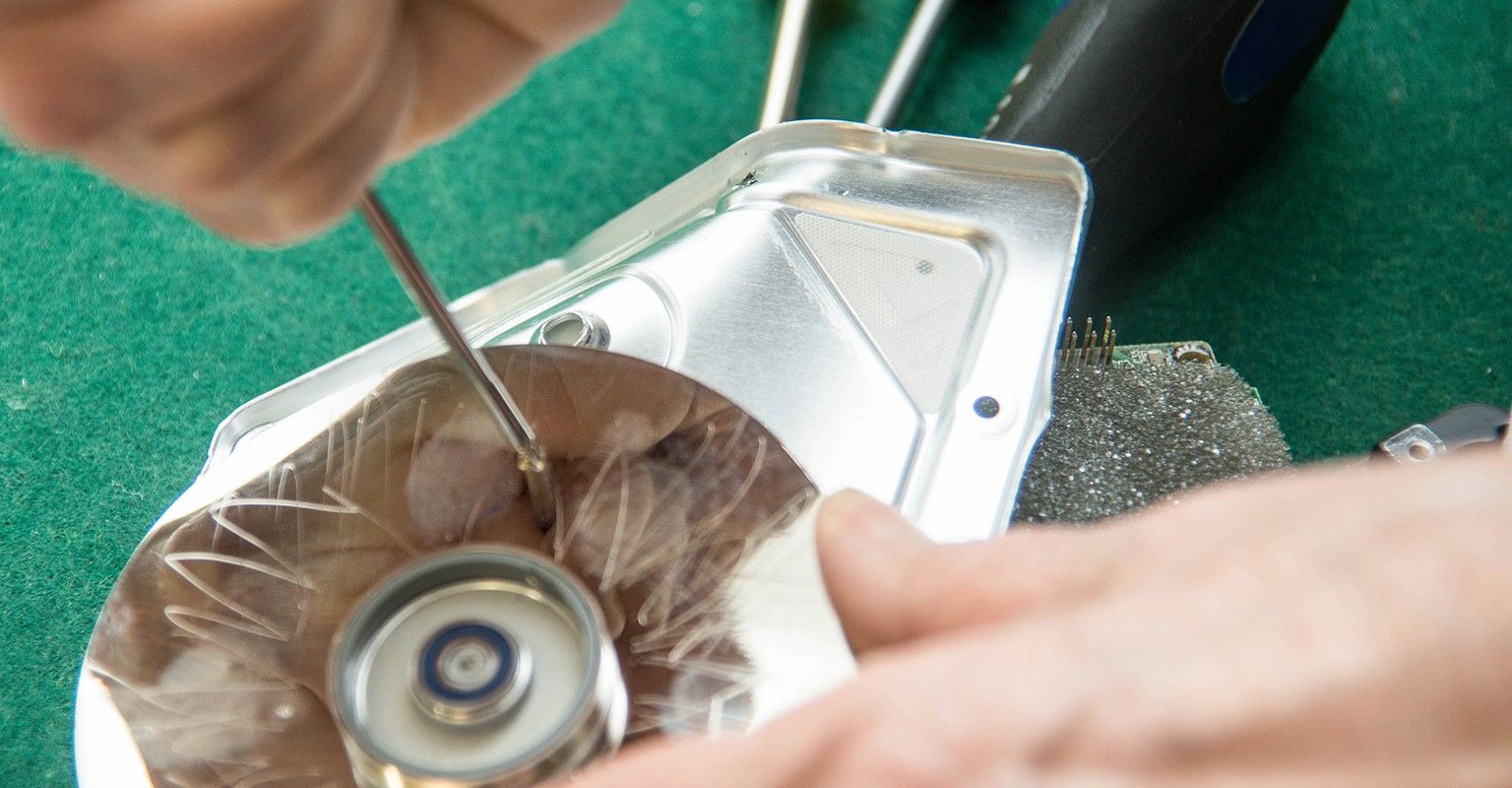
- Cleanroom Intervention: If physical repairs are required, technicians open the drive inside an ISO Class Cleanroom. These specialized environments prevent microscopic dust particles from settling on vulnerable magnetic platters, which would permanently scratch the surface and destroy data.
- Component Replacement: Damaged parts, such as spindle motors, printed circuit boards (PCBs), or read/write head assemblies, are replaced using an extensive inventory of donor drives matching the exact specifications of the failed unit.
- Sector Imaging and Cloning: Once the drive is stabilized, engineers create a bit-stream image of the storage media. This raw clone ensures that all subsequent data manipulation occurs on a healthy virtual copy, protecting the original drive from further degradation.
- Data Reconstruction and Verification: Using advanced algorithms, technicians reconstruct file systems, parse database headers, and verify the integrity of critical corporate files before delivering them securely back to the client.
Comparing Storage Media Failure and Recovery Complexity
Different storage technologies present unique engineering challenges during the recovery process. The table below outlines how various storage media behave under failure conditions and the corresponding recovery approach.
| Storage Medium | Common Failure Modes | Recovery Complexity | Primary Recovery Challenge |
|---|---|---|---|
| Traditional HDD | Head crashes, motor failure, bad sectors | Moderate to High | Physical cleanroom intervention and donor part matching |
| Enterprise SSD | Controller lockup, NAND wear, firmware corruption | High | Proprietary controller encryption and memory chip dumping |
| RAID / NAS Arrays | Multiple simultaneous drive failures, controller failure | High to Very High | Rebuilding stripe sets, parity blocks, and file system metadata |
| Encrypted Drives | BitLocker/FileVault corruption, lost keys | Variable | Requiring valid recovery keys or side-channel decryption attacks |
The Business Impact: Financial and Operational Continuity
When data becomes inaccessible, the financial ramifications extend far beyond the immediate hardware replacement cost. Businesses face quantifiable losses driven by operational downtime, missed service-level agreements, regulatory penalties, and reputational damage.
Operational downtime means employees cannot access customer databases, accounting ledgers, or project management tools. According to industry analyses, the cost of unplanned IT downtime can accumulate rapidly, making the fee associated with professional drive recovery a minor fraction of the potential business loss. Furthermore, regulatory frameworks such as the General Data Protection Regulation (GDPR) or the Health Insurance Portability and Accountability Act (HIPAA) impose strict mandates on data availability and integrity. Failing to recover customer records or financial audits can trigger severe regulatory fines and legal liabilities.
Beyond tangible costs, there is the irreplaceable loss of intellectual property, proprietary source code, and historical analytics. For small and medium-sized enterprises (SMEs) that may lack robust offsite backup systems, a professional drive recovery service often serves as the single remaining bridge between total corporate insolvency and operational recovery.
Common Pitfalls and Mistakes to Avoid
When a business faces a sudden drive failure, panic frequently leads to actions that permanently destroy recoverable data. IT managers and business owners must avoid several critical mistakes:
- Using Unverified Recovery Software on Damaged Hardware: Running consumer scanning software on a drive with mechanical head damage forces the failing heads to grind across the platters, turning recoverable data into unrecoverable magnetic dust.
- Attempting DIY Physical Repairs: Opening a hard drive outside of a cleanroom environment introduces dust particles that instantly ruin delicate platter surfaces. Similarly, swapping circuit boards without transferring the specific ROM chip containing adaptive firmware parameters will render the drive permanently unusable.
- Ignoring Chain of Custody and Security: Corporate data often contains sensitive trade secrets, financial records, or personally identifiable information (PII). Handing damaged drives to unverified, uncertified local repair shops exposes the organization to severe data breach risks. Businesses must partner with certified labs that maintain strict data privacy compliance and secure facilities.
Integrating Drive Recovery into an IT Disaster Recovery Plan
A professional drive recovery service should never be viewed as a substitute for a comprehensive backup strategy. Instead, it must be recognized as the ultimate safety net within an enterprise Disaster Recovery Plan (DRP).
Best practices dictate adherence to the established 3-2-1 backup rule: maintaining at least three copies of critical data, across two different media types, with at least one copy stored offsite or in the cloud. However, physical disasters—such as fires, floods, or localized power surges—can occasionally compromise primary backups or render complex server topologies unbootable. In such extreme scenarios, engaging a certified data recovery partner ensures that the organization has expert technical backing to extract data that automated backups failed to capture.
Organizations should pre-vet and establish service level agreements (SLAs) with reputable data recovery providers before an emergency occurs. Having a pre-negotiated vendor relationship eliminates precious hours of deliberation during a crisis, ensuring that failed drives are shipped to secure facilities immediately upon failure.
Frequently Asked Questions
What should I do immediately if an enterprise drive fails?
Power down the affected system immediately to prevent further damage from automated write cycles or failing mechanical components. Do not run diagnostic software or formatting tools on the failing drive. If the drive is making clicking, grinding, or buzzing noises, disconnect all power sources and consult a certified data recovery professional.
Can all lost data be successfully recovered?
Not 100 percent of data is recoverable in every scenario. If the magnetic data layer on a hard drive platter has been physically gouged by a failed read/write head, that specific data is permanently destroyed. However, in the vast majority of electronic, firmware, and logical failure cases, professional laboratories achieve a high success rate in restoring critical files.
Why is professional drive recovery expensive?
Professional recovery requires multimillion-dollar cleanroom facilities, highly trained storage engineers, extensive libraries of donor hardware components, and proprietary software tools. The labor-intensive, manual nature of dismantling sensitive hardware and reconstructing damaged file systems accounts for the specialized pricing structure of enterprise recovery services.
Will attempting DIY recovery void professional recovery chances?
Yes, unauthorized DIY attempts—whether opening the drive casing or running aggressive data-scraping software on failing hardware—frequently worsen the damage. Physical contamination in a non-cleanroom environment or overwriting sectors through software attempts can transform a recoverable failure into a total data loss scenario.
How are enterprise data privacy and security maintained during recovery?
Reputable data recovery providers operate in secure, access-controlled facilities, utilize encrypted transmission channels for returned data, and sign strict non-disclosure agreements (NDAs). Businesses should always verify that their chosen recovery partner adheres to industry security standards and offers certified data destruction options for obsolete donor media.
Conclusion and Next Actions
A drive recovery service represents a critical engineering safety net for businesses navigating the realities of hardware failure, logical corruption, and unexpected data loss. While robust backup protocols remain the primary line of defense, professional data recovery provides the advanced technical intervention required when standard recovery measures fail. To protect organizational assets, IT leaders should audit their current backup infrastructures, establish pre-vetted partnerships with certified recovery laboratories, and educate staff on proper emergency protocols when storage hardware exhibits signs of distress.
Image Gallery