How EdClub Touch Typing Helps You Learn Faster
EdClub touch typing accelerates typing speed and keyboard mastery through interactive micro-lessons, visual hand placement guides, and real-time error feedback. By systematically converting individual keystrokes into automatic muscle m...
EdClub touch typing accelerates typing speed and keyboard mastery through interactive micro-lessons, visual hand placement guides, and real-time error feedback. By systematically converting individual keystrokes into automatic muscle memory, the platform eliminates visual hunting and pecking, allowing users to dramatically increase words-per-minute performance while freeing mental bandwidth for higher-level cognitive tasks.
Contents
The Science of Touch Typing Speed and Cognitive Load
Learning to type efficiently is not merely a mechanical exercise; it is an exercise in neuro-cognitive optimization. Traditional "hunt-and-peck" typing forces the brain to continuously split its attention between three distinct processes: conceptualizing the text, visually searching the physical keyboard for the correct key, and verifying that the character appeared on screen. This constant context switching creates high cognitive friction, reducing overall writing speed and increasing mental fatigue.
Touch typing relies on procedural memory—the same motor-skill memory system used when riding a bicycle or playing an instrument. When a typist builds procedural memory for the keyboard, the neurological pathway bypasses the visual search step entirely. The brain receives the intent to write a letter, and the spinal motor neurons signal the appropriate finger to execute the stroke automatically.
EdClub’s touch typing curriculum (popularly known through its core tool, TypingClub) is built explicitly to construct these procedural memory pathways as rapidly as possible. By isolating specific key pairings, reinforcing proper home-row finger mechanics, and providing instant multi-sensory feedback, EdClub shortens the motor-learning feedback loop. As a result, learners transition from conscious keystroke selection to subconscious automated execution far quicker than they would through unguided practice.
Core EdClub Features That Accelerate Skill Acquisition
EdClub does not treat keyboarding as a static test of endurance. Instead, it breaks down the entire standard layout—including letters, numbers, punctuation, and shift-key combinations—into granular, highly structured learning segments.
- Visual Screen Cues
- Motor Neuron Trigger
- Keystroke Execution
- Instant Feedback Loop (feeds back to Visual Screen Cues)
Visual Hand Guides and Home Row Mastery
One of the primary obstacles beginners face is knowing which finger is responsible for which key. Looking down at the physical keyboard reinforces bad visual habits and breaks motor learning pathways.
EdClub addresses this with on-screen, animated visual hand guides that display transparent hands positioned directly over an interactive digital keyboard. As each prompt appears:
- The target key lights up on screen.
- The specific finger required to press that key highlights in real time.
- The system visually demonstrates the exact reach path from the home row (
A-S-D-Ffor the left hand,J-K-L-;for the right hand).
By keeping the user's eyes locked firmly on the screen rather than looking down at their hands, EdClub enforces strict spatial awareness. The visual model guides the brain to build an internal spatial map of the keyboard, dramatically cutting down the setup time required to establish home row discipline.
Micro-Lessons and Spaced Repetition
Long, uninterrupted typing drills often lead to physical fatigue, loss of focus, and sloppy finger mechanics. EdClub structures its content into short micro-lessons, typically lasting between one and three minutes each.
These bite-sized modules leverage the educational principles of micro-learning and spaced repetition:
- Targeted Introductions: Lessons introduce no more than one or two new keys at a time.
- Contextual Integration: New keys are immediately paired with previously mastered keys to build muscular transitions (e.g., introducing the letter
Eright after establishingDandK). - High-Frequency Repetition: Short, dense bursts of movement lock in neural pathways without triggering muscle strain or cognitive exhaustion.
Because users can complete several micro-lessons in a single 15-minute practice block, momentum remains high, and learning retention improves significantly over time.
Real-Time Error Correction and Feedback Loops
Muscle memory is agnostic; it memorizes bad habits just as easily as good ones. If a typist repeatedly uses the wrong finger to hit the letter R or routinely makes mistakes without noticing, those bad habits become deeply ingrained and difficult to correct later.
EdClub prevents wrong motor patterns through real-time feedback mechanisms:
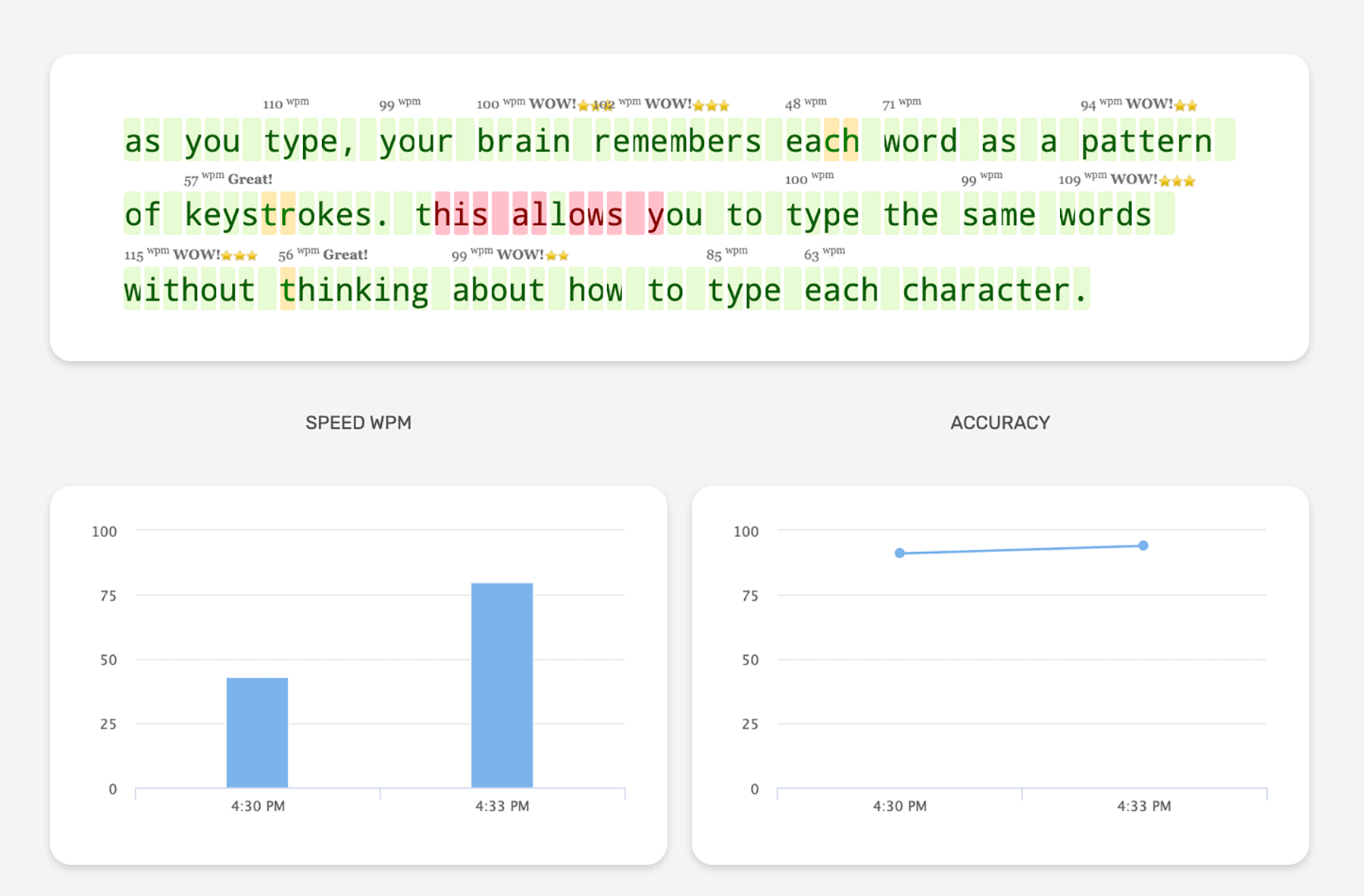
- Visual Instant Signals: Correct keystrokes turn green, while incorrect keystrokes flash bright red.
- Audio Cues: Optional subtle sound triggers alert the typist to mistakes without interrupting rhythm.
- Blocker Settings: In structured practice modes, the cursor will not advance until the user hits the correct key using the proper correction sequence, preventing users from rushing through text by making wild guesses.
By immediate identification and correction of errors, EdClub ensures that typists build accurate motor pathways from their very first day.
Gamified Progression and Dynamic Calibration
Sustained practice is essential for building motor skills, but repetitive drills can become tedious. EdClub uses structured gamification to keep motivation consistent over weeks and months of study.
Typists earn stars (up to five per lesson) based on a dual evaluation of Words Per Minute (WPM) and Accuracy percentage. Lessons must be retaken if speed or accuracy falls below set thresholds. This prevents learners from prematurely advancing to complex sentences before mastering foundational key combinations. Badges, unlockable games, customized avatars, and visual progress maps provide concrete benchmarks of growth, encouraging typists to voluntarily spend more time practicing.
Structural Comparison: Traditional Instruction vs. EdClub Methodology
To understand why EdClub yields faster learning outcomes, it is useful to compare its dynamic digital architecture against conventional keyboard instruction methods, such as paper textbook drills or unguided software typers.
| Evaluation Metric | Traditional Paper / Unstructured Typing | EdClub Touch Typing Platform | Impact on Learning Speed |
|---|---|---|---|
| Visual Focus | Split between physical paper, physical keyboard, and screen. | 100% focused on screen via interactive visual guides. | Eliminates head movement; speeds up visual processing. |
| Error Feedback | Delayed (reviewed after full page or block of text is typed). | Immediate keystroke-level visual and audio cues. | Prevents bad muscle memory habits from solidifying. |
| Adaptive Pacing | Static progression; everyone moves through lessons at the same speed. | Dynamic gating; requires threshold WPM and accuracy to advance. | Ensures 95%+ proficiency before introducing complex keys. |
| Lesson Granularity | Full paragraphs or lengthy page-wide drills. | Micro-modules lasting 1 to 3 minutes each. | Maintains high focus and prevents mental and physical fatigue. |
| Weak-Key Detection | Manual inspection by student or teacher required. | Automated reporting on specific finger/key error rates. | Allows immediate targeted remedial practice. |
| Engagement Model | Repetitive text reproduction. | Star ratings, badges, video tutorials, and interactive typing games. | Increases voluntary practice frequency and overall time on task. |
Step-by-Step Implementation Guide for Maximum Speed Gains
To achieve optimal speed improvements using EdClub, learners should follow a systematic framework rather than jumping randomly between lessons.
- Step 1: Ergonomic & Placement Setup
- Step 2: Establish the Accuracy Floor (95%+)
- Step 3: Implement Daily Micro-Sessions (15-20 Mins)
- Step 4: Utilize Target Drill Analytics for Weak Keys
Step 1: Establish Proper Physical Ergonomics
Speed originates from posture and positioning. Before launching the first EdClub module:
- Position your chair so your feet are flat on the floor and your elbows are bent at a 90-degree angle.
- Keep your wrists elevated slightly above the desk surface rather than resting them heavily on wrist pads or table edges while actively typing.
- Rest your index fingers gently on the tactile anchor bumps of the
FandJkeys.
Step 2: Enforce the Accuracy Floor Rule
The fastest path to high typing speed is prioritizing accuracy over raw speed during the initial learning phases.
- Set a strict personal threshold: Do not advance to the next EdClub lesson until you reach at least 95% accuracy (ideally 98%).
- Attempting to type fast with low accuracy creates erratic muscle memory, forcing you to waste time pressing the backspace key later. Speed naturally follows once finger positioning becomes precise and automatic.
Step 3: Commit to Short, High-Frequency Sessions
Brain plasticity responds best to frequent, brief practice blocks rather than long, sporadic marathon sessions.
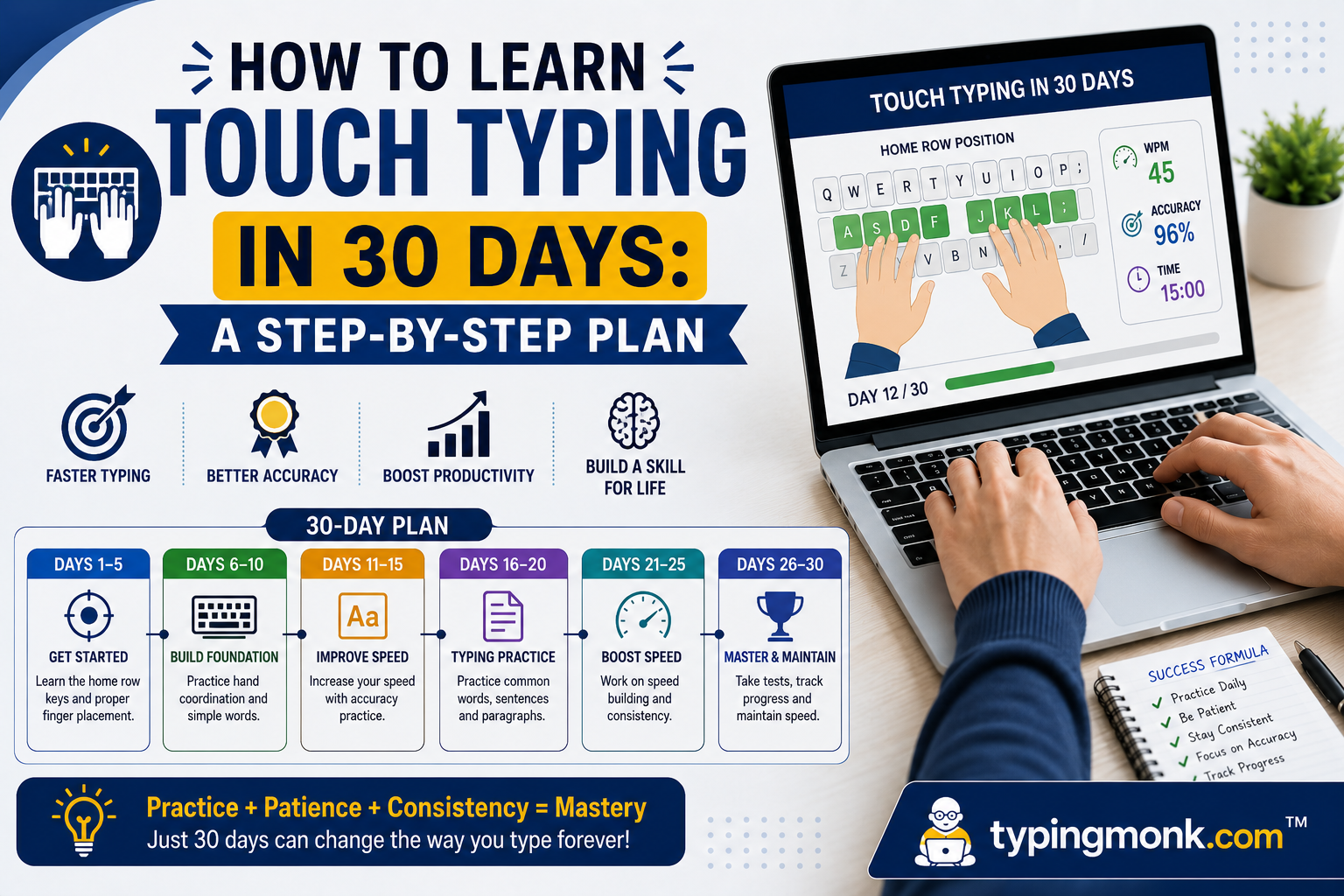
- Practice on EdClub for 15 to 20 minutes per day, 5 days per week.
- Consistently typing for 15 minutes a day yields faster motor automation than practicing for 2 hours once on the weekend.
Step 4: Analyze Performance Dashboards to Targeted Weakness
EdClub automatically collects keystroke data, highlighting specific keys that cause hesitation or frequent mistyping.
- Review your diagnostic report after every 10 to 15 lessons.
- Identify your lowest-performing fingers (often the ring and pinky fingers, or key stretches like
Z,X,Q, and numbers). - Run EdClub's specialized practice modules focused exclusively on those trouble spots to eliminate performance bottlenecks.
Common Mistakes That Slow Down Touch Typing Progress
Even with advanced software like EdClub, bad habits can slow down progress. Avoiding these common mistakes ensures continuous speed gains:
- Glancing Down at the Physical Keyboard: Looking down at your fingers temporarily relieves cognitive discomfort, but it destroys long-term spatial memory development. Cover your hands with a small towel or paper sheet if you struggle to keep your eyes on the screen visual guide.
- Prioritizing WPM over Accuracy: Chasing high WPM numbers early leads to erratic typing rhythms. High-speed typing requires a steady, rhythmic cadence. Errors break that rhythm and force costly backspacing cycles.
- Failing to Use All Ten Fingers: Beginners often default to using only their index and middle fingers for awkward reaches (such as using the index finger for the
PorCkeys). Stick strictly to the finger mapping prescribed by the EdClub visual guide. - Neglecting Wrist and Finger Rest Breaks: Typing while fatigued leads to poor technique and wrist strain. If your accuracy drops noticeably during a session, log off and resume the next day.
Frequently Asked Questions
How long does it take to see noticeable speed improvements on EdClub?
Most learners see measurable improvements within two to three weeks of consistent daily practice (15-20 minutes per day). Beginners typically progress from 15–20 WPM using hunt-and-peck techniques to 40–50 WPM using proper ten-finger touch typing within 30 to 45 days of structured curriculum completion.
Why is accuracy more important than speed when first starting touch typing?
Speed is a natural byproduct of automated muscle memory. If you focus on speed prematurely, you lock in inaccurate finger reaches and frequent typos. Correcting errors requires multiple backspace keystrokes, which degrades your net WPM far more than typing slightly slower but with 98% precision.
Can adults benefit from EdClub touch typing, or is it designed only for school students?
While EdClub is widely integrated into school curricula, its core motor-learning algorithms and lesson structures apply equally well to adults. Adult learners often progress faster than younger students because they possess higher focused attention spans and better developed fine motor control.
How does EdClub prevent students from cheating by looking at their hands?
EdClub utilizes dynamic visual hand guides on screen so that learners have no incentive to look down. Furthermore, educators using EdClub’s management portal can enable strict typing modes, mandate minimum accuracy standards, and monitor live typing playback to ensure proper technique is being maintained.
What is the ideal daily practice duration on EdClub for maximum skill retention?
The optimal practice duration is 15 to 25 minutes daily. Shorter, consistent daily sessions maximize memory retention and prevent physical fatigue, allowing the brain to consolidate motor skills far more effectively than longer, irregular practice sessions.
Recommended Next Steps
To accelerate your typing speed using EdClub today:
- Take an Initial Diagnostic Speed Test: Log into EdClub or TypingClub and take a baseline placement test to document your starting WPM and accuracy baseline.
- Configure Your Daily Practice Reminder: Set aside a dedicated 15-minute window every morning or afternoon specifically for typing practice.
- Master the Home Row First: Complete the foundational home-row modules with a mandatory target of 98% accuracy before unlocking top-row and bottom-row lessons.
- Track Weekly Analytics: Review your speed dashboard at the end of every week to identify slow keys and utilize customized remedial drills to clear spatial hurdles.
Image Gallery