FXO Cards Explained: The Essential Guide to Connecting VoIP Systems to Analog Lines
An FXO card is a hardware component used in computer-based telephony systems to connect a private branch exchange (PBX) to the public switched telephone network (PSTN). By acting as the bridge between digital VoIP software and traditio...
An FXO card is a hardware component used in computer-based telephony systems to connect a private branch exchange (PBX) to the public switched telephone network (PSTN). By acting as the bridge between digital VoIP software and traditional analog copper lines, these cards allow businesses to make and receive calls through their local telephone service provider.
Contents
In the landscape of 2026 telecommunications, while digital SIP trunks and cloud-hosted PBX solutions dominate the market, physical hardware like FXO (Foreign eXchange Office) cards remains a critical component for specialized infrastructure. Whether used for emergency redundancy, legacy integration in remote areas, or maintaining dedicated fax lines, understanding how these cards function is essential for any network administrator or IT professional managing on-premise communication systems.
Understanding the Core Concepts: FXO vs. FXS
To understand FXO cards, one must first master the distinction between FXO and FXS interfaces. These two terms describe the "handshake" required to complete an analog telephone circuit.
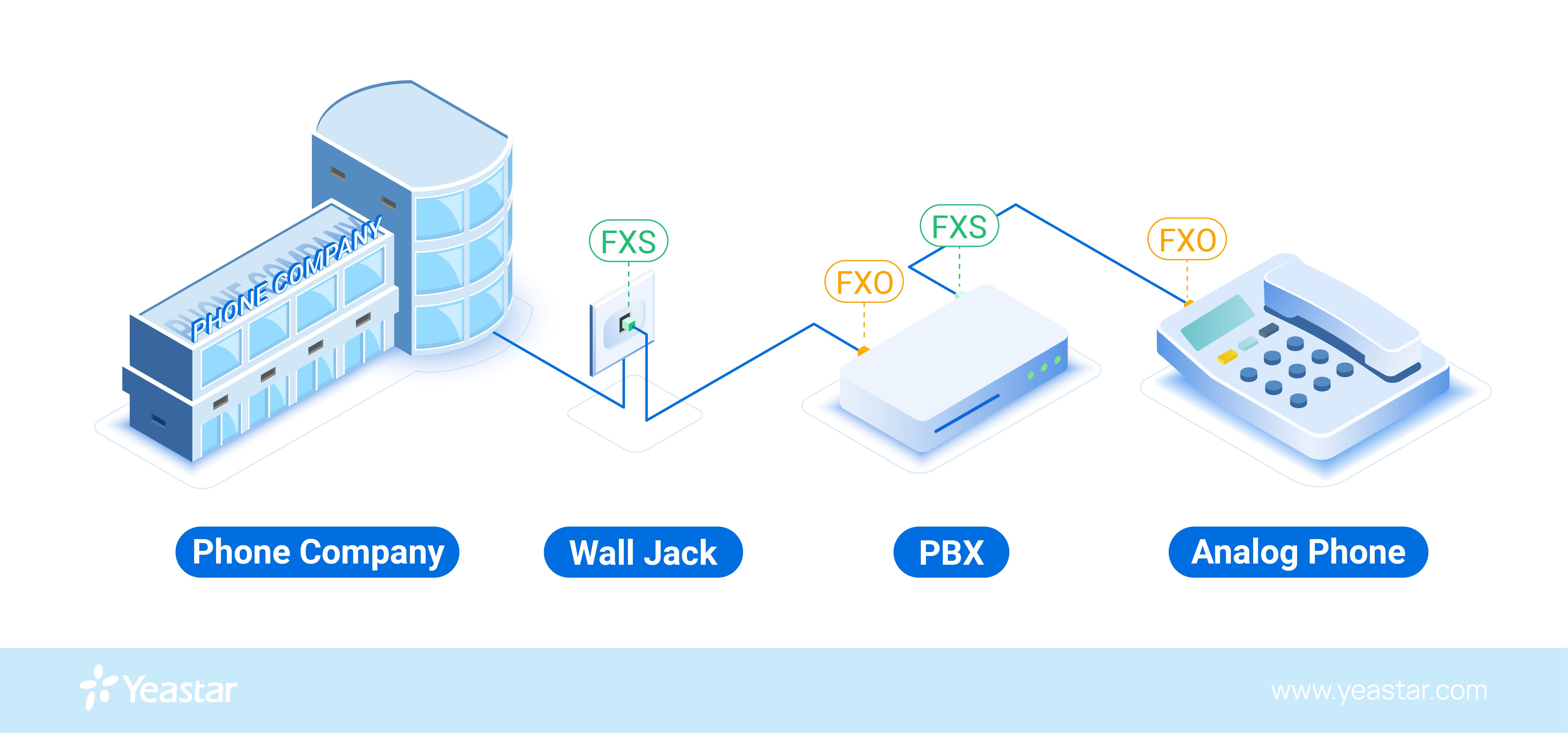
An FXO (Foreign eXchange Office) port is the interface that receives the telephone service. It is designed to connect to a central office (CO) from a service provider or to an FXS port on another device. In simpler terms, the FXO port "acts like a telephone." It waits for a dial tone, detects ringing voltage, and performs the "off-hook" and "on-hook" actions required to manage a call.
Conversely, an FXS (Foreign eXchange Station) port is the interface that delivers the telephone service. This is the plug on the wall or the back of a traditional router that provides a dial tone, battery current, and ring voltage. You plug a phone into an FXS port; you plug an FXO port into the wall.
An FXO card installed in a server converts the analog signals coming from the wall into digital data that a software-based PBX, such as Asterisk, FreePBX, or 3CX, can process. This allows a modern server to utilize "old world" telephony infrastructure seamlessly.
How FXO Cards Function Within a PBX
The primary role of an FXO card is to manage the signaling and media conversion between the analog PSTN and the digital IP network. When a call arrives from the telephone company, the FXO card detects the high-voltage AC signal (ringing) and alerts the PBX software. Once the software "answers" the call, the card goes "off-hook," completing the electrical circuit and allowing voice data to flow.
Signaling and Loop Current
FXO cards primarily use Loop Start signaling, which is the standard for residential and small business analog lines. When the card wants to initiate a call, it closes the loop between the "Tip" and "Ring" wires, allowing DC current to flow. The central office detects this current and provides a dial tone. For more complex enterprise environments, some cards support Ground Start signaling, which helps prevent "glare"—a condition where an incoming call and an outgoing call attempt to use the same line simultaneously.
Digital to Analog Conversion (DAC)
The voice signals traveling over the PSTN are analog waves. The FXO card contains a Codec (Coder-Decoder) that samples these analog waves thousands of times per second and converts them into digital packets (often using the G.711 μ-law or a-law standard). Conversely, when a user on a VoIP phone speaks, the FXO card takes those digital packets and converts them back into an analog electrical signal to be sent across the copper wires.
Technical Specifications and Hardware Form Factors
In 2026, FXO cards are almost exclusively produced for PCI Express (PCIe) slots, though legacy PCI versions may still be found in older industrial hardware. When selecting a card, the density of ports and the modularity of the design are the most significant factors.
Port Density and Modularity
FXO cards are typically categorized by the number of ports they support:
- Single/Dual Port: Used for home offices or very small businesses needing one or two backup lines.
- 4-Port Cards: The industry standard for small to medium-sized businesses (SMBs).
- 8-Port to 24-Port Cards: High-density cards used for larger on-premise installations or legacy integration projects.
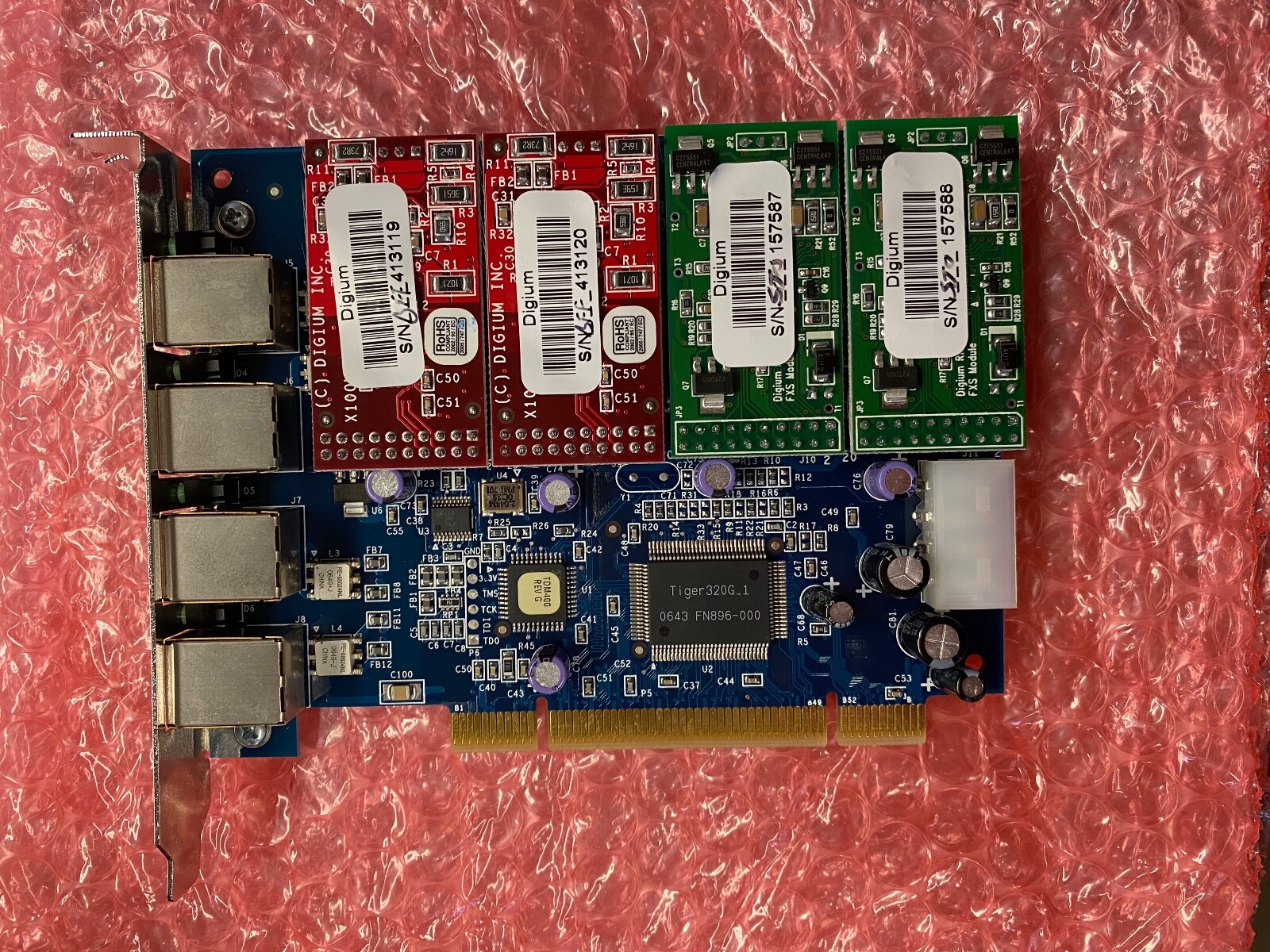
Many modern cards are modular. This means you buy a baseboard (the PCIe card) and then plug in smaller "daughterboards" or modules. For example, a 4-port baseboard might allow you to mix and match FXO modules (for incoming lines) and FXS modules (for internal analog fax machines or handsets) on the same physical card.
Hardware Echo Cancellation
One of the most critical specifications to look for is an on-board Hardware Echo Cancellation (VPM) module. When analog signals are converted to digital, a slight delay occurs. If this signal reflects back from the PSTN, the caller will hear their own voice with a distracting delay. While software can handle echo cancellation, it consumes significant CPU resources and is often less effective than a dedicated hardware chip on the FXO card itself. High-quality cards from manufacturers like Sangoma or OpenVox often include these modules to ensure toll-quality audio.
FXO vs. FXS Comparison
The following table highlights the functional and technical differences between these two essential interfaces to help determine which hardware is needed for a specific setup.
| Feature | FXO (Foreign eXchange Office) | FXS (Foreign eXchange Station) |
|---|---|---|
| Primary Role | Receives the dial tone/service. | Provides the dial tone/service. |
| Device Connection | Connects to the wall jack (PSTN). | Connects to a phone or fax machine. |
| Common Use Case | Bringing outside lines into a PBX. | Connecting analog phones to a PBX. |
| Ringing Signal | Detects ringing voltage. | Generates ringing voltage. |
| Power Consumption | Draws power from the line. | Supplies power (battery) to the line. |
| Equivalent Device | Acts like a standard telephone. | Acts like a telephone company switch. |
Why Businesses Still Use FXO Cards in 2026
With the prevalence of high-speed internet and SIP (Session Initiation Protocol) trunks, one might wonder why FXO cards are still relevant. There are several strategic reasons for their continued use:
- Local Survivability and Redundancy: If a business relies entirely on a cloud PBX or SIP trunk, an internet outage will sever all communications. By having a physical FXO card connected to a traditional analog line, the PBX can automatically failover to the PSTN, ensuring that emergency calls (911/112) and essential business functions remain active.
- Fax Machine Compatibility: Despite the rise of e-faxing, many legal, medical, and government institutions still require traditional faxing. Analog lines are inherently more stable for fax protocols (T.30) than many VoIP implementations (T.38), making FXO cards a reliable bridge.
- Cost Savings in Specific Regions: In certain geographic locations, local calls may be included for free or at very low cost via analog lines, whereas SIP providers might charge per minute.
- Security and Privacy: Some sensitive organizations prefer to keep their primary voice traffic off the public internet, utilizing dedicated copper lines for internal or secure communications.
Installation and Configuration Requirements
Deploying an FXO card requires more than just physical installation. It involves a specific software stack to ensure the operating system can communicate with the hardware.
The DAHDI Interface
Most Linux-based PBX systems use DAHDI (Digium/Asterisk Hardware Device Interface). This is a collection of drivers and libraries that allow the Asterisk software to talk to the FXO card. After physically seating the card in a PCIe slot, an administrator must:
- Install the DAHDI Linux drivers.
- Run hardware detection tools (like
dahdi_genconf) to identify the ports. - Configure the signaling parameters (e.g.,
fxs_ksfor loop-start signaling) in the configuration files. - Set the correct regional impedance settings to prevent audio issues.
Impedance and Gain Tuning
Because analog lines vary significantly in quality based on the distance from the central office, FXO cards often require "tuning." This involves adjusting the impedance (the electrical resistance of the line) and the RX/TX Gain (the volume of the received and transmitted audio). If the gain is too high, the audio will distort; if it is too low, the caller will be inaudible. Most modern DAHDI installations include a utility called fxotune that automates this process by testing the line and calculating the optimal electrical settings.
Troubleshooting Common FXO Issues
Working with analog lines is often more complex than digital networking because of the physical variables involved. Common issues include:
- Line Noise and Hum: This is usually caused by electromagnetic interference or poor grounding. Ensuring the server is properly grounded and that the telephone lines are not run parallel to high-voltage power cables can mitigate this.
- Echo: If hardware echo cancellation is not present or incorrectly configured, callers will hear themselves. This is often solved by running the
fxotuneutility or adjusting the impedance settings. - Hung Ports: Occasionally, a line may stay "off-hook" even after a call has ended. This "disconnect supervision" problem occurs when the PBX doesn't receive the correct signal from the telco to hang up. Administrators may need to adjust the "battery drop" or "cpc" (Calling Party Control) settings in the DAHDI configuration.
- Caller ID Failures: Different countries use different standards for sending Caller ID (e.g., Bellcore, ETSI, or DTMF). If the FXO card is not set to the correct regional standard, the PBX will not be able to display the incoming caller's number.
Choosing Between FXO Cards and FXO Gateways
As of 2026, an alternative to the FXO card is the FXO Gateway. A gateway is a standalone external device that connects to the PSTN and converts the lines into SIP traffic that travels over the local network to the PBX.
The choice depends on the infrastructure. An FXO card is generally more cost-effective and offers lower latency because it resides directly on the server's bus. However, it requires a physical PCIe slot and the installation of complex drivers. An FXO Gateway is easier to set up (it’s essentially a "plug and play" network device) and can be placed anywhere in the building where there is a network jack, but it introduces an extra hop in the network and usually costs more per port.
Frequently Asked Questions
Can I plug a standard telephone into an FXO card?
No. A standard telephone is an FXO device. You cannot connect an FXO device to an FXO port. To use a standard analog phone with your PBX, you need an FXS card or an FXS port, which provides the necessary dial tone and power.
Do I need a special driver for FXO cards?
Yes. Most FXO cards require the DAHDI (Digium/Asterisk Hardware Device Interface) driver suite on Linux. Windows-based telephony systems often use proprietary drivers provided by the card manufacturer.
How many concurrent calls can one FXO port handle?
One analog FXO port can handle exactly one concurrent call. If you need to handle four simultaneous calls from the PSTN, you must have four separate analog lines from your service provider plugged into a 4-port FXO card.
Will an FXO card work with a digital T1 or E1 line?
No. FXO cards are strictly for analog (POTS) lines. If you have a digital T1, E1, or PRI line, you need a different type of hardware known as a Digital T1/E1 card or a PRI Gateway.
Does an FXO card support Caller ID?
Yes, almost all modern FXO cards support Caller ID, provided the service is enabled by your telephone company. You must ensure the software (like Asterisk) is configured to wait for the Caller ID spill between the first and second ring.
Final Recommendations
When implementing an FXO card in 2026, prioritize hardware echo cancellation. While it increases the initial cost of the card, it prevents the most common complaint in VoIP-to-PSTN integration: poor voice quality. For businesses seeking a reliable on-premise PBX, an FXO card remains the most robust way to ensure that even if the internet goes down, the dial tone remains. Always verify that your server has an available PCIe slot and that your chosen telephony software supports the specific card model and its DAHDI drivers before purchasing.
Image Gallery