Understanding a Facebook Page ID: A Comprehensive Guide for Administrators and Developers
A Facebook Page ID is a unique, fixed string of numbers assigned by Meta to every business or public-facing entity on its platform. Unlike a vanity URL or a page name, which can be modified by administrators, the Page ID remains consta...
A Facebook Page ID is a unique, fixed string of numbers assigned by Meta to every business or public-facing entity on its platform. Unlike a vanity URL or a page name, which can be modified by administrators, the Page ID remains constant for the lifetime of the entity, serving as the definitive technical identifier for API integrations, advertising campaigns, and official support requests.
Contents
The Role and Significance of the Facebook Page ID
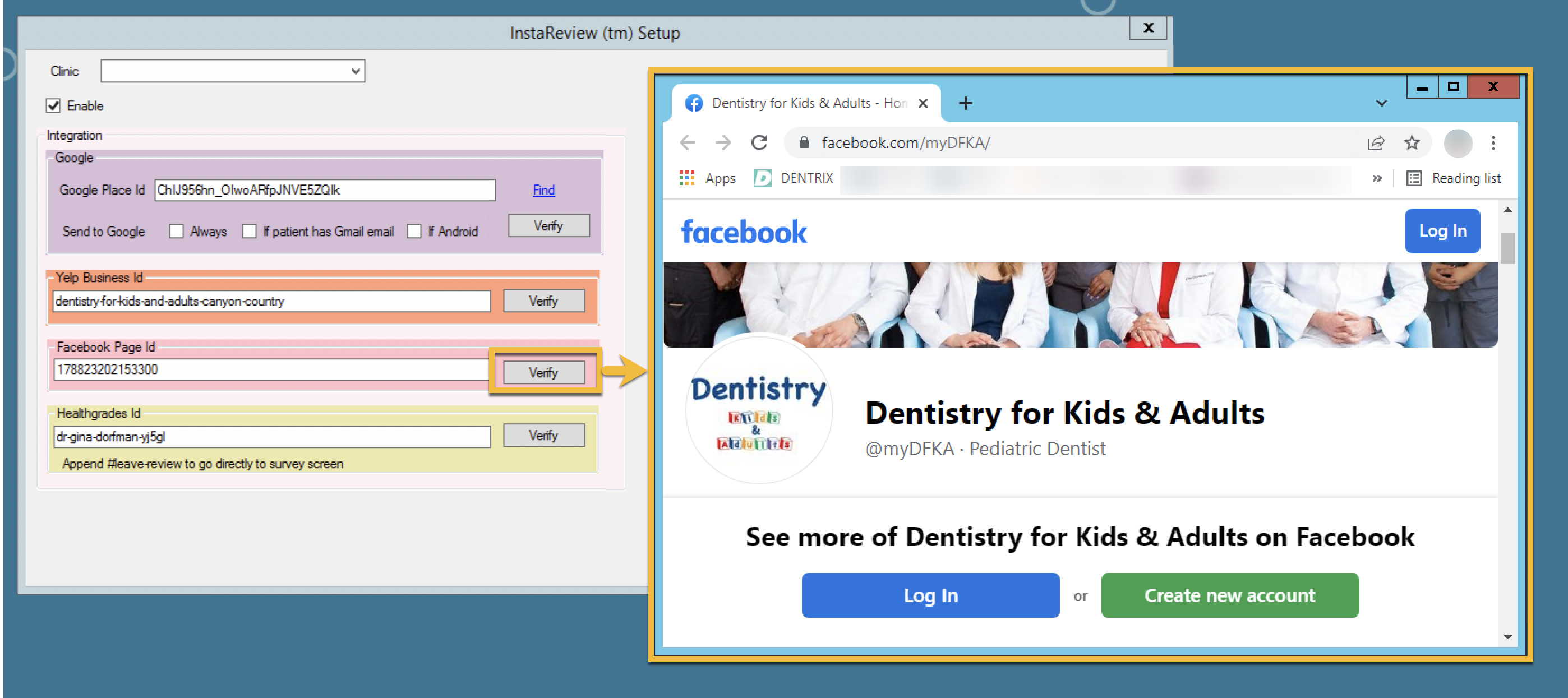
At its core, a Facebook Page ID is the fundamental database key that links your public entity to the vast infrastructure of the Meta ecosystem. While users typically interact with a Facebook page through its human-readable URL (such as facebook.com/BrandName), the internal systems of Meta do not process these strings to identify accounts. Instead, they rely on the Page ID—a long-form numerical sequence—to ensure that data is routed to the correct destination.
Understanding this identifier is critical for several technical workflows. Whether you are setting up a third-party social media management dashboard, configuring a Meta Pixel for website tracking, or attempting to troubleshoot an issue through the Meta Business Help Center, you will almost certainly be prompted to provide your Page ID. Because page names can be duplicated or changed, the Page ID acts as the "source of truth," ensuring that your brand’s permissions, analytics, and advertising spend are correctly associated with your specific business entity.
Distinguishing Between Page IDs, User IDs, and App IDs
A common point of confusion for new administrators is the distinction between various IDs generated within the Facebook environment. Meta utilizes distinct ID structures for different types of entities:
- Page ID: This identifier is specific to a business, brand, or public figure's presence on the platform. It is public information and can be found by inspecting the metadata of a page.
- User ID: This is a private, unique identifier associated with an individual personal profile. Even if you are an administrator of a page, your personal User ID is distinct from the Page ID.
- App ID: If you have integrated a third-party application or created a custom integration via the Meta Developers portal, that specific application will have its own unique App ID.
Mixing these up is a frequent source of integration failure. If a platform asks for your Page ID but receives an App ID, the data synchronization process will return an error, as the two identifiers belong to different functional tiers of the Meta infrastructure.
Methods for Locating Your Page ID
Finding your Page ID can be accomplished through several methods, ranging from simple front-end inspection to advanced API queries. As of 2026, the most reliable methods are as follows:
1. The About Section Method (Desktop)
The most direct way to find your Page ID without technical tools is to navigate to your page’s "About" section:
- Log in to Facebook and navigate to your Page.
- Select the "About" tab in the sub-navigation menu.
- Scroll down to the "Page transparency" section.
- Click "See all." Your Page ID will be displayed clearly in the pop-up window.
2. Using the URL Inspection Method
If you are comfortable with basic web navigation, you can often find the ID embedded in the page source:
- Navigate to your Page’s homepage.
- Right-click anywhere on the page and select "View Page Source."
- Use the browser search function (Ctrl+F or Cmd+F) and type "page_id".
- The numeric string following this text is your Page ID.
3. Third-Party Lookup Tools
Several reputable digital marketing tools offer "Facebook ID Finders." These tools utilize the Graph API to resolve a public URL to its numerical identifier. When using such tools, ensure you are only inputting the public URL of a Page, never your personal login credentials.
Comparison of Methods for ID Retrieval
| Method | Technical Difficulty | Speed | Best Use Case |
|---|---|---|---|
| About Section | None | Fast | Quick checks for owners |
| Page Source | Low | Moderate | When the UI is restricted |
| Graph API Explorer | High | Fast | Developers/Bulk workflows |
| Third-Party Tools | Low | Fast | Non-technical users |
Technical Considerations for Developers
For those working with the Meta Graph API, the Page ID is the essential parameter for GET and POST requests. When building an application that pulls performance metrics or posts content, the ID is typically required as the primary object identifier.
Developers should be aware of "App-Scoped" vs. "Page-Scoped" identifiers. In some specific privacy-focused API integrations, Meta may return a scoped ID that only functions within the context of a specific app. If you are attempting to bridge data between two different applications, you must ensure you are using the Global Page ID, which is consistent across all applications, rather than an app-scoped variant.
Troubleshooting Common Issues
Despite the straightforward nature of the Page ID, users occasionally encounter challenges:
- The ID is Not Found: This usually occurs if the Page is unpublished, restricted due to age or location settings, or if the user is trying to find an ID for a personal profile while logged into a business view. Ensure the page is active and public before attempting to retrieve the ID.
- Permissions Errors: If you are using a third-party tool that requires API access, ensure your administrative role on the page is sufficient. "Editor" or "Admin" roles typically have the required access to see full technical details, whereas "Analyst" or "Advertiser" roles may be restricted from seeing specific meta-data in certain views.
- ID Mismatch: If you manage multiple pages, it is surprisingly easy to copy the ID of the wrong entity. Always verify the ID against the page name to ensure you have the correct data for your specific marketing or technical project.
Regulatory and Privacy Implications
It is important to understand that the Page ID is, by design, a public identifier. It does not contain personally identifiable information (PII) about the page administrators. However, it is the key used to aggregate all public data associated with that entity. In the context of the General Data Protection Regulation (GDPR) and other global privacy mandates, the Page ID itself does not violate privacy protocols because it identifies the entity (the brand), not the individuals operating behind the scenes.
When configuring tracking tools like the Meta Pixel, the Page ID acts as the "destination" for data events. By ensuring this ID is correctly configured in your event manager, you maintain compliance with Meta’s data sharing policies, as it clearly identifies the data controller (your brand) responsible for the information being collected.
Frequently Asked Questions
Is the Facebook Page ID the same as my username? No. A username (the text in your URL) is a display feature that can be changed by administrators. The Page ID is a permanent numerical database key that cannot be changed once assigned.
Can a Page ID be deleted? A Page ID is deleted only when the entire Facebook Page is permanently deleted. If you unpublish a page, the ID remains reserved in the Meta system, but it will not be reachable via public API requests.
Do I need a special developer account to see a Page ID? No. Any user with a standard Facebook account can view a Page ID using the "Page Transparency" section or by inspecting the page source code.
Why does my third-party tool show a different ID? Your tool might be showing an "App-Scoped" ID if it was created specifically for that application. If you need the global ID, use the "About" section method as a manual verification step.
Is it safe to share my Page ID? Yes. Your Page ID is public information. Sharing it does not grant anyone access to your administrative panel, your password, or any private data. It is standard practice to share this ID with marketing agencies or developers to grant them access to your page's data stream.
Next Steps for Page Administrators
If you are currently setting up a new business integration or auditing your digital footprint, start by documenting your Page ID in a secure internal spreadsheet alongside your other primary business assets. This ensures that when you engage with third-party software—or if you ever need to contact Meta support for technical issues—you have the most important piece of identification ready.
If you find that your current setup requires you to use the Graph API for automation, spend time familiarizing yourself with the Meta for Developers documentation. While the ID is simple to find, how you use it within complex workflows can significantly impact the stability of your automated marketing efforts in the years ahead.
Image Gallery