How to Learn App Development in 2026: A Structured Path to Mastery
Learning app development involves a systematic progression from understanding programming logic and choosing a target platform (iOS, Android, or cross-platform) to mastering specific frameworks and publishing to stores. Success require...
Learning app development involves a systematic progression from understanding programming logic and choosing a target platform (iOS, Android, or cross-platform) to mastering specific frameworks and publishing to stores. Success requires hands-on project building, proficiency in modern integrated development environments (IDEs), and a firm grasp of user experience (UX) principles and cloud-based backend integration.
Contents
Defining Your Development Path
Before writing a single line of code, you must decide which ecosystem you intend to serve. In 2026, the mobile landscape remains split between Apple’s iOS and Google’s Android, but the gap in development methodology has narrowed thanks to the maturity of cross-platform tools. Your choice determines the programming languages you must learn and the hardware you need to own.
Native development involves building an app specifically for one operating system. This approach offers the highest performance and the most seamless integration with device hardware, such as the camera, biometric sensors, and advanced GPU features. If you aim to build high-performance games or complex utility apps that require deep system access, native is the standard.
Cross-platform development allows you to write one codebase that runs on both iOS and Android. This is the dominant choice for most business and consumer apps because it significantly reduces development time and maintenance costs. Modern frameworks like Flutter and React Native now offer performance that is nearly indistinguishable from native apps for the vast majority of use cases.
Essential Prerequisites and Technical Foundations
You do not need a computer science degree to learn app development, but you do need a foundation in logical thinking and the right hardware.
- Hardware Requirements: If you want to develop for iOS, you generally need a Mac. Apple’s development environment, Xcode, only runs on macOS. While there are cloud-based workarounds, they are often slow and inefficient for beginners. For Android-only development, any powerful Windows, Linux, or Mac machine will suffice.
- Logic and Algorithms: Before picking a language, understand basic programming concepts: variables, loops, conditional statements (if/else), and data structures (arrays, dictionaries). These concepts are universal across all languages.
- UI/UX Design Basics: Apps are built for humans. Understanding how users interact with screens—touch targets, navigation flows, and visual hierarchy—is as important as the code. Tools like Figma are industry standards in 2026 for prototyping before development begins.
Selecting Your Tech Stack
The "stack" refers to the combination of programming languages and frameworks you use. Here is a breakdown of the primary options available in 2026:
Native iOS: Swift and SwiftUI
Swift is Apple’s powerful and intuitive programming language. In 2026, SwiftUI is the primary framework for building user interfaces. It uses a declarative syntax, meaning you describe what the UI should look like, and the framework handles the rendering. This has replaced the older, more complex Imperative UI patterns (UIKit).
Native Android: Kotlin and Jetpack Compose
Kotlin is the preferred language for Android development, having officially superseded Java years ago. Similar to Apple’s shift, Android now relies on Jetpack Compose, a modern toolkit for building native UI. It simplifies UI development by allowing developers to write less code while maintaining high performance.
Cross-Platform: Flutter or React Native
- Flutter: Developed by Google, Flutter uses the Dart language. It is highly regarded for its "hot reload" feature and its ability to create visually stunning, custom designs that look identical on every platform.
- React Native: Created by Meta (Facebook), this framework uses JavaScript or TypeScript. It is an excellent choice if you already have experience with web development, as it leverages the React library to build mobile interfaces.
| Feature | Native (iOS/Android) | Cross-Platform (Flutter/RN) | Progressive Web App (PWA) |
|---|---|---|---|
| Performance | Maximum | High | Moderate |
| Development Cost | High (Two codebases) | Moderate (One codebase) | Low |
| Device API Access | Full / Immediate | Near-Full | Limited |
| User Experience | Fluid / Platform-specific | Highly consistent | Browser-like |
| Time to Market | Longer | Faster | Fastest |
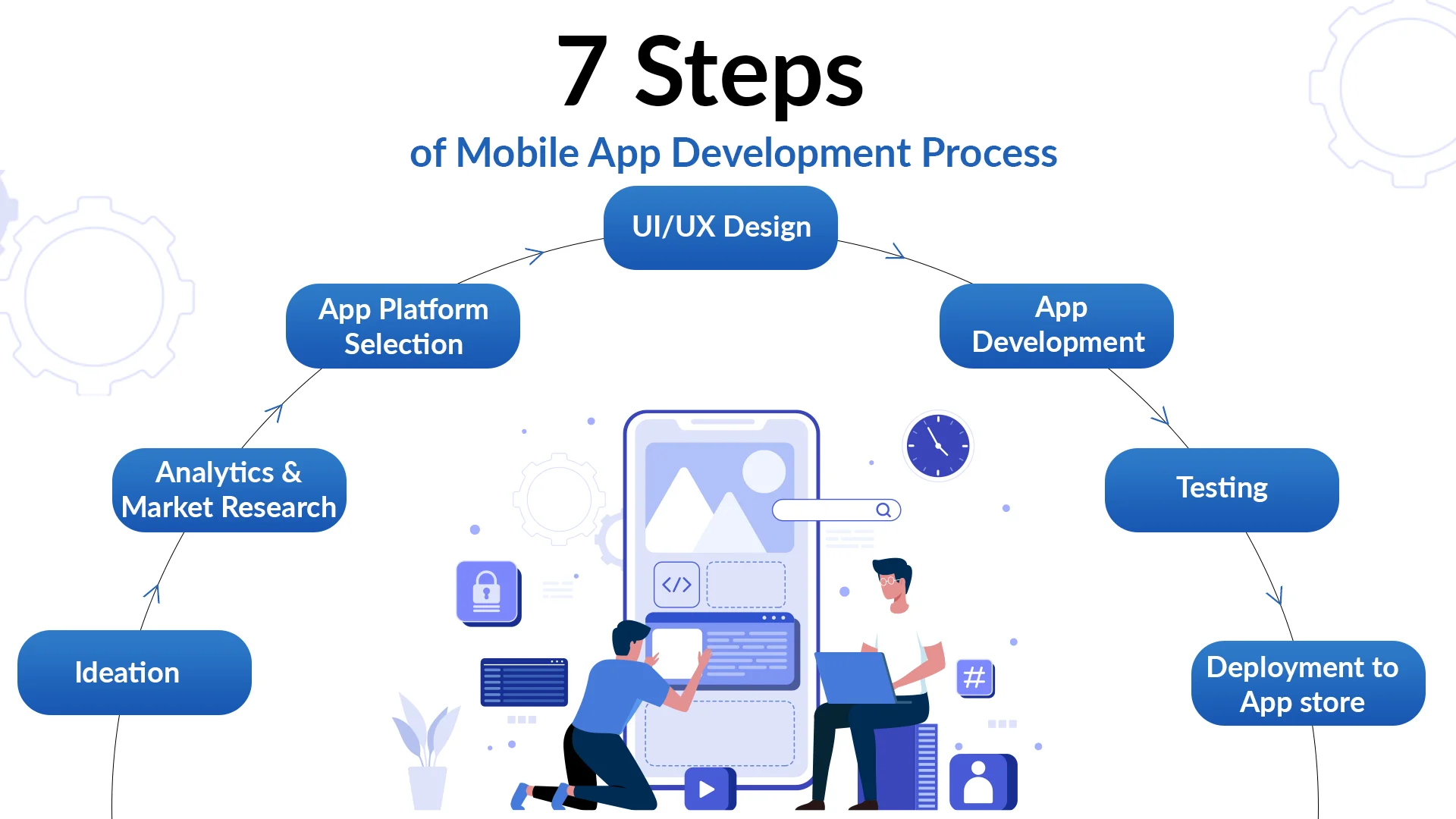
The Step-by-Step Learning Roadmap
Phase 1: Master the Language Basics
Do not rush into building an app immediately. Spend the first 2–4 weeks mastering the syntax of your chosen language (Swift, Kotlin, or Dart). Focus on Object-Oriented Programming (OOP) or Functional Programming paradigms, as these govern how data and logic are structured in professional apps. Use official documentation like the Swift Language Guide or the Kotlin Documentation.
Phase 2: Explore the IDE and Tooling
The Integrated Development Environment (IDE) is where you spend 90% of your time.
- Xcode (iOS): Learn how to use the Simulator, Interface Builder, and the Debugging console.
- Android Studio (Android): Master the Layout Editor, Logcat for error tracking, and the AVD (Android Virtual Device) manager.
- VS Code: Commonly used for React Native and Flutter, supplemented by specific extensions for those frameworks.
Phase 3: Building User Interfaces (UI)
Start with static screens. Learn how to place buttons, text fields, and images. Move on to Dynamic Lists (like a contact list or a news feed), which are the backbone of most modern apps. Understanding how to manage "State"—how the app remembers what the user has clicked or typed—is the most challenging but critical part of this phase.
Phase 4: Connecting to the Internet (APIs)
Modern apps rarely exist in isolation. You must learn how to fetch data from a server using REST APIs or GraphQL. This involves understanding JSON (the format data usually arrives in) and asynchronous programming, which ensures the app doesn't "freeze" while waiting for data to download.
Phase 5: Persistence and Backends
Learn how to save user data locally using databases like SQLite or Realm. For cloud-based features like user authentication (Login/Signup) and real-time syncing, explore "Backend-as-a-Service" (BaaS) platforms. Firebase and Supabase are the leading choices in 2026 for developers who want to focus on the frontend without managing physical servers.
Essential Soft Skills and Version Control
Professional app development is a collaborative process. You must learn Git, a version control system that tracks changes to your code. Platforms like GitHub or GitLab are essential for hosting your code and collaborating with other developers.
Furthermore, adopt the habit of reading documentation. In 2026, while AI assistants like GitHub Copilot can help write boilerplate code, they often hallucinate or provide outdated patterns for new framework releases. The ability to verify code against the latest official Android Developer Guidelines or Apple’s Human Interface Guidelines is what separates a senior developer from a beginner.
Common Pitfalls to Avoid
Many beginners quit because they try to build the "next big social network" as their first project. This leads to burnout. Instead, start with small, functional apps:
- A To-Do List: Teaches UI, state management, and local storage.
- A Weather App: Teaches API integration and JSON parsing.
- A Personal Finance Tracker: Teaches data persistence and complex UI logic.
Avoid "Tutorial Hell"—the state of watching endless videos without actually coding. For every hour of video you watch, spend at least three hours typing code, breaking it, and fixing it.
FAQ
How long does it take to learn app development? For a dedicated learner spending 10–15 hours per week, it typically takes 6 to 9 months to reach a junior-developer level. This includes mastering a language, understanding a framework, and building a portfolio of 2–3 original apps.
Do I need to be good at math to build apps? Generally, no. Most app development focuses on logic, data flow, and UI layout. Unless you are developing high-end 3D games, physics engines, or specialized encryption algorithms, basic high-school-level math is sufficient.
Can I learn app development using only AI? While AI tools in 2026 are highly advanced, they are best used as "pair programmers." You must understand the underlying logic to debug the AI's output. Relying solely on AI without learning the fundamentals will leave you unable to solve unique architectural problems or optimize for performance.
Is it better to learn native or cross-platform first? If you have no preference, cross-platform (like Flutter) is often more rewarding for beginners because you see results on two platforms simultaneously. However, if you are certain you want to work for major tech companies like Apple, Google, or high-end startups, learning native development is often more lucrative.
How much does it cost to publish an app? To publish on the Apple App Store, you must pay an annual Developer Program fee of approximately $99 USD. The Google Play Store requires a one-time registration fee of $25 USD. These prices are standard as of 2026, though localized taxes may apply.
Final Recommendation
Start by choosing one platform and one language. Do not try to learn Swift and Kotlin simultaneously. Spend your first month focusing exclusively on the fundamentals of programming logic. Once you can build a simple "Hello World" app that fetches data from a public API, you will have the momentum needed to tackle more complex architectural challenges. Consistency—coding for at least one hour every day—is more effective than marathon sessions once a week.
Image Gallery