How to Scrub Email Lists for Better Deliverability
Scrubbing an email list involves identifying and removing invalid, inactive, duplicate, or high-risk email addresses from your subscriber database. Performing this cleaning process regularly protects your domain sender reputation, redu...
Scrubbing an email list involves identifying and removing invalid, inactive, duplicate, or high-risk email addresses from your subscriber database. Performing this cleaning process regularly protects your domain sender reputation, reduces hard bounce rates below critical thresholds, and ensures your marketing messages reach active subscriber inboxes rather than primary spam folders.
Contents
Why Email List Hygiene Directs Deliverability Success
Email deliverability depends heavily on sender reputation, a score assigned by Internet Service Providers (ISPs) and inbox service providers such as Google, Microsoft, and Yahoo. These providers evaluate incoming mail based on historical subscriber engagement, bounce frequency, and spam complaint rates. When your email list contains dead accounts, syntax errors, or unmonitored mailboxes, your domain reputation drops, causing ISPs to throttle or outright block your campaigns.
In early 2024, major inbox providers enforced stricter delivery thresholds. For example, Google and Yahoo set explicit requirements for bulk senders, establishing that spam complaint rates must stay strictly below 0.3% (with a targeted rate under 0.1%) and that authentication protocols like SPF, DKIM, and DMARC must be properly aligned. High bounce rates—typically anything exceeding 2%—signal to receiving mail servers that a sender practices poor list acquisition and maintenance.
Subscriber List -> Automated Scrubbing -> Validated Contacts -> Higher Sender Score -> Primary Inbox Delivery
The Anatomy of List Decay
Email databases naturally decay at an estimated rate of 20% to 30% annually. Subscribers change jobs, abandon old personal accounts, switch service providers, or intentionally enter bogus addresses into signup forms. Unmaintained lists accumulate several distinct hazards:
- Hard Bounces: Permanent delivery failures caused by invalid, non-existent, or closed email addresses.
- Soft Bounces: Temporary delivery failures caused by full inboxes or temporary server outages. Repeated soft bounces eventually convert into hard bounces.
- Pristine Spam Traps: Addresses created by ISPs or security organizations specifically to catch web scrapers and spammers. These addresses have never opted in to receive mail. Hit one, and your sender reputation suffers immediate damage.
- Recycled Spam Traps: Real user email addresses that were abandoned, deactivated by the provider, and later converted into traps by ISPs to catch senders who do not practice routine list hygiene.
- Role-Based Addresses: Email addresses such as
sales@,support@, orinfo@. These accounts are usually monitored by multiple people, rarely engage with promotional content, and generate high rates of spam complaints. - Disposable Email Addresses: Temporary, short-lived accounts generated by users to bypass gating mechanisms (e.g., content downloads) without sharing their actual email address.
Key Indicators That Your Email List Needs Scrubbing
Recognizing when to clean your database prevents long-term domain burning and mailbox blocklisting. You should audit and scrub your list if you observe any of the following technical red flags:
Declining Open and Click-Through Rates
A sudden or progressive drop in open rates often indicates that mailbox providers have begun routing your messages to the spam folder rather than the main inbox. If your open rate drops significantly below your historical benchmark without a major change in content strategy, deliverability issues are usually the root cause.
Bounce Rates Exceeding 2%
Industry standards dictate that overall bounce rates should never cross 2%. If a broadcast campaign yields a 3% or 4% bounce rate, your IP address and sending domain are immediately placed under increased scrutiny by security filters.
Spike in Spam Complaints
Inbox providers monitor user-initiated spam button clicks carefully. Receiving more than 1 spam complaint per 1,000 sent messages (0.1%) is a serious warning sign. Exceeding 0.3% can lead to immediate domain throttling or outright blocklisting on databases like Spamhaus or Barracuda.
Increased Delivery Latency
If your Email Service Provider (ESP) reports that messages take several hours to reach subscribers after sending, receiving servers are likely deferring your traffic due to low sender reputation.
Step-by-Step Guide: How to Scrub Your Email List
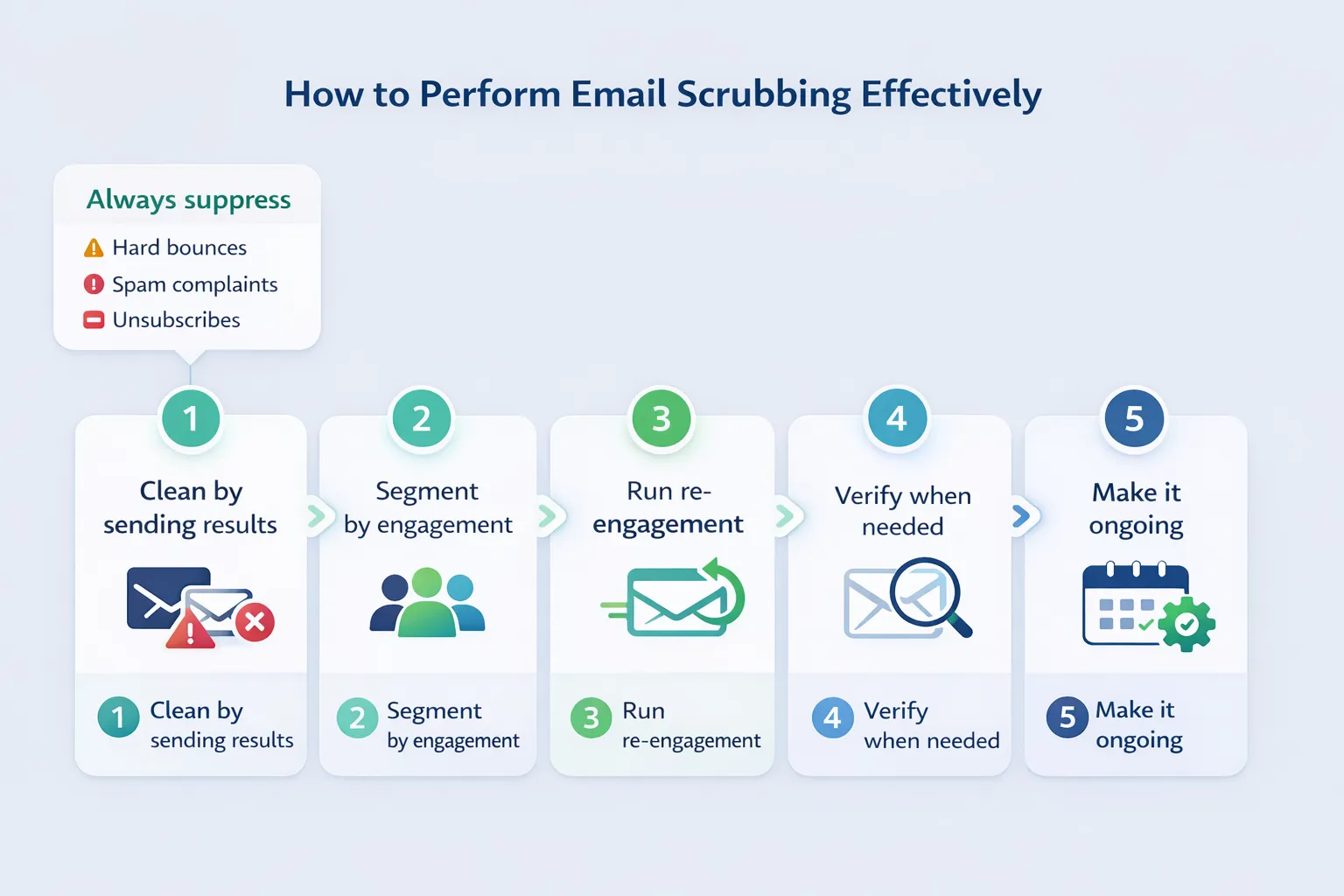
Scrubbing an email list effectively requires a combination of automated validation tools, manual data auditing, and strategic engagement-based segmentation.
Step 1: Export Data --> Step 2: Clean Syntax --> Step 3: Verification Tool --> Step 4: Sunset Policy --> Step 5: Suppress
Step 1: Export and Back Up Your Database
Before executing any cleanup commands or running third-party software, export your complete subscriber list as a CSV or JSON file. Keep a master backup file containing original opt-in timestamps, IP addresses, and engagement logs to preserve historical consent data required by privacy frameworks like the General Data Protection Regulation (GDPR) and the California Consumer Privacy Act (CCPA).
Step 2: Remove Syntax Errors and Formatting Inconsistencies
Initial cleaning can be done within database software or spreadsheet applications to fix standard syntax anomalies before paying for automated API verification.
- Correct Domain Typos: Fix obvious domain misspellings (e.g., changing
@gmai.comor@yaho.comto@gmail.comand@yahoo.com). - Strip Invalid Characters: Delete trailing spaces, accidental quotes, or invalid ASCII characters that violate standardized email syntax specified in RFC 5322.
- Deduplicate Contacts: Filter your database by the primary key (email address) and remove identical duplicate records to avoid sending multiple messages to the same user during a single broadcast.
Step 3: Run List Through an Automated Email Verification Service
Automated validation services verify email addresses in real time without sending actual messages to the recipient's inbox. These services perform several underlying checks:
- DNS & MX Record Lookup: Confirms that the target domain exists and possesses valid Mail Exchanger (MX) records capable of receiving mail.
- SMTP Handshake Ping: Initiates a protocol communication with the destination mail server to check if the specific mailbox account exists, dropping the connection right before sending message data.
- Disposable Domain Detection: Cross-references addresses against updated registries of temporary mail providers (e.g., Mailinator, TempMail).
- Spam Trap Detection: Identifies known or suspected pristine spam traps and high-risk domains using proprietary security databases.
Export the verified file from your verification provider and segment the results into clear categories: Valid, Invalid, Accept-All (Catch-All), and Unknown. Automatically purge all entries tagged as Invalid.
Step 4: Establish a Sunset Policy for Inactive Subscribers
Addresses that are syntactically valid and pass SMTP pings can still harm your deliverability if the recipients never open your emails. ISPs track recipient engagement; if a large percentage of your recipients consistently ignore your mail, providers downgrade your domain.
Implement a strict Sunset Policy based on sending frequency:
- Daily Senders: Define inactivity as zero opens or clicks within the last 60 to 90 days.
- Weekly Senders: Define inactivity as zero opens or clicks within the last 120 to 180 days.
- Monthly Senders: Define inactivity as zero opens or clicks within the last 365 days.
Step 5: Execute a Re-Engagement (Win-Back) Campaign
Do not instantly delete unengaged contacts without giving them a final opportunity to confirm interest. Isolate unresponsive contacts into a dedicated segment and send a targeted 2-to-3 part re-engagement sequence.
- Message 1: A simple, direct subject line (e.g., "Do you still want to hear from us?").
- Message 2: Offer a compelling incentive or ask them to update their content preferences.
- Message 3: Clear notice of removal with a simple 1-click link to remain subscribed.
If a subscriber fails to interact with any message in the re-engagement campaign, move them directly to your permanent suppression list.
Step 6: Update Master Suppression Lists
In your Email Service Provider or Customer Relationship Management (CRM) platform, move all invalid, unsubscribed, and unengaged contacts into a Suppression List rather than deleting their records entirely.
Maintaining a master suppression list prevents your system from accidentally re-importing or re-subscribing those same bad addresses if you upload raw lead data from secondary campaigns or web forms in the future.
Comparison of Email Verification & Scrubbing Methods
Different cleaning techniques address distinct risks within your database. The table below details how various validation methods function and when to apply them.
| Scrubbing Method | Primary Function | Ideal Execution Frequency | Impact on Deliverability | Accuracy Level |
|---|---|---|---|---|
| Syntax & Typo Correction | Fixes formatting errors and domain misspellings | At form entry & before broadcast | Low to Moderate | High (Rule-Based) |
| MX & DNS Lookup | Verifies destination domain can accept email | Monthly or quarterly | Moderate | Very High |
| SMTP Ping Validation | Confirms individual mailbox existence without sending mail | Quarterly or prior to new campaign | High | High (95%+ accuracy) |
| Spam Trap Filtering | Removes known security traps and honeypots | Semi-annually or after list import | Critical | Variable (Database-Dependent) |
| Engagement Sunset Policy | Removes valid addresses that do not open/click | Automated (Continuous background process) | Critical | High (Behavior-Based) |
Best Practices to Prevent Email List Contamination
Scrubbing your list fixes past contamination, but implementing preventative controls reduces the need for heavy manual cleaning in the future.
User Registration -> Real-Time API Validation -> Double Opt-In Confirmation -> Clean Subscriber List
Implement Double Opt-In (DOI)
Double opt-in requires new subscribers to click a confirmation link sent to their email inbox before becoming active subscribers. This single step eliminates invalid syntax, fake addresses, bot signups, and third-party malicious submissions.
Integrate Real-Time API Verification on Lead Forms
Deploy an email verification API directly on your website signup forms and checkout pages. Real-time validation checks the address as the user types it, flagging typos or disposable email providers immediately and prompting the user to supply a valid corporate or personal address.
Monitor Sender Performance Tools
Regularly inspect technical telemetry using official tools provided by major mailbox networks:
- Google Postmaster Tools: Provides data on IP/Domain reputation, spam complaint rates, DMARC errors, and delivery errors. Access performance diagnostics directly at Google Postmaster Tools.
- Microsoft Smart Network Data Services (SNDS): Tracks traffic health, complaint rates, and spam trap hits originating from your dedicated IP addresses across Outlook and Hotmail nodes.
Enforce Automated ESP Rules
Configure your Email Service Provider to automatically suppress an address after a single hard bounce or after 3 consecutive soft bounces. Hard bounces should never receive subsequent marketing sends.
Common Mistakes to Avoid When Scrubbing Email Lists
When optimizing lists for deliverability, avoid taking shortcuts that can compromise your compliance standing or inadvertently damage deliverability.
Mistake 1: Purchasing Pre-Scrubbed Third-Party Lists
Buying or renting email lists is a major cause of server blocklisting. Purchased lists are routinely seeded with pristine spam traps by security intelligence firms. Furthermore, sending un-solicited commercial email violates privacy regulations such as the European Union's GDPR, the UK GDPR, and Canada's Anti-Spam Legislation (CASL).
Mistake 2: Deleting Contacts Instead of Suppressing Them
If you hard-delete unengaged or bounced contacts from your system instead of flagging them as "Suppressed," you lose the historic record of their opt-out or bounce status. If those contacts are introduced back into your CRM via a fresh integration, they will unknowingly receive emails again, prompting instant bounce flags or spam complaints.
Mistake 3: Treating Catch-All (Accept-All) Domains as Invalid
"Catch-All" domains are configured by corporate IT administrators to accept all incoming mail sent to their domain, regardless of whether the specific mailbox exists (e.g., any address @company.com will return a successful receipt).
Do not automatically delete all Catch-All addresses during verification. Instead, separate Catch-All addresses into a secondary segment and send to them slowly, monitoring bounce metrics closely.
Frequently Asked Questions
How often should you scrub an email list?
High-volume senders (sending multiple campaigns per week) should execute automated engagement-based cleaning continuously and run full third-party verification every 3 months. Low-volume or seasonal senders should scrub their full list at least twice a year and always perform a verification scan before launching major seasonal campaigns after a period of sending inactivity.
Will scrubbing my email list reduce my total sales revenue?
While list scrubbing reduces your total subscriber head count, it rarely reduces actual revenue. Unengaged subscribers and dead mailboxes do not generate sales. By removing non-responsive addresses, your inbox placement improves for your active subscribers, leading to higher overall open rates, improved click-through rates, and increased conversions.
What is the difference between a hard bounce and a soft bounce?
A hard bounce occurs when an email is permanently undeliverable because the domain does not exist, the recipient username is invalid, or the destination server has permanently blocked your domain. A soft bounce is a temporary delivery failure caused by a full mailbox, temporary server downtime, or a message file size that exceeds receiving limits.
Can list scrubbing restore a damaged sender reputation?
List scrubbing is a necessary first step toward restoring a damaged sender reputation, but it must be paired with operational changes. After purging invalid contacts and spam traps, you must temporarily reduce sending volumes, target only your most engaged subscribers (e.g., active within the last 30 days), and gradually warm up your IP/domain back to normal sending capacity while keeping spam complaints below 0.1%.
What are spam traps and how do they end up on a subscriber list?
Spam traps are email addresses used by security organizations and ISPs to identify spammers. Pristine spam traps are created solely for trapping and have never registered for newsletters; they enter lists via web scrapers harvest scripts. Recycled spam traps were once valid user accounts that were abandoned and later converted into monitoring traps. List scrubbing tools detect these addresses by matching your list against security databases.
Final Recommendation & Next Steps
To improve your email deliverability, begin with an audit of your sending health using Google Postmaster Tools to evaluate your current domain reputation and bounce metrics. If your bounce rate exceeds 1.5% or your open rates are declining, export your subscriber database immediately and process it through a dedicated automated verification tool to purge syntax errors, invalid addresses, and high-risk accounts.
Once your list is verified, build an automated sunset workflow inside your Email Service Provider to automatically suppress contacts that display zero engagement over a rolling 90-to-180-day window. Pair this routine maintenance with double opt-in registration forms to maintain a high-performing email file.
Image Gallery