Did Hotmail Become Outlook? The Complete History and Current Status
Yes, Hotmail officially became Outlook.com as part of a massive rebranding and infrastructure migration orchestrated by Microsoft between 2012 and 2013. While the "Hotmail" brand was retired in favor of the more professional "Outlook"...
Yes, Hotmail officially became Outlook.com as part of a massive rebranding and infrastructure migration orchestrated by Microsoft between 2012 and 2013. While the "Hotmail" brand was retired in favor of the more professional "Outlook" name, all existing @hotmail.com email addresses remain active, functional, and fully integrated into the modern Outlook.com webmail service.
Contents
The transition from Hotmail to Outlook was not merely a cosmetic name change; it represented a fundamental shift in how Microsoft approached consumer email, moving away from the aging architecture of the 1990s toward a unified, cloud-based ecosystem. As of 2026, users who originally signed up for Hotmail decades ago continue to use their original credentials to log in via the Outlook.com portal or the Microsoft 365 suite.
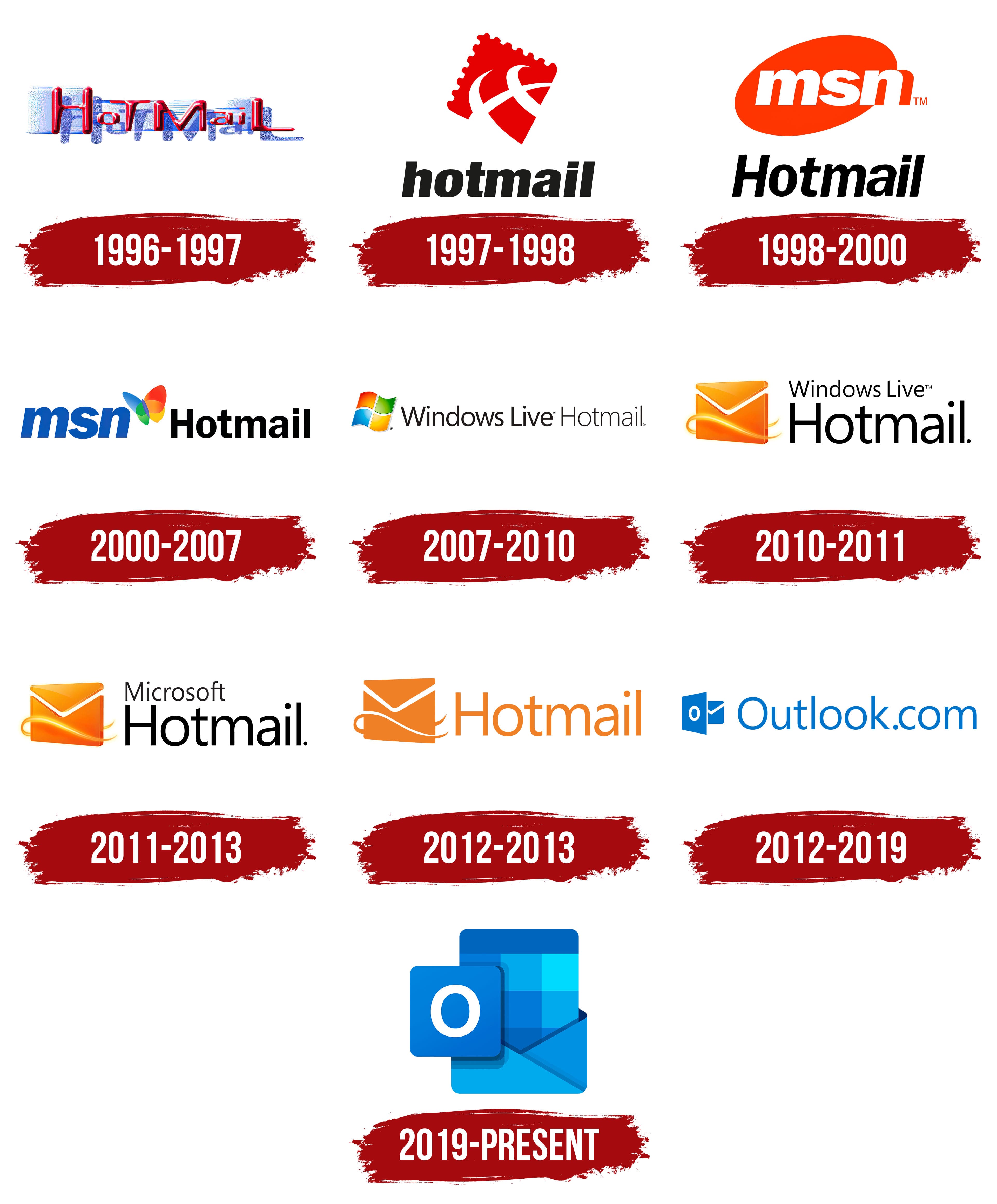
The Evolution of Webmail: From HoTMaiL to Outlook
To understand how Hotmail became Outlook, one must look at the trajectory of web-based communication over the last thirty years. Hotmail was a pioneer in the industry, but it eventually became a victim of its own legacy, necessitating a total overhaul to compete in the modern era of the internet.
The Birth of HoTMaiL (1996)
Hotmail was launched on July 4, 1996, by Sabeer Bhatia and Jack Smith. The date was chosen specifically to symbolize "freedom" from ISP-based email, which at the time tied a user's email address to their internet service provider. The original capitalization, HoTMaiL, was a nod to HTML (HyperText Markup Language), the coding language used to build the web. It was one of the first free webmail services in the world, allowing users to access their inbox from any computer with an internet connection.
The Microsoft Acquisition and the MSN Era
In December 1997, Microsoft acquired Hotmail for an estimated $400 million, a staggering sum at the time. It was quickly integrated into the Microsoft Network (MSN) and rebranded as MSN Hotmail. During this period, Hotmail saw explosive growth, becoming the world's largest webmail service. However, the service struggled with technical limitations, as it was originally built on a FreeBSD and Solaris backend that Microsoft spent years migrating to Windows-based servers.
The Windows Live Phase
By the mid-2000s, Microsoft launched the "Windows Live" initiative, an attempt to unify its online services under a single brand. MSN Hotmail became Windows Live Hotmail. This era introduced more sophisticated features, such as increased storage and better integration with Windows Live Messenger. Despite these updates, the Hotmail brand began to suffer from a perception problem, often being associated with "spam" or "unprofessional" accounts compared to the rising dominance of Google’s Gmail.
The 2012–2013 Transition: Why Microsoft Rebranded
The decision to retire the Hotmail brand in 2012 was a strategic move to align Microsoft’s consumer email service with its highly successful corporate brand, Outlook. By this point, the name Hotmail carried significant "legacy baggage," and Microsoft needed a clean slate to compete with Gmail’s clean interface and powerful search capabilities.
Competition with Gmail and the Need for Modernization
By 2012, Gmail had surpassed Hotmail in terms of active users and technological prestige. Gmail offered a fast, search-centric experience, while Hotmail’s interface felt cluttered with banner ads and legacy menus. Microsoft realized that simply updating Hotmail wouldn't be enough; they needed to leverage the reputation of the Outlook desktop client—the gold standard for business communication—to regain consumer trust.
The Infrastructure Migration
The transition was a massive technical undertaking. Microsoft didn't just change the logo; they moved hundreds of millions of users to a new backend built on the Office 365 infrastructure. This allowed for better synchronization across devices, improved security protocols, and a much cleaner, "Metro-style" user interface that matched the design language of Windows 8. In early 2013, Microsoft announced that the migration of all Hotmail accounts to Outlook.com was complete, marking the end of the Hotmail brand as a standalone entity.
What Happened to My @hotmail.com Email Address?
One of the most common points of confusion is whether @hotmail.com addresses still exist. The answer is a definitive yes. Microsoft did not force users to change their email suffixes. If you created an account as example@hotmail.com in 1999, that address is still your valid primary login today.
Legacy Support in 2026
In 2026, Microsoft continues to support several legacy domains within the Outlook.com ecosystem. These include:
- @hotmail.com
- @live.com
- @msn.com
- @passport.com (in rare cases)
- Country-specific domains like @hotmail.co.uk or @hotmail.fr
When you log in with a Hotmail address today, you are using the same servers and interface as someone with a newer @outlook.com address. The only difference is the text following the "@" symbol. Your old emails, folders, and contacts were automatically migrated during the 2013 transition, provided the account remained active.
How to Access Your Old Hotmail Account in 2026
If you have a legacy Hotmail account that you haven't accessed in years, getting back in requires following Microsoft's modern security protocols. The "Hotmail.com" URL still works, but it will automatically redirect you to the Microsoft Outlook sign-in page.
Steps to Log In
- Navigate to Outlook.com or login.live.com.
- Enter your full Hotmail address (e.g.,
user@hotmail.com). - Enter your password. If you have forgotten it, you will need to use the "Forgot password?" link to initiate a recovery via a secondary email or phone number.
- If you have Two-Factor Authentication (2FA) enabled, you will need to verify your identity via the Microsoft Authenticator app or a SMS code.
Account Deactivation Rules
It is important to note that Microsoft has strict "Account Activity" policies. If a Hotmail account has been completely inactive (meaning no logins) for more than two years, Microsoft may have deleted the account and its contents permanently to free up server space. In 2026, if an account was purged due to inactivity, it is generally impossible to recover the old data, though the username may occasionally be available for re-registration.
Key Differences Between Legacy Hotmail and Modern Outlook
The shift from Hotmail to Outlook was more than skin-deep. The modern service integrates artificial intelligence, cloud storage, and productivity tools that were non-existent during the Hotmail era.
| Feature | Legacy Hotmail (Pre-2012) | Modern Outlook.com (2026) |
|---|---|---|
| Storage Capacity | Limited (often 2GB to 5GB) | 15GB (Free) / 50GB+ (Microsoft 365) |
| User Interface | Banner ads and sidebar clutter | Clean, ad-free (Paid) or "Focused" Inbox |
| Security | Basic password protection | 2FA, Biometric login, AI-driven spam filtering |
| Cloud Integration | Minimal | Fully integrated with OneDrive and Office Web Apps |
| Search Speed | Slow, index-based | Near-instant, powered by Microsoft Search |
| AI Integration | None | Microsoft Copilot for drafting and summarizing |
Security and Privacy in the Outlook Era
One of the primary reasons for the transition to Outlook was the implementation of enterprise-grade security for consumer accounts. Hotmail was frequently targeted by "brute-force" attacks and phishing schemes in the 2000s.
Advanced Threat Protection
Today, all Hotmail/Outlook accounts are protected by Exchange Online Protection (EOP). This system uses machine learning to analyze billions of signals daily to block spam and malware before it ever reaches your inbox. In 2026, Microsoft has further enhanced this with AI-driven identity protection, which can detect if a login attempt is coming from a suspicious location or a known "botnet" IP address.
The Role of Microsoft 365
For users who require more than just basic email, Microsoft now bundles Outlook with the Microsoft 365 subscription. This provides an ad-free experience, advanced encryption for sensitive emails, and "Safe Links" technology that scans attachments and URLs in real-time to prevent ransomware infections.
Troubleshooting Common Access Issues
If you are trying to use an old Hotmail account and encountering errors, it is likely due to the updated security requirements implemented over the last decade.
- "Account Does Not Exist": This usually means the account was deleted due to long-term inactivity (usually 2+ years).
- "Incorrect Password": Because Microsoft unified all logins, your Hotmail password is now your "Microsoft Account" password, which may have been changed if you use an Xbox, Windows PC, or Skype.
- IMAP/SMTP Errors: If you are using an old third-party mail app, you must update your server settings. Modern Outlook requires OAuth2 authentication. Legacy "Basic Authentication" (just a username and password) was phased out by Microsoft in late 2024 to improve security.
FAQ: Frequently Asked Questions about Hotmail and Outlook
Can I still create a new Hotmail email address in 2026? Yes. When you sign up for a new Microsoft account, the registration page usually offers a dropdown menu allowing you to choose between @outlook.com and @hotmail.com. While Microsoft promotes the Outlook domain, they maintain @hotmail.com as an option due to its enduring brand recognition in certain regions.
Is Hotmail being shut down? No. The brand was retired as the primary face of Microsoft’s mail service, but the service itself—the servers, the domains, and the user accounts—continues to operate under the Outlook.com umbrella. There are no plans to discontinue @hotmail.com addresses.
What happened to the emails I had in 2010? If you have logged into your account at least once every two years, those emails should still be there. They were automatically moved to the new Outlook.com interface during the migration. If you didn't log in for several years, the account might have been wiped according to the Microsoft Services Agreement.
Are Hotmail and Outlook the same thing now? Essentially, yes. Think of "Hotmail" as a legacy brand name and "Outlook" as the current technology platform. They both use the same login page, the same servers, and the same mobile app.
Why does my Hotmail account say "Outlook" at the top? This is normal. Since the transition, Microsoft uses the Outlook branding for the webmail interface. Whether you have a Hotmail, Live, or MSN address, the "software" you are using to read your mail is Outlook.
Summary and Next Actions
Hotmail did not disappear; it evolved. The transition to Outlook was a necessary step for Microsoft to provide a secure, modern, and professional communication tool. By merging the consumer-facing Hotmail with the enterprise-grade Outlook, Microsoft created a unified platform that serves billions of users.
If you are a legacy user, your best course of action is to ensure your recovery information is up to date. Visit your Microsoft Account security dashboard and verify that your recovery phone number and secondary email address are current. As security threats become more sophisticated in 2026, relying on an old Hotmail account without modern 2FA enabled is a significant risk.
Image Gallery