How to Set Shutter Speed on the Canon Rebel T3i
To set the shutter speed on a Canon EOS Rebel T3i, turn the top Mode Dial to Tv (Shutter-Priority) or M (Manual). Look at the LCD screen or optical viewfinder, then rotate the Main Dial—located directly behind the shutter button—right...
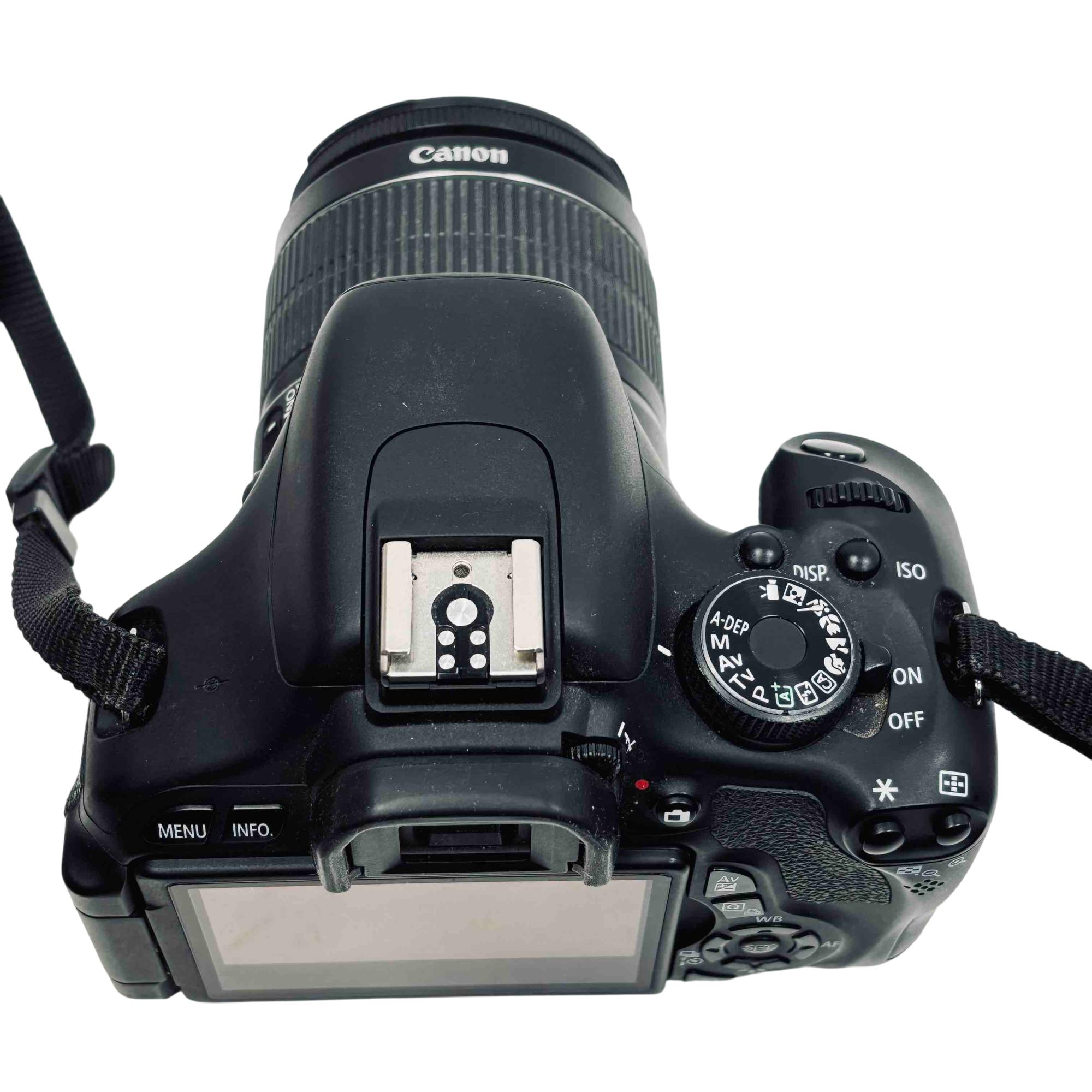
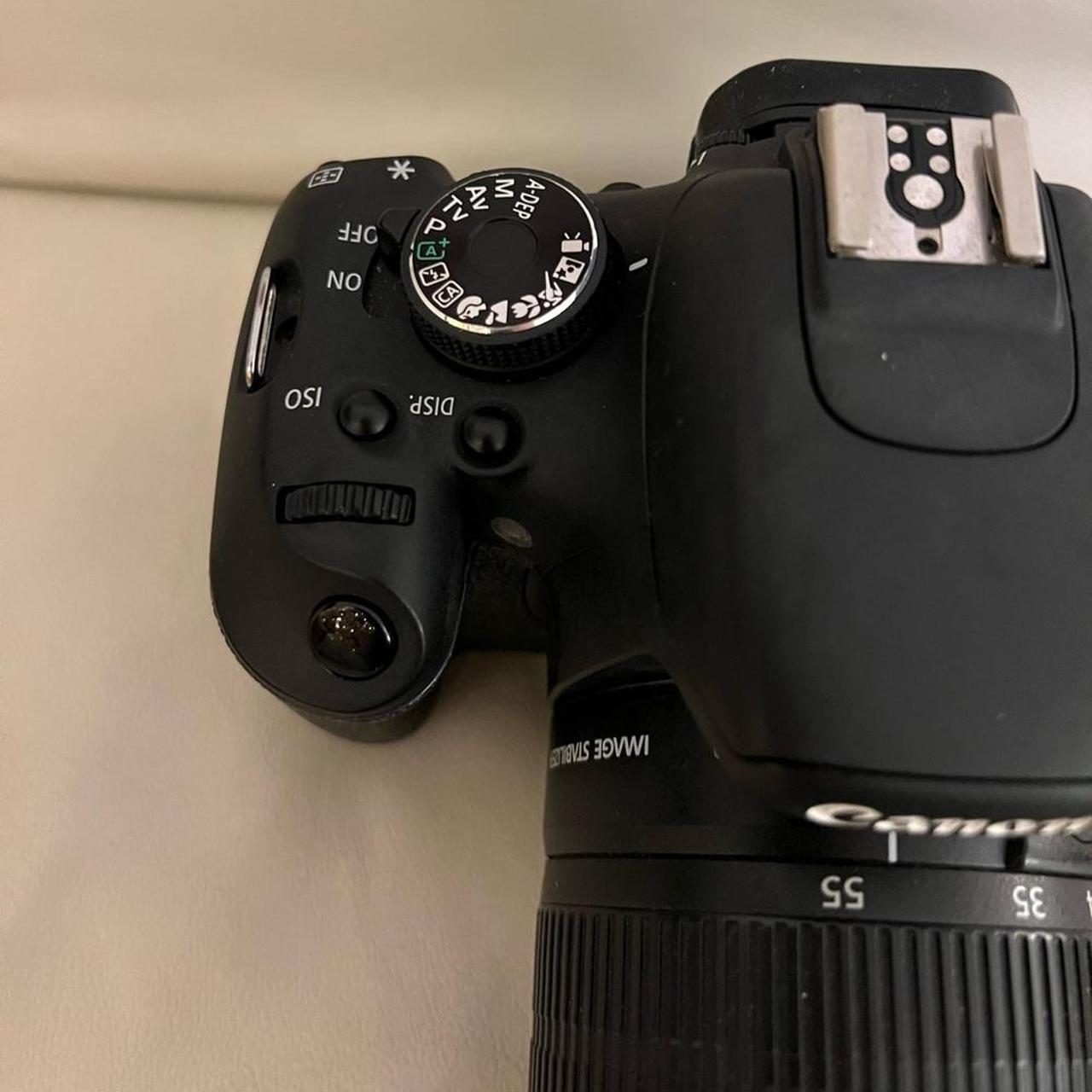
To set the shutter speed on a Canon EOS Rebel T3i, turn the top Mode Dial to Tv (Shutter-Priority) or M (Manual). Look at the LCD screen or optical viewfinder, then rotate the Main Dial—located directly behind the shutter button—right to increase shutter speed or left to decrease it.
Contents
Understanding Shutter Speed Controls on the Canon Rebel T3i
The Canon EOS Rebel T3i (also known as the EOS 600D) is built around a standard physical layout that gives photographers direct mechanical control over basic camera settings. Shutter speed measures the length of time the camera’s mechanical shutter remains open to expose the 18.0-megapixel APS-C image sensor to incoming light.
shutter speed determines two primary elements of an image: exposure level (the overall brightness) and motion rendering (whether moving subjects appear frozen sharp or intentionally blurred).
How Shutter Speed Display Values Work
On the T3i's rear 3.0-inch Vari-angle LCD screen and within the optical viewfinder status bar, shutter speeds are represented as fractions of a second or full seconds:
- Fractions of a second: Fractions are displayed as whole numbers. For example,
4000indicates 1/4000 of a second (the fastest available mechanical shutter speed on the T3i), while250represents 1/250 of a second, and4represents 1/4 of a second. - Whole seconds: Full seconds are indicated by quotation marks (
"). For instance,0"5signifies 0.5 (half) a second,2"represents 2 seconds, and30"represents 30 seconds (the longest preset exposure time). - Bulb Mode: Displayed as
BULB, this setting keeps the shutter open for as long as you hold down the shutter release button (or remote trigger).
Setting Shutter Speed in Shutter Priority Mode (Tv)
Shutter Priority mode is designated as Tv on the Canon Mode Dial, standing for "Time Value." In Tv mode, you select the desired shutter speed, and the T3i automatically calculates and adjusts the lens aperture (f-number) to achieve a standard exposure based on your selected ISO.
- Canon Rebel T3i Top Panel:
- Mode Dial: M, Av, Tv, P, CA, [+]
- Shutter Button
- Main Dial
Step-by-Step Instructions for Tv Mode
- Turn On the Camera: Move the power switch on top of the camera body to the ON position.
- Select Tv Mode: Rotate the top Mode Dial until the abbreviation Tv aligns with the white index line next to the dial.
- Locate the Main Dial: Position your index finger on the black knurled wheel located on top of the camera grip, situated directly between the shutter release button and the Mode Dial.
- Adjust the Speed:
- Rotate the Main Dial to the right (clockwise) to increase shutter speed (e.g., moving from 1/125s to 1/1000s) to freeze fast movement.
- Rotate the Main Dial to the left (counter-clockwise) to decrease shutter speed (e.g., moving from 1/60s to 1/2s) to introduce intentional motion blur.
- Verify the Value: Observe the numerical reading on the LCD screen or look through the optical viewfinder. The left-most number on the bottom line of the viewfinder display indicates your current shutter speed.
Managing Tv Mode Exposure Warnings
Because Tv mode leaves aperture control to the camera, extreme shutter speeds may exceed the mechanical limits of your attached lens:
- Blinking Minimum Aperture (High Number, e.g., f/22): The scene is too bright for the selected slow shutter speed. To avoid overexposure, select a faster shutter speed or lower your ISO setting.
- Blinking Maximum Aperture (Low Number, e.g., f/3.5 or f/1.8): The scene is too dark for the selected fast shutter speed. To avoid underexposure, choose a slower shutter speed or increase your ISO setting.
Setting Shutter Speed in Manual Mode (M)
Manual mode (M) gives you complete authority over both shutter speed and aperture, bypassing the camera's automatic exposure calculations. This mode is ideal for studio environments, tripod-mounted landscape photography, night photography, and consistent flash photography.
Step-by-Step Instructions for Manual Mode
- Select M Mode: Turn the top Mode Dial until M aligns with the indicator mark.
- Adjust Shutter Speed: Rotate the Main Dial directly. Turning right increases shutter speed; turning left decreases shutter speed.
- Adjust Aperture (If Needed): Because the T3i features a single control dial, changing the lens aperture in Manual mode requires a button combination. Press and hold the Av +/- button (located on the upper-right rear panel next to the LCD screen) while turning the same Main Dial.
- Read the Light Meter: Look through the viewfinder or check the LCD screen to monitor the Exposure Level Indicator scale (ranging from -2 to +2 EV). Adjust your shutter speed until the mark aligns with the center
0mark for balanced baseline exposure.
- Exposure Level Scale:
- Underexposed: Indicator mark positioned to the left of 0 (e.g., at -1)
- Balanced: Indicator mark aligned at center (0)
- Overexposed: Indicator mark positioned to the right of 0 (e.g., at +2)
Accessing Bulb (Long Exposure) Mode
For exposures longer than 30 seconds:
- Set the camera to Manual (M) mode.
- Rotate the Main Dial to the left past the
30"setting. - The shutter speed display will change to read BULB.
- In Bulb mode, the shutter opens when the shutter button is pressed and closes when it is released. Using an external shutter release cable (such as the Canon RS-60E3) or a wireless remote is strongly recommended to eliminate camera shake caused by holding the physical shutter button.
Canon Rebel T3i Shutter Speed Reference Guide
The following table summarizes common shutter speed ranges available on the Canon T3i, their optical effects, and practical photography applications.
| Display Value | Actual Shutter Speed | Optical Effect on Motion | Typical Application | Stabilization Required |
|---|---|---|---|---|
| 4000 | 1/4000 sec | Freezes extremely fast motion | Midday sunlight, fast sports, action, hummingbirds | Handheld |
| 1000 – 2000 | 1/1000 – 1/2000 sec | Freezes high-speed movement | Running athletes, pets, flying birds, splash action | Handheld |
| 250 – 500 | 1/250 – 1/500 sec | Freezes typical human motion | Street photography, portraits, walking subjects | Handheld |
| 125 – 160 | 1/125 – 1/160 sec | Sharps subject; mild background blur if panning | Standard flash sync baseline, candid group shots | Handheld |
| 30 – 60 | 1/30 – 1/60 sec | Slight motion blur on moving elements | Panning moving vehicles, slow-moving indoor events | Handheld (with IS lens) |
| 2 – 15 | 1/2 – 1/15 sec | Soft, silky motion blur | Moving water, waterfalls, motion blurring crowds | Tripod Required |
| 1" – 30" | 1 to 30 seconds | Pronounced light trails & smooth water | Night cityscapes, starry skies, light painting | Tripod & Remote |
| BULB | Unlimited (Manual control) | Cumulative light gathering over time | Astrophotography, star trails, fireworks displays | Tripod & Remote Cable |
How Shutter Speed Interacts with the Exposure Triangle
Shutter speed does not operate in isolation; it works in tandem with Aperture and ISO to regulate image brightness and quality on the T3i's APS-C sensor.
- Exposure Triangle:
- Shutter Speed
- Aperture
- ISO
Balancing Light Volume and Exposure Time
- Fast Shutter Speeds (e.g., 1/2000s): Let in light for a very brief duration. To compensate and maintain an accurate exposure, you must widen the lens aperture (smaller f-number, like f/2.8) or raise the ISO sensitivity (e.g., ISO 800 or 1600).
- Slow Shutter Speeds (e.g., 1/4s): Allow light to fall onto the sensor over a longer period. To avoid overexposure, you must narrow the lens aperture (larger f-number, like f/11 or f/16) or lower the ISO setting (e.g., ISO 100).
Flash Synchronization Limit (X-Sync)
The built-in pop-up flash and external hot-shoe speedlites on the Canon T3i have a maximum flash sync speed (X-sync) of 1/200 of a second.
If you shoot in Tv or M mode with the pop-up flash activated, the camera automatically caps your maximum shutter speed at 1/200s. Setting a faster shutter speed without dedicated High-Speed Sync (HSS) flash equipment results in dark bands across the frame caused by the physical shutter curtains obscuring the sensor during the flash burst.
Troubleshooting Shutter Speed Problems on the T3i
If you encounter unexpected behavior when attempting to change shutter speeds on your T3i, review these common issues and solutions:
1. The Main Dial Is Not Changing the Shutter Speed
- Cause: The camera is set to an automated shooting mode, such as Full Auto (Green Square), Flash Off, Program (P), or Aperture Priority (Av).
- Fix: Turn the top Mode Dial strictly to Tv or M. In modes like P or Av, turning the Main Dial controls program shift or aperture values instead of shutter speed.
2. Photos Are Blurry Despite a Fast Shutter Speed
- Cause: The shutter speed may freeze subject movement, but inaccurate auto-focus or extreme sensor noise can mimic motion blur. Alternatively, camera shake can occur if handholding a long telephoto lens without adhering to the Reciprocal Rule.
- Fix: Ensure your shutter speed matches or exceeds the reciprocal of your effective focal length. Because the T3i features a 1.6x crop factor, a 50mm lens behaves like an 80mm lens on full-frame equipment. Keep your shutter speed at 1/80s or faster when handholding a 50mm lens on the T3i. Turn on Image Stabilization (STABILIZER ON) on EF-S kit lenses.
3. Images Are Pure White (Overexposed) or Completely Black (Underexposed)
- Cause: In Manual (M) mode, the shutter speed was selected without balancing ISO and aperture settings.
- Fix: Watch the exposure scale in the optical viewfinder while turning the Main Dial. Align the tick mark with
0. If shooting in bright daylight at slow shutter speeds (e.g., for waterfall effects), use a Neutral Density (ND) filter to block excess light.
Practical Setup Recommendations for Canon T3i Owners
To gain immediate practical control over shutter speed on your Canon Rebel T3i, follow these recommended practices based on your intended subject:
- For Fast Action and Sports: Set the Mode Dial to Tv, dial in a shutter speed of 1/1000s, set ISO to Auto, and switch your drive mode to Continuous Shooting (4.3 frames per second on the T3i).
- For Smooth Waterfalls: Place the camera on a sturdy tripod, select Tv mode, set shutter speed to 1" (1 second), and lower your base setting to ISO 100. Use the camera's built-in 2-second self-timer to eliminate vibration caused by pressing the shutter button.
- For Low-Light Night Landscapes: Switch the camera to M mode, mount it on a tripod, select 30", set aperture to f/8, and set ISO to 100 or 400 for sharp, low-noise nocturnal images.
Frequently Asked Questions
What is the maximum shutter speed on the Canon Rebel T3i?
The maximum mechanical shutter speed on the Canon EOS Rebel T3i is 1/4000 of a second. This speed is achieved using the camera's vertical-travel, focal-plane mechanical shutter and is available in both Tv (Shutter Priority) and M (Manual) exposure modes.
Why won't my Canon T3i let me set a shutter speed faster than 1/200 when using flash?
The Canon T3i's maximum flash sync speed (X-sync) is 1/200 of a second. When the built-in pop-up flash or a basic non-HSS external flash unit is enabled, the camera automatically restricts the shutter speed to 1/200s or slower to ensure the entire image sensor is fully uncovered when the flash fires.
How do I set long exposures over 30 seconds on the T3i?
To shoot exposures longer than 30 seconds, turn the Mode Dial to M (Manual) and scroll the Main Dial to the left past 30" until the display reads BULB. In Bulb mode, the shutter remains open for as long as the shutter button (or connected remote cable) is held down.
What is the difference between Tv mode and M mode on the Canon T3i?
In Tv (Shutter Priority) mode, you select the shutter speed while the camera automatically calculates the matching lens aperture to maintain standard exposure. In M (Manual) mode, you must manually adjust both the shutter speed and the aperture independently.
Why are the aperture numbers blinking on my screen when I set shutter speed in Tv mode?
A blinking aperture number indicates that the requested exposure cannot be achieved at your chosen shutter speed with the current lighting conditions and ISO setting. A blinking minimum aperture (e.g., f/22) means the image will be overexposed; a blinking maximum aperture (e.g., f/3.5) means the image will be underexposed.
Image Gallery