What Is Email Filtering: How It Works, Core Techniques, and Enterprise Deployment
Email filtering is an automated security and content-classification process that inspects inbound and outbound messages to detect, redirect, quarantine, or block unwanted, malicious, or non-compliant communications. Operating through p...
Email filtering is an automated security and content-classification process that inspects inbound and outbound messages to detect, redirect, quarantine, or block unwanted, malicious, or non-compliant communications. Operating through predetermined rules, machine learning algorithms, and threat intelligence feeds, filtering protects networks against spam, malware, phishing, and sensitive data leakage before messages reach user inboxes.
Contents
Modern email remains the primary attack vector for enterprise breaches. Threat actors routinely leverage social engineering, weaponized attachments, credential harvesting links, and brand impersonation to bypass traditional perimeter defenses. Consequently, understanding how email filtering functions, where it deploys within the mail transfer pipeline, and which technical methods yield the highest efficacy is essential for system administrators, security engineers, and organizational decision-makers.
The Core Functions: Inbound vs. Outbound Filtering
Effective email security architectures distinguish between messages entering an organization and those leaving it. While both flows utilize complementary inspection engines, their operational goals differ substantially.
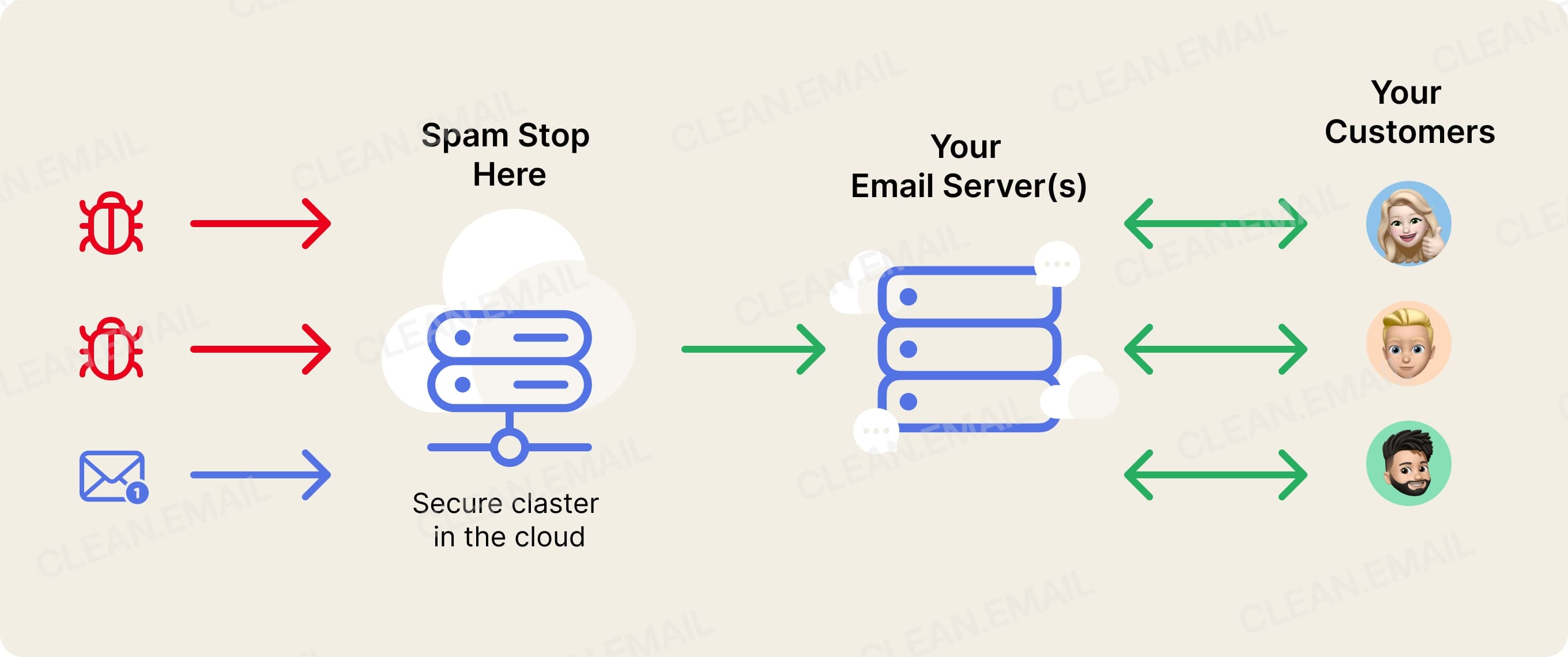
[Inbound Email Pipeline] External Sender -> Network Edge / MX Record -> Secure Email Gateway (SEG) -> Authentication (SPF/DKIM/DMARC) -> Reputation & Content Analysis -> Safe Delivery / Quarantine / Drop -> User Inbox [Outbound Email Pipeline] Internal User -> Local Mail Server / API -> Policy & DLP Inspection -> Cryptographic Signing (DKIM) -> Threat Scan -> External Recipient / Block & Alert
Inbound Email Filtering
Inbound filtering functions as a gatekeeper against external threats. When a remote mail transfer agent (MTA) attempts to deliver a message to a recipient's domain, the inbound filter assesses the connection, the sender's cryptographic credentials, and the message contents.
Its primary objectives include:
- Spam Reduction: Diverting bulk marketing communications, unsolicited commercial mail, and nuisance messages into junk folders or discarding them outright.
- Threat Interception: Identifying and neutralizing zero-day malware, trojans, ransomware payloads, malicious URLs, and business email compromise (BEC) attacks.
- Identity Verification: Confirming whether the sending server has legitimate authorization to send on behalf of the declared sender domain.
Outbound Email Filtering
Outbound filtering inspects messages originating from internal users before transmitting them across the public internet. Organizations often underestimate outbound filtering, yet it is vital for protecting reputation and maintaining compliance.
Its core applications include:
- Data Loss Prevention (DLP): Scanning message bodies and attachments for sensitive data such as Personally Identifiable Information (PII), payment card industry data (PCI-DSS), Protected Health Information (PHI), and intellectual property.
- Compromised Account Mitigation: Detecting abnormal sending spikes, suspicious outbound attachments, or spam distribution originating from hijacked corporate accounts.
- Domain Reputation Preservation: Preventing internal systems from distributing spam or malware, which causes recipient mail systems to list the organization’s domain or IP addresses on Domain Name System Blocklists (DNSBLs).
Key Email Filtering Mechanisms and Technologies
Modern email filtering solutions employ multiple layers of analysis. Relying on a single mechanism exposes organizations to significant risk, as sophisticated attackers engineer tactics specifically to bypass static signature checks.
1. Reputation and Connection-Level Filtering
Before evaluating message contents, filtering systems analyze the sending server's historical behavior and connection attributes:
- IP and Domain Blocklists (DNSBL/RBL): The filter cross-references the connecting IP address against real-time blocklists managed by cybersecurity consortia and threat intelligence organizations.
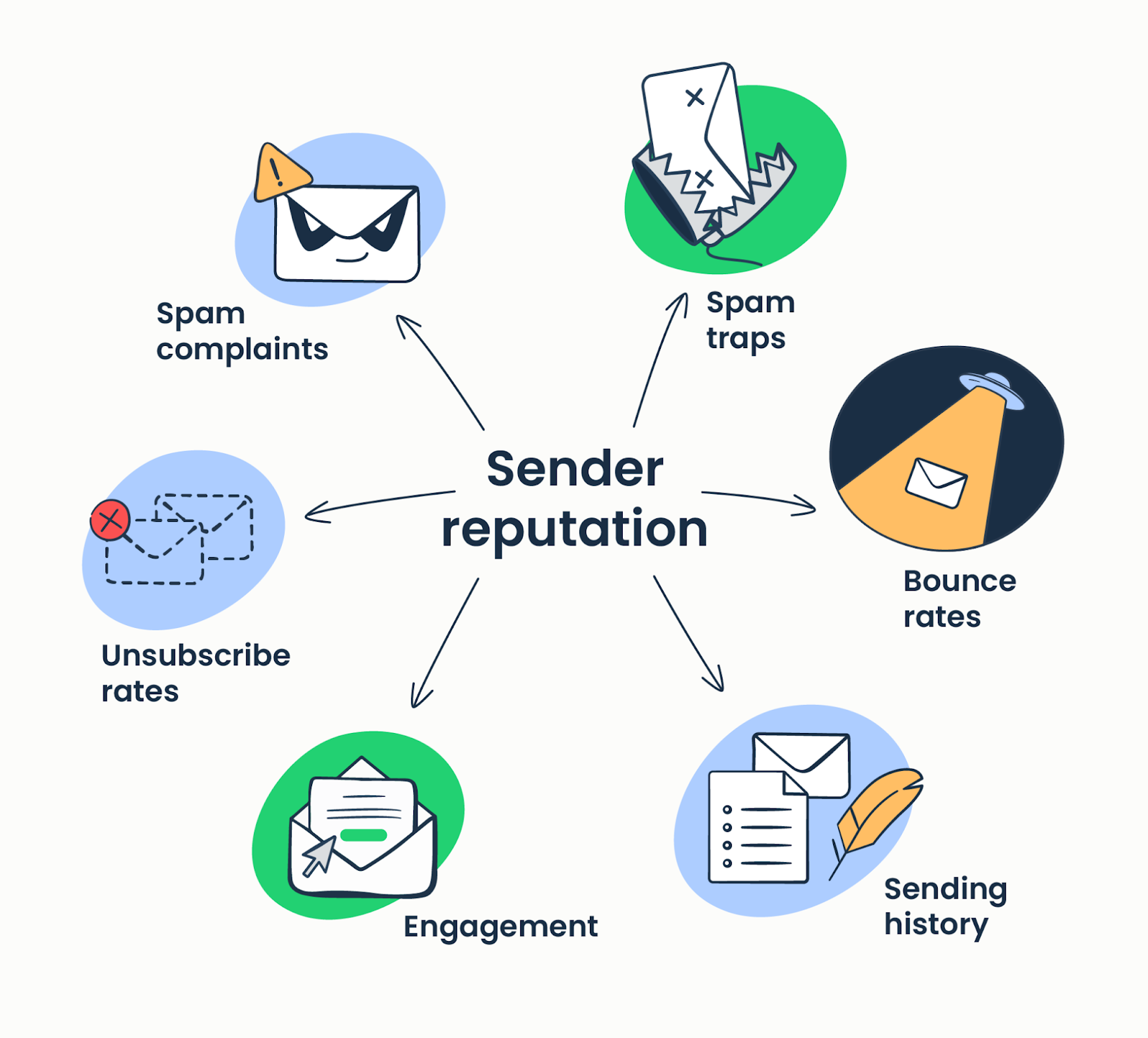
- Sender Reputation Scoring: Reputational engines track metrics such as bounce rates, email volume volatility, and spam report history to generate a dynamic trust score for the sending domain and IP block.
- Rate Limiting and Greylisting: A receiving server temporarily rejects an email from an unknown sender with a transient
451/421SMTP error code. Legitimate MTAs retry delivery after a standard interval, whereas low-tier spam engines frequently abandon unconfirmed targets.
2. Cryptographic Email Authentication
Email filtering verifies identity through established technical protocols:
- Sender Policy Framework (SPF): Checks the sender's DNS records to verify whether the connecting IP address is authorized to send email on behalf of the
Return-Pathdomain. - DomainKeys Identified Mail (DKIM): Validates a cryptographic signature embedded in the email header against the sender's public DNS key, verifying that the email was not altered in transit.
- Domain-based Message Authentication, Reporting, and Conformance (DMARC): Enforces policy alignment between SPF and DKIM while evaluating the visible
From:header. DMARC instructs receiving servers to monitor (p=none), quarantine (p=quarantine), or reject (p=reject) non-aligned messages.
3. Content and Heuristic Inspection
Content analysis assesses the structural and linguistic elements of an incoming message:
- Bayesian and Heuristic Analysis: Statistical models calculate the probability that a message is malicious based on specific word combinations, abnormal syntax, distorted character sets, or known phishing templates.
- Header Analysis: Filters evaluate routing trails, mismatched
Reply-ToandFromfields, missing standard headers, and irregularities in MIME encoding.
4. Advanced Threat Protection (Sandboxing and URL Rewriting)
Sophisticated attacks bypass static text and signature filters by utilizing zero-day exploits or delayed payload activation:
- Dynamic Attachment Sandboxing: Suspicious files (executables, macro-enabled documents, compressed archives) execute within an isolated, virtual environment. The system observes behavioral anomalies—such as unauthorized registry edits, command-and-control callbacks, or process injection—before approving delivery.
- Time-of-Click URL Analysis: Hyperlinks within messages are rewritten to route clicks through a secure proxy server. If a link originally appeared harmless at the time of delivery but later points to a weaponized landing page, the proxy blocks the user upon interaction.
5. Natural Language Processing (NLP) and Behavioral AI
Business Email Compromise (BEC) and executive impersonation attacks rarely contain malicious links or attachments. Instead, they rely on social engineering, urgency, and deceptive contexts (e.g., fraudulent wire transfer requests). Modern filters utilize Natural Language Processing and Behavioral AI to map communication baselines between employees, flagging anomalies in phrasing, sentiment, timing, and authority hierarchies.
Architectural Comparison: Deployment Models
Email filtering platforms are structured based on where the inspection engine intercepts the mail flow. Selecting the right architecture impacts visibility, latency, operational overhead, and defense-in-depth capabilities.
| Deployment Model | Mechanism of Action | Primary Advantages | Common Limitations |
|---|---|---|---|
| Secure Email Gateway (SEG) | MX record points to the gateway; traffic routes through external nodes before reaching the mail host. | Comprehensive perimeter control; absorbs high-volume volumetric attacks; standard across legacy architectures. | Blind to internal-to-internal email traffic; configuration complexity; latency during large processing backlogs. |
| Integrated Cloud Email Security (ICES) | Connects natively to cloud suites (e.g., Microsoft 365, Google Workspace) via direct API. | Deep contextual awareness; analyzes internal lateral communications; rapid zero-configuration onboarding. | Dependent on cloud provider API rate limits; processes messages post-delivery or near-delivery point. |
| On-Premises MTA Filter | Deployed on dedicated physical hardware or virtual appliances within an internal data center. | Complete operational sovereignty over data; adheres to strict internal isolation mandates. | High administrative burden; requires manual signature updates and capacity scaling; elevated hardware costs. |
| Client-Side Filtering | Rules and software engines embedded directly inside desktop or mobile mail clients. | End-user customization; local organization rules; zero network changes required. | Ineffective against advanced enterprise threats; relies on user endpoint performance; inconsistent policy enforcement. |
How an Email Traverses a Filtering Engine: Step-by-Step
Understanding the technical journey of an incoming email clarifies how multiple layers cooperate to make real-time triage decisions:
- Connection Initialization: The sender's MTA initiates a TCP handshake on port 25 with the receiving filter. The filter checks the connecting IP against real-time connection blacklists. If listed, the session terminates immediately via an SMTP rejection code (
550). - Envelope and Authentication Verification: The filter inspects the SMTP handshake commands (
HELO/EHLO,MAIL FROM,RCPT TO). It initiates asynchronous DNS queries to fetch the sender's SPF, DKIM, and DMARC records to confirm domain authenticity. - Reputational Scoring: The filter compares the domain name, IP range, and sender characteristics against global threat intelligence networks. Low reputation scores route the message toward aggressive inspection tiers.
- Static Content and Signature Scanning: Antivirus engines scan attached files against known cryptographic hash databases. Static heuristics flag known phishing phrases, base64 obfuscations, or deceptive HTML layouts.
- Dynamic Analysis and Deep Inspection: Unrecognized attachments deploy into a cloud or local sandbox for behavioral execution. Hyperlinks undergo dynamic crawl checks to uncover redirects and credential harvesting pages.
- AI Contextual Analysis: Machine learning models evaluate whether the email exhibits indicators of impersonation, payroll modification requests, or vendor fraud against historic baselines.
- Final Policy Disposition: The filtering engine calculates an aggregate threat score and executes the corresponding policy action:
- Deliver: Transmit cleanly to the user's inbox.
- Tag/Modify: Add contextual banners (e.g.,
[External Sender]) or modify headers to redirect to the user's Junk folder. - Quarantine: Hold the message in a secure repository accessible only to security analysts or authenticated end-users.
- Drop/Reject: Silently drop the packet or issue a permanent SMTP failure notice to the sender.
Best Practices for Implementing and Managing Email Filters
A misconfigured email filter either exposes an organization to catastrophic breaches or disrupts routine operations through false-positive rejections. Follow these operational standards to optimize filtering efficiency:
1. Enforce Strict Authentication Standards
Publish clear DNS records for SPF, DKIM, and DMARC. Progress your DMARC policy methodically: begin with an observation policy (p=none) to monitor legitimate third-party services (such as payroll, CRM, and marketing systems), transition to p=quarantine, and finally enforce p=reject. Ensure that inbound filtering strictly honors and scores receiving DMARC policies.
2. Implement Layered Defenses (SEG and API-Driven Engines)
Relying exclusively on native mailbox controls often leaves organizations vulnerable to sophisticated social engineering. Pair an infrastructure-level perimeter defense with an Integrated Cloud Email Security (ICES) platform that utilizes graph-based APIs. This hybrid approach delivers both edge resilience against massive spam bursts and lateral protection against compromised internal accounts.
3. Maintain Balanced Quarantine Management
Design intuitive, role-based quarantine access:
- Allow end-users self-service digest access for generic bulk marketing or spam false positives.
- Strictly reserve administrative access for messages containing high-confidence malware, malicious macros, phishing payloads, or executive impersonation signals. Allowing end-users to release suspicious attachments manually neutralizes technical safeguards.
4. Continuous Tuning and Exception Auditing
Legacy allowlists represent a persistent administrative risk. Threat actors frequently compromise legitimate domains or purchase expired domains that reside on organizational allowlists. Conduct monthly audits to retire stale bypass rules, deprecate domain-wide exemptions, and enforce explicit conditions (e.g., matching both sending IP range and DKIM domain) rather than trusting bare email addresses.
Frequently Asked Questions
Can an email filter eliminate 100% of phishing and spam?
No security system achieves complete mitigation. Attackers continually adapt their tactics, utilizing compromised legitimate accounts, polymorphic malware, zero-day vulnerabilities, and multi-stage evasion techniques (such as sending QR codes inside images to bypass optical character recognition). An email filter serves as the foundational barrier in a defense-in-depth framework that must also include multi-factor authentication (MFA), continuous user awareness training, and endpoint detection and response (EDR).
What is the difference between email filtering and an email firewall?
While the terms are occasionally used interchangeably in commercial marketing, an email firewall generally refers to the hardware or network appliance that governs transport-layer SMTP traffic, connection thresholds, and network-level blocklists at the network edge. Email filtering encompasses the broader, application-layer software processes—including heuristic content evaluation, sandbox analysis, machine learning classification, and DLP compliance checks—whether hosted on-premises or provided via cloud APIs.
Why do legitimate emails get marked as spam by filters?
Legitimate communications are commonly flagged due to misconfigured DNS records (such as syntax errors in SPF or missing DKIM signatures), newly registered sending domains lacking established reputation, sudden spikes in outbound sending volume, or the inclusion of trigger elements such as broken hyperlinks, URL shorteners, or poorly coded HTML.
Does email filtering inspect encrypted emails?
Standard transport encryption via Transport Layer Security (TLS) protects messages in transit between servers; email filters terminate the TLS session, inspect the plaintext contents, and re-encrypt the message for downstream transit. However, end-to-end encrypted emails (such as those using S/MIME or PGP) obscure the message body and attachments from intermediate gateways. In these environments, content filtering must occur either at the endpoint client after decryption or rely solely on unencrypted envelope and connection metadata.
How does an email filter mitigate Business Email Compromise (BEC)?
BEC attacks rely primarily on social engineering rather than weaponized code, rendering signature-based antivirus tools ineffective. Advanced email filters counter BEC by pairing Natural Language Processing with historical behavioral profiles. These tools detect anomalous display names, non-matching reply paths, out-of-character language patterns, and sudden requests for wire transfers or payroll changes, subsequently applying interactive caution banners or isolating the message for administrative review.
Practical Next Steps
Organizations evaluating their messaging posture should begin by conducting a comprehensive audit of their published DNS records—verifying syntax and alignment for SPF, DKIM, and DMARC across all active and parked domains.
Following record validation, assess current quarantine release logs to determine your baseline false-positive and false-negative rates. If your enterprise relies solely on legacy perimeter gateway defenses, evaluate the integration of an API-driven cloud security solution to ensure lateral, internal-to-internal message inspection and continuous protection against modern, identity-driven email threats.
Image Gallery