PayPal Invoice Security: Comprehensive Guide to Safe Transactions in 2026
PayPal invoice security relies on a combination of platform-level encryption, automated fraud detection, and user vigilance to prevent unauthorized transactions and phishing. While PayPal provides robust Seller and Purchase Protection,...
PayPal invoice security relies on a combination of platform-level encryption, automated fraud detection, and user vigilance to prevent unauthorized transactions and phishing. While PayPal provides robust Seller and Purchase Protection, users must actively verify sender identities and secure their accounts with multi-factor authentication to defend against increasingly sophisticated social engineering and overpayment scams.
Contents
Digital commerce has reached unprecedented volumes in 2026, and with that growth, the sophistication of financial fraud has evolved. PayPal remains one of the most targeted platforms for invoice-related scams precisely because its invoicing system is so effective and widely trusted. Understanding the mechanics of PayPal invoice security is no longer just a technical requirement for IT departments; it is a fundamental skill for freelancers, small business owners, and everyday consumers.
The Evolution of PayPal Invoice Security Scams
To secure your transactions, you must first understand the threats. In 2026, the most prevalent security risk isn't a breach of PayPal’s servers, but rather the exploitation of the platform's legitimate features to deceive users.
The "Service Fee" or Phishing Invoice
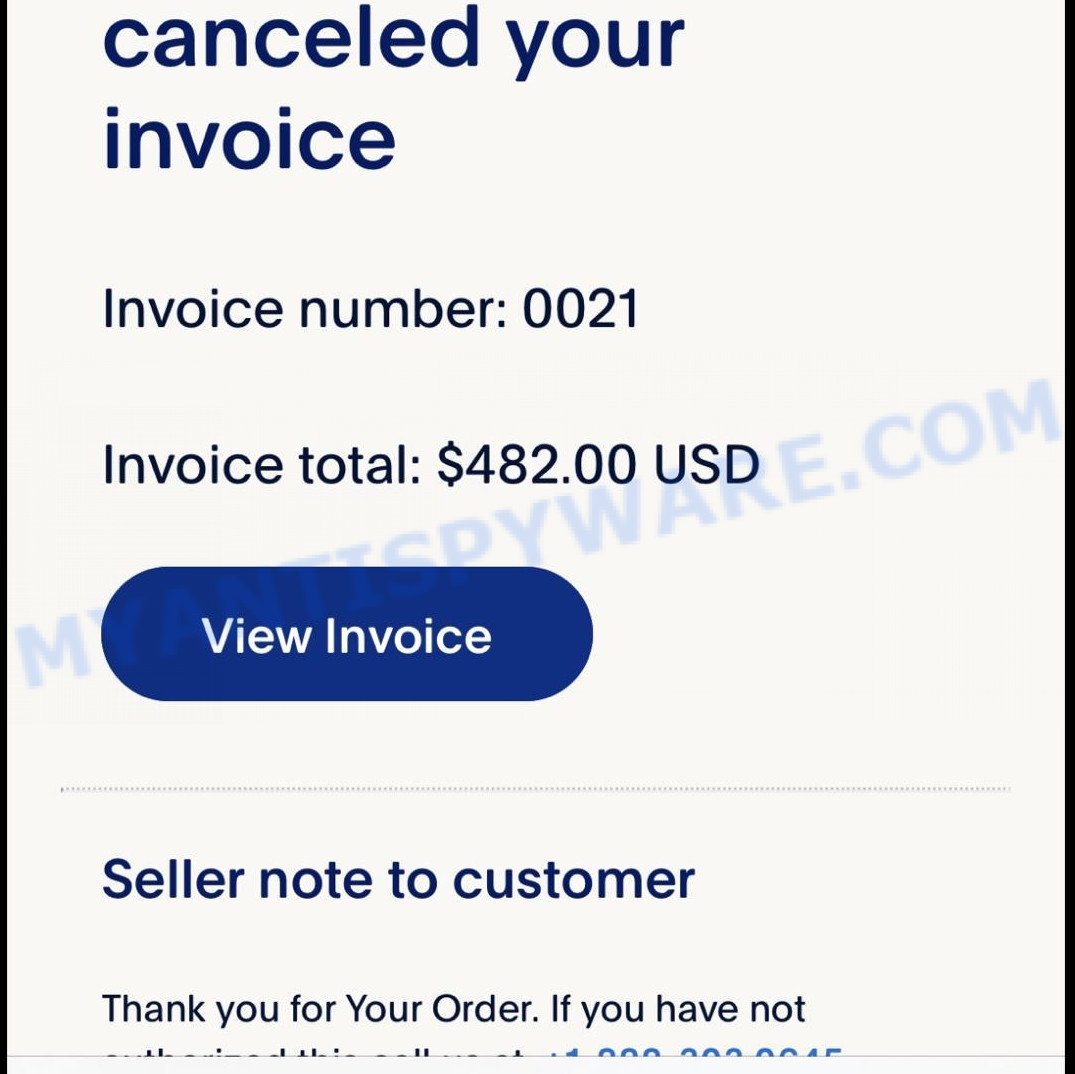
The most common threat involves scammers using legitimate PayPal accounts to send official-looking invoices to random email addresses. Because the notification comes directly from service@paypal.com, it bypasses most spam filters. These invoices often include a note claiming that the recipient’s account has been compromised or that a high-value purchase (like cryptocurrency or high-end electronics) has been made. The goal is to provoke panic, leading the recipient to call a fraudulent "support" number listed in the invoice notes. Once on the phone, the scammer attempts to gain remote access to the victim’s computer or extract login credentials.
The Overpayment Scam
Targeting sellers and freelancers, the overpayment scam involves a "buyer" who sends a PayPal invoice or payment that exceeds the agreed-upon price. They then contact the seller, claiming a mistake, and ask for the difference to be refunded via a different platform, such as a wire transfer or a different digital wallet. Once the seller "refunds" the money, the original PayPal payment—often made with a stolen credit card—is reversed, leaving the seller out of both the product and the refunded cash.
Spoofed Shipping Addresses
Advanced scammers may use invoices to redirect physical goods. By requesting a change of address via email after an invoice is paid, they void the seller’s eligibility for PayPal’s Seller Protection, which typically requires shipping to the address listed on the Transaction Details page.
Core Technical Safeguards Provided by PayPal
As of 2026, PayPal employs several layers of technical security to protect the integrity of its invoicing system. These features are designed to ensure that data remains encrypted and that suspicious patterns are flagged before funds change hands.
- End-to-End Encryption: Every invoice generated and sent through the platform is protected by Transport Layer Security (TLS), ensuring that the details of the transaction—including names, addresses, and item descriptions—cannot be intercepted by third parties during transmission.
- AI-Driven Fraud Monitoring: PayPal’s 2026 security infrastructure utilizes advanced machine learning models that analyze billions of transactions in real-time. If an invoice deviates significantly from a user's typical behavior (e.g., a new account suddenly sending high-value invoices to international recipients), the system may trigger a manual review or a temporary hold.
- Passkey and Biometric Integration: To prevent account takeovers, PayPal has moved toward a passwordless environment. By utilizing FIDO2 standards, users can secure their accounts with biometrics or hardware keys, making it significantly harder for scammers to send unauthorized invoices from a hijacked account.
Best Practices for Senders: Securing Your Business
If you are a business owner or freelancer, the security of your invoices is paramount to maintaining professional trust and ensuring you get paid.
Verifying Recipient Identity
Before sending an invoice, ensure the recipient’s email address is accurate. Sending an invoice to the wrong address not only risks a "non-payment" dispute but can also expose your business's pricing structure and contact details to unauthorized parties. In 2026, it is standard practice to use PayPal’s "Contact Book" feature to store verified client emails, reducing the risk of manual entry errors.
Detailed Itemization
Vague invoices are a security risk. When creating an invoice, provide a comprehensive description of the goods or services rendered. This documentation is your primary defense if a buyer later claims the item was "not as described." Include serial numbers, project milestones, or specific delivery dates. Detailed invoices are much easier for PayPal’s dispute resolution team to verify in your favor.
Utilizing Seller Protection
PayPal's Seller Protection program is a cornerstone of invoice security, but it is not universal. To be eligible, you must meet specific requirements, such as providing proof of delivery from an approved shipping carrier.
| Feature | Covered by Seller Protection | Not Covered / Exclusions |
|---|---|---|
| Physical Goods | Items with a valid tracking number and proof of delivery. | Intangible items (unless specific criteria are met). |
| Unauthorized Transactions | When a payment is made without the account holder's permission. | Claims filed through a bank or credit card (Chargebacks). |
| Shipping Address | Must ship to the address on the Transaction Details page. | Items hand-delivered or picked up in person. |
| Transaction Types | Invoices sent through the "Request Money" or "Create Invoice" tool. | Payments sent as "Friends and Family." |
Best Practices for Recipients: How to Spot a Fake Invoice
As a consumer or client, receiving an invoice should always trigger a verification process. Do not assume an invoice is legitimate just because it appears in your inbox or PayPal dashboard.
The "View on Dashboard" Rule
Never click links within an email notification to pay an invoice. Instead, open a new browser tab, navigate directly to PayPal.com, and log in. If the invoice is legitimate, it will appear in your "Activity" or "Pending Actions" section. If you see an email but no corresponding invoice on your official dashboard, the email is a phishing attempt.
Checking for "Action Required" Phrasing
Scammers use urgency to bypass critical thinking. Be wary of invoices with notes like "Urgent: Payment required within 2 hours to avoid account suspension." PayPal does not use its invoicing system to communicate account status or security alerts to users.
Analyzing the Sender’s Email Headers
While the "From" name might say "PayPal Service," you should check the actual email address. Official communications will always come from the @paypal.com domain. If the sender's address is a long string of random characters or a free service like Gmail or Outlook, it is a fraudulent request.
Advanced Security: Integrating PayPal with Enterprise Tools
For larger organizations, PayPal invoice security can be enhanced through API integrations. By connecting PayPal to an Enterprise Resource Planning (ERP) system or dedicated accounting software (like QuickBooks or Xero), businesses can automate the verification of incoming payments. These integrations allow for two-way synchronization, ensuring that an invoice marked as "Paid" in PayPal is verified against the bank's actual cash flow, preventing "fake payment" scams where a user sends a fake confirmation screenshot.
Troubleshooting and Incident Response
If you suspect you have interacted with a fraudulent invoice or that your account has been used to send unauthorized requests, immediate action is required to limit the damage.
- Report the Invoice: Inside the PayPal dashboard, there is an option to "Report this invoice" for suspicious requests. This alerts PayPal’s fraud team to the sender's account, often leading to a swifter suspension of the malicious actor.
- Update Security Credentials: If you clicked a link or provided any information, immediately update your password and ensure that Two-Factor Authentication (2FA) or a Passkey is active. Check your "Logged In Devices" list to ensure no unauthorized sessions are active.
- Contact Financial Institutions: If a payment was actually processed through a linked credit card or bank account, notify your bank immediately. While PayPal’s internal dispute process is the first line of defense, your bank may offer additional layers of protection for unauthorized electronic fund transfers.
FAQs About PayPal Invoice Security
Is it safe to pay a PayPal invoice from someone I don't know? It is generally unsafe to pay an invoice from an unknown sender. If you receive an unexpected invoice, it is likely a phishing attempt or an error. You are under no obligation to pay or even acknowledge unsolicited invoices. Simply report them as spam within the PayPal interface.
Does PayPal Buyer Protection cover all invoices? No. Buyer Protection typically covers physical goods that are not received or are significantly different from the description. It often excludes real estate, motorized vehicles, and certain types of digital assets or "Friends and Family" payments. Always ensure the invoice is categorized as a "Goods and Services" transaction.
Can a scammer cancel an invoice after I pay it? A scammer cannot "cancel" a payment once it has been completed, but they can attempt to reverse the transaction through a credit card chargeback or by claiming their own account was hacked. This is why sellers must always maintain proof of delivery and strictly follow PayPal’s Seller Protection guidelines.
What is the difference between a "Request for Money" and an "Invoice"? While both appear in your account, an invoice is a more formal document often used by businesses; it can include taxes, shipping details, and itemized lists. A "Request for Money" is simpler and often used for casual transactions. Both are subject to similar security risks, but invoices provide better documentation for dispute resolution.
Are digital goods protected under PayPal's 2026 security policies? As of 2026, PayPal has expanded protections for digital goods, but sellers must provide "compelling evidence" of delivery, such as download logs or unique access keys. Buyers are also protected if the digital service was not rendered, provided they can prove the non-delivery or non-functionality.
Practical Recommendations for 2026
To maximize your PayPal invoice security, adopt a "Zero Trust" approach. For senders, this means never shipping an item until the payment status in your PayPal dashboard explicitly says "Payment Received" and "OK to Ship." For recipients, it means ignoring the "Pay Now" button in your email and always logging into the official portal or mobile app to verify requests. By combining these behavioral habits with modern security tools like biometrics and hardware security keys, you can navigate the 2026 digital economy with confidence and safety.
Image Gallery