How to Track a Green Card Case Status
Tracking a green card case status requires using the official receipt number provided by the United States Citizenship and Immigration Services (USCIS) to monitor application progress through online tools, accounts, and official notifi...
Tracking a green card case status requires using the official receipt number provided by the United States Citizenship and Immigration Services (USCIS) to monitor application progress through online tools, accounts, and official notification channels. When an immigrant submits an application for lawful permanent residence, staying informed about adjudication milestones helps applicants manage processing times, respond promptly to official inquiries, and ensure that document deliveries are not missed.
Contents
Understanding the Green Card Receipt Number
The foundation of tracking any immigration petition or application with the USCIS is the unique identifier known as the receipt number. When the agency accepts an application package for processing, it issues an official Form I-797, Notice of Action. This document serves as a formal receipt confirming that the paperwork has been logged into the system and fee payments have been cleared.
Anatomy of a Receipt Number
A standard USCIS receipt number is a unique 13-character string consisting of three letters followed by ten numbers. The initial three letters indicate the specific service center or processing system handling the case. Common prefixes include:
- MSC: National Benefits Center
- LIN: Nebraska Service Center
- SRC: Texas Service Center
- WAC: California Service Center
- EAC: Vermont Service Center
- IOE: Electronic Immigration System (ELIS)
The following ten digits represent the fiscal year, the computer workday the file was opened, and the specific case sequence number. Understanding this format helps applicants verify that they are entering the correct alphanumeric code into tracking systems, as even a single transposed digit will trigger an error message or pull up an entirely unrelated record.
Keeping Notices Secure
Applicants must safeguard their Form I-797 receipt notices. These documents contain critical data points beyond the receipt number, including the Alien Registration Number (often called the A-Number), the specific form type (such as Form I-485 for adjustment of status or Form I-130 for an alien relative), and instructions for subsequent steps like biometrics appointments. Losing a receipt notice complicates tracking efforts and requires formal inquiries to retrieve lost identification numbers.
Primary Methods for Tracking Case Status
Applicants have several official channels available to monitor the real-time status of their pending petitions. Utilizing official platforms managed directly by the Department of Homeland Security guarantees that status updates reflect authentic, verified changes in adjudication progress.
Using the Online Case Status Tool
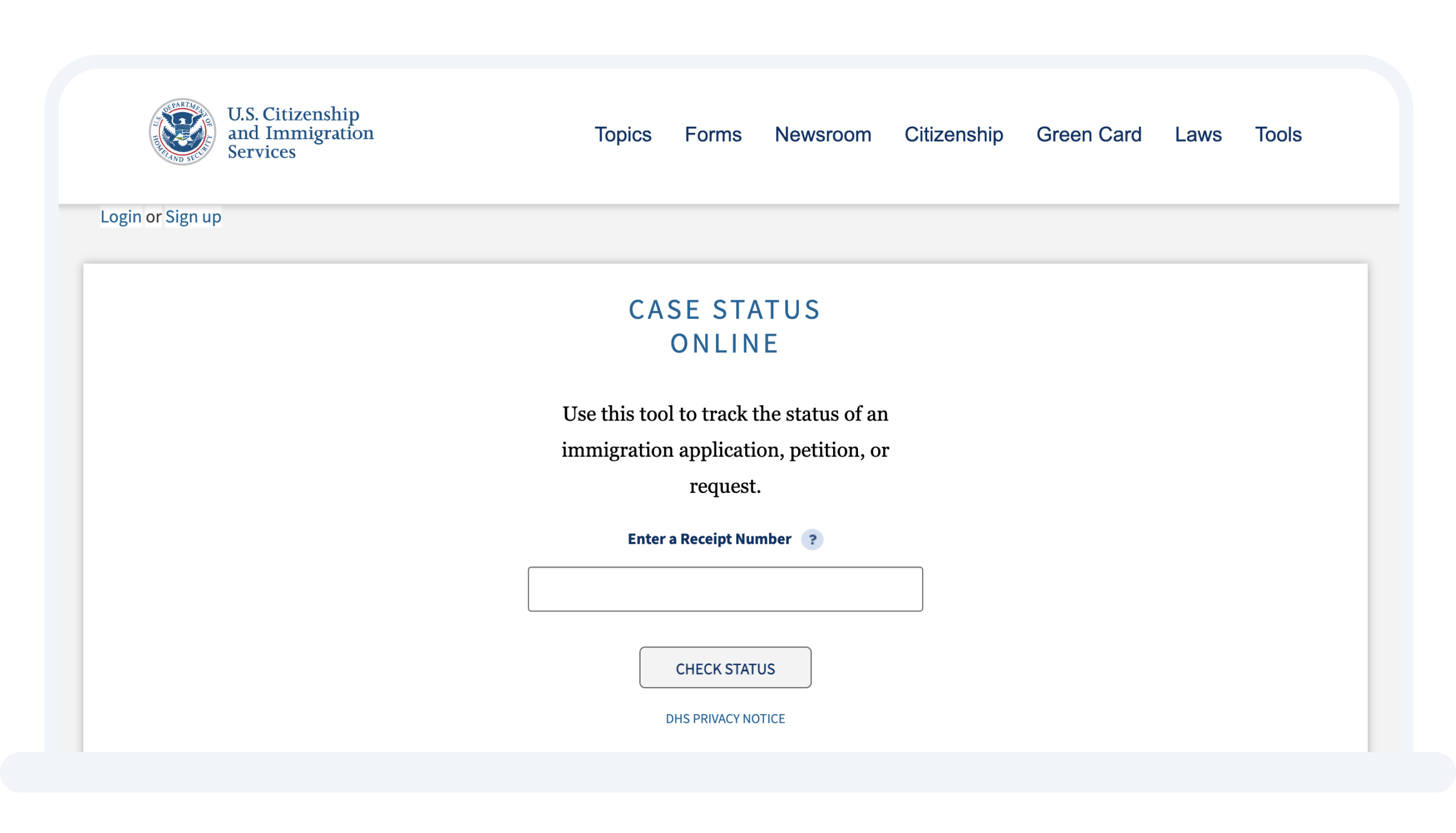
The most direct method for checking daily updates is the online Case Status Search tool hosted on the official USCIS website. Navigating to this portal allows users to input their 13-character receipt number without dashes, though hyphens can be included if they match the exact printed format.
Upon submitting the number, the system displays the most recent action taken on the file, a brief description of what that status means, and instructions regarding expected next steps. If an application remains pending, the portal typically lists the general adjudication stage, such as fingerprint fee received, case was received, or interview was scheduled.
Managing a USCIS Online Account
Beyond simple status lookups, creating a secure USCIS online account provides a centralized dashboard for managing multiple applications, tracking historical notices, and viewing detailed progress timelines.
| Feature | Basic Case Status Tool | USCIS Online Account |
|---|---|---|
| Access Requirement | Receipt number only | Username, password, and multi-factor authentication |
| Historical Notices | Not available | Digital copies of official notices (Form I-797) |
| Message Center | Not available | Secure messaging and response capabilities |
| Progress Tracking | Basic text updates | Visual milestone trackers for select forms |
| Address Updates | Separate online form required | Integrated profile management |
Creating an account requires a valid email address and the completion of identity verification steps. Once established, applicants can link paper-filed applications to their digital profile using a specialized online access code provided in supplemental welcome notices or by requesting assistance through the help portal.
Interpreting Status Updates and Processing Milestones
Tracking a green card application involves navigating specialized terminology used by immigration adjudicators. Misunderstanding these updates can cause unnecessary anxiety or lead to missed deadlines for submitting required evidence.
Common Status Messages Explained
When checking a case, applicants frequently encounter standardized system phrasing. Knowing what these phrases signify ensures proper preparation for upcoming actions:
- Case Was Received: The application package has arrived, fees have cleared, and the file has been entered into the agency queue for preliminary review.
- Request for Initial Evidence (RFIE) or Request for Evidence (RFE): The adjudicating officer requires additional documentation or clarification before moving forward. This status indicates a temporary halt in processing until the specified response deadline expires.
- Fingerprint Fee Was Received: The biometric services fee has been logged, signaling that an appointment notice for fingerprints, photographs, and signatures will follow.
- Interview Was Scheduled: A local field office or service center has set a date, time, and location for an in-person interview. The official notice detailing required documents will arrive by mail.
- Card Is Being Produced: The application has received final approval, and authorization has been sent to manufacture the physical permanent resident card.
Understanding Processing Times
Published processing times fluctuate based on field office workloads, service center capacities, and regulatory backlogs. USCIS provides an historical processing times tool that allows users to select their specific form type and office jurisdiction to estimate how long adjudication currently takes.
These estimates are calculated using historical completion data from previous months. Because processing durations shift dynamically, applicants should view these numbers as general guidelines rather than absolute guarantees of completion dates.
Troubleshooting and Resolving Tracking Issues
Technical glitches, delayed updates, and communication failures can disrupt the smooth tracking of a green card case. Knowing how to troubleshoot these hurdles ensures that missing information is recovered and administrative errors are corrected quickly.
Addressing System Errors and Missing Updates
If the online case status tool returns an error message, applicants should double-check the receipt number for typographical errors, ensuring no spaces were accidentally included at the beginning or end of the string. If the error persists despite correct input, temporary server maintenance by the agency may be underway, requiring the user to try again later.
When an application appears stuck on a single status for an unusually long time, applicants should consult the posted processing time range for their specific form and office. If the case inquiry date listed on the official schedule has passed without a status change, individuals can submit an "e-Request" online for outside normal processing times.
Managing Communication and Address Changes
Failing to receive physical notices in the mail remains a frequent tracking complication. To prevent lost correspondence, applicants must keep their mailing address updated with the agency at all times.
Under federal regulations, most non-citizens must file Form AR-11, Alien's Change of Address, within ten days of relocating. Updating an address through the online portal updates both the general database and any pending applications linked to the user account, ensuring that interview notices, requests for evidence, and the final green card reach the correct destination.
Frequently Asked Questions
Can I track my green card case status over the phone?
Yes. Applicants can call the USCIS Contact Center to check case statuses, though automated phone trees or live representatives will typically require the receipt number and personal identifying information. For complex inquiries or cases outside normal processing times, speaking with a live agent or scheduling an InfoPass appointment provides more detailed assistance than automated phone menus.
What should I do if I lose my green card receipt number?
If the Form I-797 receipt notice is lost, applicants should first check their bank or credit card statements for the payment transaction, which sometimes lists the receipt number in the billing descriptor. Alternatively, individuals can submit a formal inquiry through the USCIS Contact Center, consult an immigration attorney who maintains a copy in client files, or review past correspondence from the agency.
How long does it take for a case status to update after biometrics?
Status updates following a biometrics appointment vary significantly. While some files update within a few days to reflect that fingerprints were taken and applied to the case, others may remain unchanged for weeks or months while background checks and security clearances are processed by external law enforcement agencies.
What is the difference between case status online and my USCIS online account?
The basic case status online tool is a public search utility that requires only a receipt number to view the most recent text update for a single application. A USCIS online account is a secure, authenticated dashboard that centralizes multiple applications, stores digital copies of official notices, enables secure messaging, and provides enhanced progress tracking features for supported form types.
Does a status update showing "Case Was Approved" mean the physical card has shipped?
Not immediately. An approval status indicates that the adjudicating officer has granted the petition. The file must subsequently move to card production facilities. Once the physical document is manufactured and mailed, a separate tracking number for the delivery service is typically added to the online account profile.
Next Actions for Applicants
To maintain control over an immigration journey, applicants should regularly check their designated tracking tools, ensure mailing addresses remain current, and respond immediately to any official requests for evidence or interview notices. Maintaining an organized file of all receipt notices and digital correspondence safeguards against administrative delays and keeps the permanent residency process moving forward efficiently.
Image Gallery