Databricks Features Unpacked: Architecting the Modern Data Intelligence Platform
Databricks serves as a unified data intelligence platform designed to integrate data engineering, data science, machine learning, and business intelligence within a single, cohesive architecture. By leveraging the open-source foundatio...
Databricks serves as a unified data intelligence platform designed to integrate data engineering, data science, machine learning, and business intelligence within a single, cohesive architecture. By leveraging the open-source foundations of Apache Spark, Delta Lake, and MLflow, the platform enables organizations to process massive datasets, build production-grade machine learning models, and execute real-time analytics without the friction caused by siloed legacy systems.
Contents
The Foundation: The Databricks Data Intelligence Platform
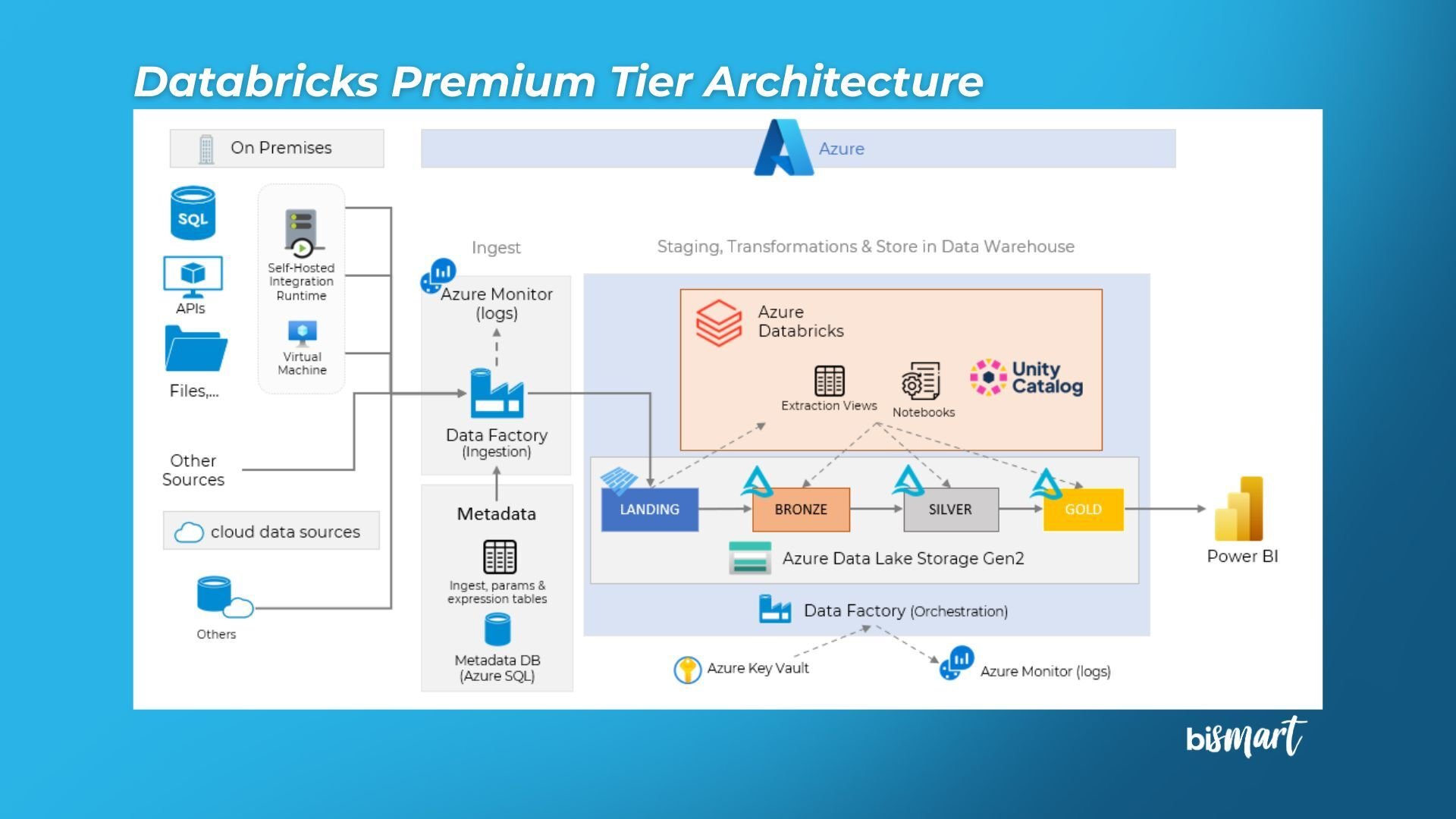
At its core, Databricks is built on a "Lakehouse" architecture. This design combines the cost-effectiveness and scale of a data lake with the reliability and transactional integrity of a data warehouse. By utilizing Delta Lake as the storage layer, Databricks provides ACID (Atomicity, Consistency, Isolation, Durability) transactions, schema enforcement, and time travel (data versioning) capabilities on top of standard cloud object storage like AWS S3, Azure Data Lake Storage, or Google Cloud Storage.
This unified approach eliminates the need to move data between disparate systems for different workloads. Data engineers can curate raw data into refined tables, data scientists can access these tables to train models, and analysts can query the same data using SQL—all within a unified security and governance framework.
Key Technical Components and Capabilities
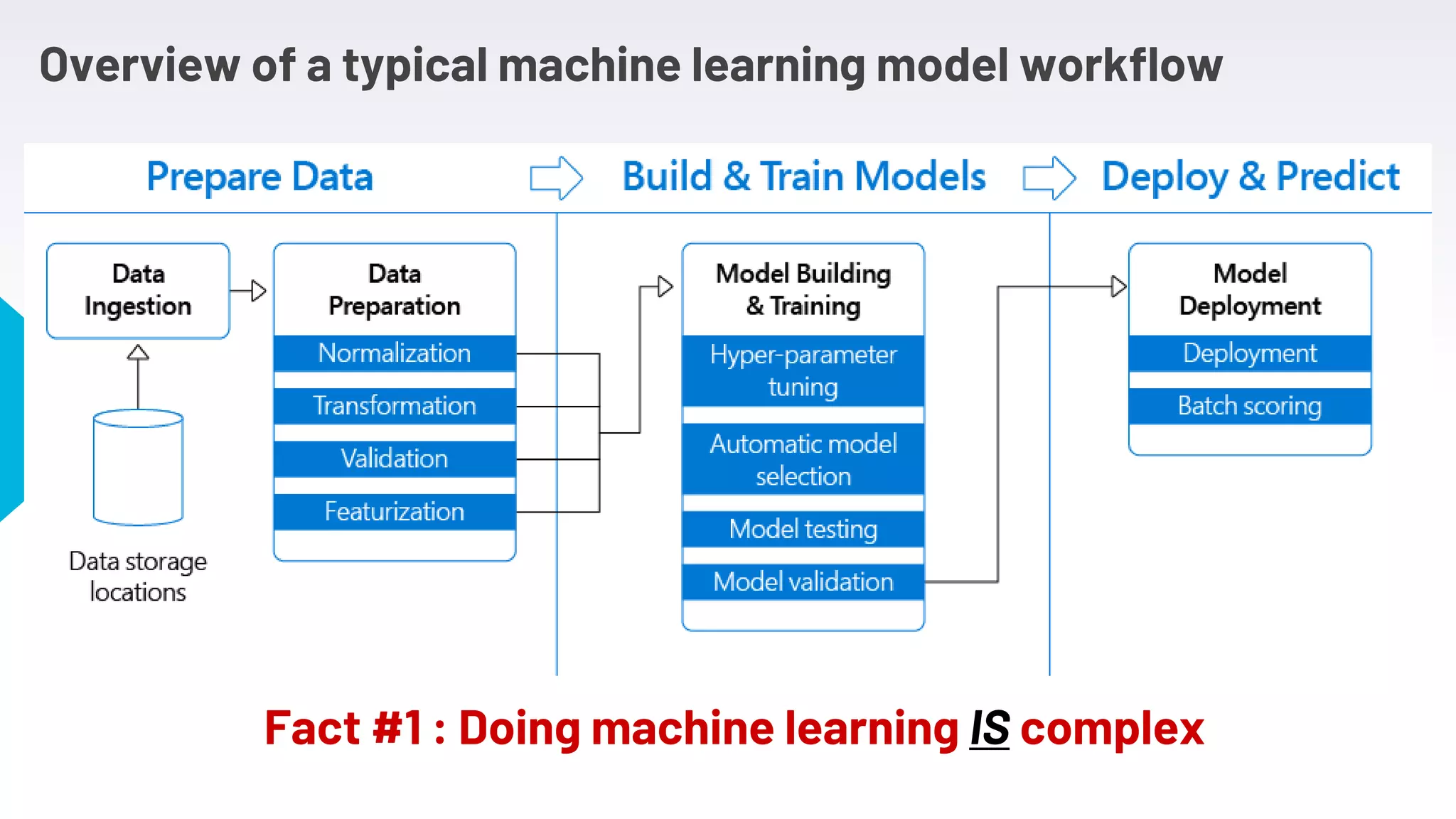
To understand the full scope of Databricks, it is essential to break down the platform into its primary functional layers. Each layer addresses a specific segment of the data lifecycle.
1. Compute and Processing
Databricks compute resources are elastic and ephemeral. Users can spin up clusters configured for specific tasks, such as high-memory instances for large-scale ETL (Extract, Transform, Load) jobs or GPU-accelerated instances for deep learning workloads. The Photon engine, a high-performance, vectorized query engine written in C++, significantly accelerates SQL and DataFrame operations, providing performance benchmarks that often exceed traditional data warehousing solutions.
2. Unity Catalog: The Governance Layer
Unity Catalog provides centralized access control, auditing, and lineage for all data and AI assets across the workspace. It enables administrators to manage permissions using standard SQL GRANT and REVOKE statements. Because it is unified, a policy applied to a table in the catalog automatically propagates across notebooks, SQL warehouses, and ML models, ensuring compliance and secure data sharing across departmental boundaries.
3. Notebooks and Collaboration
The Databricks notebook environment is built on top of Jupyter but optimized for multi-user collaboration. It supports polyglot programming—allowing users to write Python, SQL, Scala, and R in the same notebook. Integrated version control through Git and real-time co-authoring tools facilitate team-based development, moving data projects from experimental code to production workflows efficiently.
4. Databricks SQL
Databricks SQL turns the Lakehouse into a full-featured data warehouse. It provides an optimized interface for business analysts to run BI dashboards and ad-hoc queries. With the introduction of serverless compute, SQL warehouses can start nearly instantly, scaling up and down automatically to optimize costs while ensuring consistent query performance during peak usage.
Comparison of Core Databricks Workloads
The following table outlines how different personas within an organization interact with the Databricks feature set.
| Feature Area | Primary Persona | Technical Objective | Key Technology |
|---|---|---|---|
| Data Engineering | Data Engineer | ETL/ELT, Data Pipeline Orchestration | Delta Live Tables (DLT) |
| Data Science | Data Scientist | Model Training, Experiment Tracking | MLflow, Mosaic AI |
| Data Analytics | Data Analyst | BI Reporting, Ad-hoc SQL Queries | Databricks SQL, Serverless |
| Governance | Data Steward | Security, Lineage, Compliance | Unity Catalog |
Advanced Features: Delta Live Tables and Mosaic AI
Delta Live Tables (DLT) represents a shift in data engineering, moving from manual pipeline management to declarative infrastructure. By defining the "expected" state of data via SQL or Python, DLT automates complex tasks such as dependency resolution, error handling, and infrastructure scaling. This ensures that data pipelines remain resilient and observable, reducing the maintenance burden on engineering teams.
For AI workloads, Databricks integrates Mosaic AI. This includes tools for LLM (Large Language Model) deployment, fine-tuning, and vector search capabilities. By integrating vector database functionality directly into the Lakehouse, developers can build Retrieval-Augmented Generation (RAG) applications that ground generative AI in an organization’s proprietary, secure data.
Operational Considerations: Cost and Scaling
Operational efficiency in Databricks relies heavily on understanding its billing model, which is primarily consumption-based, measured in Databricks Units (DBUs). Costs are determined by the instance types used (e.g., general-purpose vs. memory-optimized) and the uptime of clusters.
To manage costs effectively:
- Auto-termination: Always configure idle timeout settings to ensure clusters shut down when not in use.
- Serverless SQL: Utilize serverless SQL warehouses to eliminate the overhead of managing cluster lifetimes.
- Spot Instances: Leverage cloud provider spot instances for non-critical, fault-tolerant batch workloads to reduce compute costs by up to 80%.
Troubleshooting and Common Hurdles
While Databricks streamlines the data stack, users often encounter specific bottlenecks that require attention:
- Small File Problem: Frequent streaming writes can create a massive number of small files, degrading query performance. Use the
OPTIMIZEcommand andAUTO OPTIMIZEto compact these files into larger, more efficient Parquet blocks. - Permission Conflicts: Ensure that cross-account access and Unity Catalog metastores are correctly configured before attempting to share tables across workspaces.
- Memory Spills: Large join operations or high-cardinality group-bys may cause "out of memory" errors. In these cases, check the distribution of the data (data skew) and consider salting keys or increasing executor memory.
Frequently Asked Questions
How does Databricks differ from a traditional Data Warehouse? Databricks uses a Lakehouse architecture. While a traditional warehouse requires ETL to move data from a data lake into a proprietary format, Databricks allows you to perform analytical workloads directly on open-format files (like Parquet/Delta) in your own cloud storage.
Is Databricks suitable for small-scale projects? Yes, but the overhead of setting up Unity Catalog and cluster configurations may be overkill for very simple applications. It is most cost-effective when your data volumes require distributed processing.
What is the difference between Delta Lake and Databricks? Delta Lake is an open-source storage framework that provides reliability to data lakes. Databricks is the commercial platform that provides the compute, orchestration, and interface (Notebooks, SQL Warehouses) to work with that data.
Can I run AI workloads without using MLflow? You can, but you would lose experiment tracking, reproducibility, and the integrated model registry. MLflow is an integral part of the Databricks AI suite and is recommended for any production-grade machine learning lifecycle.
Does Databricks store my data? No. Databricks processes your data, but the files reside in your own cloud storage bucket or container (S3, ADLS, or GCS). This ensures you retain full ownership and control over your data assets.
Next Actions for Implementation
To begin working with the platform, first define the scope of your initial workload—whether it is a migration of existing ETL pipelines or the launch of a new AI initiative. Provision a workspace, set up your primary Unity Catalog metastore, and ingest a subset of data using Auto Loader. Once the pipeline is established, utilize Databricks SQL to validate your data quality and verify that your team has the necessary access permissions before scaling to full production.
Image Gallery