Online Medical Billing Software: Comprehensive Guide to Cloud-Based Practice Management and RCM
Online medical billing software is a cloud-based application designed to automate healthcare revenue cycle management, including insurance eligibility checks, claim generation, code scrubbing, clearinghouse submission, and patient paym...
Online medical billing software is a cloud-based application designed to automate healthcare revenue cycle management, including insurance eligibility checks, claim generation, code scrubbing, clearinghouse submission, and patient payment processing. Hosted on secure remote infrastructure, these platforms allow practices to manage billing workflows through any web browser while meeting strict regulatory standards.
Contents
Understanding Web-Based Medical Billing Systems
Online medical billing software operates on a Software-as-a-Service (SaaS) model, replacing legacy client-server software that required dedicated local servers and manual updates. In a cloud framework, the software vendor handles server maintenance, system backups, database security, and regulatory updates centrally. Practice personnel access the system securely over the internet using encrypted web connections.
- Healthcare Provider Office (Web Browser / Mobile Interface - Patient Data & Billing Inputs)
- TLS 1.3 Encrypted Internet
- Cloud Billing Platform (SaaS Vendor)
- Patient Demographics
- Fee Schedules
- Claim Scrubbing Engine
- Denial Workflow Management
- X12 EDI Standards (270/271, 837)
- Clearinghouse / Payer (Eligibility Verification, Claim Processing & ERA Response 835)
The primary objective of web-based billing software is to streamline the Revenue Cycle Management (RCM) process. The revenue cycle begins when a patient schedules an appointment and ends when all clinical services are fully reimbursed by insurance payers and patients. By digitizing each step, online platforms reduce manual data entry, lower administrative overhead, minimize claim errors, and accelerate cash flow for medical facilities ranging from solo practitioners to multi-specialty health networks.
Modern cloud systems integrate directly with Electronic Health Record (EHR) and Electronic Medical Record (EMR) systems via Application Programming Interfaces (APIs). When a physician completes a clinical chart note, the system automatically translates diagnoses and procedures into standardized billable codes, populating the billing queue without requiring duplicate entries.
Essential Features of Modern Online Medical Billing Software
Selecting an online medical billing platform requires evaluating the toolsets that directly affect clean claim rates and reimbursement speed. High-performing software includes several core functionality modules:
1. Real-Time Insurance Eligibility Verification
Before a patient arrives for care, the system queries insurance databases using Electronic Data Interchange (EDI) transaction standard 270/271. The software retrieves real-time details regarding coverage status, copayments, coinsurance rates, remaining deductibles, and prior authorization prerequisites. Automating this step prevents claim rejections caused by terminated coverage or invalid subscriber IDs.
2. Automated Claim Scrubbing Engine
Before submitting claims to insurance payers, the software runs them through an automated claim scrubber. This rules engine cross-references entries against National Correct Coding Initiative (NCCI) edits, payer-specific billing rules, and current coding updates (ICD-10, ICD-11, CPT, and HCPCS). The scrubber flags invalid modifier combinations, unbundled codes, and missing demographic fields so billers can fix errors before transmission.
3. Clearinghouse Integration and EDI Submission
Online medical billing systems transmit claims electronically using standard ANSI ASC X12 formats (such as 837P for professional claims and 837I for institutional claims). Built-in clearinghouse integration automatically packages, formats, and routes claims to thousands of commercial payers, Medicare, and Medicaid. Real-time batch tracking provides immediate feedback when a payer accepts or rejects a transmission file.
4. Electronic Remittance Advice (ERA) and Payment Posting
Once a payer processes a claim, it issues an Electronic Remittance Advice (EDI 835 transaction), which serves as the digital equivalent of an Explanation of Benefits (EOB). Online billing software reads incoming ERAs and automatically posts payments, contractual adjustments, and write-offs to the corresponding patient accounts. Automated posting eliminates hours of manual data entry and reduces human calculation errors.
5. Denial Management Workflows
When claims are denied, the software categorizes rejections by standard Claim Adjustment Reason Codes (CARCs) and Remittance Advice Remark Codes (RARCs). Built-in denial management dashboards prioritize denied claims based on dollar value and timely filing deadlines, assigning work tickets to billing specialists with recommended corrective actions.
6. Patient Billing Portals and Digital Payments
As patient financial responsibility increases due to high-deductible health plans (HDHPs), online billing applications include patient-facing portals. Patients receive text or email notifications with secure links to view itemized statements, set up recurring payment plans, and pay bills online via credit card, ACH transfer, or digital wallet services.
Cloud-Based vs. On-Premise Medical Billing Software
Medical practices choosing a billing architecture must weigh the operational differences between web-hosted platforms and on-premise infrastructure.
| Feature | Cloud-Based (Online) Software | On-Premise Software |
|---|---|---|
| Deployment & Hosting | Vendor-managed cloud infrastructure (e.g., AWS, Microsoft Azure) | Local physical servers maintained inside the practice |
| Upfront Capital Expense | Low; minimal initial hardware investment | High; requires server purchases, rack mounting, and network equipment |
| Pricing Model | Monthly or annual subscription fee (SaaS) | Upfront software licensing fee plus ongoing maintenance contracts |
| Maintenance & Updates | Automatic background updates managed by the vendor | Manual installation of updates, patches, and code set revisions |
| Remote Access | Web-based; accessible securely from any browser or authorized device | Restricted to local office network or complex VPN configurations |
| Data Backups & Recovery | Automated, redundant off-site backups managed by provider | Practice responsibility; requires dedicated backup drives or secondary backup services |
| Compliance Management | Shared responsibility; vendor maintains server security standards | Practice assumes full technical burden for local server physical and network security |
| Scalability | Near-instant scaling to add new providers, locations, or users | Requires hardware upgrades, server reconfigurations, and additional software seats |
Regulatory, Security, and Compliance Standards
Medical billing software handles sensitive Protected Health Information (PHI) and financial data. Systems must comply with federal regulations and data security frameworks to safeguard patient privacy and prevent data breaches.
HIPAA and HITECH Act Compliance
Under the Health Insurance Portability and Accountability Act (HIPAA) and the Health Information Technology for Economic and Clinical Health (HITECH) Act, cloud billing vendors act as Business Associates.
- Business Associate Agreement (BAA): Vendors must sign a legal contract agreeing to implement administrative, physical, and technical safeguards to protect PHI.
- Encryption Standards: Data must be encrypted both in transit (using TLS 1.3 protocols) and at rest (using AES-256 bit encryption standards). Review official guidance via the HHS HIPAA Security Rule Guidelines to understand statutory safeguard obligations.
- Access Controls: Role-based access controls (RBAC) ensure billing employees access only the minimum necessary data to perform their job functions. Multi-factor authentication (MFA) is mandatory for web logins.
- Audit Logs: System logs must record every instance of PHI access, modification, export, or deletion, preserving immutable audit trails for compliance inspections.
Standardized Transaction Code Sets
To process claims electronically, platforms must conform to federal standards governed by the Centers for Medicare & Medicaid Services (CMS) Electronic Data Interchange (EDI) standards. Systems must maintain updated code tables for:
- ICD-10-CM / ICD-11: Clinical diagnostic coding.
- CPT (Current Procedural Terminology): Medical, surgical, and diagnostic procedures.
- HCPCS Level II: Supplies, materials, and injectable medications.
- ANSI ASC X12 Formats: Standardized electronic claim structures (837P, 837I, 835, 270/271, 276/277).
Cost Structures and Pricing Models
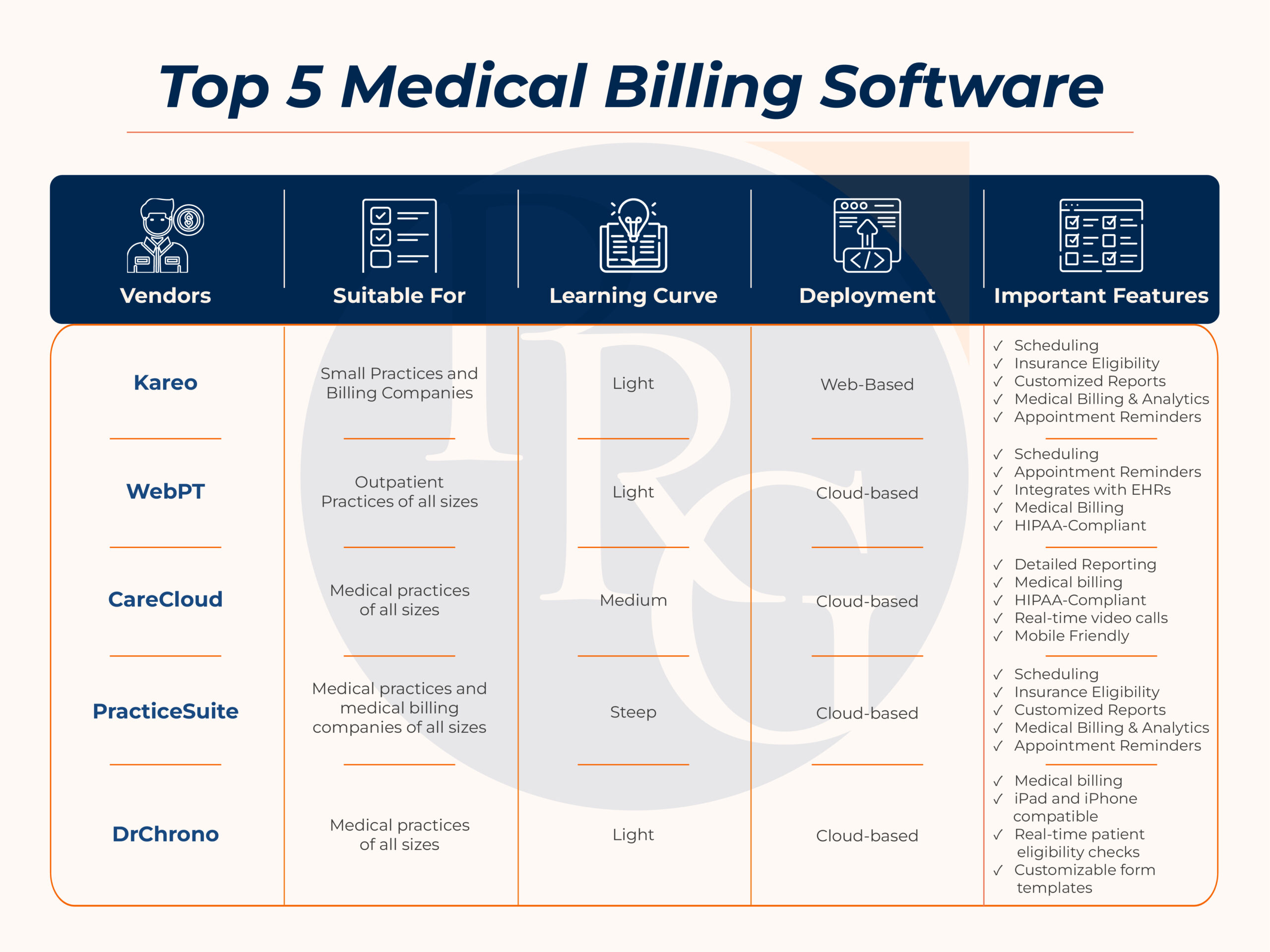
Online medical billing software vendors generally structure pricing around one of three standard commercial models:
- Online Billing Pricing Models
- Fixed SaaS Subscription
- $200–$700/mo/provider
- Predictable expenses
- Percentage of Revenue
- 3%–8% of collections
- Full RCM management
- Per-Claim / Transaction
- $0.29–$0.60/claim
- High-volume practices
- Fixed SaaS Subscription
1. Monthly Subscription (Flat Rate / Per Provider)
Practices pay a fixed monthly or annual subscription fee per active rendering provider. Rates typically range from $200 to $700 per provider per month, depending on features, clearinghouse inclusions, and tier levels. This model provides predictable operational costs regardless of practice collections volume.
2. Percentage of Monthly Collections
Common among full-service Revenue Cycle Management software hybrid packages, the vendor charges a percentage of the total revenue collected by the practice each month—typically 3% to 8%. This model aligns the software vendor’s financial incentive with practice collections success, though it becomes more expensive as billing volume scales.
3. Per-Claim / Transaction-Based Pricing
Some vendors charge a low baseline subscription fee plus a small fee per submitted claim or transaction (e.g., $0.29 to $0.60 per claim). This model suits low-volume practices, part-time specialists, or startup clinics aiming to minimize baseline fixed overhead.
Step-by-Step Selection Framework for Healthcare Practices
Evaluating online medical billing applications requires a systematic selection process to avoid software mismatches and operational downtime.
- Step 1: Identify Clinical Specialty Requirements
- Step 2: Audit Clearinghouse & EHR Interoperability
- Step 3: Evaluate Claim Scrubbing & Denial Modules
- Step 4: Verify Security Controls & BAA Execution
- Step 5: Test Usability & Calculate Total Cost of Ownership (TCO)
Step 1: Identify Specialty-Specific Requirements
Medical specialties have distinct billing needs. A mental health practice requires recurring appointment billing and specialized therapy CPT codes, whereas an orthopedic surgery clinic requires advanced modifier rules, global surgical package management, and durable medical equipment (DME) claims capabilities. Confirm the software includes specialty-tuned templates and rule sets.
Step 2: Audit Clearinghouse and EHR Interoperability
Ensure the billing platform integrates with your existing Electronic Health Record software through established APIs or standard HL7/FHIR protocols. Additionally, verify whether the software includes native clearinghouse access or requires a third-party clearinghouse connection, which may incur additional monthly transmission fees.
Step 3: Evaluate Claim Scrubbing and Denial Workflows
Request a live demo testing the software's claim scrubbing speed and rules update frequency. Ask vendors to demonstrate how the platform manages claim denials, handles secondary and tertiary insurance cross-over claims, and generates automated appeal letters.
Step 4: Verify Compliance Protocols and BAA Execution
Confirm the vendor executes a standard Business Associate Agreement (BAA) without excluding responsibility for infrastructure security. Check for independent security certifications, such as SOC 2 Type II compliance or HITRUST CSF certification, which validate that the cloud provider's data protection controls undergo third-party auditing.
Step 5: Calculate Total Cost of Ownership (TCO)
Look beyond advertised subscription prices. Factor in optional costs such as mandatory onboarding fees, clearinghouse transaction surcharges, patient statement printing and postage fees, premium customer support plans, and custom report building fees.
Common Implementation Challenges and Remediation
Transitioning to a new web-based billing platform presents potential operational hurdles. Understanding these challenges helps practice managers prevent cash flow interruptions during go-live.
Data Migration Errors
Migrating patient demographics, insurance policies, active fee schedules, and open accounts receivable (A/R) balances from legacy systems into a cloud database can lead to corrupted or missing fields.
- Remediation: Conduct data mapping validation tests using a staging environment. Audit a sample of patient records before performing full database migration, and avoid migrating closed A/R older than 120 days into the active system.
Clearinghouse Payer Enrollment Delays
Payer enrollments for Electronic Claim Submission (837) and Electronic Remittance Advice (835) can take between 30 to 90 days depending on the payer (e.g., Medicare, Medicaid, major commercial carriers).
- Remediation: Initiate electronic payer re-enrollment applications at least 60 days prior to the planned system go-live date. Maintain manual billing pathways or parallel system runs for high-volume payers during the transition window.
Staff Productivity Dip During System Onboarding
Staff unfamiliarity with new web navigation layouts, claim queues, and denial tagging interfaces can temporarily cause billing delays and backlog accumulation.
- Remediation: Mandate role-specific training sessions provided by the software vendor prior to go-live. Establish temporary target metrics for daily claim submissions during the first 30 days of implementation.
Frequently Asked Questions
What is the difference between medical billing software and an EHR system?
Electronic Health Record (EHR) software focuses on clinical documentation, patient medical histories, chart notes, e-prescribing, and lab results. Medical billing software focuses on financial management, claim generation, insurance eligibility verification, clearinghouse submissions, and payment posting. Modern platforms often bundle EHR and billing tools into a single integrated Practice Management system.
Is cloud-based medical billing software safe for HIPAA compliance?
Yes, cloud-based medical billing software can be fully HIPAA compliant, provided the vendor signs a Business Associate Agreement (BAA) and implements end-to-end encryption (TLS 1.3 in transit, AES-256 at rest), strict role-based access controls, multi-factor authentication, and immutable audit logs. The practice remains responsible for enforcing strong password protocols and secure local network access.
What clean claim rate should a practice target with online software?
Medical practices should target a clean claim rate of 95% or higher. A clean claim is a claim submitted to an insurance payer that is accepted for processing on the first submission without errors, rejections, or requests for additional documentation. Advanced claim scrubbers within online billing software help achieve this metric by correcting errors prior to transmission.
How does clearinghouse integration work in web-based billing applications?
A clearinghouse acts as an intermediary between the medical billing software and insurance payers. When a biller generates claims, the software securely transmits the ANSI 837 data file to the integrated clearinghouse. The clearinghouse scrubs the file against specific payer edits, translates it into the appropriate format, and routes it to the designated insurance company.
Can small or solo medical practices afford online billing software?
Yes. Cloud software operates on a SaaS pricing model with minimal upfront capital requirements. Solo providers can subscribe to full-featured billing solutions for a flat monthly fee (often $200–$400 per month per provider) or opt for a per-claim fee model, avoiding the server hardware, IT maintenance, and licensing costs associated with older on-premise software.
Practical Implementation Checklist
To select and launch an online medical billing system, complete the following practical action steps:
- Audit Practice Workflow: Calculate your monthly claim volume, current clean claim rate, average days in Accounts Receivable (A/R), and primary denial reasons.
- Issue RFP (Request for Proposal): Request system demonstrations from at least three cloud billing vendors, evaluating specialty rules, clearinghouse connectivity, and patient portal functions.
- Validate Vendor Security Credentials: Obtain a signed Business Associate Agreement (BAA) and verify third-party security audit reports (e.g., SOC 2 Type II, HITRUST) prior to contract signing.
- Schedule Payer Re-Enrollment: Submit EDI 837 and ERA 835 clearinghouse authorization forms for Medicare, Medicaid, and major commercial payers 60 days before go-live.
- Conduct Dual-Run Testing: Process a test batch of historical claims through the scrub engine in a sandbox environment to confirm that fee schedules, billing rules, and diagnostic code mappings operate accurately.
Image Gallery